
mosaic
A platform for behavior analysis.


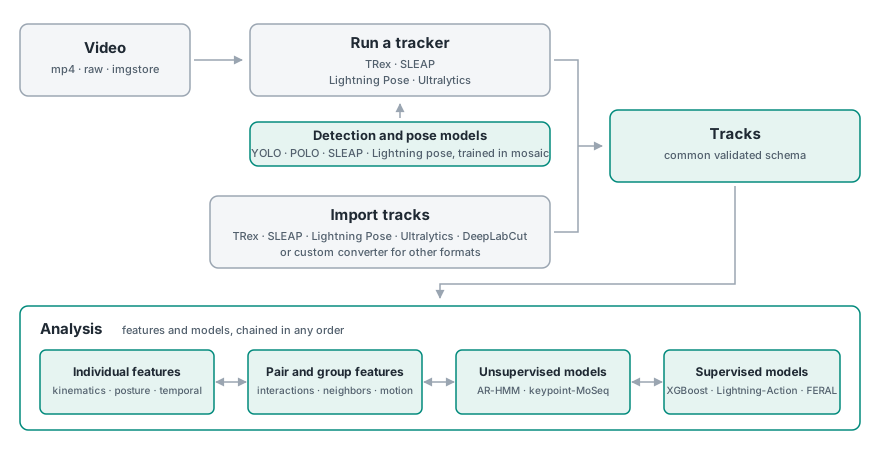
Mosaic drives trackers — TRex, SLEAP, Lightning Pose, Ultralytics — or imports tracks something else already produced, then gives a flexible and expandable analysis framework for working with the data through the feature construct: individual behavioral metrics, collective motion, unsupervised methods, and supervised model fitting on annotated behaviors. A core focus is enabling multi-animal analysis: a feature can be calculated on individuals, on pairs, or on all animals at once.
Results are organized by a content-addressed scheme for run-caching and
reproducibility: the same inputs and parameters produce the same run_id, so
re-running is a no-op, parameter sweeps organize themselves, and mosaic inventory
tells you exactly what a dataset already holds.
What it does
| Step | What mosaic does |
|---|---|
| Track | Run 4 integrated trackers over your videos from one command — or import tracks you already have, from 8 formats |
| Standardize | Every tracker's output becomes one validated schema: video pixels, X/Y at the body centre, keypoints optional |
| Feature | 46 registered features — kinematic, social, collective-motion, spectral, reduction, temporal context |
| Model | t-SNE, k-means, Ward, AR-HMM, keypoint-MoSeq, VAME; XGBoost / Lightning-Action / FERAL classifiers; three visual identity models |
| Annotate | Overlay video with identities, poses and predicted behavior; egocentric crops for identity work |
| Train pose | No tracks yet? Sample frames for annotation and train YOLO pose, POLO point detection, or a heatmap localizer from CVAT / COCO / Lightning Pose |
| Operate | 32 CLI commands and 20 ops behind one job contract, with a run log, cancellation, and a dataset inventory |
Install
conda create -n mosaic python=3.12 -y
conda activate mosaic
conda install -c conda-forge ffmpeg av py-opencv -y
pip install "mosaic-behavior[all]"
The distribution is mosaic-behavior and the import name is mosaic. An unrelated
project named mosaic exists on PyPI, so never run pip install mosaic.
pip install mosaic-behavior on its own is a complete analysis install: converters,
features, clustering, classifiers, overlays. [all] adds the deep-learning surface:
the heatmap localizer and the identity models, which means PyTorch. YOLO pose and POLO
point work is not in it. Tracking, inference and training alike run in an environment
you build, so no install of mosaic carries an AGPL-licensed dependency.
ffmpeg and ffprobe must be on PATH. av and py-opencv are installed from
conda-forge, before pip runs, so that the environment holds a single ffmpeg build. A
plain pip install brings the PyPI wheels of both, which collide on macOS.
Install from source
To work on mosaic itself, or to build the Ultralytics, POLO, keypoint-MoSeq or VAME environment, clone the repository and install it editable into the same kind of conda environment:
git clone https://github.com/EcodylicScience/mosaic.git
cd mosaic
pip install -e ".[all]"
The
environment notes
of CONTRIBUTING.md cover working against an unreleased mosaic-media.
Installation has the extras table, a CPU-only PyTorch line, the tools mosaic drives but does not install, and Windows/WSL2 support. The Ultralytics, POLO, keypoint-MoSeq and VAME environments are built from files in the repository that the pip package does not carry.
In 60 seconds
# Work in a directory of your own, not inside a mosaic source checkout.
cd ~
mosaic init study --name "Experiment 1"

# Point the dataset at video that can live anywhere -- a NAS, another volume.
mosaic sources add -m study/dataset.yaml --kind media \
    --path /data/day1 --extensions .mp4
mosaic scan -m study/dataset.yaml

# Track it, then derive something from the result.
mosaic track trex -m study/dataset.yaml --set track_max_individuals=4
mosaic run  -m study/dataset.yaml --feature speed-angvel

# What does this dataset now hold, and is any of it stale?
mosaic inventory -m study/dataset.yaml
Already have tracks? Skip the tracker: declare them as a --kind tracks source with
their --src-format, and mosaic convert-tracks standardizes them.
Documentation
| Documentation | What mosaic is, and where everything lives |
| Install | The environment, the extras, and the tools that run in their own environment |
| Reference | Every feature, op, CLI command and track format — generated from the code |
| AI coding agents | Run mosaic agent install to give an agent the mosaic guide |
Five worked examples live in notebooks/
in the repository, not in the pip package. Each fetches its own data from Hugging Face,
so they run as written:
| Notebook | What it shows |
|---|---|
| CalMS21 template | The fullest path: ingest, features, embedding, clustering, an XGBoost classifier |
| Collective motion: shiners | A converter written in the notebook, then order parameters across four group sizes |
| Collective motion: zebrafish | A keypoint-free tracker, and social-force maps from neighbour positions |
| CalMS21 pose training | Tracks become pose annotations, train a YOLO model, track with it in TREx |
| Shiners point training | A POLO point model, and two ways to give TREx a body |
The two tracking notebooks drive external tools mosaic does not install; they say so and skip those sections when the tool is absent.
Status
Early development (0.x). Public APIs, feature names, and on-disk layouts may change between releases; CHANGELOG.md records what moved and why.
How to cite
Cite the tools that produced your results first: the tracker, the pose model and the method behind each feature you used. Cite mosaic second, as the software that ran them. The citing page says how, and NOTICE records the origin, license and citation of each component.
Contributing
See CONTRIBUTING.md, and please open an issue before making large changes. To contribute with an AI coding agent, CLAUDE.md is the developer orientation.
License
GNU Affero General Public License v3 or later. See LICENSE, and NOTICE for the third-party attributions that must travel with it.
mosaic bundles no third-party source and no model weights, but it drives tools whose terms differ from its own — keypoint-MoSeq prohibits commercial use, TRex requires a paid license for company use, and Ultralytics is AGPL-3.0. NOTICE records how each component reaches you and what that means for your use of it.
1 maintainer

Metadata
1 maintainer
Release files for mosaic-behavior 0.17.0
For a detailed explanation of source distributions (sdists) and built distributions (wheels), please see the package formats documentation.
Source distribution (sdist)
| File | Size | Uploaded | Provenance | |
|---|---|---|---|---|
| mosaic_behavior-0.17.0.tar.gz | 1.7 MB | Without provenance | Details |
Built distribution (wheel)
| File | Interpreter | ABI | Platform | Reset |
|---|---|---|---|---|
| mosaic_behavior-0.17.0-py3-none-any.whl | Python 3 | none | any | Details |
Total release size: 3.7 MB
Release files / mosaic_behavior-0.17.0.tar.gz
| Download URL | mosaic_behavior-0.17.0.tar.gz |
|---|---|
| Size | 1.7 MB |
| Tags | Source |
|
SHA-256 checksum How to use checksums |
c3e7c81f47ed62a5d658792c34a023a2ce6c1f05881704948473a91178e8e7f7
|
|
BLAKE2b-256 checksum How to use checksums |
615afb175cc96d906c0fb649ec40c8a45b0b4f11328908f759259bb019cbd2df
|
| Upload date | |
|
Uploaded using Trusted Publishing? What is trusted publishing? |
Yes |
| Uploaded via |
uv/0.13.1 {"installer":{"name":"uv","version":"0.13.1","subcommand":["publish"]},"python":null,"implementation":{"name":null,"version":null},"distro":{"name":"Ubuntu","version":"24.04","id":"noble","libc":null},"system":{"name":null,"release":null},"cpu":null,"openssl_version":null,"setuptools_version":null,"rustc_version":null,"ci":true}
|
Release files / mosaic_behavior-0.17.0-py3-none-any.whl
| Download URL | mosaic_behavior-0.17.0-py3-none-any.whl |
|---|---|
| Size | 2.0 MB |
| Tags | Python 3 |
|
SHA-256 checksum How to use checksums |
8be26decec8b5d9dd53ce00d110e546fcdddc38638931d27b6742cfd2b6cc443
|
|
BLAKE2b-256 checksum How to use checksums |
455aa726d8906d9766a61e40e4c9a32dcee7a12216179eb9fca3cfff39ad9875
|
| Upload date | |
|
Uploaded using Trusted Publishing? What is trusted publishing? |
Yes |
| Uploaded via |
uv/0.13.1 {"installer":{"name":"uv","version":"0.13.1","subcommand":["publish"]},"python":null,"implementation":{"name":null,"version":null},"distro":{"name":"Ubuntu","version":"24.04","id":"noble","libc":null},"system":{"name":null,"release":null},"cpu":null,"openssl_version":null,"setuptools_version":null,"rustc_version":null,"ci":true}
|
Security for mosaic-behavior 0.17.0
Provenance
Provenance describes where a file came from. On PyPI, provenance is shared via attestations, which provide a verifiable record of the build or publishing details. View details, limitations and caveats.
No provenance found
None of the files in this release were uploaded with provenance metadata.
A note on package security
PyPI is a repository for distributing packages, not a service for auditing them. While third-party security researchers and our staff do their best to detect and remove malicious packages, PyPI cannot guarantee the quality, security or suitability of any given package.
To learn more about protecting yourself from malicious actors, visit our package security documentation.













