
mosaic-os
The Python client and command line for mOSaic, the operating system for organizational AI.





In mOSaic, company knowledge is a filesystem (/org) and AI agents are processes with PIDs, quotas and capabilities.
Every action an agent takes in the real world is a system call: policy can stop it, a person can approve it, a
sandbox contains it, and a hash-chained journal records it. All of it runs on one machine, on local models.
mosaic-os lets you drive a mOSaic gateway from Python or from your terminal: start tasks and watch them think,
approve or reject governed actions, search and read company knowledge, add files, inspect memory and the process
table, and read the audit trail. It is pure standard library: no dependencies, Python 3.9 and later, any OS.
Contents
- Install
- Quick start: the command line
- Quick start: Python
- Connecting and signing in
- Command reference
- Python API reference
- Recipes
- Configuration
- Concepts in one page
- Troubleshooting
- Compatibility and development
Install
pip install mosaic-os
or, as an isolated command line tool:
pipx install mosaic-os # or: uv tool install mosaic-os
This installs the mosaic command and the mosaic_os Python package. python -m mosaic_os works too.
You need a running mOSaic gateway (mosaicd). To run your own, follow the
installation guide; your team may also give you
a public gateway URL.
Quick start: the command line
mosaic connect https://your-gateway.example        # save the gateway (checks /health first)
mosaic login --as priya@acme.example               # dev sign-in; or: mosaic login <code from the console>
mosaic status                                      # who you are and the state of the system
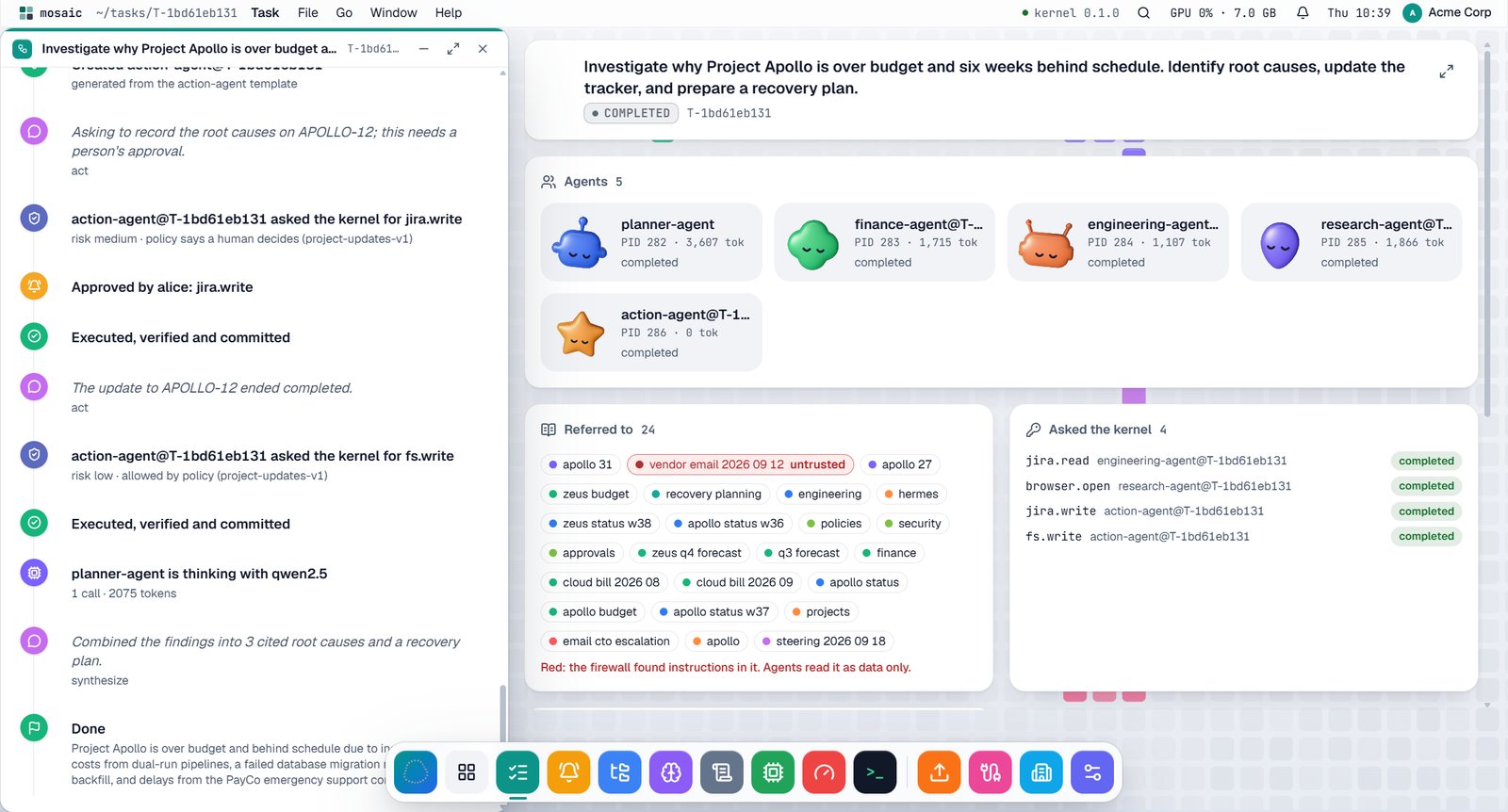
mosaic ask "Investigate why Project Apollo is over budget and six weeks behind schedule. Identify root causes, update the tracker, and prepare a recovery plan."
mosaic ask streams the run as it happens:
T-5afd79c8fd  Investigate why Project Apollo is over budget ...
  ● Spawned planner-agent                          kernel
  ● Retrieved 8 objects (0 filtered by policy)     agent:planner-agent#315
  ● Spawned finance-agent@T-5afd79c8fd             agent:planner-agent#315
  ● browser.open: ALLOW (allowed by research-agent-v1)   kernel.policy
  ● jira.write: REQUIRES_APPROVAL                  kernel.policy
  || action-agent@T-5afd79c8fd wants jira.write (medium risk): APR-627ef96795
     decide: mosaic approve APR-627ef96795   (or in the console, or on the phone)
  ● Committed SC-8a22591ffe                        kernel.transactions
  completed

Apollo is 31% (6.2 lakh) over budget ...
  evidence: /org/finance/apollo-budget, /org/engineering/apollo-status-w38, ...
In a second terminal (or as an approver on your phone):
mosaic approvals                                   # what is waiting for a person
mosaic approve APR-627ef96795 -m "checked the evidence"
Every command takes --json for scripting, and --url to target another gateway.
Quick start: Python
from mosaic_os import Mosaic

m = Mosaic("https://your-gateway.example")
m.login_dev("priya@acme.example")                  # dev mode; or m.login_code("K7QM-4ZPD")

task = m.ask(
    "Which vendors were paid more than their contract in Q3, and by how much? Draft a note.",
    on_entry=lambda e: print(e["kind"], e["summary"]),             # the story of the run, live
    on_approval=lambda a: print("needs a person:", a["approval_id"]),
)
print(task["status"])                              # completed
print(task["result"]["summary"])                   # the answer, with its sources
print(task["result"]["evidence"])                  # the /org documents behind it
Search and read company knowledge:
for hit in m.search("apollo budget variance", top_k=5)["hits"]:
    flagged = " (untrusted)" if hit["firewall_flags"] else ""
    print(f"{hit['score']:.2f}  {hit['path']}  {hit['title']}{flagged}")

doc = m.read("/org/finance/apollo-budget")
print(doc["frontmatter"]["owner"], doc["body"][:200])
Connecting and signing in
Which gateway, in order of precedence:
| Source | Example |
|---|---|
Mosaic(url) or mosaic --url |
Mosaic("http://localhost:8089") |
$MOSAIC_URL |
export MOSAIC_URL=https://your-gateway.example |
saved by mosaic connect URL |
stored in ~/.config/mosaic/config.json |
| default | http://localhost:8089 |
Who you are, in order of precedence:
| Method | How | When |
|---|---|---|
| A token | Mosaic(token=...) or $MOSAIC_TOKEN |
automation with a session you already have |
| A saved session | mosaic login / m.login_dev() / m.login_code() / m.login_google() |
people; one session is saved per gateway |
| Dev headers | $MOSAIC_USER (default alice), $MOSAIC_ORG (default acme) |
only accepted by gateways in dev mode (MOSAIC_AUTH=dev) |
Sign-in options
- One-time code (works for every account, including Google): in the mOSaic console, click your name in the menu
bar, then Sign in on your phone; run
mosaic login K7QM-4ZPDorm.login_code("K7QM-4ZPD"). - Dev sign-in (dev-mode gateways):
mosaic login --as EMAIL. The demo organization hasalice@acme.example(owner),priya@acme.example(approver) andsam@acme.example(viewer). - Google (Google-mode gateways):
m.login_google(id_token)with a Google ID token for the gateway's client ID.
Your role decides what you may do; the gateway enforces it on every request:
| Role | Can |
|---|---|
viewer |
read knowledge and results |
member |
also start tasks |
approver |
also approve or reject actions |
admin |
also cancel tasks, add knowledge, manage connectors, members and settings |
owner |
everything |
Command reference
| Command | What it does |
|---|---|
mosaic / mosaic status [-v] |
who you are, the gateway's version, component health (-v lists every component) |
mosaic connect URL |
check and save the default gateway |
mosaic login [CODE] / login --as EMAIL |
sign in with a console code, or by email in dev mode |
mosaic logout · mosaic whoami |
sign out of this gateway · your user, org, role and permissions |
mosaic ask GOAL... [--priority P] [--no-wait] |
start a task and stream its story until it ends; shows approvals as they appear |
mosaic tasks [--status S] [-n N] |
recent tasks, newest first |
mosaic task ID |
one task: status, answer and evidence |
mosaic cancel ID |
cancel a task (children are cancelled first) |
mosaic audit ID |
the task's hash-chained journal and chain_verified |
mosaic ps [--task ID] [-n N] |
the agent process table: PID, state, task, agent |
mosaic pause PID · resume PID · kill PID |
control one agent process |
mosaic approvals [--status S] |
what is waiting for a person |
mosaic approve ID [-m COMMENT] · reject ID [-m COMMENT] |
decide on a pending action |
mosaic search WORDS... [-k N] |
hybrid (keyword, vector, graph) search over /org; untrusted documents are marked |
mosaic ls [PATH] |
list an /org folder |
mosaic read PATH (alias cat) |
print a document with its frontmatter |
mosaic memory [--owner A] [--task ID] [-v] |
what agents remember, fresh or stale (-v shows the sources) |
mosaic upload FILE... [--to /org/uploads] |
add files to /org (Markdown, text, PDF, Office, CSV and more) |
mosaic mount FOLDER [NAME] · mounts · unmount NAME |
mirror a folder of the gateway's machine into /org/mnt/NAME, watched |
mosaic config |
the whole running system as JSON (secrets redacted) |
mosaic --version · mosaic help |
version · help |
Global options: --url URL, --json. Colours turn off when output is not a terminal or NO_COLOR is set.
Exit codes: 0 success, 1 an error from the gateway or an unreachable gateway, 130 interrupted.
Python API reference
Mosaic(url=None, *, token=None, user=None, org=None, timeout=30, remember=True, config=None)
remember=Falseneither reads nor saves sessions (good for services).configoverrides the directory for saved settings and sessions.
Every method returns the gateway's JSON as plain dict / list values; the shapes are documented in the gateway's
OpenAPI spec (/docs on any gateway).
| Area | Methods |
|---|---|
| System | health(), status(), resources(), config(), models() |
| Identity | auth_config(), login_dev(email, name=""), login_code(code), login_google(id_token), logout(), me(), pairing_code() |
| Tasks | create_task(goal, priority="normal", **fields), ask(goal, priority="normal", wait=True, **wait_kw), wait(task_id, on_entry=None, on_approval=None, poll=1.2, timeout=None), tasks(status=None), task(id), cancel(id), resume(id), artifacts(id), artifact(id, name), audit(id) |
| Governance | approvals(status="pending"), approve(id, comment=None), reject(id, comment=None), policies() |
| Agents | agents(task_id=None), agent_tree(task_id=None), agent(pid), pause(pid), resume_agent(pid), kill(pid), registry(), sandboxes(task_id=None) |
| Knowledge | search(query, top_k=8, scope=None), tree(path="/org"), read(path), graph(path=None, depth=None), upload(files, target="/org/uploads", privacy=None), mounts(), mount(host_path, name), unmount(name) |
| Memory | memory(owner=None, task_id=None) |
| Connectors | connectors(), sync(connector_id) |
| Anything else | get(route, **params), post(route, body=None, **params), request(method, route, body=None, params=None, ...) |
Errors. Every failure raises MosaicError with:
status: the HTTP status, or0when the gateway cannot be reached;code: the mOSaic error code, such asPERMISSION_DENIED,NOT_FOUNDorUNREACHABLE;message.
from mosaic_os import Mosaic, MosaicError

try:
    Mosaic().approve("APR-123")
except MosaicError as e:
    if e.code == "PERMISSION_DENIED":
        print("your role cannot approve actions")
    else:
        raise
wait() raises TimeoutError if you pass timeout and the task is still running.
Recipes
An approval inbox in your terminal. It prints what each pending action wants and asks you to decide:
import time
from mosaic_os import Mosaic

m = Mosaic()
seen = set()
while True:
    for a in m.approvals():
        if a["approval_id"] in seen:
            continue
        seen.add(a["approval_id"])
        sc = a["syscall"]
        print(f"\n{a['agent']} wants {sc['capability']} ({sc.get('risk')} risk)")
        print("why:", sc.get("justification"))
        print("evidence:", ", ".join(sc.get("evidence") or []))
        if input("approve? [y/N] ").lower() == "y":
            m.approve(a["approval_id"], "approved from the terminal")
        else:
            m.reject(a["approval_id"], "rejected from the terminal")
    time.sleep(2)
A morning brief as a scheduled job (cron, Task Scheduler, CI):
export MOSAIC_URL=https://your-gateway.example MOSAIC_TOKEN=...   # a session from `mosaic login`
mosaic --json ask "Prepare a steering-committee briefing on Project Zeus budget risk for Q4" > brief.json
Add a folder of notes and ask about it:
m = Mosaic()
res = m.upload(["notes/q3-review.md", "notes/vendors.pdf"], target="/org/uploads/q3")
print(res["created"])
print(m.ask("Summarise the Q3 review notes and list open vendor issues")["result"]["summary"])
Prove what happened:
journal = m.audit("T-5afd79c8fd")
assert journal["chain_verified"], "the audit chain was tampered with"
for e in journal["entries"]:
    print(e["kind"], e["summary"])
Watch memory notice a change. Edit a source document on the gateway's machine, then:
for r in m.memory(owner="finance-agent"):
    print("stale" if r["stale"] else "fresh", r["derived_from"])
Configuration
| Variable | Meaning | Default |
|---|---|---|
MOSAIC_URL |
the gateway | the saved one, else http://localhost:8089 |
MOSAIC_TOKEN |
a session token to use instead of a saved session | none |
MOSAIC_USER, MOSAIC_ORG |
dev-mode identity when not signed in | alice, acme |
MOSAIC_CONFIG_DIR |
where settings and sessions are saved | ~/.config/mosaic |
NO_COLOR |
turn off colours | unset |
Files in the config directory:
config.json: the default gateway.sessions.json: one session per gateway. It holds bearer tokens and is written with mode600; keep it private.
Concepts in one page
| Concept | What it means for you |
|---|---|
| Task | a goal you give mOSaic; it becomes a tree of agent processes |
| Agent process | an AI agent with a PID, a state, quotas and capabilities; created for the task from a role template, never with more rights than you have |
| Syscall | the only way an agent can change anything (write Jira, a file, the database, open a browser) |
| Policy and approval | YAML policies decide: allow, deny, or ask a person. Writes ask a person by default |
| Audit chain | every step of a task is journaled; each entry hashes the previous one; chain_verified proves it is intact |
/org |
company knowledge as a filesystem; every document has an owner, a trust level, a privacy level and a source |
| Context firewall | retrieved text that looks like instructions is flagged untrusted and treated as data, never obeyed |
| Memory | what agents learned, with derived_from sources; it goes stale when a source changes and is re-derived |
The full explanation is in PROJECT.md.
Troubleshooting
| Symptom | Fix |
|---|---|
cannot reach the mOSaic gateway at ... |
check the URL (mosaic connect URL tests /health); is mosaicd running; is the tunnel or VPN up? |
401 ... sign in |
your session expired or the gateway is in Google mode: mosaic login <code> |
PERMISSION_DENIED |
your role does not allow it (see the role table); ask an owner or admin |
mosaic ask never finishes |
it is probably waiting for an approval: mosaic approvals |
mount: no such folder |
the path must exist on the gateway's machine, not yours; use upload to send your own files |
| Strange characters on Windows | use Windows Terminal, or set NO_COLOR=1 |
| Wrong gateway | mosaic --url ... status; $MOSAIC_URL overrides the saved default |
Compatibility and development
- Python 3.9 to 3.13, Windows, macOS and Linux. No third-party dependencies.
- Built for mOSaic gateway contract 0.13; it uses only documented REST routes, so older and newer gateways work for the routes they have.
- Source:
sdk/pythonin the mOSaic repository. Tests run against a stub gateway:pytest sdk/python/tests. - Report security issues privately: SECURITY.md.
Built by Team mOSaic: Mishka Tiwari, Kamal Karteek U, Manjunath Patil and Mayeraa Singh. MIT licensed.
1 maintainer

Metadata
1 maintainer
Release files for mosaic-os 0.1.0
For a detailed explanation of source distributions (sdists) and built distributions (wheels), please see the package formats documentation.
Source distribution (sdist)
| File | Size | Uploaded | Provenance | |
|---|---|---|---|---|
| mosaic_os-0.1.0.tar.gz | 21.0 kB | Without provenance | Details |
Built distribution (wheel)
| File | Interpreter | ABI | Platform | Reset |
|---|---|---|---|---|
| mosaic_os-0.1.0-py3-none-any.whl | Python 3 | none | any | Details |
Total release size: 41.6 kB
Release files / mosaic_os-0.1.0.tar.gz
| Download URL | mosaic_os-0.1.0.tar.gz |
|---|---|
| Size | 21.0 kB |
| Tags | Source |
|
SHA-256 checksum How to use checksums |
8df41d195735a316f33814e73be6c28df6e2bc649d3c9a017b9876fc88bfa05a
|
|
BLAKE2b-256 checksum How to use checksums |
7cc82928e038d5ce1e0214e785fcd47405cb7b9a5e1bf1836ec5698bc729277f
|
| Upload date | |
|
Uploaded using Trusted Publishing? What is trusted publishing? |
No |
| Uploaded via |
uv/0.9.2
|
Release files / mosaic_os-0.1.0-py3-none-any.whl
| Download URL | mosaic_os-0.1.0-py3-none-any.whl |
|---|---|
| Size | 20.7 kB |
| Tags | Python 3 |
|
SHA-256 checksum How to use checksums |
02c70f55b9b2b4eaf20f4d7f6cb3b833007f2cdba9615fae5dc58e01286b3a49
|
|
BLAKE2b-256 checksum How to use checksums |
6757eb09045d4029e977f9d27281914d6fdbb9f8fae4e3cb53b3118f6d1336b6
|
| Upload date | |
|
Uploaded using Trusted Publishing? What is trusted publishing? |
No |
| Uploaded via |
uv/0.9.2
|
Security for mosaic-os 0.1.0
Provenance
Provenance describes where a file came from. On PyPI, provenance is shared via attestations, which provide a verifiable record of the build or publishing details. View details, limitations and caveats.
No provenance found
None of the files in this release were uploaded with provenance metadata.
A note on package security
PyPI is a repository for distributing packages, not a service for auditing them. While third-party security researchers and our staff do their best to detect and remove malicious packages, PyPI cannot guarantee the quality, security or suitability of any given package.













