





Quick start · Documentation · Contributing · Issues
MOSA is a Python library for multi-omics integration. It combines the MOSA variational autoencoder with tools for preparing data, training and evaluating models, optimizing their parameters, and analysing the results.
The MOSA model
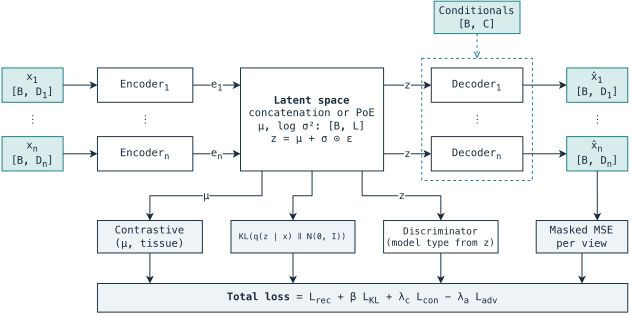
The MOSA VAE is a conditional multiview variational autoencoder for bulk multi-omics integration. It learns a shared representation across omics and estimates missing measurements, allowing samples with incomplete profiles to be analysed together. Batch, tissue, and mutation information can condition reconstructions, while optional adversarial training discourages batch-associated information in the representation. See the model guide for available settings and their interpretation.
The library
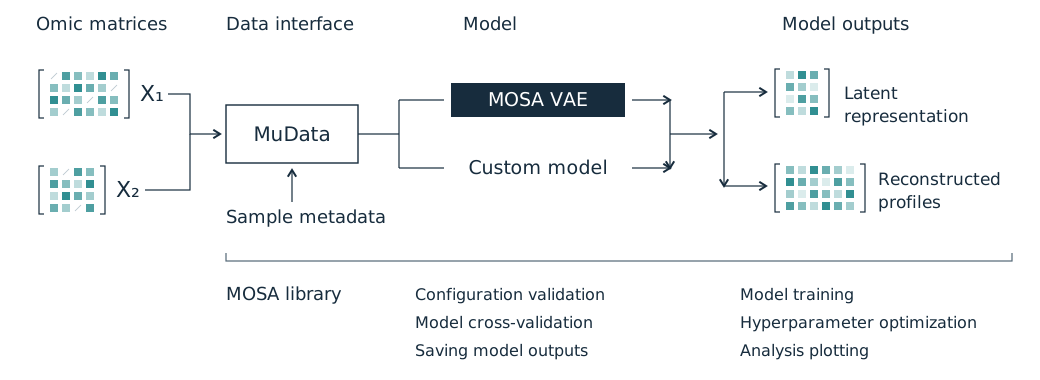
The library provides command-line and Python interfaces for running integration experiments from a configuration file. Prepare a dataset in MuData, compare model settings through cross-validation and Optuna hyperparameter search, then use the fitted model to project new samples and analyse reconstructed profiles. Other integration methods can be added through the model interface.
Quick start
Install
Use Python 3.11 or newer. Create a virtual environment to keep MOSA's dependencies separate from other projects.
From PyPI
Install MOSA and its dependencies from PyPI, then check that the command-line interface is available:
python -m venv .venv
source .venv/bin/activate
python -m pip install mosalib
mosa --help
The final command lists MOSA's available commands. The package installs as mosalib; use mosa in the terminal or import mosa in Python.
From source
To work from a local copy of the code, clone the repository and install it in editable mode:
git clone https://github.com/QuantitativeBiology/mosa.git
cd mosa
python -m venv .venv
source .venv/bin/activate
python -m pip install -e .
mosa --help
An editable installation uses the code in this checkout, so changes to the Python source are available without reinstalling the package.
On Windows, replace the activation command with .venv\Scripts\activate. Keep the environment active when running MOSA.
Prepare and run
For a first run, follow Getting started using the supplied synthetic dataset. For your own data, follow Preparing a dataset, then adapt the example configuration with your data path, view names, and output directory. Save it as config.yaml and run:
mosa validate --config config.yaml
mosa train --config config.yaml
Validation checks the configuration against the dataset before training. After the fit, use Analysing results to read the saved outputs and generate diagnostic plots. The MOSA VAE supports CPU, CUDA, and Apple silicon through MPS; the example configuration uses CPU.
Documentation
Use the documentation to follow a complete task or look up a setting:
- Using the library: data preparation, training, evaluation, optimization, and plotting.
- Models: the MOSA VAE and external integrations.
- Developing model integrations: the interface, registration, persistence, and testing.
- Reference: commands, configuration fields, saved files, and troubleshooting.
Contributing
See CONTRIBUTING.md for development setup, checks, and the model interface. Report bugs or discuss changes in GitHub issues.
License
MOSA is licensed under the BSD 3-Clause License.
1 maintainer

Metadata
1 maintainer
Release files for mosalib 0.1.1
For a detailed explanation of source distributions (sdists) and built distributions (wheels), please see the package formats documentation.
Source distribution (sdist)
| File | Size | Uploaded | |
|---|---|---|---|
| mosalib-0.1.1.tar.gz | 138.9 kB | Details |
Built distribution (wheel)
| File | Interpreter | ABI | Platform | Reset |
|---|---|---|---|---|
| mosalib-0.1.1-py3-none-any.whl | Python 3 | none | any | Details |
Total release size: 230.3 kB
Release files / mosalib-0.1.1.tar.gz
| Download URL | mosalib-0.1.1.tar.gz |
|---|---|
| Size | 138.9 kB |
| Tags | Source |
|
SHA-256 checksum How to use checksums |
c9263f44fb888d96dc771462b40cde96a3740ce5f44591e8cd9e84d3cdae52c2
|
|
BLAKE2b-256 checksum How to use checksums |
60b48e85357c75d77a767b2320a6dabd81b5f2e00027f132c0fa8e3f90ca2293
|
| Upload date | |
|
Uploaded using Trusted Publishing? What is trusted publishing? |
Yes |
| Uploaded via |
twine/7.0.0 CPython/3.13.14
|
Provenance
Provenance describes where a file came from. On PyPI, provenance is shared via attestations, which provide a verifiable record of the build or publishing details. View details, limitations and caveats.


PyPI Publish Attestation
PyPI verified that this artifact, at this checksum, originated from the publisher listed below.
Signed by GitHub Actions, verified by PyPI on Oct 15, 2026.
Transparency logRelease files / mosalib-0.1.1-py3-none-any.whl
| Download URL | mosalib-0.1.1-py3-none-any.whl |
|---|---|
| Size | 91.4 kB |
| Tags | Python 3 |
|
SHA-256 checksum How to use checksums |
9abf7685cedb6fb37f5984e99b3f9c545bc3f687403ac46e3a4180f6c7755c7a
|
|
BLAKE2b-256 checksum How to use checksums |
14403ebcb1e9e19aad59813ef970cc40ddcfc9bfe1c66577066bdfe821d41093
|
| Upload date | |
|
Uploaded using Trusted Publishing? What is trusted publishing? |
Yes |
| Uploaded via |
twine/7.0.0 CPython/3.13.14
|
Provenance
Provenance describes where a file came from. On PyPI, provenance is shared via attestations, which provide a verifiable record of the build or publishing details. View details, limitations and caveats.
PyPI Publish Attestation
PyPI verified that this artifact, at this checksum, originated from the publisher listed below.
Signed by GitHub Actions, verified by PyPI on Oct 15, 2026.
Transparency log













