
A clean, installable multi-person SMPL motion editor with pluggable auto-correction and metrics.

Project description
Motion Studio





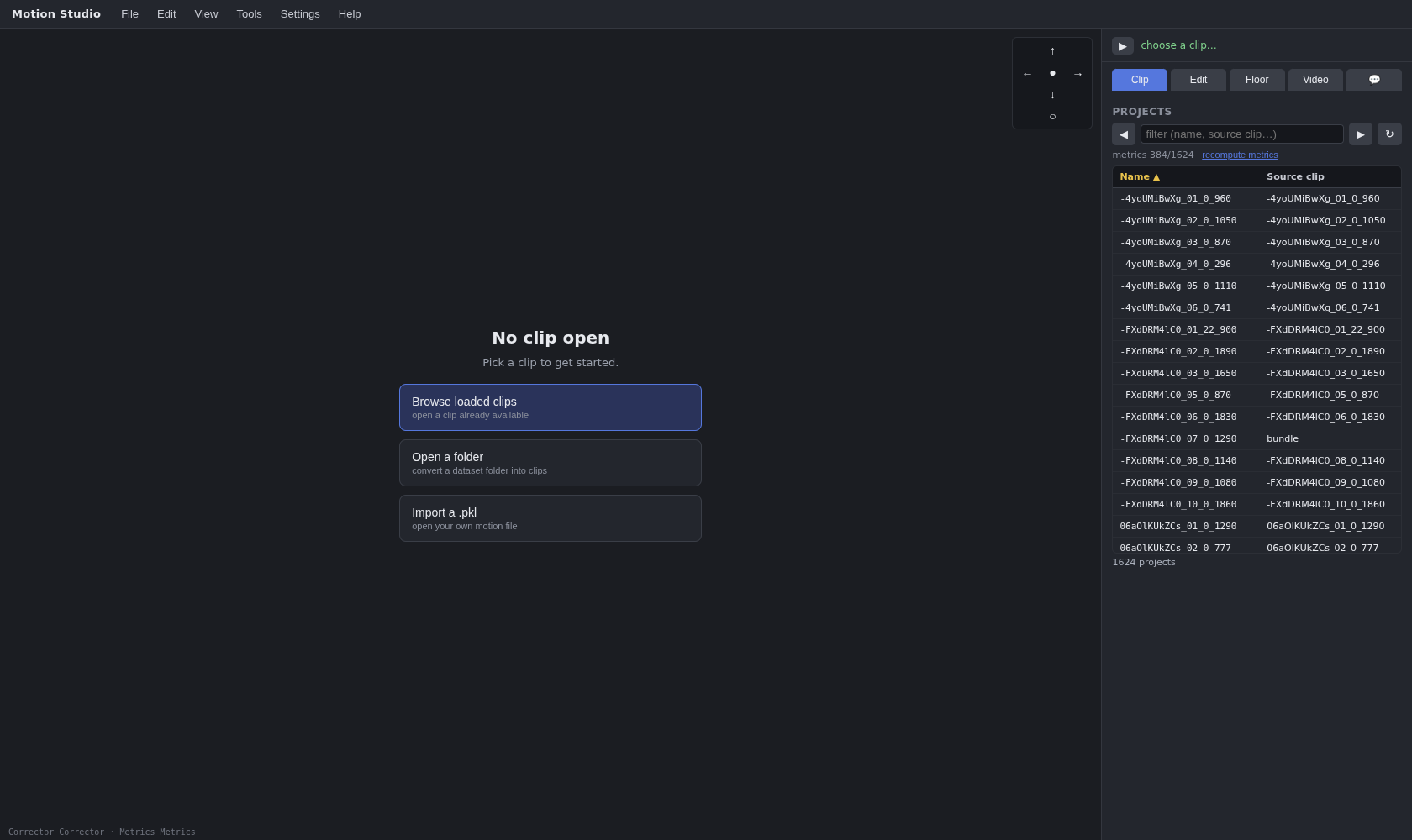
A clean, installable multi-person SMPL motion editor for the browser, with a 3D view (Three.js), a video/music background, frame-by-frame pose editing, and pluggable auto-correction and metrics.
It started as an internal pose editor for the AIOZ-GDANCE dataset and was rewritten as a small, modular, self-contained tool: no dependency on any external research repo, a single save-file format, and a plugin contract so you can drop in your own correction / metrics classes without touching the app.
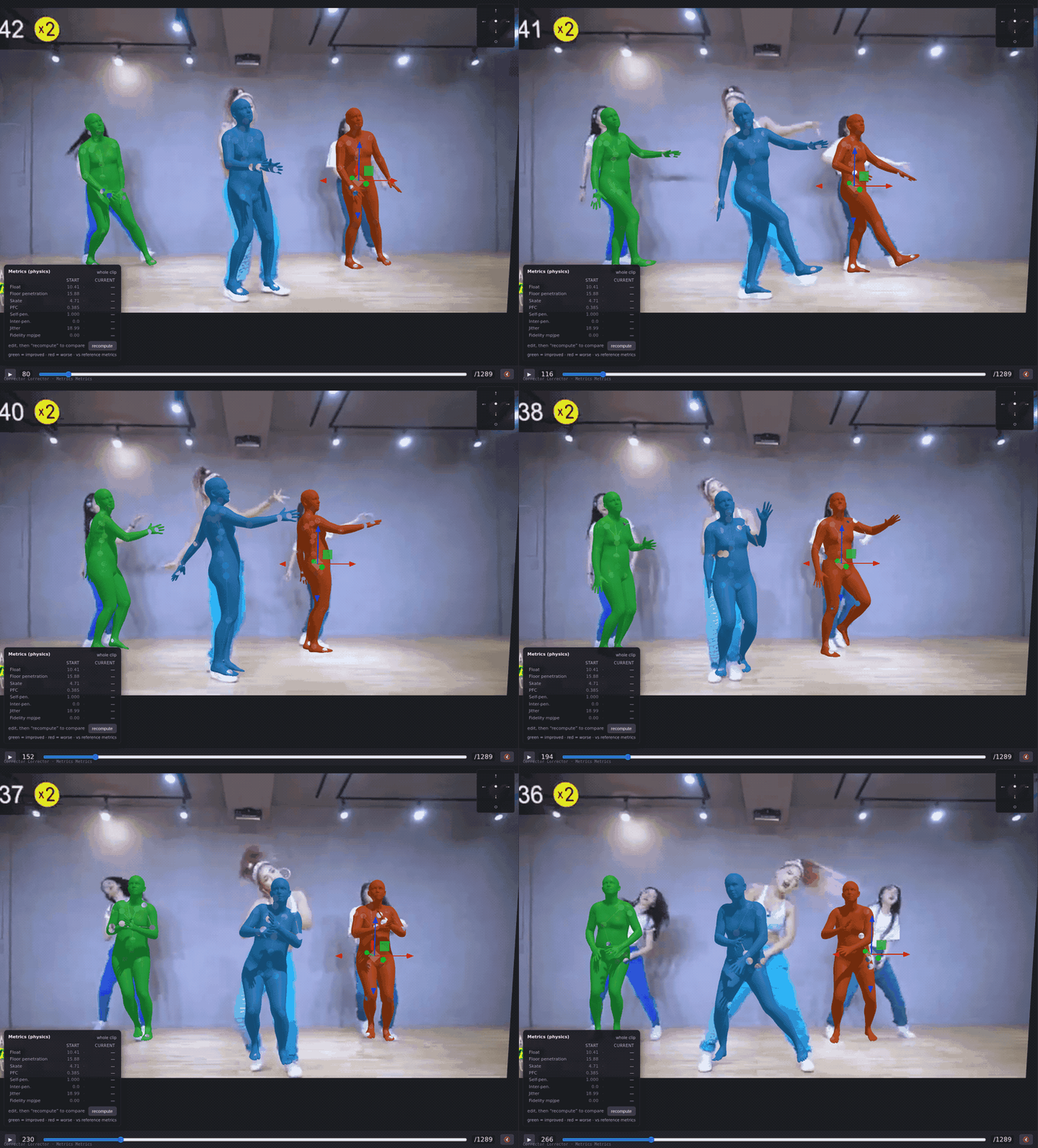
Editing a multi-person clip: the SMPL motion and the source video play in sync while you orbit the camera.
Features
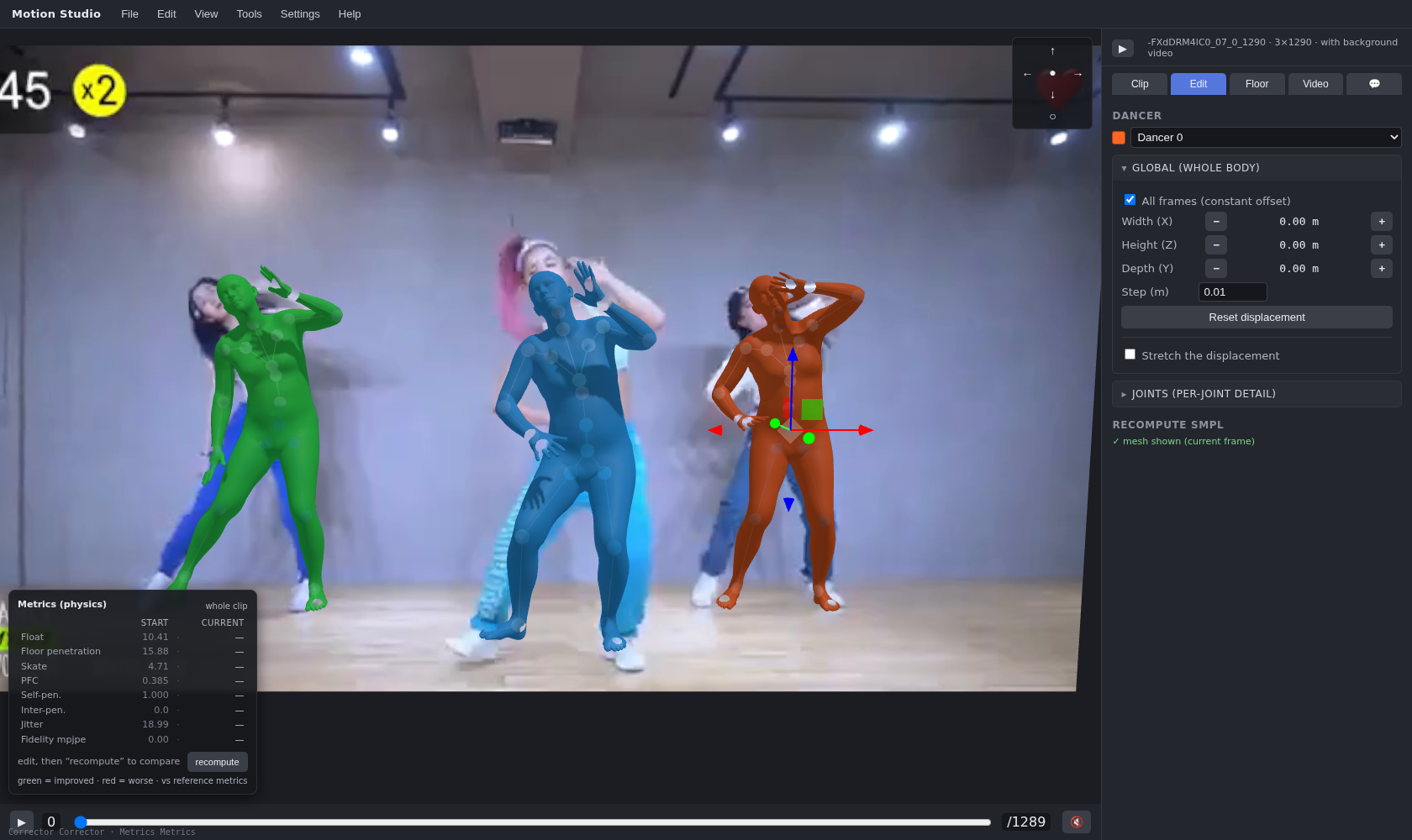
- 3D editor: skeleton + SMPL mesh, per-joint and whole-body editing, undo/redo.
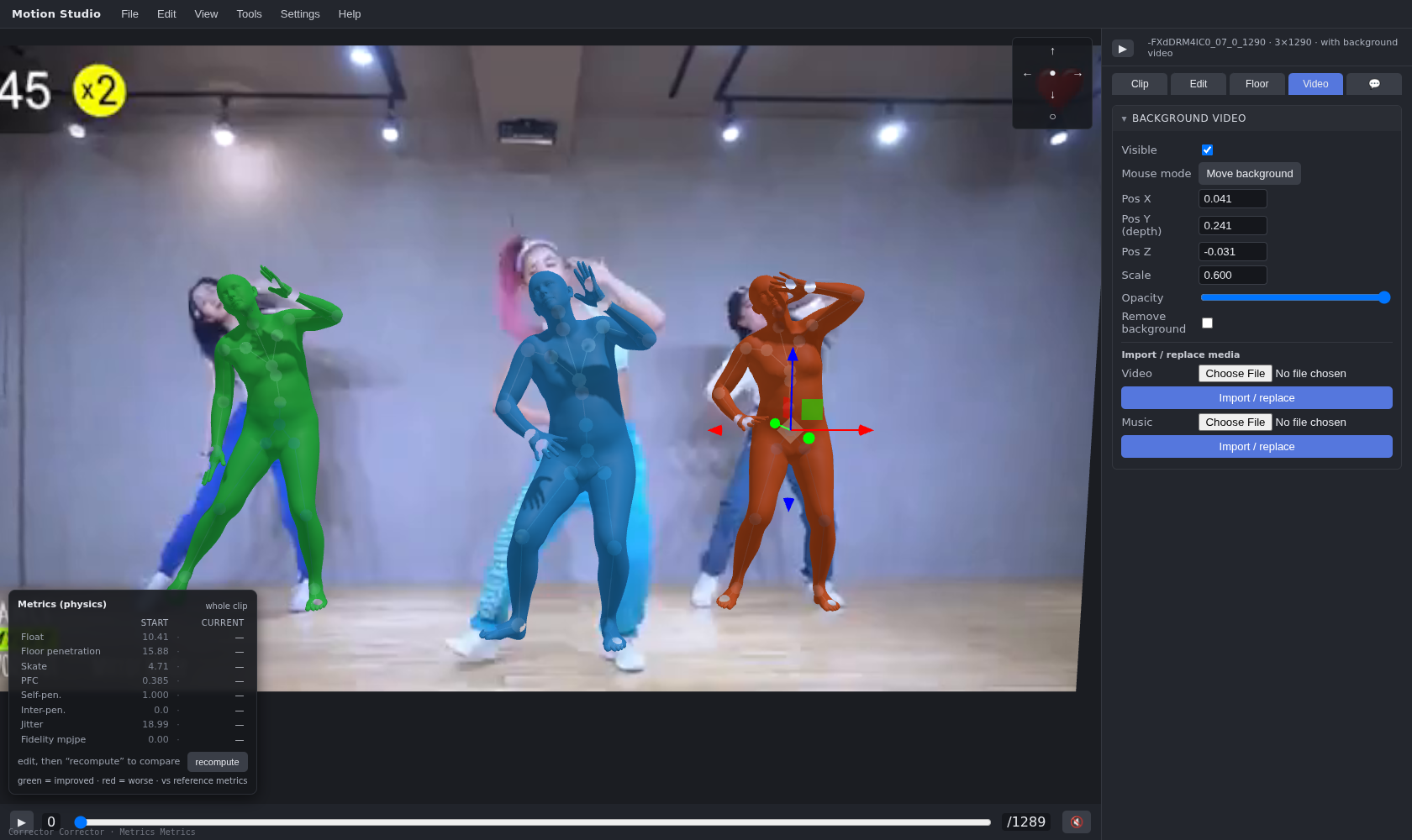
- Video & music background: place the source video in the scene (position, scale, opacity, time offset), server-side background removal, audio playback synced to the timeline.
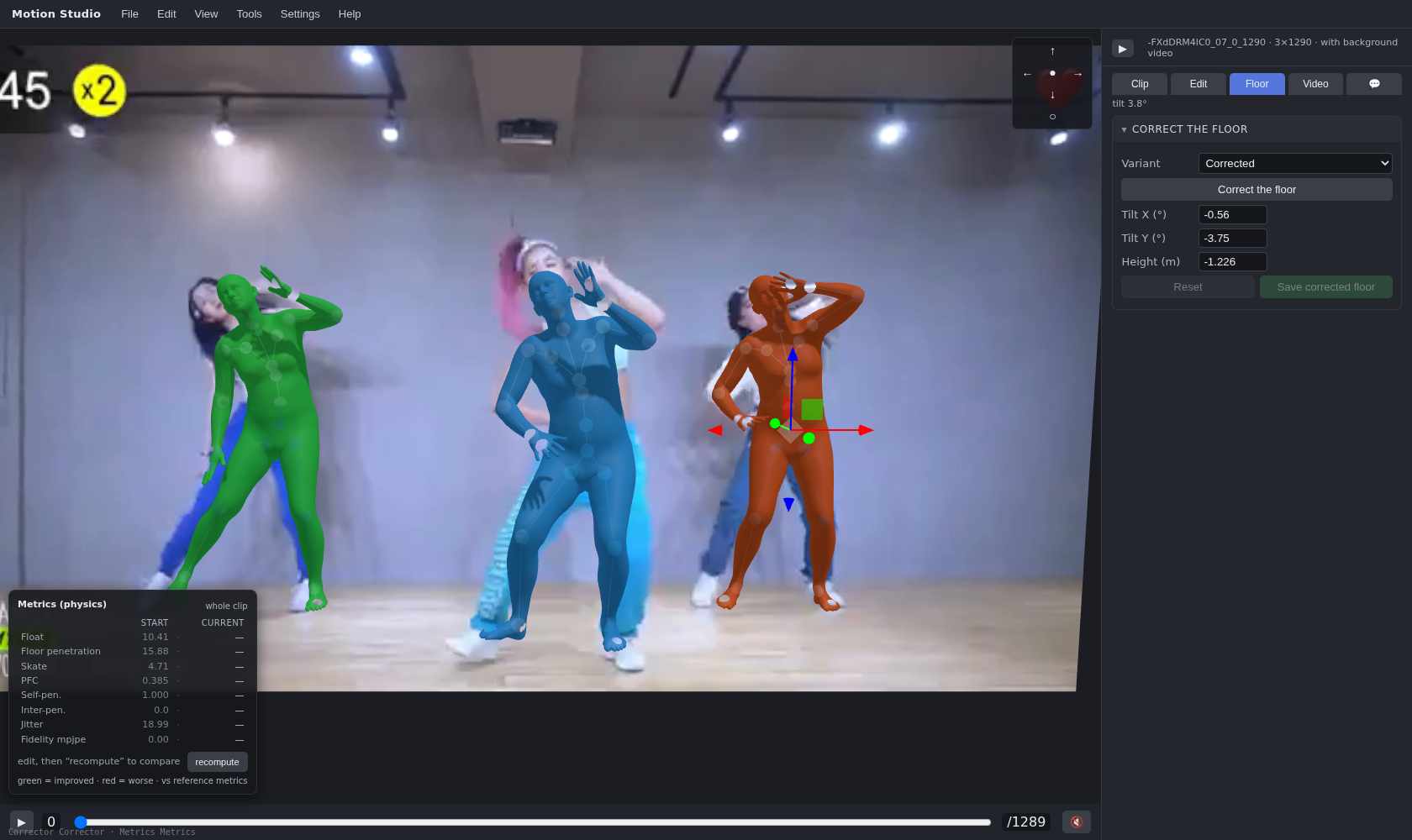
- Floor: estimate / edit / recompute the ground plane.
- Auto-correction & metrics: run a corrector and score the motion; both are plugins. The built-ins are simple, generic reference implementations (floor grounding + geometric metrics) — swap in your own for anything more.
- One save file: a
.motionbundle holds the original motion, your edits, the video, the music, placement parameters, comments and a metrics snapshot. - Two ways to load: open a single SMPL
.pkl(with optional video/music), or point at your data directories (a flatpkl_dir/, plus optionalvideos_dir/andaudio_dir/matched by clip name) and convert them into the workspace.
Screenshots
Install
pip install "motion-studio[all]" # recommended: full feature set
[all] pulls in torch, smplx, torchvision, pillow, librosa and scipy — the SMPL
forward kinematics, pose refit, built-in corrector/metrics, server-side
background removal and music import. Narrower extras are available:
pip install motion-studio            # core only (numpy + flask): no SMPL/video
pip install "motion-studio[smpl]"    # + torch, smplx
pip install "motion-studio[video]"   # + pillow, torchvision, librosa, scipy
pip install "motion-studio[dev]"     # + pytest, ruff, black, pre-commit
Requires Python >= 3.9. The SMPL body models are not shipped; point the tool
at your local copy with --smpl-dir.
Run
motion-studio --port 8815
# optional: point at your own plugins
motion-studio --corrector ./my.py:MyCorrector --metrics ./my.py:MyMetrics
Then open http://127.0.0.1:8815.
The data directories (SMPL .pkl motions, background videos, music) and the
SMPL model directory are configured from the UI ("Data source" / settings) and
persisted to workspace/config.json, so a bare relaunch reuses them. The
workspace is the root folder that holds your saved .motion bundles,
like any desktop app keeps its documents.
When a real (non-default) metrics plugin is configured, the server computes and caches each bundle's reference metrics in the background after launch, so the library becomes sortable by metric.
Command line
The bare command (or motion-studio serve) starts the editor server. Two
headless subcommands run the same plugins from a terminal, no browser:
motion-studio                                       # start the editor (default)
motion-studio --port 8815                           # on a chosen port

# Run the auto-corrector on a .motion and write the corrected bundle:
motion-studio correct in.motion -o out.motion
motion-studio correct in.motion -o out.motion --corrector ./my.py:MyCorrector

# Compute metrics on a .motion and print them:
motion-studio metrics in.motion
motion-studio metrics in.motion --metrics ./my.py:MyMetrics

motion-studio --version
--corrector / --metrics take a plugin spec (<module-or-path>:<Class>),
the same as the server flags; omit them to use the built-in plugins.
Docker
A Dockerfile is included. Build the image, then run it with your SMPL models
mounted in and the port published:
docker build -t motion-studio .
docker run -p 8815:8815 -v ~/smpl/models:/models -e SMPL_DIR=/models motion-studio
Then open http://127.0.0.1:8815. Mount a host folder to /workspace (and set
MOTION_STUDIO_HOME=/workspace) to persist your .motion bundles across runs.
Python API
Motion Studio is also a library — import it and use the data model, bundle I/O and plugin loaders directly, headless:
import motion_studio as ms

bundle = ms.load_bundle("session.motion")     # -> Bundle (original/edited + media)
motion = bundle.original                       # -> Motion(poses, trans, betas, …)

corrector = ms.load_corrector(
    "motion_studio.plugins_builtin.corrector:Corrector",
    smpl_dir="~/smpl/models",
)
fixed = corrector.correct(motion)

ms.save_bundle("fixed.motion", original=motion, edited=fixed)
The top-level surface (__all__) is: Motion, Floor, load_bundle,
save_bundle, load_corrector, load_metrics, scan_dataset, Config,
__version__. The library core imports with only numpy + flask (no torch).
The .motion save file
A .motion file is a single ZIP archive bundling an entire editing session:
manifest.json        format/version, comments, video placement params,
                     metrics snapshot, timestamps
motion_original.npz  the original SMPL motion (poses, trans, betas, fps, gender)
motion_edited.npz    your edited motion (omitted if you have not edited)
video.mp4            the source video (optional)
music.<ext>          the music track (optional)
Open a .motion to continue where you left off; the SMPL .pkl is written
out only when you click Export.
Plugins: bring your own correction / metrics
Motion Studio depends only on a small contract, not on any concrete
implementation. A plugin is any class matching one of these protocols
(motion_studio/core/plugins.py):
class MotionCorrector(Protocol):
    def __init__(self, *, smpl_dir, floor=None): ...
    def correct(self, motion: Motion, log=print) -> Motion: ...

class MotionMetrics(Protocol):
    def __init__(self, *, smpl_dir): ...
    def compute(self, motion: Motion, floor: Floor) -> dict[str, float]: ...
Motion and Floor are the only types exchanged
(motion_studio/core/types.py):
@dataclass
class Motion:
    poses: np.ndarray   # (N, T, 24, 3) axis-angle, z-up
    trans: np.ndarray   # (N, T, 3)
    betas: np.ndarray | None
    gender: str
    fps: float
    name: str

@dataclass
class Floor:
    plane: tuple[float, float, float]   # z = a*x + b*y + c
Point the tool at your own classes (a dotted module or a file path, followed by the class name); they are re-imported on every run, so edits take effect on the next click:
motion-studio --corrector ./my_corrector.py:MyCorrector \
              --metrics   ./my_metrics.py:MyMetrics
The built-in plugins live in motion_studio/plugins_builtin/. They are
deliberately simple reference implementations — a floor-grounding corrector and
a handful of geometric metrics — there to make the editor work out of the box,
not a research-grade physics pipeline. Point --corrector/--metrics at your
own classes for anything more.
New to plugins? See the full authoring guide in
docs/PLUGINS.md and the runnable, dependency-light
examples in examples/. For instance, the pure-numpy metrics
example (no torch / no SMPL needed) shows custom keys rendering end to end:
motion-studio --metrics ./examples/simple_metrics.py:SimpleMetrics
Documentation
docs/ARCHITECTURE.md— module map, data model, request flow, the heavy-lock model, the.motionformat.docs/PLUGINS.md— the plugin authoring guide.docs/USAGE.md— day-to-day editor usage.docs/API.md— the HTTP API.CONTRIBUTING.md— dev install, tests, lint/format.SECURITY.md— the threat model and--allow-remoterisk.
Third-party components & attribution
The in-browser 3D view is built on Three.js (r160, MIT), vendored under
motion_studio/static/vendor/ along with its OrbitControls / TransformControls
addons. Background removal uses torchvision DeepLabV3-ResNet101 server-side
(BSD-3-Clause) with a client-side MediaPipe Image Segmenter fallback
(Apache-2.0). The SMPL / SMPL-X body models are not shipped — you provide
them yourself under the Max Planck Institute (MPI-IS) non-commercial / research
license. See THIRD_PARTY_NOTICES.md for the full list
of bundled and depended-on components with their licenses and sources.
License
Released under the MIT License (see the LICENSE file in the repository).
Release history Release notifications | RSS feed

Download files
Download the file for your platform. If you're not sure which to choose, learn more about installing packages.
Source Distribution
Built Distribution
Filter files by name, interpreter, ABI, and platform.
If you're not sure about the file name format, learn more about wheel file names.
Copy a direct link to the current filters
File details
Details for the file motion_studio-0.1.3.tar.gz.
File metadata
- Download URL: motion_studio-0.1.3.tar.gz
- Upload date:
- Size: 479.0 kB
- Tags: Source
- Uploaded using Trusted Publishing? No
- Uploaded via: twine/6.2.0 CPython/3.9.25
File hashes
| Algorithm | Hash digest | |
|---|---|---|
| SHA256 |
ab126030ed16d595d3e31fc4b3b50146160481941a29953f2a9c06b8e193f5c5
|
|
| MD5 |
cd47f54a82fb7d406128eb4c3d4a78bf
|
|
| BLAKE2b-256 |
9b30187d1ab4bf0d163d84f664fa5aa4e9b55eb07663e13858ad630c13a87e77
|
File details
Details for the file motion_studio-0.1.3-py3-none-any.whl.
File metadata
- Download URL: motion_studio-0.1.3-py3-none-any.whl
- Upload date:
- Size: 473.9 kB
- Tags: Python 3
- Uploaded using Trusted Publishing? No
- Uploaded via: twine/6.2.0 CPython/3.9.25
File hashes
| Algorithm | Hash digest | |
|---|---|---|
| SHA256 |
dedcf99be7931125c09d0478c7878224e564e04564ca15b612fc8fde2d5dda43
|
|
| MD5 |
76ee03c43389a5e999960b5742f0449e
|
|
| BLAKE2b-256 |
dae4e919f401ccda00a25eb1011b6a1c8a51e2317690aeb12fa9086fba41f105
|






