

Motion Vector Extractor
This tool extracts motion vectors, frames, and frame types from H.264 and MPEG-4 Part 2 encoded videos.
A replacement for OpenCV's VideoCapture that returns for each frame:
- Frame type (I, P, or B)
- motion vectors
- Optional decoded frame as BGR image
Frame decoding can be skipped for very fast motion vector extraction, ideal for, e.g., fast visual object tracking. Both a C++ and a Python API is provided.
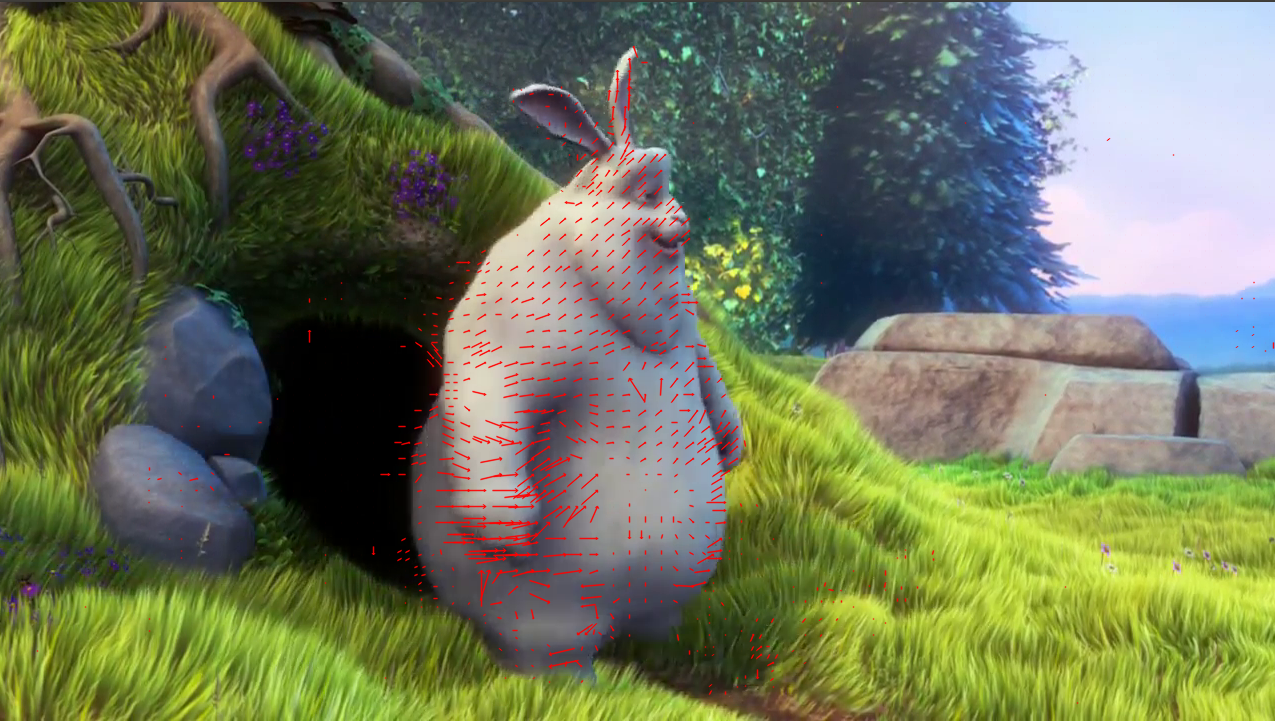
The image below shows a video frame with extracted motion vectors overlaid.
Note on Deprecation of Timestamp Extraction
Versions 1.x of the motion vector extractor additionally returned the timestamps of video frames. For RTSP streams, the UTC wall time of when the sender transmitted a frame was returned (rather than the more easily retrievable reception timestamp).
Since this feature required patching FFmpeg internals, it became difficult to maintain and prevented compatibility with newer versions of FFmpeg.
As a result, timestamp extraction was removed in the 2.0.0 release. If you rely on this feature, please use version 1.1.0.
News
Recent Changes in Release 2.0.0
- New motion-vectors-only mode, in which frame decoding is skipped for better performance (thanks to @microa)
- Dropped extraction of timestamps as this feature was complex and difficult to maintain. Note the breaking API change to the
readandretrievemethods of theVideoCaptureclass
- ret, frame, motion_vectors, frame_type, timestamp = cap.read()
+ ret, frame, motion_vectors, frame_type = cap.read()
- Added support for Python 3.13 and 3.14
- Moved installation of FFMPEG and OpenCV from script files directly into Dockerfile
- Improved quickstart section of the readme
Quickstart
Step 1: Install
pip install motion-vector-extractor
Note, that we currently provide the package only for x86-64 linux, such as Ubuntu or Debian, and Python 3.9 to 3.14. If you are on a different platform, please use the Docker image as described below.
Step 2: Extract Motion Vectors
You can follow along the examples below using the example video vid_h264.mp4 from the repo.
Command Line
# Extract motion vectors and show live preview
extract_mvs vid_h264.mp4 --preview --verbose

# Extract motion vectors and skip frame decoding (faster)
extract_mvs vid_h264.mp4 --verbose --skip-decoding-frames

# Extract and store motion vectors and frames to disk without showing live preview
extract_mvs vid_h264.mp4 --dump

# See all available options
extract_mvs -h
Python API
from mvextractor.videocap import VideoCap

cap = VideoCap()
cap.open("vid_h264.mp4")

# (optional) skip decoding frames
cap.set_decode_frames(False)

while True:
    ret, frame, motion_vectors, frame_type = cap.read()
    if not ret:
        break
    print(f"Num. motion vectors: {len(motion_vectors)}")
    print(f"Frame type: {frame_type}")
    if frame is not None:
        print(f"Frame size: {frame.shape}")

cap.release()
Advanced Usage
Installation via Docker
Instead of installing the motion vector extractor via PyPI you can also use the prebuild Docker image from DockerHub. The Docker image contains the motion vector extractor and all its dependencies and comes in handy for quick testing or in case your platform is not compatible with the provided Python package.
Prerequisites
To use the Docker image you need to install Docker. Furthermore, you need to clone the source code with
git clone https://github.com/LukasBommes/mv-extractor.git mv_extractor
Run Motion Vector Extraction in Docker
Afterwards, you can run the extraction script in the mv_extractor directory as follows
./run.sh python3.12 extract_mvs.py vid_h264.mp4 --preview --verbose
This pulls the prebuild Docker image from DockerHub and runs the extraction script inside the Docker container.
Building the Docker Image Locally (Optional)
This step is not required and for faster installation, we recommend using the prebuilt image.
If you still want to build the Docker image locally, you can do so by running the following command in the mv_extractor directory
docker build . --tag=mv-extractor
Note that building can take more than one hour.
Now, run the docker container with
docker run -it --ipc=host --env="DISPLAY" -v $(pwd):/home/video_cap -v /tmp/.X11-unix:/tmp/.X11-unix:rw mv-extractor /bin/bash
Python API
This module provides a Python API which is very similar to that of OpenCV VideoCapture. Using the Python API is the recommended way of using the H.264 Motion Vector Capture class.
Class :: VideoCap()
| Methods | Description |
|---|---|
| VideoCap() | Constructor |
| open() | Open a video file or url |
| grab() | Reads the next video frame and motion vectors from the stream |
| retrieve() | Decodes and returns the grabbed frame and motion vectors |
| read() | Convenience function which combines a call of grab() and retrieve() |
| release() | Close a video file or url and release all ressources |
| set_decode_frames() | Enable/disable decoding of video frames |
| Attributes | Description |
|---|---|
| decode_frames | Getter to check if frame decoding is enabled (True) or skipped (False) |
Method :: VideoCap()
Constructor. Takes no input arguments and returns nothing.
Method :: open()
Open a video file or url. The stream must be H264 encoded. Otherwise, undesired behaviour is likely.
| Parameter | Type | Description |
|---|---|---|
| url | string | Relative or fully specified file path or an url specifying the location of the video stream. Example "vid.flv" for a video file located in the same directory as the source files. Or "rtsp://xxx.xxx.xxx.xxx:554" for an IP camera streaming via RTSP. |
| Returns | Type | Description |
|---|---|---|
| success | bool | True if video file or url could be opened successfully, false otherwise. |
Method :: grab()
Reads the next video frame and motion vectors from the stream, but does not yet decode it. Thus, grab() is fast. A subsequent call to retrieve() is needed to decode and return the frame and motion vectors. the purpose of splitting up grab() and retrieve() is to provide a means to capture frames in multi-camera scenarios which are as close in time as possible. To do so, first call grab() on all cameras and afterwards call retrieve() on all cameras.
Takes no input arguments.
| Returns | Type | Description |
|---|---|---|
| success | bool | True if next frame and motion vectors could be grabbed successfully, false otherwise. |
Method :: retrieve()
Decodes and returns the grabbed frame and motion vectors. Prior to calling retrieve() on a stream, grab() needs to have been called and returned successfully.
Takes no input arguments and returns a tuple with the elements described in the table below.
| Index | Name | Type | Description |
|---|---|---|---|
| 0 | success | bool | True in case the frame and motion vectors could be retrieved sucessfully, false otherwise or in case the end of stream is reached. When false, the other tuple elements are set to empty numpy arrays or 0. |
| 1 | frame | numpy array | Array of dtype uint8 shape (h, w, 3) containing the decoded video frame. w and h are the width and height of this frame in pixels. Channels are in BGR order. If no frame could be decoded an empty numpy ndarray of shape (0, 0, 3) and dtype uint8 is returned. If frame decoding is disabled with set_decode_frames(False) None is returned instead. |
| 2 | motion vectors | numpy array | Array of dtype int32 and shape (N, 10) containing the N motion vectors of the frame. Each row of the array corresponds to one motion vector. If no motion vectors are present in a frame, e.g. if the frame is an I frame an empty numpy array of shape (0, 10) and dtype int32 is returned. The columns of each vector have the following meaning (also refer to AVMotionVector in FFMPEG documentation): - 0: source: offset of the reference frame from the current frame. The reference frame is the frame where the motion vector points to and where the corresponding macroblock comes from. If source < 0, the reference frame is in the past. For source > 0 the it is in the future (in display order).- 1: w: width of the vector's macroblock.- 2: h: height of the vector's macroblock.- 3: src_x: x-location (in pixels) where the motion vector points to in the reference frame.- 4: src_y: y-location (in pixels) where the motion vector points to in the reference frame.- 5: dst_x: x-location of the vector's origin in the current frame (in pixels). Corresponds to the x-center coordinate of the corresponding macroblock.- 6: dst_y: y-location of the vector's origin in the current frame (in pixels). Corresponds to the y-center coordinate of the corresponding macroblock.- 7: motion_x: Macroblock displacement in x-direction, multiplied by motion_scale to become integer. Used to compute fractional value for src_x as src_x = dst_x + motion_x / motion_scale.- 8: motion_y: Macroblock displacement in y-direction, multiplied by motion_scale to become integer. Used to compute fractional value for src_y as src_y = dst_y + motion_y / motion_scale.- 9: motion_scale: see definiton of columns 7 and 8. Used to scale up the motion components to integer values. E.g. if motion_scale = 4, motion components can be integer values but encode a float with 1/4 pixel precision.Note: src_x and src_y are only in integer resolution. They are contained in the AVMotionVector struct and exported only for the sake of completeness. Use equations in field 7 and 8 to get more accurate fractional values for src_x and src_y. |
| 3 | frame_type | string | Unicode string representing the type of frame. Can be "I" for a keyframe, "P" for a frame with references to only past frames and "B" for a frame with references to both past and future frames. A "?" string indicates an unknown frame type. |
Method :: read()
Convenience function which internally calls first grab() and then retrieve(). It takes no arguments and returns the same values as retrieve().
Method :: release()
Close a video file or url and release all ressources. Takes no input arguments and returns nothing.
Method :: set_decode_frames()
Enable/disable decoding of video frames. May be called anytime, even mid-stream. Returns nothing.
| Parameter | Type | Description |
|---|---|---|
| enable | bool | If True (default) RGB frames are decoded and returned in addition to extracted motion vectors. If False, frame decoding is skipped, yielding much higher extraction througput. |
C++ API
The C++ API differs from the Python API in what parameters the methods expect and what values they return. Refer to the docstrings in src/video_cap.hpp.
Theory
What follows is a short explanation of the data returned by the VideoCap class. Also refer this excellent book by Iain E. Richardson for more details.
Frame
The decoded video frame. Nothing special about that.
Motion Vectors
H.264 and MPEG-4 Part 2 use different techniques to reduce the size of a raw video frame prior to sending it over a network or storing it into a file. One of those techniques is motion estimation and prediction of future frames based on previous or future frames. Each frame is segmented into macroblocks of e.g. 16 pixel x 16 pixel. During encoding motion estimation matches every macroblock to a similar looking macroblock in a previously encoded frame (note that this frame can also be a future frame since encoding and presentation order might differ). This allows to transmit only those motion vectors and the reference macroblock instead of all macroblocks, effectively reducing the amount of transmitted or stored data.
Motion vectors correlate directly with motion in the video scene and are useful for various computer vision tasks, such as visual object tracking.
In MPEG-4 Part 2 macroblocks are always 16 pixel x 16 pixel. In H.264 macroblocks can be 16x16, 16x8, 8x16, 8x8, 8x4, 4x8, or 4x4 in size.
Frame Types
The frame type is either "P", "B" or "I" and refers to the H.264 encoding mode of the current frame. An "I" frame is send fully over the network and serves as a reference for "P" and "B" frames for which only differences to previously decoded frames are transmitted. Those differences are encoded via motion vectors. As a consequence, for an "I" frame no motion vectors are returned by this library. The difference between "P" and "B" frames is that "P" frames refer only to past frames, whereas "B" frames have motion vectors which refer to both past and future frames. References to future frames are possible even with live streams because the decoding order of frames differs from the presentation order.
About
This software is maintained by Lukas Bommes. It is based on MV-Tractus and OpenCV's videoio module.
License
This project is licensed under the MIT License - see the LICENSE file for details.
Citation
If you use our work for academic research please cite
@INPROCEEDINGS{9248145,
  author={L. {Bommes} and X. {Lin} and J. {Zhou}},
  booktitle={2020 15th IEEE Conference on Industrial Electronics and Applications (ICIEA)},
  title={MVmed: Fast Multi-Object Tracking in the Compressed Domain},
  year={2020},
  volume={},
  number={},
  pages={1419-1424},
  doi={10.1109/ICIEA48937.2020.9248145}}
1 maintainer

Metadata
1 maintainer
Release files for motion-vector-extractor 2.0.0
For a detailed explanation of source distributions (sdists) and built distributions (wheels), please see the package formats documentation.
Built distributions (wheels)
| File | Reset | |||
|---|---|---|---|---|
| motion_vector_extractor-2.0.0-cp314-cp314-manylinux_2_28_x86_64.whl | CPython 3.14 | CPython 3.14 | Linux glibc 2.28+ x86-64 | Details |
| motion_vector_extractor-2.0.0-cp313-cp313-manylinux_2_28_x86_64.whl | CPython 3.13 | CPython 3.13 | Linux glibc 2.28+ x86-64 | Details |
| motion_vector_extractor-2.0.0-cp312-cp312-manylinux_2_28_x86_64.whl | CPython 3.12 | CPython 3.12 | Linux glibc 2.28+ x86-64 | Details |
| motion_vector_extractor-2.0.0-cp311-cp311-manylinux_2_28_x86_64.whl | CPython 3.11 | CPython 3.11 | Linux glibc 2.28+ x86-64 | Details |
| motion_vector_extractor-2.0.0-cp310-cp310-manylinux_2_28_x86_64.whl | CPython 3.10 | CPython 3.10 | Linux glibc 2.28+ x86-64 | Details |
| motion_vector_extractor-2.0.0-cp39-cp39-manylinux_2_28_x86_64.whl | CPython 3.9 | CPython 3.9 | Linux glibc 2.28+ x86-64 | Details |
Total release size: 327.7 MB
Release files / motion_vector_extractor-2.0.0-cp314-cp314-manylinux_2_28_x86_64.whl
| Download URL | motion_vector_extractor-2.0.0-cp314-cp314-manylinux_2_28_x86_64.whl |
|---|---|
| Size | 54.6 MB |
| Tags | CPython 3.14 Linux glibc 2.28+ x86-64 |
|
SHA-256 checksum How to use checksums |
33704f0b89dbe8c19329fa04db2593f433e7b8092c08cde0b30b1600941889e6
|
|
BLAKE2b-256 checksum How to use checksums |
b3db94c76d405675b4a3609fe9a4ea185a1a7c743b8b312b299b993df71dc79d
|
| Upload date | |
|
Uploaded using Trusted Publishing? What is trusted publishing? |
No |
| Uploaded via |
twine/6.2.0 CPython/3.11.2
|
Release files / motion_vector_extractor-2.0.0-cp313-cp313-manylinux_2_28_x86_64.whl
| Download URL | motion_vector_extractor-2.0.0-cp313-cp313-manylinux_2_28_x86_64.whl |
|---|---|
| Size | 54.6 MB |
| Tags | CPython 3.13 Linux glibc 2.28+ x86-64 |
|
SHA-256 checksum How to use checksums |
2ba92b5aef3f7caaf61204f12d63127cb165c5d2b6927137b747d533b4e89ac9
|
|
BLAKE2b-256 checksum How to use checksums |
4a852adf61e54928f6e98df9e5877b61c70f557d6801ed1093640bc42b3e2dcb
|
| Upload date | |
|
Uploaded using Trusted Publishing? What is trusted publishing? |
No |
| Uploaded via |
twine/6.2.0 CPython/3.11.2
|
Release files / motion_vector_extractor-2.0.0-cp312-cp312-manylinux_2_28_x86_64.whl
| Download URL | motion_vector_extractor-2.0.0-cp312-cp312-manylinux_2_28_x86_64.whl |
|---|---|
| Size | 54.6 MB |
| Tags | CPython 3.12 Linux glibc 2.28+ x86-64 |
|
SHA-256 checksum How to use checksums |
676b1f50152dad82593e99693ef4dcef98a7dd119368145cb8901050328fbee0
|
|
BLAKE2b-256 checksum How to use checksums |
85d656bcb03a15c329706d0cbc168168d884724dcfd5ababb603a17973080a95
|
| Upload date | |
|
Uploaded using Trusted Publishing? What is trusted publishing? |
No |
| Uploaded via |
twine/6.2.0 CPython/3.11.2
|
Release files / motion_vector_extractor-2.0.0-cp311-cp311-manylinux_2_28_x86_64.whl
| Download URL | motion_vector_extractor-2.0.0-cp311-cp311-manylinux_2_28_x86_64.whl |
|---|---|
| Size | 54.6 MB |
| Tags | CPython 3.11 Linux glibc 2.28+ x86-64 |
|
SHA-256 checksum How to use checksums |
8585d1a4424b8d4356e75dfde2faa42e3e9ad37997b733571df8b00bc2ccb66c
|
|
BLAKE2b-256 checksum How to use checksums |
253d36c968311d78b72c42f3eb8c3c59ba9b51702dac1c427982408dc0444e12
|
| Upload date | |
|
Uploaded using Trusted Publishing? What is trusted publishing? |
No |
| Uploaded via |
twine/6.2.0 CPython/3.11.2
|
Release files / motion_vector_extractor-2.0.0-cp310-cp310-manylinux_2_28_x86_64.whl
| Download URL | motion_vector_extractor-2.0.0-cp310-cp310-manylinux_2_28_x86_64.whl |
|---|---|
| Size | 54.6 MB |
| Tags | CPython 3.10 Linux glibc 2.28+ x86-64 |
|
SHA-256 checksum How to use checksums |
3f03a4ade04262c2400dc529c6fa824bfca189afc63b6d800f0923122bc79ffe
|
|
BLAKE2b-256 checksum How to use checksums |
bed93085a734ae1a927e341542a0880310df44cbca16ee09fcf4082e7880f974
|
| Upload date | |
|
Uploaded using Trusted Publishing? What is trusted publishing? |
No |
| Uploaded via |
twine/6.2.0 CPython/3.11.2
|
Release files / motion_vector_extractor-2.0.0-cp39-cp39-manylinux_2_28_x86_64.whl
| Download URL | motion_vector_extractor-2.0.0-cp39-cp39-manylinux_2_28_x86_64.whl |
|---|---|
| Size | 54.6 MB |
| Tags | CPython 3.9 Linux glibc 2.28+ x86-64 |
|
SHA-256 checksum How to use checksums |
df11be8679b06df90b8d7351fb77524eab378649ce9e2c8f5b61d0bcac145e4d
|
|
BLAKE2b-256 checksum How to use checksums |
20d10b9c1509be3da9034bbf76db491af15ded517d5a119ba57a06bcf15b5452
|
| Upload date | |
|
Uploaded using Trusted Publishing? What is trusted publishing? |
No |
| Uploaded via |
twine/6.2.0 CPython/3.11.2
|














