
motioneye, a multilingual web interface for motion.

Project description
What is motionEye?
motionEye is an online interface for the software motion, a video surveillance program with motion detection.
Check out the wiki for more details. Changelog is available on the releases page.
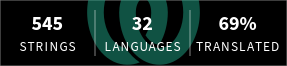
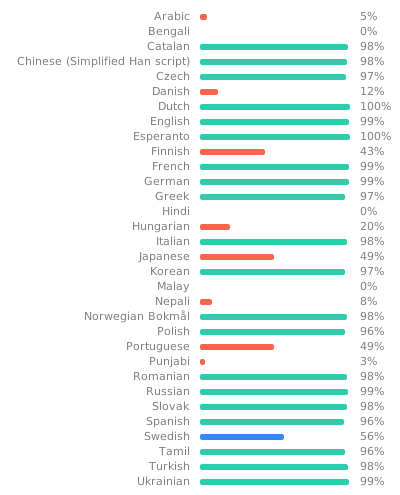
From version 0.43, motionEye is multilingual:
  |
|---|
You can contribute to translations on Weblate.
Installation
-
Install Python 3.7 or later and build dependencies
Here the commands for APT-based Linux distributions are given.
Thanks to pre-compiled wheels from PyPI, installing motionEye usually does not require anything but Python 3 and cURL with the ability to do HTTPS network requests:
sudo apt update
sudo apt --no-install-recommends install ca-certificates curl python3
On ARMv6/ARMv7 (32-bit), RISC-V, and other rare CPU architectures additional build dependencies may be required to compile the Pillow, PycURL, and CFFI modules:
sudo apt --no-install-recommends install python3-dev gcc libjpeg62-turbo-dev libcurl4-openssl-dev libssl-dev libffi-dev
-
Install the Python package manager
pipcurl -sSfO 'https://bootstrap.pypa.io/get-pip.py' sudo python3 get-pip.py rm get-pip.py
On recent distro versions, like Debian 12/Bookworm, Ubuntu 23.04/Lunar, and later, the
libpython3.*-stdlibpackage ships a file/usr/lib/python3.*/EXTERNALLY-MANAGED, which prevents the installation of Python modules outside ofvenvenvironments. motionEye however has a small number of dependencies with no strict version requirements and hence is very unlikely to break any Python package you might have installed via APT. To bypass this block, addbreak-system-packages=trueto the[global]section of yourpip.conf:grep -q '\[global\]' /etc/pip.conf 2> /dev/null || printf '%b' '[global]\n' | sudo tee -a /etc/pip.conf > /dev/null sudo sed -i '/^\[global\]/a\break-system-packages=true' /etc/pip.conf
-
Install and setup motionEye
sudo python3 -m pip install motioneye
sudo motioneye_init
NB:
motioneye_initcurrently assumes either an APT- or RPM-based distribution withsystemdas init system. For a manual setup, config and service files can be found here: https://github.com/motioneye-project/motioneye/tree/dev/motioneye/extra -
Access the web interface
After having successfully followed the installation instructions, the motionEye server should be running on your system and listening on port 8765. Fire up your favorite web browser and visit the following URL (replacing
[your_ip]with... well, your system's IP address):http://[your_ip]:8765/Use usernamme admin with empty password when prompted for credentials. For security, please do set up a proper password for the admin user, at least if you plan to make your motionEye installation accessible from the Internet.
Upgrade
When upgrading motionEye, remember to restart the service. To rule out any mix of old in-memory backend code with new frontend assets, it is recommended to stop it prior to the upgrade, and start it back up afterwards:
sudo systemctl stop motioneye
sudo python3 -m pip install --upgrade motioneye
sudo systemctl start motioneye
Pre-releases
We may push beta versions to PyPI to give upcoming releases some testing period. Those can be installed with pip's --pre flag:
sudo systemctl stop motioneye
sudo python3 -m pip install --upgrade --pre motioneye
sudo systemctl start motioneye
If you want to test a recent commit on our development branch:
sudo systemctl stop motioneye
sudo python3 -m pip install --upgrade 'https://github.com/motioneye-project/motioneye/archive/dev.tar.gz'
sudo systemctl start motioneye
Release history Release notifications | RSS feed


Download files
Download the file for your platform. If you're not sure which to choose, learn more about installing packages.
Source Distribution
Built Distribution
Filter files by name, interpreter, ABI, and platform.
If you're not sure about the file name format, learn more about wheel file names.
Copy a direct link to the current filters
File details
Details for the file motioneye-0.44.0.tar.gz.
File metadata
- Download URL: motioneye-0.44.0.tar.gz
- Upload date:
- Size: 1.0 MB
- Tags: Source
- Uploaded using Trusted Publishing? No
- Uploaded via: twine/6.2.0 CPython/3.14.6
File hashes
| Algorithm | Hash digest | |
|---|---|---|
| SHA256 |
73e448b5c2eca77fa5dfa586692d1af969ebda4e4bcba052351ba13d042d43f3
|
|
| MD5 |
22776ea58e8e5ec8fe70a0c1bc99575b
|
|
| BLAKE2b-256 |
32279c835b7142ac7863248178858ee9f695b15bd79ec2bc49aa294af8803102
|
File details
Details for the file motioneye-0.44.0-py3-none-any.whl.
File metadata
- Download URL: motioneye-0.44.0-py3-none-any.whl
- Upload date:
- Size: 1.2 MB
- Tags: Python 3
- Uploaded using Trusted Publishing? No
- Uploaded via: twine/6.2.0 CPython/3.14.6
File hashes
| Algorithm | Hash digest | |
|---|---|---|
| SHA256 |
54723abbd2a011251e8b1836cee3f5fd90cf3e59fa0971cb3eaeaeff0bda9cdc
|
|
| MD5 |
edcd977be9fb874733eb8ea8ebad01ae
|
|
| BLAKE2b-256 |
e36b1eec9089d3e75ed994810bf1a26e231470c3f65c0786fde519c639703011
|






