
Make animations with Python

Project description




Introduction
motionpicture is a Python library to simplify the creation of videos out of
individual frames. With motionpicture, you just have to specify how to produce
a generic frame, and the package will do everything else for you. In
motionpicture, your code can be configured via command-line or text files:
turning your code into a plug-in for motionpicture is trivial, so you will be
able to reuse your code with ease.
Examples
There are two important ingredients to use motionpicture: mopi, and a
movie file. mopi is a command-line utility that comes when you install this
package. It will be your main interface to motionpicture and it has a
comprehensive --help function. A movie file is a recipe on how to produce a
generic frame. With few small restrictions, you have full control over this file
(more info in section Movie files).
In these examples we are going to use matplotlib to do the plotting, but you
are completely free to generate frames with any Python package you wish.
Unveiling a sine wave
In this example, we show how to use mopi to generate the following video.
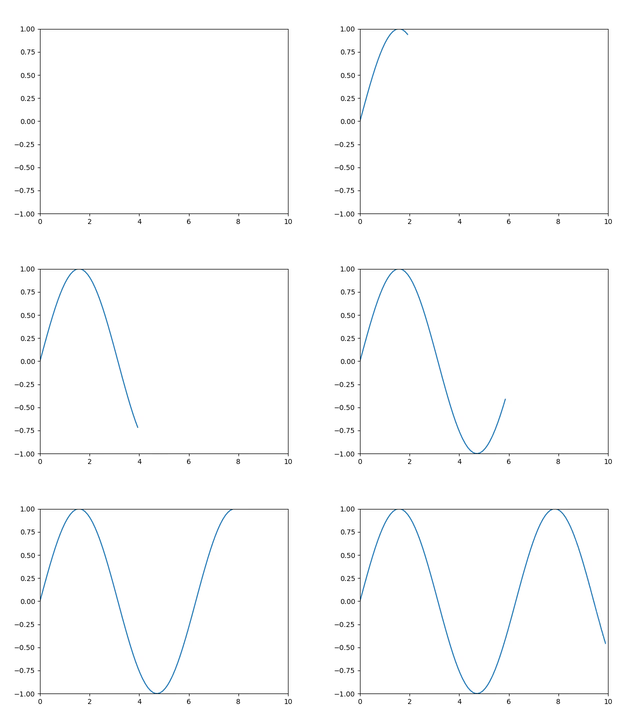
To produce this video, we need the following movie file.
import matplotlib.pyplot as plt
import numpy as np

class MOPIMovie:
    def __init__(self, _args):
        self.times = np.linspace(0, 10, 100)
        self.values = np.sin(self.times)

    def get_frames(self):
        # Here we tell motionpicture what we consider a frame
        return range(self.times)

    def make_frame(self, path, frame_number):
        # Here we plot a specific frame
        plt.clf()
        plt.plot(self.times[:frame_number], self.values[:frame_number])
        plt.xlim([0, self.times[-1]])
        plt.ylim([-1, 1])
        plt.savefig(path)
Assuming this file is saved in sin_wave.py, we run
mopi -m sin_wave.py -o frames_dir --parallel
This is produce the individual frames in a folder frames_dir using all the CPUs
available on your machine. Then, it will glue the frames together in a video
that has the default name of video.mp4. If you want to change name, or other
properties (e.g., the fps), you can add options to mopi
mopi -m sin_wave.py -o frames_dir --parallel --fps 10 --movie-name sin_wave
This will produce a sin_wave.mp4 video with 10 frames per second instead
Unveiling a sine wave with controllable frequency
Let us continue on the example of the sine wave, and let us assume that we want to explore different frequencies.
We can edit the previous movie file adding a mopi_add_custom_options
function:
def mopi_add_custom_options(parser):
    """Add command-line options specific to this movie."""
    parser.add_argument(
        "-f",
        "--frequency",
        default=1,
        type=int,
        help="Frequency of the sine wave (default: %(default)s)",
    )
Then, we edit the __init__ function too:
def __init__(self, args):
    self.times = np.linspace(0, 10, 100)
    self.values = np.sin(args.frequency * self.times)
Movie files have to have an __init__ that takes two arguments. The second
is a Namespace that contains all the controllable options. These arguments
can be passed via command-line or configuration file.
mopi -m sin_wave.py -o frames_dir --parallel --frequency 3
This command will produce the following video.
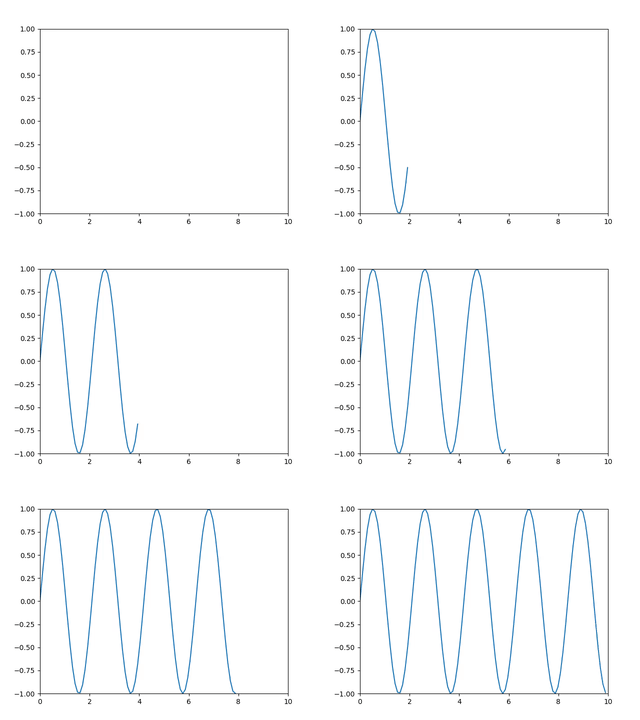
Alternatively, you can put any of arguments in a config file conf, for example:
outdir: frames_dir
frequency: 3
Config files support several syntaxes. Once you have the file, just call
mopi sin_wave.py -c conf
You can use config files and command-line options at the same time, but in case of conflict, the command-line arguments have the precedence.
Unveiling data in an arbitrary file
Now that you have seen that you can control movies via command-line, it is time
to introduce you to the plugin system in motionpicture.
Suppose we have two-column files with time series data, we can modify the movie file used in the previous example to animate those files, specifying which one at run-time.
def mopi_add_custom_options(parser):
    """Add command-line options specific to this movie."""
    parser.add_argument(
        "-f",
        "--file",
        required=True,
        help="File to plot",
    )
Then, we import numpy as np and edit the __init__ function too:
def __init__(self, args):
    self.times, self.values = np.loadtxt(args.file).T
    self.y_min, self.y_max = np.amin(self.value), np.amax(self.value)
We computed the minimum and maximum of the value so that we can adjust the y axis
range. The make_frame method will be the same, with the exception that we change
the plt.ylim([-1, 1]) line to plt.ylim([self.y_min, self.y_max]).
We can save this file as plot_timeseries and call mopi:
mopi -m plot_timeseries -o frames -f my_file.dat
Of course, we can add as many options as we wish to control the output. For instance,
we may want to add a switch to use logarithmic axes instead. The class
MOPIMovie has full access to the user-supplied options, so you can do anything
you wish.
We did not hard-code anything in plot_timeseries, so the code will work for
any dataset. However, if we want to use this file again, but in a different
folder, we would have to copy it over, since mopi -m expects the path of the
movie file. Alternatively, we can copy plot_timeseries to a specific folder
of our choice, for example ~/.mopi_videos. Then, we can set the environment
variable MOPI_MOVIES_DIR to be ~/.mopi_videos, and mopi will be able to
find plot_timeseries from anywhere in your filesystem. In this case, you can
simply call:
mopi plot_timeseries -o frames -f my_other_file.dat
Essentially, plot_timeseries became a plugin for motionpicture and you can
animate any data without having to write new code. This is one of the greatest
strengths of motionpicture, as it encourages you to write generic code that you
can easily reuse.
Installation
motionpicture is available on PyPI. You can install it with pip:
pip3 install motionpicture
To produce the final video, you have to have ffmpeg installed. Without
ffmpeg, you will not be able to glue together the frames, but you can still
use motionpicture to render the frames.
Movie files
In the language of motionpicture, a movie file is a recipe on how to
generate an individual frame. It is completely up to you how you do that, but
motionpicture imposes some minimum requirements:
- It has to be a valid Python 3 file
- It has to contain a class
MOPIMoviewith a methodmake_frameand a methodget_frames. - The method
__init__has to take two arguments. - The method
get_frameshas to return an iterable (e.g., a list) that identifies each frame. The elements of this iterable are passed as theframeargument tomake_frame. - The method
make_framehas to take two arguments, thepathof the output of the frame, andframe, the value that identifies frame (typically the frame number).pathis where the image has to be saved. You are in charge of saving the image using the save method of your plotting package.
Other than these requirements, you can do anything you want in the movie file (e.g., you can add more methods, functions, classes...).
:warning: Due to its own nature,
motionpicturehas to execute any code that you supply. Do not usemotionpicturewith codes you do not trust!
Development
We use:
- Poetry to manage dependencies, build, and publish
motionpicture. - Black for formatting the code (with 89 columns).
- pytest for unit tests (with
pytest-covfor test coverage). - GitHub actions for continuous integration.
We are happy to accept contributions.
Credits
The idea for motionpicture originated from the SimVideo package developed by
Wolfgang Kastaun.


Download files
Download the file for your platform. If you're not sure which to choose, learn more about installing packages.
Source Distribution
Built Distribution
Filter files by name, interpreter, ABI, and platform.
If you're not sure about the file name format, learn more about wheel file names.
Copy a direct link to the current filters
File details
Details for the file motionpicture-0.1.2.tar.gz.
File metadata
- Download URL: motionpicture-0.1.2.tar.gz
- Upload date:
- Size: 27.4 kB
- Tags: Source
- Uploaded using Trusted Publishing? No
- Uploaded via: poetry/1.1.4 CPython/3.9.1 Linux/5.9.12-200.fc33.x86_64
File hashes
| Algorithm | Hash digest | |
|---|---|---|
| SHA256 |
45fd5e25320d2486154320eb96c74796f3cc875f202da56789d611e4530e57cb
|
|
| MD5 |
0b584afd470bf2501f4c198cbe024bd4
|
|
| BLAKE2b-256 |
2ecd484f9adf28fc7b20605f9e7613751a335319413b54b119d846608f8fec98
|
File details
Details for the file motionpicture-0.1.2-py3-none-any.whl.
File metadata
- Download URL: motionpicture-0.1.2-py3-none-any.whl
- Upload date:
- Size: 26.8 kB
- Tags: Python 3
- Uploaded using Trusted Publishing? No
- Uploaded via: poetry/1.1.4 CPython/3.9.1 Linux/5.9.12-200.fc33.x86_64
File hashes
| Algorithm | Hash digest | |
|---|---|---|
| SHA256 |
a8e52e45555f0a4f2ab86e3db00dd52ad39e7b78f2a9d025a8c4d56d6dd8e4ff
|
|
| MD5 |
2e0a8082c2f28b298105114c39927d41
|
|
| BLAKE2b-256 |
dce855a3171efad3179558047b0bf71a3b01089d4e47f1e70ddfa67030be3d3c
|






