







[!Warning]
mov-cli is in an unmaintained state!
This project has been in an unmaintained state for a long while now. I made an announcement on the discord regarding the future of mov-cli a few months ago, now it's time to quote it here on the readme:
... I don't think I'll be maintaining the mov-cli project anymore (including handling issues) going forward, as I'm extremely occupied with life and other work and projects that are more important to me. Mov-cli was actually never really my project, its founder is Poseidon444. The project was later taken by Ananas, then I came in far later into the project.
Anyways, we all began contributing less and less to the project as we used it less and less eventually resulting in the development halting and some leaving the project. Now it's just me and the initial founder of the project left and I really do not have much spare time anymore, and to be completely honest, I also don't have much personal reason to resume with the development of the project in the current way it is.
I do have work in progress plans for a potential reboot of mov-cli but that is at the bottom of my priority list and I'll need a team to maintain many parts of it as I want maintenance to be low. As I cannot promise this, it's better to say I will be stepping away from the project than promise a sequel. This doesn't mean the tool will spontaneously combust. Some plugins should still continue to work.
For now, Goodbye! 👋
~ Goldy
[!Warning]
You may have noticed, development slowing down and halting for a long while. This is because I and the other contributors sadly no longer have the time to take this project to the next level (v4.5).
This isn't the end, v4.4 may still continue to receive bug fixes here and there, but v4.4 is currently on feature freeze, so new features will only be added once v4.5 development begins again. v4.5 is a rewrite.
We are hoping we have the time and motivation to return one day, hopefully with more contributors to help this time.
[!Note] v4 is constantly changing so be sure to keep the tool and your plugins up to date. Also, I would advise not using it as a library yet as the API still has many breaking changes.
What is mov-cli? 💫
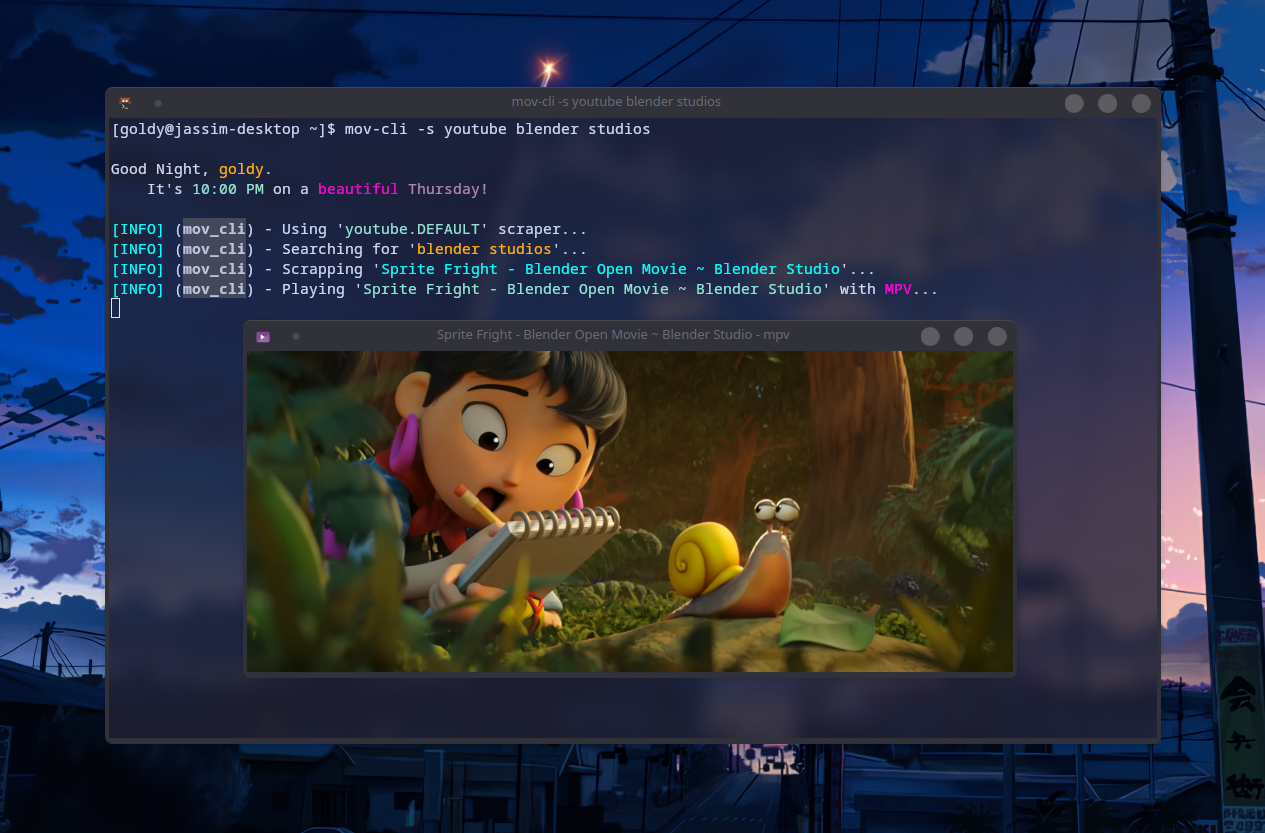
mov-cli is a command line tool with plugin support that streamlines the process of streaming media from the comfort of your terminal; so you can show off to your friends the superiority of the command line. 💪 The tool is sort of a framework that handles metadata, configuration and scraping of the media to be streamed in your media player of choice.
mov-cli is not a piracy tool; in fact, we encourage the opposite through the existence of our plugins mov-cli-files and mov-cli-jellyplex. 🫵 You obtain the media. You pick the plugins.
Installation 🛠️
[!TIP] For in-depth installation instructions hit the wiki.
Prerequisites
- A supported platform:
- Linux
- Windows
- FreeBSD (https://github.com/mov-cli/mov-cli/issues/359)
- Android (via Termux)
- iOS (via iSH Shell)
- MacOS
- python (required, with pip)
- lxml (optional, ⚡ faster scraping)
- fzf (optional but highly recommended)
- mpv (recommended & default media player)
To get running these are all the prerequisites you'll need.
With the prerequisites installed, mov-cli can be installed via the pip command on all platforms with Python version 3.10 or above.
pip install mov-cli -U
Check out the wiki on installation for more in-depth guidance on installing mov-cli.
Usage 🖱️
mov-cli comes packaged with a CLI interface via the mov-cli command you can use in your respective terminal.
[!NOTE] You may notice mov-cli doesn't ship with any scrapers (or previously known as providers) by default, this is because v4 is plugin-based and scrapers are now part of plugins that must be chosen to be installed. Find out how to do so at the wiki.
- Install the plugin of your choice. Visit this wiki page on how to do so and the mov-cli-plugin topic for a list of third-party mov-cli plugins.
pip install mov-cli-youtube
This is just an example. If you are struggling, visit that wiki page.
- Add the plugin to your config.
mov-cli -e
Alternatively, you may also edit by manually opening the config file. See this Wiki page on that.
[mov-cli.plugins]
youtube = "mov-cli-youtube"
Check out the wiki for more in-depth explanation.
- Scrape away!
mov-cli -s youtube blender studio

The command above searches for
blender studiowith our youtube plugin, however once again mov-cli is plugin based and there are many of them in the wild. 😉
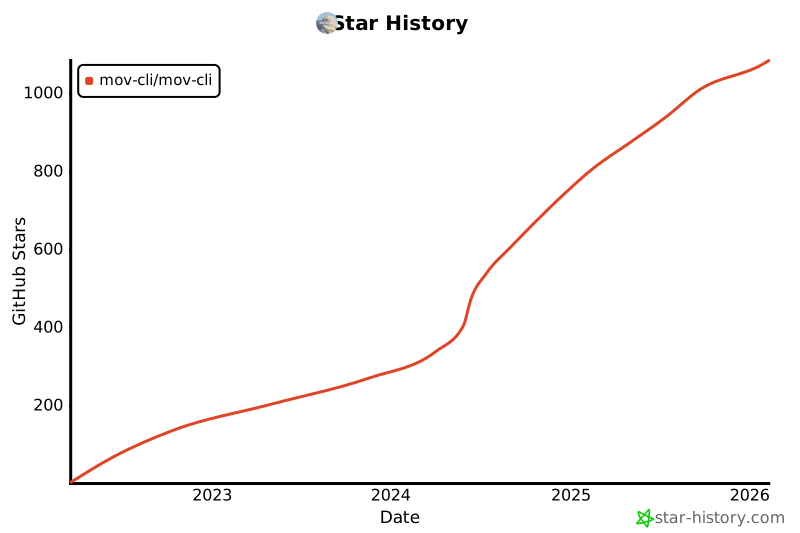
Star Graph ⭐
Contributing ✨
Pull requests are welcome and appreciated. For major changes, please open an issue first to discuss what you would like to change.

Inspiration 🌟
3 maintainers


Metadata
3 maintainers
Release files for mov-cli 4.4.20
For a detailed explanation of source distributions (sdists) and built distributions (wheels), please see the package formats documentation.
Source distribution (sdist)
| File | Size | Uploaded | Provenance | Actions |
|---|---|---|---|---|
| mov_cli-4.4.20.tar.gz | 66.9 kB | Without provenance | Details for mov_cli-4.4.20.tar.gz |
Built distribution (wheel)
| File | Interpreter | ABI | Platform | Actions Reset |
|---|---|---|---|---|
| mov_cli-4.4.20-py3-none-any.whl | Python 3 | none | any | Details for mov_cli-4.4.20-py3-none-any.whl |
Total release size: 141.6 kB
Release files / mov_cli-4.4.20.tar.gz
| Download URL | mov_cli-4.4.20.tar.gz |
|---|---|
| Size | 66.9 kB |
| Tags | Source |
|
SHA-256 checksum How to use checksums |
857d670fb98e768d145cd0b589be954ed03225c08a44fa9d8966490fe096f5a0
|
|
BLAKE2b-256 checksum How to use checksums |
84eb4e78b0bfdb9c2e3d68f8f94546d6902e4345527a52889707b48c037230f8
|
| Upload date | |
|
Uploaded using Trusted Publishing? What is trusted publishing? |
No |
| Uploaded via |
twine/6.1.0 CPython/3.11.11
|
Release files / mov_cli-4.4.20-py3-none-any.whl
| Download URL | mov_cli-4.4.20-py3-none-any.whl |
|---|---|
| Size | 74.7 kB |
| Tags | Python 3 |
|
SHA-256 checksum How to use checksums |
5429fa504112f1c56e549ee21ec5001fc1201cb249e6353c8b84c4de0dbc4eeb
|
|
BLAKE2b-256 checksum How to use checksums |
191e24682644c3beeaa201265d059546b44b0144d14ac64f6f027c13a8360167
|
| Upload date | |
|
Uploaded using Trusted Publishing? What is trusted publishing? |
No |
| Uploaded via |
twine/6.1.0 CPython/3.11.11
|
Security for mov-cli 4.4.20
Provenance
Provenance describes where a file came from. On PyPI, provenance is shared via attestations, which provide a verifiable record of the build or publishing details. View details, limitations and caveats.
No provenance found
None of the files in this release were uploaded with provenance metadata.
A note on package security
PyPI is a repository for distributing packages, not a service for auditing them. While third-party security researchers and our staff do their best to detect and remove malicious packages, PyPI cannot guarantee the quality, security or suitability of any given package.
To learn more about protecting yourself from malicious actors, visit our package security documentation.














