
MovingPandas implements Trajectory classes and corresponding methods for the analysis of movement data based on GeoPandas. Visit movingpandas.org for details.

Project description
MovingPandas












MovingPandas implements a Trajectory class and corresponding methods based on GeoPandas.
Visit movingpandas.org for details!
You can run MovingPandas examples on MyBinder - no installation required: 
To try the cutting-edge dev version, use this MyBinder link.
Documentation
The official documentation is hosted on ReadTheDocs
Examples
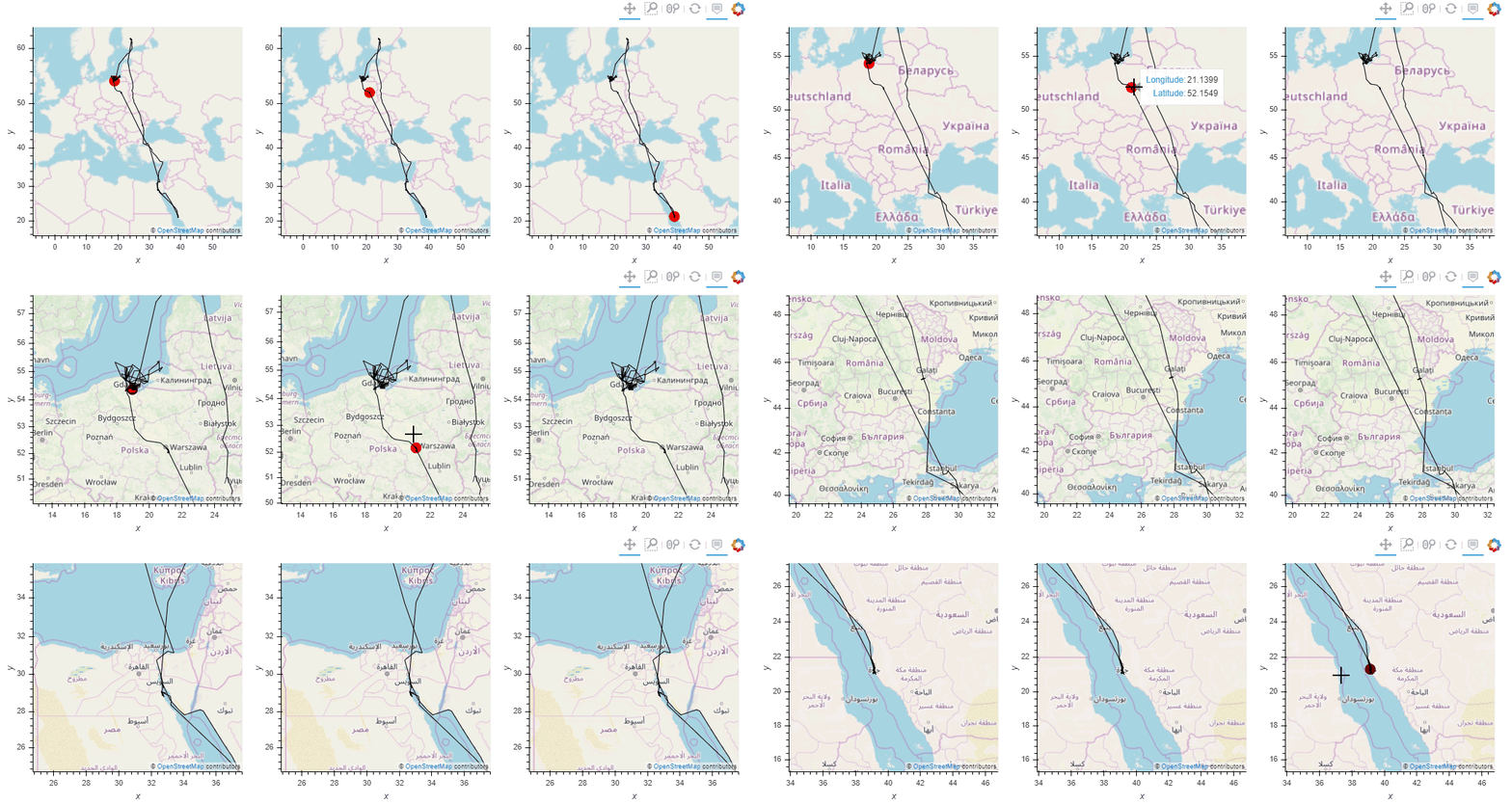
Trajectory plots 
Create interactive trajectory plots, including multiple linked plots with ease
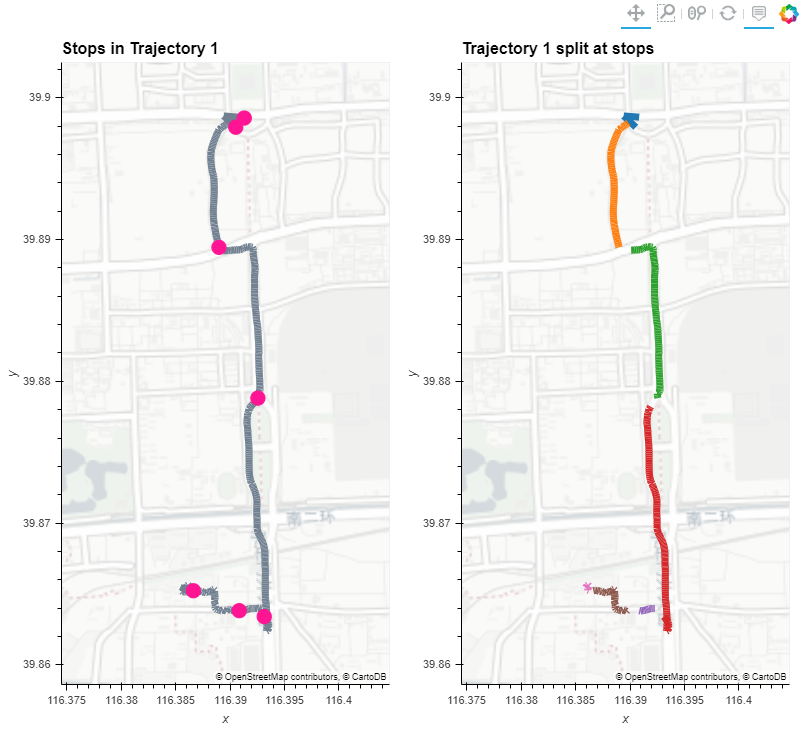
Stop detection
Detect stops in trajectories, extract them as points or segments, and use them to split trajectories
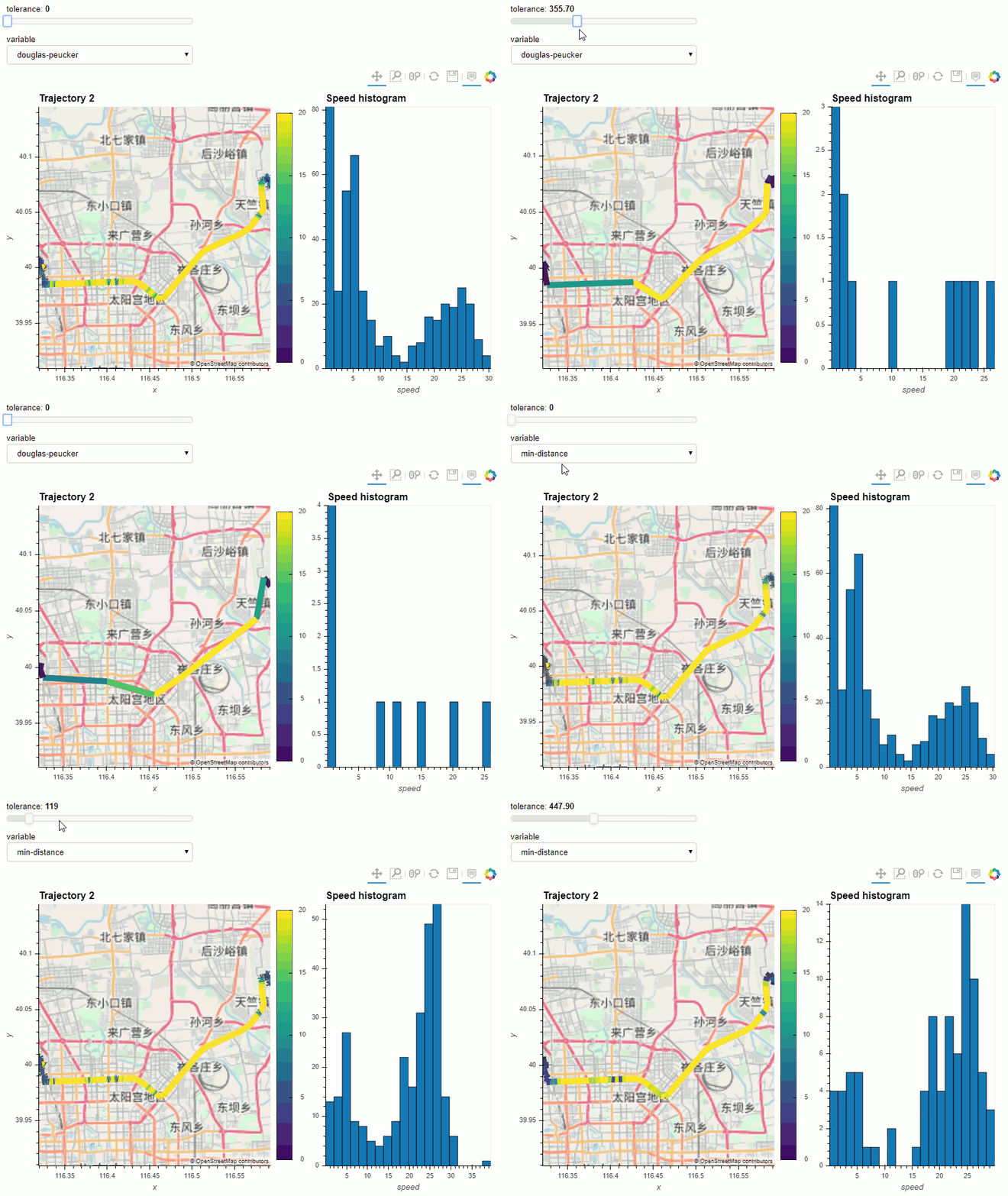
Trajectory generalization
Generalize trajectories using spatial, temporal, and spatiotemporal methods
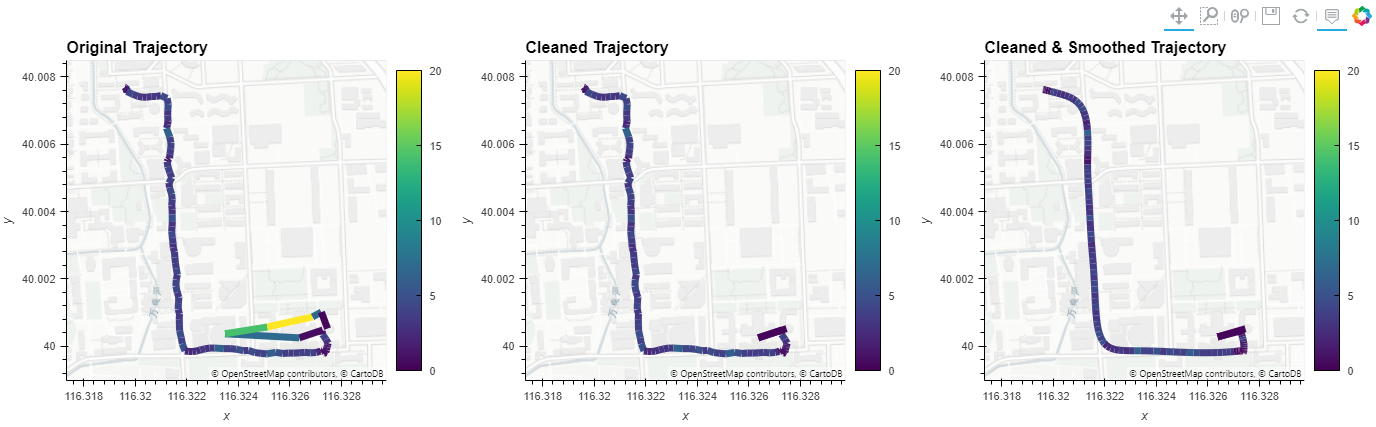
Trajectory cleaning & smoothing
Clean and sooth trajectories by removing outliers and applying Kalman filters
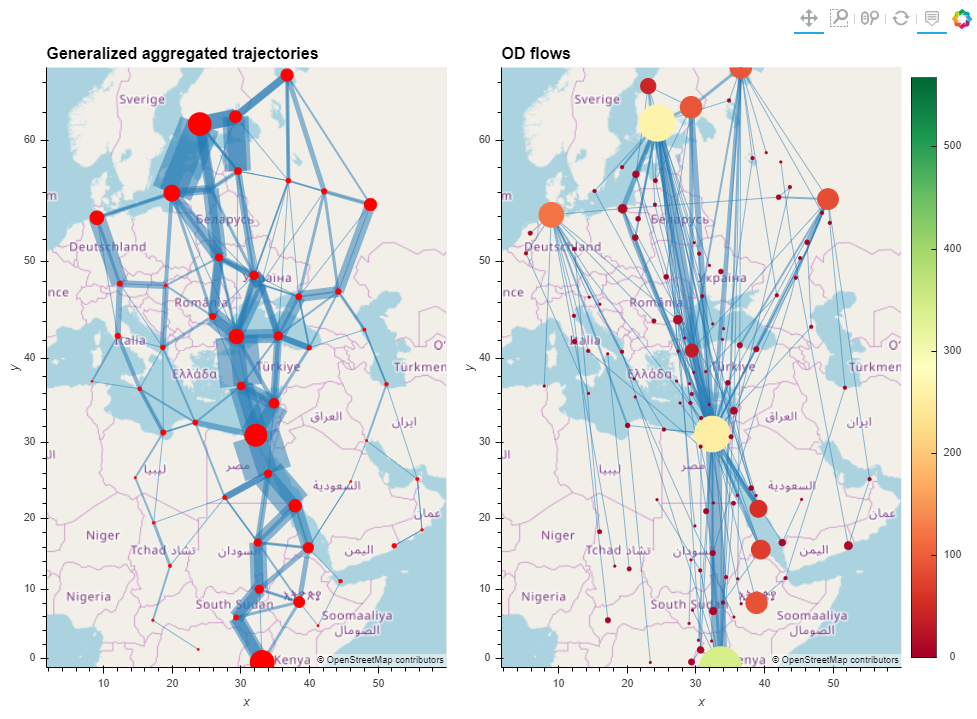
Trajectory aggregation
Aggregate trajectories to explore larger patterns
Installation
MovingPandas for Python >= 3.7 and all it's dependencies are available from conda-forge and can be installed using conda install -c conda-forge movingpandas.
Conda status




Note that it is NOT recommended to install MovingPandas from PyPI! If you're on Windows or Mac, many GeoPandas / MovingPandas dependencies cannot be pip installed (for details see the corresponding notes in the GeoPandas documentation). On Ubuntu, pip install fails on cartopy with "Proj 4.9.0 must be installed".
Development installation
Use the following steps to run the notebooks using the current development version:
Using conda
Linux/Mac:
conda env create -f environment.yml
Windows:
conda config --add channels conda-forge
conda config --add channels defaults
conda config --set channel_priority strict
conda env create -f environment.yml
On Windows, because conda-forge relies on some package built with defaults blas (like scipy) one must use the defaults channel on top of conda-forge and activate conda's new strict channel feature. Source: https://github.com/conda-forge/gdal-feedstock/issues/269#issuecomment-473661530
Using Anaconda
- Install Anaconda
- Clone the movingpandas repository
- In Anaconda Navigator | Environments | Import select the movingpandas environment.yml from the cloned directory:
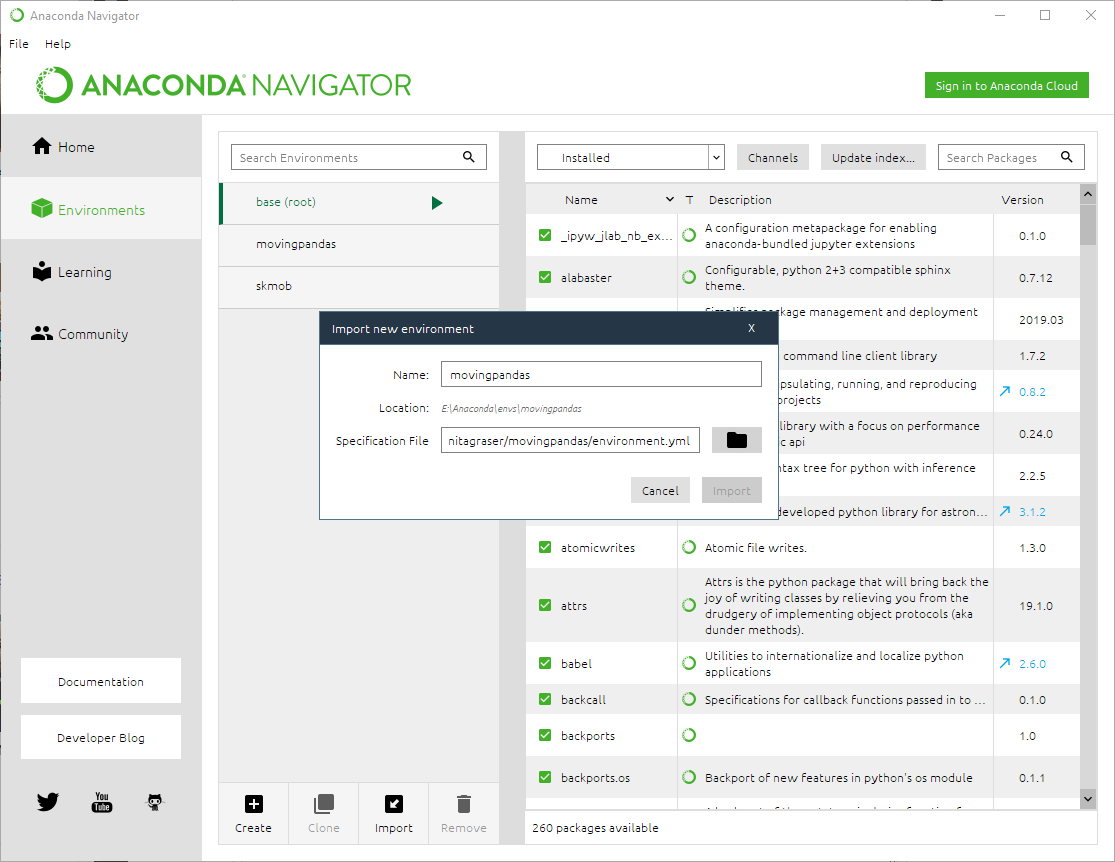
- Wait until the environment is ready, then change to the Home tab and install Jupyter notebooks into the movingpandas environment
- Launch Jupyter notebooks and navigate to the
movingpandas/tutorialsdirectory to execute them - Now you can run the notebooks, experiment with the code and adjust it to your own data
Known issues:
- On Windows, importing rasterio can lead to DLL errors. If this happens, downgrade the rasterio version to 1.0.13.
Develop mode
To install MovingPandas in "develop" or "editable" mode you may use:
python setup.py develop
Contributing to MovingPandas 
All contributions, bug reports, bug fixes, documentation improvements, enhancements and ideas are welcome.
A detailed overview on how to contribute can be found in the contributing guide on GitHub.
Related Python packages
For a more comprehensive list, including non-Python solutions, check https://github.com/anitagraser/movement-analysis-tools
scikit-mobility is a similar package which also deals with movement data. It implements TrajectoryDataFrames and FlowDataFrames on top of Pandas instead of GeoPandas. There is little overlap in the covered use cases and implemented functionality (comparing MovingPandas tutorials and scikit-mobility tutorials). MovingPandas focuses on spatio-temporal data exploration with corresponding functions for data manipulation and analysis. scikit-mobility on the other hand focuses on computing human mobility metrics, generating synthetic trajectories and assessing privacy risks. Plotting is based on Folium.
Traja extends the capabilitis of Pandas DataFrames specific for animal trajectory analysis in 2D. Plots (static) are based on seaborn.
PyMove provides functionality similar to MovingPandas. It implements PandasMoveDataFrames and DaskMoveDataFrame on top of Pandas and Dask DataFrames. Plotting is based on Folium.
Tracktable is a related Python package with its core data structures and algorithms implemented in C++, i.e. it is not based on Pandas. Plotting is based on Cartopy (for still images) and Folium (for interactive rendering).
Citation information
Please cite [0] and [1] when using MovingPandas in your research and reference the appropriate release version. All releases of MovingPandas are listed on Zenodo where you will find citation information, including DOIs.
Publications
About MovingPandas
[2] Graser, A. (2021). Exploratory Movement Data Analysis. GeoPython 2021. – 🎬 video
Scientific publications using MovingPandas
- Graser, A. & Dragaschnig, M. (2020). Open Geospatial Tools for Movement Data Exploration. KN ‒ Journal of Cartography and Geographic Information, 70(1), 3-10. doi:10.1007/s42489-020-00039-y. - "For example, Fig. 4 shows how MovingPandas can be used to split a trajectory into subtrajectories and plot the results."
- Kirkland, L. A., de Waal, A., & de Villiers, J. P. (2020). Evaluation of a Pure-Strategy Stackelberg Game for Wildlife Security in a Geospatial Framework. In Southern African Conference for Artificial Intelligence Research (pp. 101-118). Springer, Cham. - "The movingpandas Python library [12] is utilised to store trajectories which can be easily analysed and plotted after the simulation."
- Depellegrin, D., Bastianini, M., Fadini, A., & Menegon, S. (2020). The effects of COVID-19 induced lockdown measures on maritime settings of a coastal region. Science of the Total Environment, 740, 140123. - "We combined the Python libraries scikit-Mobility (Pappalardo et al., 2019) and MovingPandas (Graser, 2019) to pre-process position data received from the AAOT and to reconstruct and represent the vessel trajectory in the lockdown assessment period."
- Graser, A. (2021). An exploratory data analysis protocol for identifying problems in continuous movement data. Journal of Location Based Services. doi:10.1080/17489725.2021.1900612. - MovingPandas is used to plot individual trajectories colored by movement speeed.
- Mehri, S., Alesheikh, A. A., & Basiri, A. (2021). A Contextual Hybrid Model for Vessel Movement Prediction. IEEE Access, 9, 45600-45613. - "AIS messages are converted into trajectories by a Python library named, MovingPandas"
- Soularidis, A., & Kotis, K. (2022). Semantic Modeling and Reconstruction of Drones’ Trajectories. In European Semantic Web Conference (pp. 158-162). Springer, Cham. - "The goal of this paper is to present our position related to the semantic trajectories of swarms of drones, towards proposing methods for extending MovingPandas, a widely used open-source trajectory analytics and visualization tool."
- Elayam, M. M., Ray, C., & Claramunt, C. (2022). A hierarchical graph-based model for mobility data representation and analysis. Data & Knowledge Engineering, 102054. - "The implementation combines several open source tools such as Python, MovingPandas library, Uber H3 index, Neo4j graph database management system ..."
Teaching materials referencing MovingPandas
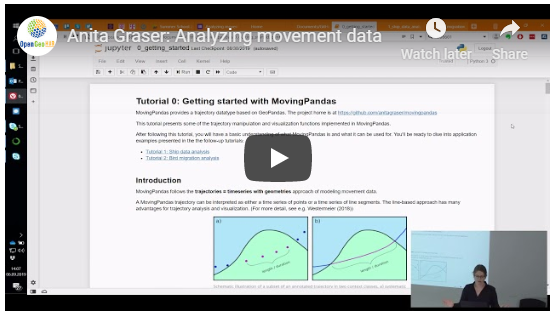
Workshop videos
Release history Release notifications | RSS feed


Download files
Download the file for your platform. If you're not sure which to choose, learn more about installing packages.
Source Distribution
Built Distribution
Filter files by name, interpreter, ABI, and platform.
If you're not sure about the file name format, learn more about wheel file names.
Copy a direct link to the current filters
File details
Details for the file movingpandas-0.12rc1.tar.gz.
File metadata
- Download URL: movingpandas-0.12rc1.tar.gz
- Upload date:
- Size: 56.4 kB
- Tags: Source
- Uploaded using Trusted Publishing? No
- Uploaded via: twine/4.0.1 CPython/3.9.15
File hashes
| Algorithm | Hash digest | |
|---|---|---|
| SHA256 |
c1b0b087010ca21c3a1af3fbdc379d72a9094ee94d2ee179a286b5d2f2190bf2
|
|
| MD5 |
24f91d6c26ab8937dbff80ac918b8158
|
|
| BLAKE2b-256 |
3c630701db3dda2d914860a891856aaafc7673c0b03d492738e5d5bb934f5578
|
File details
Details for the file movingpandas-0.12rc1-py3-none-any.whl.
File metadata
- Download URL: movingpandas-0.12rc1-py3-none-any.whl
- Upload date:
- Size: 64.7 kB
- Tags: Python 3
- Uploaded using Trusted Publishing? No
- Uploaded via: twine/4.0.1 CPython/3.9.15
File hashes
| Algorithm | Hash digest | |
|---|---|---|
| SHA256 |
738ef17307a52a6862fb9200d1aadf3fa1b8475fe964a0074073647ad5bfb1ae
|
|
| MD5 |
eacde3e4e966d11c0a66943dc920f4fc
|
|
| BLAKE2b-256 |
28818e90d2bba2a3f809b378da61e10b4ed8b142c92b9832fdc9eb1eb4ec616b
|






