
Mediapipe to Signal
module for processing mediapipe's holistic model for sign languages.
The module allows extracting pure movement features by:
- It provides pose normalization in 3D space using body proportions
- It rotates the pose toward the camera
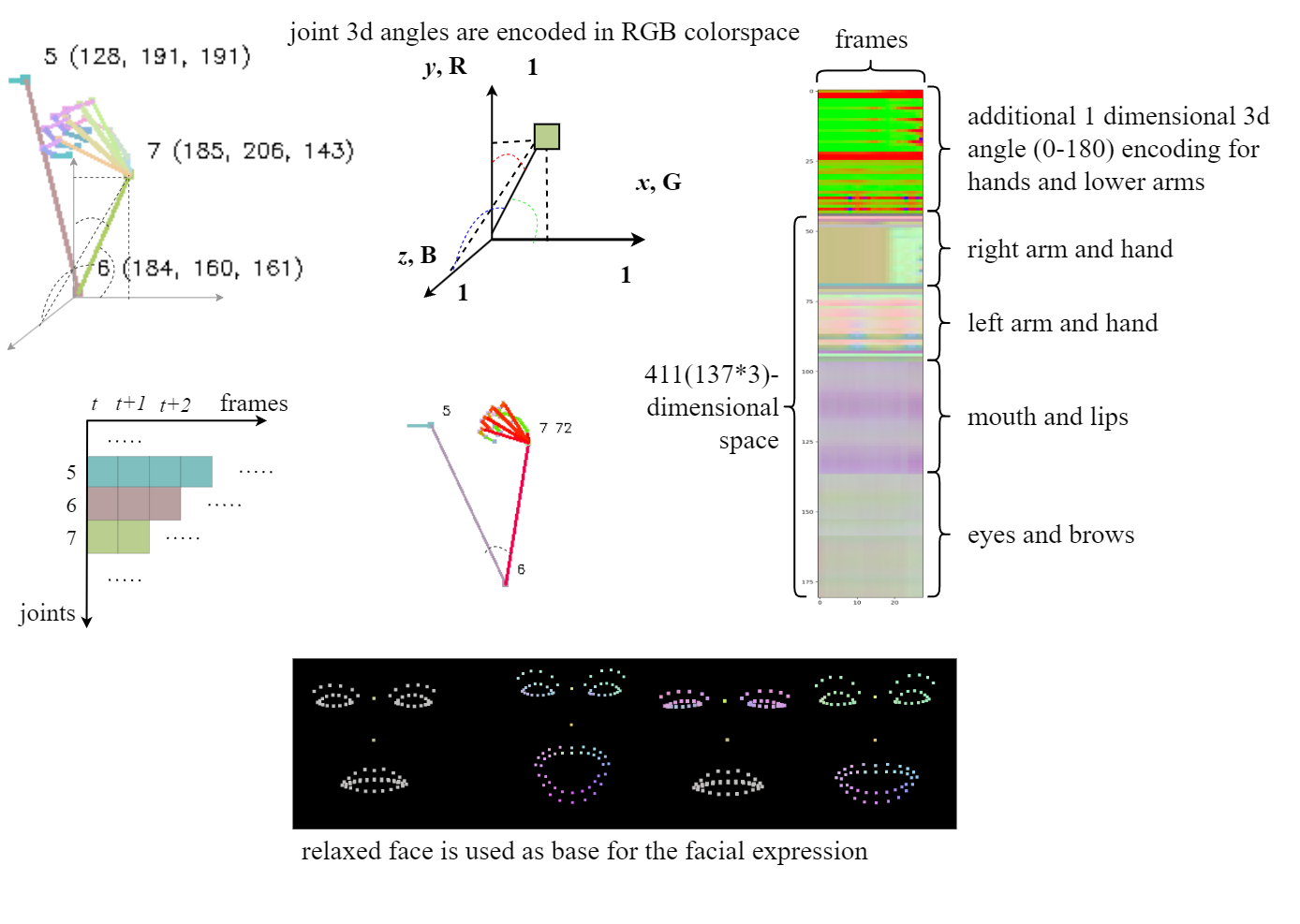
- Sign movement is presented in a series of signals (directional cosine angles per each joint)
- Sign movement is easily stored, modified, processed, and generated
- Sign movement can be processed as a signal or as an image
- It has a "human-readable" representation for quick analysis and intuition.
- Simplified data representation speeds up processing and reduces storage.
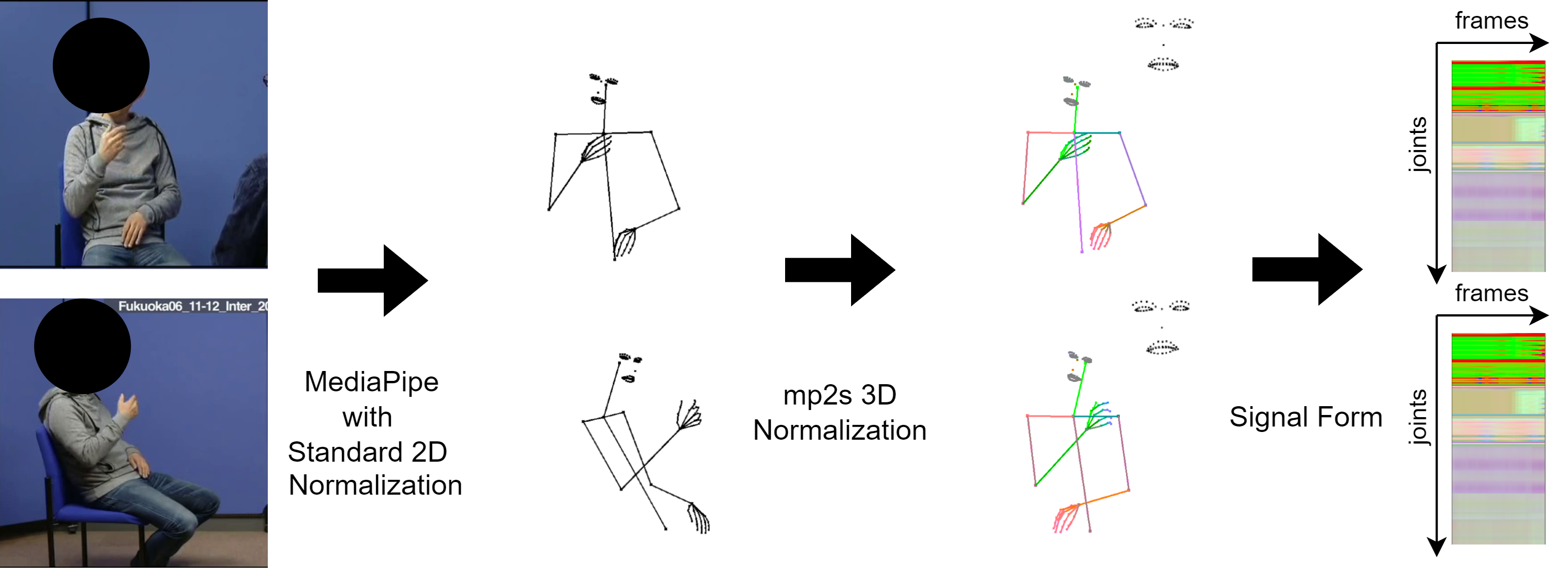
Converting videos to a series of signals that are easy to read, store, and generate:
Install
pip install mp2signal
Usage
importing the module:
import mp2signal.mp2s as mp2s
Using MediaPipe we process the video and save the normalized signal:
m = mp2s.Movement('path_to_your_signlanguage_video.mp4')
The joint signals can be plotted:
import matplotlib.pyplot as plt

human_redable_posegram = m.posegram(human=True)
print(human_redable_posegram.dtype, human_redable_posegram.shape)
plt.imshow(human_redable_posegram)
plt.show()
for processing, a two-dimensional version is available in uint8 and float:
machine_uint8_posegram = m.posegram(human=False,signal=False)
print(machine_uint8_posegram.dtype, machine_uint8_posegram.shape)
plt.imshow(machine_uint8_posegram,cmap='brg')
plt.show()

machine_float_posegram = m.posegram(human=False,signal=True)
print(machine_float_posegram.dtype, machine_float_posegram.shape)
plt.imshow(machine_float_posegram,cmap='brg')
plt.show()
Storing or Generating Movement Data
Sign Language movement is easy to store and generate in the signal form.
Movement() can be initialized with the stored or generated sample:
import numpy as np
np.save('mov_human.npy',human_redable_posegram)
np.save('mov_uin8.npy',machine_uint8_posegram)
np.save('mov_float.npy',machine_float_posegram)

human_redable = np.load('mov_human.npy')
machine_uint8 = np.load('mov_uin8.npy')
machine_float = np.load('mov_float.npy')

hum_restore = mp2s.Movement(human_redable)
hum_rest_gram = hum_restore.posegram(human=True)
print(hum_rest_gram.dtype)
plt.imshow(hum_rest_gram,cmap='brg')
plt.show()

uin8_restore = mp2s.Movement(machine_uint8)
uin8_rest_gram = uin8_restore.posegram(human=False,signal=False)
print(uin8_rest_gram.dtype)
plt.imshow(uin8_rest_gram,cmap='brg')
plt.show()

float_restore_float = mp2s.Movement(machine_float)
float_rest_gram = float_restore_float.posegram(human=False,signal=True)
print(float_rest_gram.dtype)
plt.imshow(float_rest_gram,cmap='brg')
plt.show()
Signals to Video
You can generate a video with your stored/generated movement signals:
video_out = uin8_restore.make_a_video('video_from_signal.mp4')
Usage with Camera
This script takes input from the web camera and shows rotated and normalized skeleton:
python examples/mp_live_rot_demo.py
1 maintainer

Metadata
1 maintainer
Release files for mp2signal 0.0.2
For a detailed explanation of source distributions (sdists) and built distributions (wheels), please see the package formats documentation.
Source distribution (sdist)
| File | Size | Uploaded | |
|---|---|---|---|
| mp2signal-0.0.2.tar.gz | 920.3 kB | Details |
Built distribution (wheel)
| File | Interpreter | ABI | Platform | Reset |
|---|---|---|---|---|
| mp2signal-0.0.2-py3-none-any.whl | Python 3 | none | any | Details |
Total release size: 968.1 kB
Release files / mp2signal-0.0.2.tar.gz
| Download URL | mp2signal-0.0.2.tar.gz |
|---|---|
| Size | 920.3 kB |
| Tags | Source |
|
SHA-256 checksum How to use checksums |
a6141e712ae901afea6501e1c0ff9c8f3f4cc6195c0aab02a712d17cd9851f62
|
|
BLAKE2b-256 checksum How to use checksums |
f024d321cd51d1f326616daf121590a9b67c402a19077e5d2e1c0a81a37bcfcb
|
| Upload date | |
|
Uploaded using Trusted Publishing? What is trusted publishing? |
No |
| Uploaded via |
twine/4.0.2 CPython/3.11.5
|
Release files / mp2signal-0.0.2-py3-none-any.whl
| Download URL | mp2signal-0.0.2-py3-none-any.whl |
|---|---|
| Size | 47.8 kB |
| Tags | Python 3 |
|
SHA-256 checksum How to use checksums |
60b03e76e475edde09ff850f4b52e031fa3490d7864268786a63c0dfcf5b431c
|
|
BLAKE2b-256 checksum How to use checksums |
433b785ac1a40fc979a656e351d69e92f3468c0dcca016b2d932055cc71e0fd3
|
| Upload date | |
|
Uploaded using Trusted Publishing? What is trusted publishing? |
No |
| Uploaded via |
twine/4.0.2 CPython/3.11.5
|














