
MP4 Analyzer




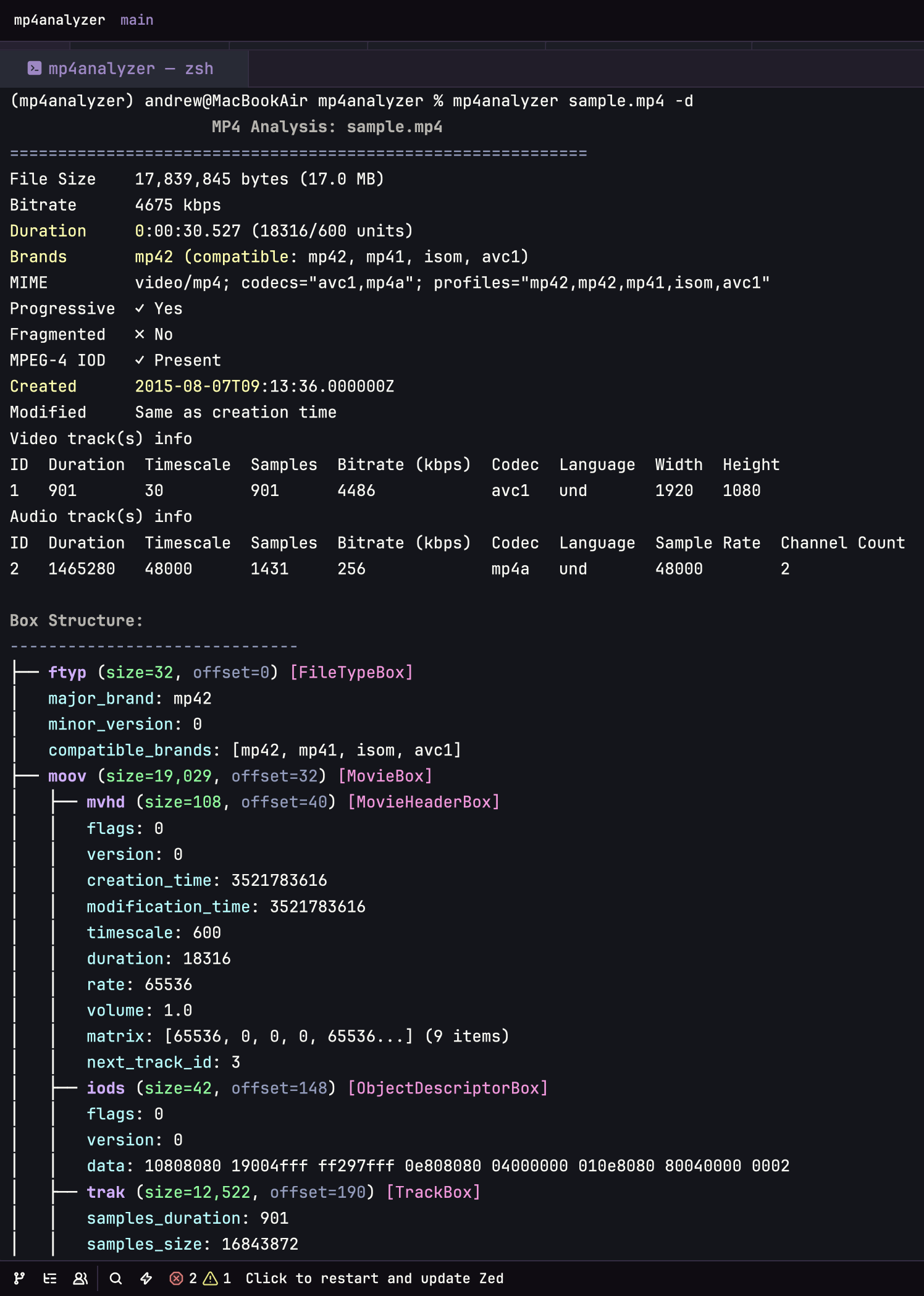
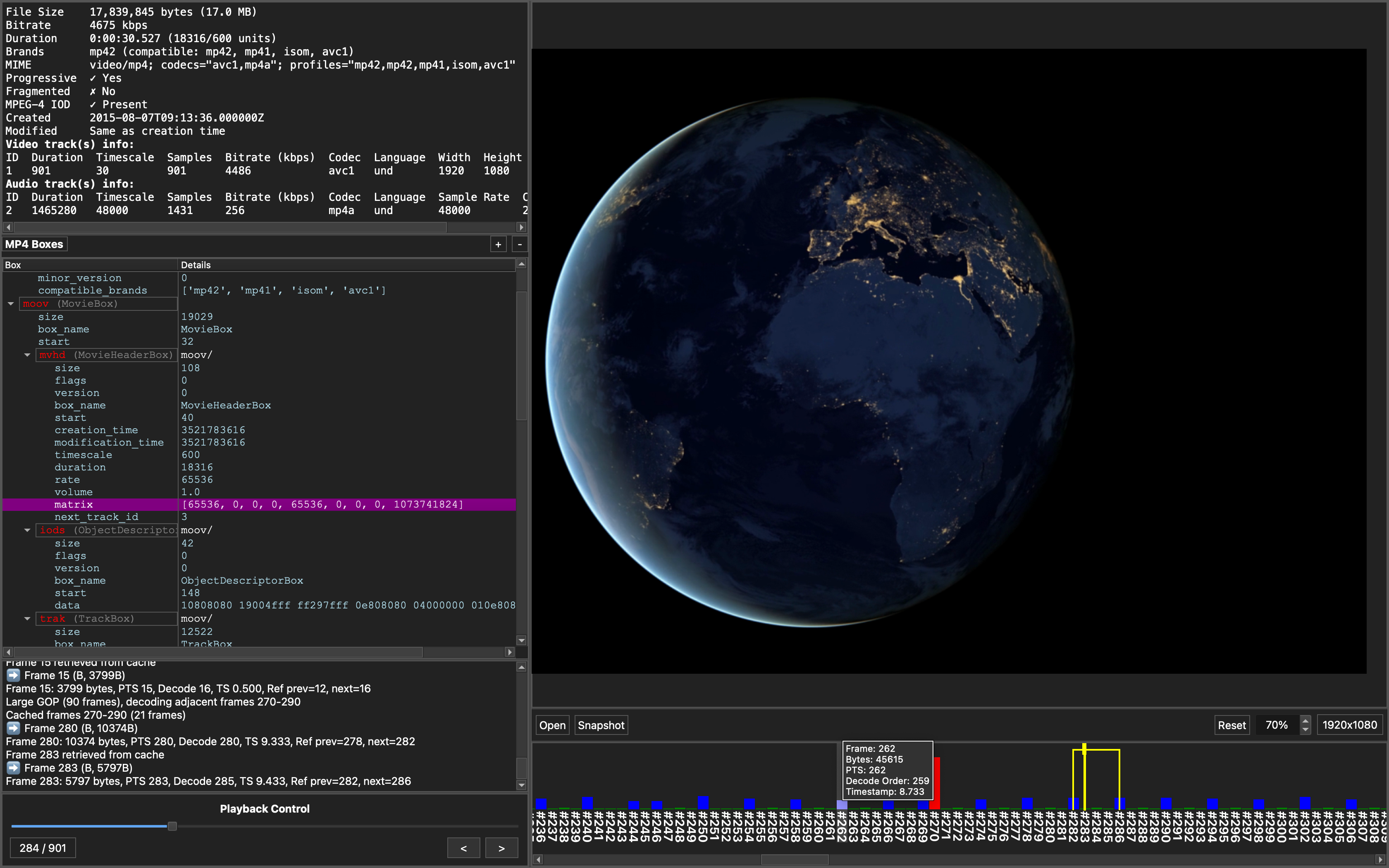
Tool for analyzing MP4 files, providing both command-line box parsing and GUI-based frame-level analysis.
| CLI | GUI |
|---|---|
 |
 |
Features
CLI Tool
- Parse and display MP4 box structure
- Extract metadata and technical information (e.g. duration, bitrate, codec info, track details)
- Supports output to JSON. No external dependencies needed
GUI Application
- Frame-by-frame video analysis with timeline visualization
- Per-frame details: type (I/P/B), byte size, timestamp, and decode vs presentation order
- Requires FFmpeg for video decoding
Installation and Usage
CLI Tool
pip install mp4analyzer
CLI Help
usage: mp4analyzer [-h] [-o {stdout,json}] [-d] [-s] [-e] [-c | --no-color] [-j JSON_PATH] file

Analyze MP4 files and display metadata information

positional arguments:
  file                  MP4 file to analyze

options:
  -h, --help            show this help message and exit
  -o {stdout,json}, --output {stdout,json}
                        Output format (default: stdout)
  -d, --detailed        Show detailed box properties and internal fields
  -s, --summary         Show concise summary instead of full analysis
  -e, --expand          Expand all arrays and large data structures
  -c, --color           Enable colored output (default: True)
      --no-color        Disable colored output
  -j JSON_PATH, --json-path JSON_PATH
                        Path to save JSON output. If specified, JSON will be saved even if
                        output format is not json.

Examples:
  mp4analyzer video.mp4                    # Basic analysis with color
  mp4analyzer -d video.mp4                 # Detailed view with box properties
  mp4analyzer -s video.mp4                 # Quick summary
  mp4analyzer -e -d video.mp4              # Expand arrays/matrices in details
  mp4analyzer --no-color video.mp4         # Disable ANSI colors
  mp4analyzer -o json video.mp4            # JSON to stdout
  mp4analyzer -j output.json video.mp4     # Save JSON to file (in addition to stdout)
GUI Application
Download and run the executable from GitHub Releases. The application will not run without FFmpeg. Works best with files < 100 MB.
Supported Box Types
ISO Base Media (MP4)
ac4, av01, av1C, avc1, avcC, btrt, colr, ctts, dac4, dinf, dref, edts, elst, esds, free, ftyp, hdlr,
hev1, hvcC, iods, mdat, mdhd, mdia, mehd, meta, mfhd, mfra, mfro, minf, moof, moov, mp4a, mvex, mvhd,
pasp, sbgp, sdtp, sgpd, smhd, stbl, stco, stsc, stsd, stss, stsz, stts, tfdt, tfhd, tfra, tkhd, traf,
trak, tref, trex, trun, udta, url , vmhd
QuickTime Extensions
chpl, gmhd, gmin, text (gmhd), ilst, data, text (sample entry), fiel
TODO
Add more boxes (e.g., VP9 codec, fragmented MP4, etc.)
Development
# Setup
uv sync --extra dev

# Run tests
uv run pytest

# Build CLI package
uv build

# Build GUI app
uv run python build_exe.py

# Create large .mp4 test file
ffmpeg -f lavfi -i "testsrc2=duration=1800:size=1920x1080:rate=30" -c:v libx264 -fs 1000M test_1000mb.mp4
Built With

1 maintainer

Metadata
1 maintainer
Release files for mp4analyzer 1.1.6
For a detailed explanation of source distributions (sdists) and built distributions (wheels), please see the package formats documentation.
Source distribution (sdist)
| File | Size | Uploaded | Provenance | Actions |
|---|---|---|---|---|
| mp4analyzer-1.1.6.tar.gz | 1.9 MB | Without provenance | Details for mp4analyzer-1.1.6.tar.gz |
Built distribution (wheel)
| File | Interpreter | ABI | Platform | Actions Reset |
|---|---|---|---|---|
| mp4analyzer-1.1.6-py3-none-any.whl | Python 3 | none | any | Details for mp4analyzer-1.1.6-py3-none-any.whl |
Total release size: 2.0 MB
Release files / mp4analyzer-1.1.6.tar.gz
| Download URL | mp4analyzer-1.1.6.tar.gz |
|---|---|
| Size | 1.9 MB |
| Tags | Source |
|
SHA-256 checksum How to use checksums |
c9664cd04449d3a9bce0fe190d410e2cf1802f9862fe5129d590ffff027441ba
|
|
BLAKE2b-256 checksum How to use checksums |
6e8d8bae49cf12f1498d2b2788b3cf1edf4c93a565fdaae1ae38d139380e6c3b
|
| Upload date | |
|
Uploaded using Trusted Publishing? What is trusted publishing? |
No |
| Uploaded via |
twine/6.1.0 CPython/3.12.9
|
Release files / mp4analyzer-1.1.6-py3-none-any.whl
| Download URL | mp4analyzer-1.1.6-py3-none-any.whl |
|---|---|
| Size | 67.8 kB |
| Tags | Python 3 |
|
SHA-256 checksum How to use checksums |
e4ebc698550b81151f4b5d5f593f1955e4899d4554322864b9661ce9e6166607
|
|
BLAKE2b-256 checksum How to use checksums |
aa61fe52b25b3ed4cc967825344069fc1f121b2e9ee0f1485d740ad994832978
|
| Upload date | |
|
Uploaded using Trusted Publishing? What is trusted publishing? |
No |
| Uploaded via |
twine/6.1.0 CPython/3.12.9
|
Security for mp4analyzer 1.1.6
Provenance
Provenance describes where a file came from. On PyPI, provenance is shared via attestations, which provide a verifiable record of the build or publishing details. View details, limitations and caveats.
No provenance found
None of the files in this release were uploaded with provenance metadata.
A note on package security
PyPI is a repository for distributing packages, not a service for auditing them. While third-party security researchers and our staff do their best to detect and remove malicious packages, PyPI cannot guarantee the quality, security or suitability of any given package.
To learn more about protecting yourself from malicious actors, visit our package security documentation.














