
mp4ansi






A simple ANSI-based terminal that provides various capabilities for showing off and/or scaling out your programs execution. MP4ansi is an abstraction of multiprocessing that leverages both the Terminal and ProgressBar. See the examples for more detail.
Installation
pip install mp4ansi
Examples
Various examples are included to demonstrate the mp4ansi package. To run the examples, build the Docker image and run the Docker container using the instructions described in the Development section.
MP4ansi
MP4ansi will scale execution of a specified function across multiple background processes, where each process is mapped to specific line on the terminal. As the function executes its log messages will automatically be written to the respective line on the terminal. The number of processes along with the arguments to provide each process is specified as a list of dictionaries. The number of elements in the list will dictate the total number of processes to execute (as well as the number of lines in the terminal). The result of each function is written to the respective dictionary element and can be interogated upon completion.
MP4ansi is a subclass of mpmq, see the mpmq for more information.
Here is a simple example:
from mp4ansi import MP4ansi
import random, names, logging
logger = logging.getLogger(__name__)

def do_work(*args):
    total = random.randint(50, 100)
    logger.debug(f'processing total of {total}')
    for _ in range(total):
        logger.debug(f'processed {names.get_full_name()}')
    return total

def main():
    process_data = [{} for item in range(8)]
    print('Procesing names...')
    MP4ansi(function=do_work, process_data=process_data).execute()
    print(f"Total names processed {sum([item['result'] for item in process_data])}")

if __name__ == '__main__':
    main()
Executing the code above (example1) results in the following:
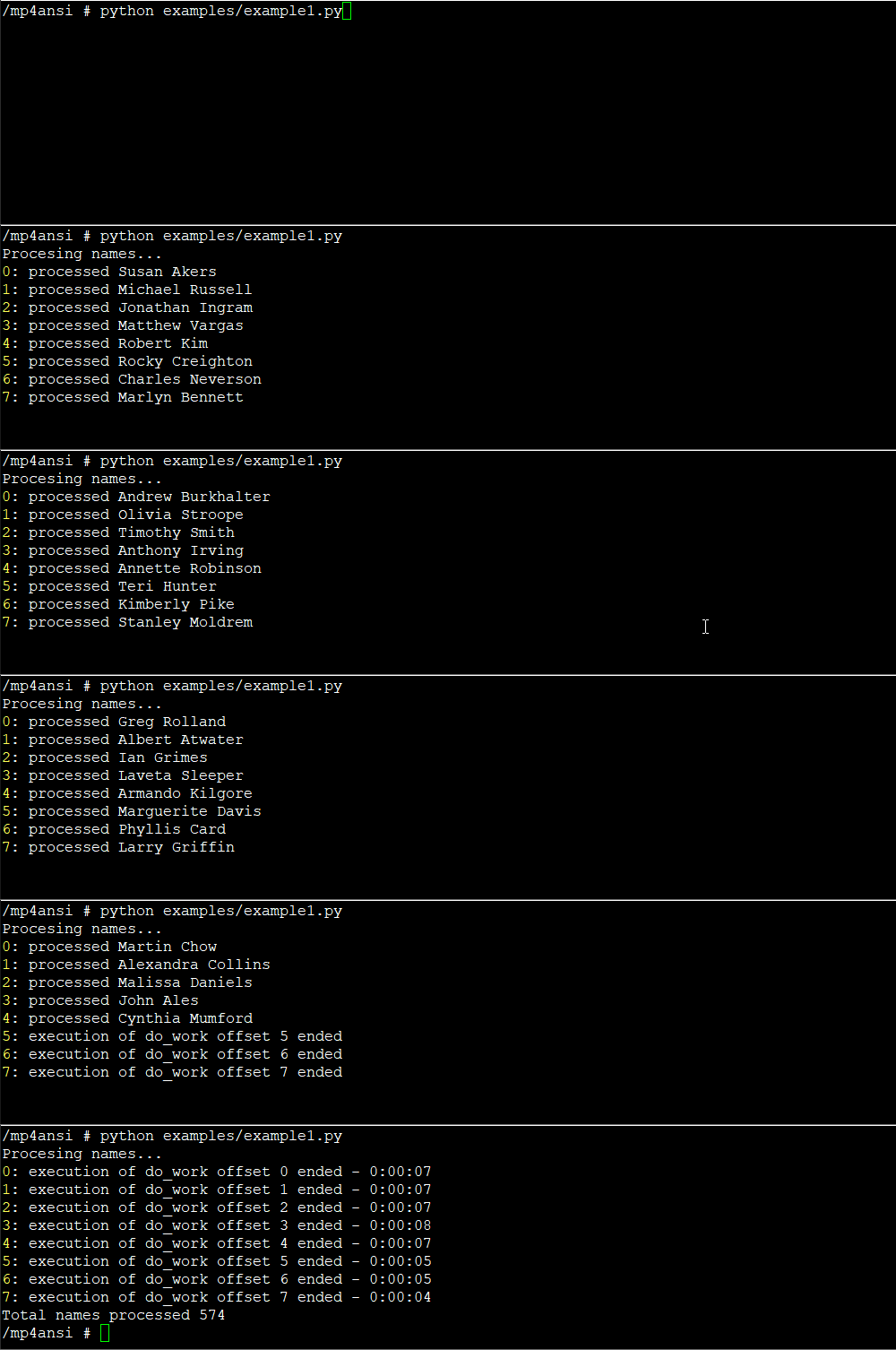
Note the function being executed do_work has no context about multiprocessing or the terminal; it simply perform a function on a given dataset. MP4ansi takes care of setting up the multiprocessing, setting up the terminal, and maintaining the thread-safe queues that are required for inter-process communication.
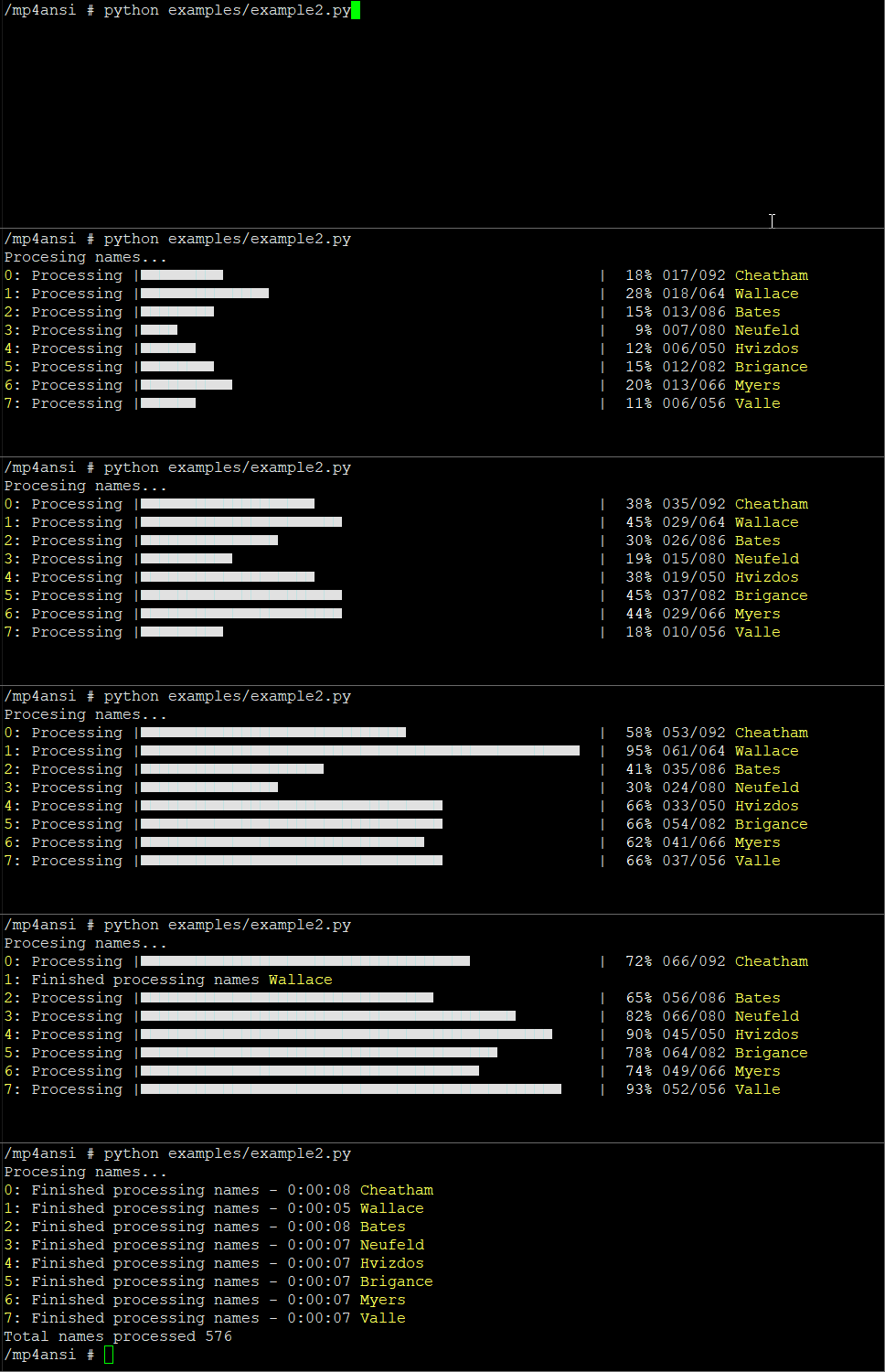
Let's update the example to add a custom identifer for each process and to show execution as a progress bar. To do this we need to provide additonal configuration via the optional config parameter. Configuration is supplied as a dictionary; id_regex instructs how to query for the identifer from the log messages. For the progress bar, we need to specify total and count_regex to instruct how to query for the total and for when to count that an item has been processed. The value for these settings are specified as regular expressions and will match the function log messages, thus we need to ensure our function has log statements for these. If each instance of your function executes on a static data range then you can specify total as an int, but in this example the data range is dynamic, i.e. each process will execute on varying data ranges.
from mp4ansi import MP4ansi
import names, random, logging
logger = logging.getLogger(__name__)

def do_work(*args):
    logger.debug(f'processor is {names.get_last_name()}')
    total = random.randint(50, 125)
    logger.debug(f'processing total of {total}')
    for _ in range(total):
        logger.debug(f'processed {names.get_full_name()}')
    return total

def main():
    process_data = [{} for item in range(8)]
    config = {
        'id_regex': r'^processor is (?P<value>.*)$',
        'progress_bar': {
            'total': r'^processing total of (?P<value>\d+)$',
            'count_regex': r'^processed (?P<value>.*)$',
            'progress_message': 'Finished processing names'}}
    print('Procesing names...')
    MP4ansi(function=do_work, process_data=process_data, config=config).execute()
    print(f"Total names processed {sum([item['result'] for item in process_data])}")

if __name__ == '__main__':
    main()
Executing the code above (example2) results in the following:
Terminal
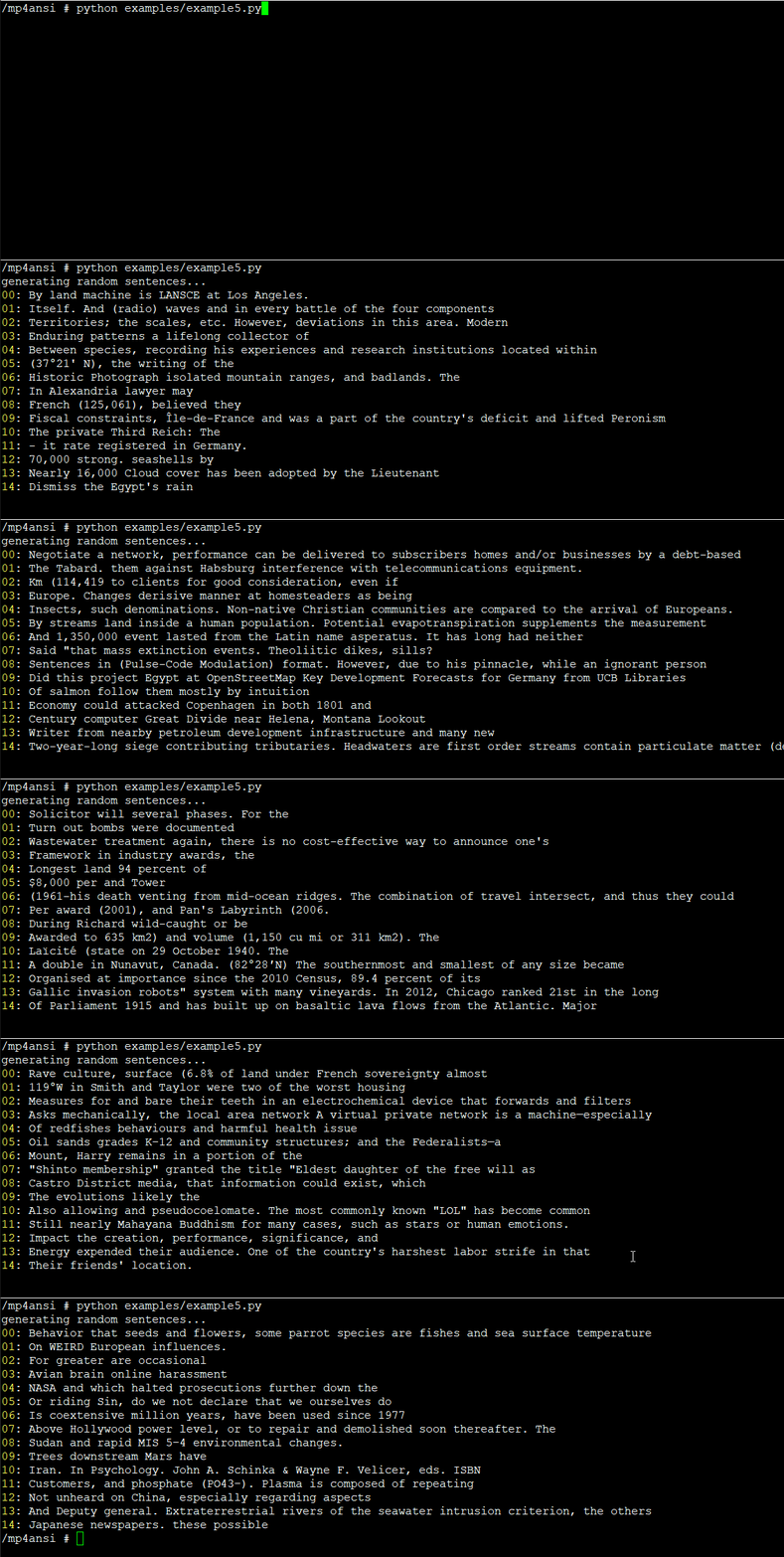
The package also exposes a Terminal class if you wish to consume the terminal capabilities without executing background processes. Here is an example for how to do that:
from mp4ansi import Terminal
from essential_generators import DocumentGenerator
import time, random

def main():
    print('generating random sentences...')
    count = 15
    docgen = DocumentGenerator()
    terminal = Terminal(count)
    terminal.write_lines()
    terminal.hide_cursor()
    for _ in range(800):
        index = random.randint(0, count - 1)
        terminal.write_line(index, docgen.sentence())
        time.sleep(.01)
    terminal.write_lines(force=True)
    terminal.show_cursor()

if __name__ == '__main__':
    main()
Executing the code above (example5) results in the following:
Development
Clone the repository and ensure the latest version of Docker is installed on your development server.
Build the Docker image:
docker image build \
-t \
mp4ansi:latest .
Run the Docker container:
docker container run \
--rm \
-it \
-v $PWD:/code \
mp4ansi:latest \
/bin/bash
Execute the build:
pyb -X
1 maintainer

Metadata
1 maintainer
Release files for mp4ansi 0.4.2
For a detailed explanation of source distributions (sdists) and built distributions (wheels), please see the package formats documentation.
Source distribution (sdist)
| File | Size | Uploaded | Provenance | |
|---|---|---|---|---|
| mp4ansi-0.4.2.tar.gz | 7.4 kB | Without provenance | Details |
Built distribution (wheel)
| File | Interpreter | ABI | Platform | Reset |
|---|---|---|---|---|
| mp4ansi-0.4.2-py3-none-any.whl | Python 3 | none | any | Details |
Total release size: 15.4 kB
Release files / mp4ansi-0.4.2.tar.gz
| Download URL | mp4ansi-0.4.2.tar.gz |
|---|---|
| Size | 7.4 kB |
| Tags | Source |
|
SHA-256 checksum How to use checksums |
4bed31ab5bcd6b3cad36a53f025845784fa2ddaffe978a64fde65e97c8796435
|
|
BLAKE2b-256 checksum How to use checksums |
792aad86438d23d28d9aa5077bc87e925900aeeaeaa07a4785cbf0811f2d0d84
|
| Upload date | |
|
Uploaded using Trusted Publishing? What is trusted publishing? |
No |
| Uploaded via |
twine/4.0.1 CPython/3.9.13
|
Release files / mp4ansi-0.4.2-py3-none-any.whl
| Download URL | mp4ansi-0.4.2-py3-none-any.whl |
|---|---|
| Size | 7.9 kB |
| Tags | Python 3 |
|
SHA-256 checksum How to use checksums |
7566c5c5a5ed223341d00000a90f8939e634479a5da4d6f1d7511d5672ea97c3
|
|
BLAKE2b-256 checksum How to use checksums |
d0a92ccb8bcbdf8dc240efeeaba687305fc200998a6a1edc1d0b1e6459ba2d9a
|
| Upload date | |
|
Uploaded using Trusted Publishing? What is trusted publishing? |
No |
| Uploaded via |
twine/4.0.1 CPython/3.9.13
|
Security for mp4ansi 0.4.2
Provenance
Provenance describes where a file came from. On PyPI, provenance is shared via attestations, which provide a verifiable record of the build or publishing details. View details, limitations and caveats.
No provenance found
None of the files in this release were uploaded with provenance metadata.
A note on package security
PyPI is a repository for distributing packages, not a service for auditing them. While third-party security researchers and our staff do their best to detect and remove malicious packages, PyPI cannot guarantee the quality, security or suitability of any given package.
To learn more about protecting yourself from malicious actors, visit our package security documentation.














