
A Python package for running work in multiple processes and visualizing that work live in the terminal using curses

Project description



mpcurses
mpcurses is a Python package for running work in multiple processes and visualizing that work live in the terminal using curses.
It is built for programs where multiple workers are running in parallel and you need a clean, real-time view of what’s happening. Under the hood, MPcurses builds on mpmq to move messages from child processes back to the parent process. Your workers emit normal log messages. mpcurses consumes those messages, matches them with regular expressions, and updates specific parts of the screen based on a declarative screen_layout.
Why use mpcurses
Parallel workloads usually break terminal output:
- logs get mixed together
- progress is hard to track
- building a clean UI takes too much effort
mpcurses fixes that by separating concerns:
- workers do the work
- workers log messages
- the main process renders the UI
You get structured, readable output without polluting your worker code.
mpcurses gives you a practical way to build terminal dashboards for multiprocessing workloads without forcing curses logic into your worker functions. If your automation or CLI already emits useful log messages, mpcurses lets you turn those messages into a structured, real-time terminal UI.
Refer to the MPcurses documentation here: https://soda480.github.io/mpcurses/
Installation
pip install mpcurses
Quick Start
Run a simple example:
from mpcurses import MPcurses
from time import sleep
import logging
import uuid
import random

logger = logging.getLogger(__name__)

def do_work(worker_id=None, num_items=None):
    logger.debug(f'worker {worker_id} will process {num_items} items')
    for _ in range(num_items):
        logger.debug(f'processing item "{uuid.uuid4()}"')
        sleep(.01)

def main():
    MPcurses(
        function=do_work,
        process_data=[{'worker_id': f'Worker-{i}', 'num_items': random.randint(100, 200)} for i in range(3)],
        screen_layout={
            'worker': {'position': (1, 1), 'color': 2, 'table': True, 'clear': True, 'regex': r'^worker (?P<value>.*) will process \d+ items$'},
            'num_items': {'position': (1, 10), 'color': 4, 'table': True, 'clear': True, 'regex': r'^worker .* will process (?P<value>\d+) items$'},
            'item': {'position': (1, 14), 'color': 6, 'table': True, 'clear': True, 'regex': r'^processing item "(?P<value>.*)"$'},
        }).execute()

if __name__ == '__main__':
    main()

What this example does
Runs 3 workers in parallel and displays their activity as a live table in the terminal.
How it works
Each worker receives its own worker_id and a random number of items, then logs when it starts and as it processes each item. mpcurses captures those log messages from all processes and uses the screen_layout regex rules to extract values and render them into a table, where each row represents a worker and updates in real time.
Result
You get a real-time table showing all workers updating independently as they run. No interleaved logs. No manual curses code. Just structured output driven by log messages.
Examples
Build the Docker image using the instructions below, run the examples. python examples/##/sample.py
Prime Numbers Counter
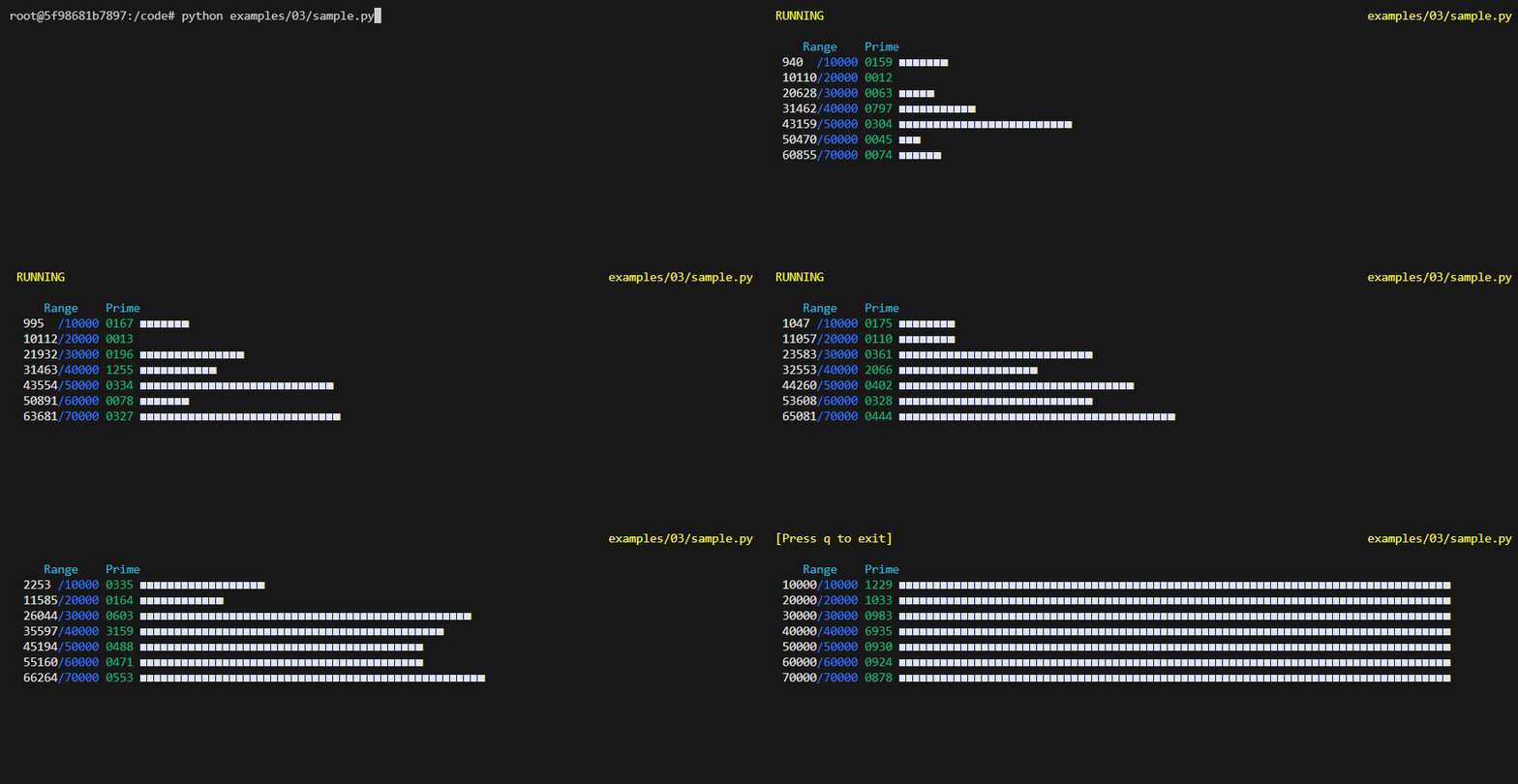
Execute a function that calculates prime numbers for a set range of integers. Execution is scaled across 7 different workers where each process computes the primes for a different range of numbers. For example, the first worker computes primes for the range 1-10K, second worker computes for the range 10K-20K, etc. The main process keeps track of the number of prime numbers encountered for each worker and shows overall progress for each worker using a progress bar.
Item Processor
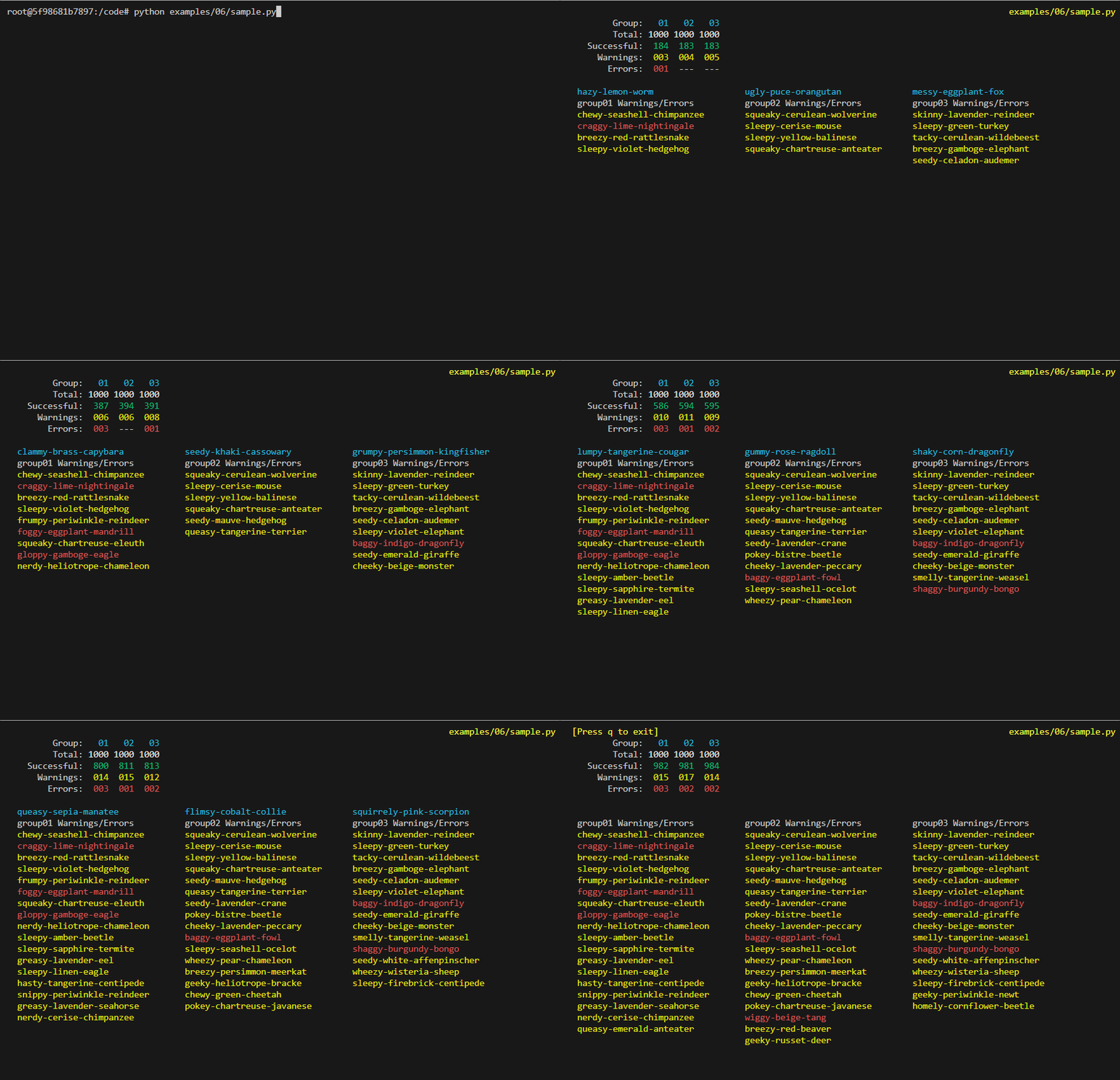
Execute a function that processes a list of random items. Execution is scaled across 3 workers where each worker processes a unique set of items. The main process maintains indicators showing the number of items that have been processed by each worker; counting the number of Successful, Errors and Warnings. Three lists are also maintained, one for each group that list which specific items had Warnings and Failures.
Bay Enclosure Firmware Update
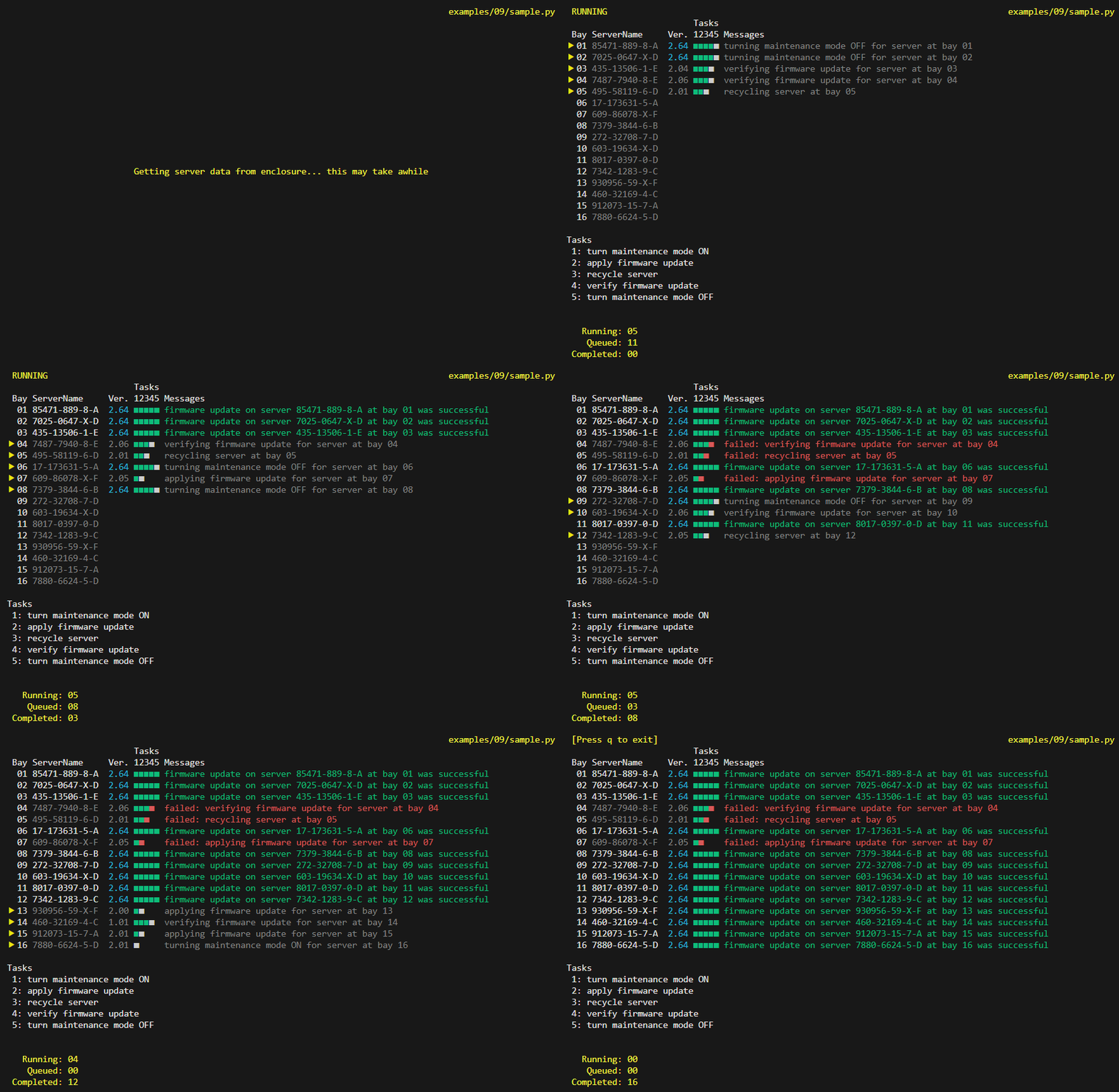
Execute a function that contains a workflow containing tasks to update firmware on a server residing in a blade enclosure. Execution is scaled across a worker pool with five active workers. The main process updates the screen showing status of each worker as they execute the workflow tasks for each blade server.
Projects using mpcurses
-
edgexfoundry/sync-github-labels A script that synchronizes GitHub labels and milestones
-
edgexfoundry/prune-github-tags A script that prunes GitHub pre-release tags
Development
Clone the repository and ensure the latest version of Docker is installed on your development server.
Build the Docker image:
docker image build \
--target build-image \
-t mpcurses:latest .
Run the Docker container:
docker container run \
--rm \
-it \
-v $PWD:/code \
mpcurses:latest \
bash
Execute the build:
make dev
Release history Release notifications | RSS feed


Download files
Download the file for your platform. If you're not sure which to choose, learn more about installing packages.
Source Distribution
Built Distribution
Filter files by name, interpreter, ABI, and platform.
If you're not sure about the file name format, learn more about wheel file names.
Copy a direct link to the current filters
File details
Details for the file mpcurses-1.1.0.tar.gz.
File metadata
- Download URL: mpcurses-1.1.0.tar.gz
- Upload date:
- Size: 24.8 kB
- Tags: Source
- Uploaded using Trusted Publishing? No
- Uploaded via: twine/6.2.0 CPython/3.12.13
File hashes
| Algorithm | Hash digest | |
|---|---|---|
| SHA256 |
11ab13291fe15e68968c069679161a607a9f4176978d9448bf4f8dc50d3f8430
|
|
| MD5 |
c4beb8d34a4fd1f8179acd6f01f82a44
|
|
| BLAKE2b-256 |
3b2f76e9c2dd99856f5560be25caaca4f5a50bdc3635d9a43eae98c5467a57eb
|
File details
Details for the file mpcurses-1.1.0-py3-none-any.whl.
File metadata
- Download URL: mpcurses-1.1.0-py3-none-any.whl
- Upload date:
- Size: 16.2 kB
- Tags: Python 3
- Uploaded using Trusted Publishing? No
- Uploaded via: twine/6.2.0 CPython/3.12.13
File hashes
| Algorithm | Hash digest | |
|---|---|---|
| SHA256 |
4ab33c16c0a99942cd8bc49ba3195f0bd36ffe58e6ae52acd2080808c6838d5b
|
|
| MD5 |
10ec668a0f991e3a1ddc84f0ed2138b1
|
|
| BLAKE2b-256 |
42cf58e1710455f6e09e4fe023526b82272fed4f2cc27f456669d7a065d380c7
|






