
mpl-altair
A prototype native matplotlib backend for Altair. It renders Altair charts as real matplotlib Figure/Axes objects, not as an image copy of Vega-Lite's own renderer. That means a chart from mpl-altair is a genuine matplotlib plot: you can theme it with any mpl style, embed it in a subplot grid next to other matplotlib plots, or export it through any matplotlib backend (PDF, SVG, PGF/LaTeX, and so on).
Examples
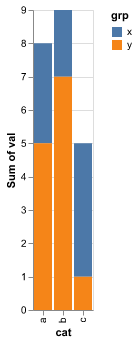
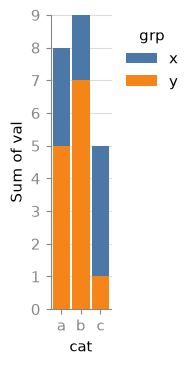
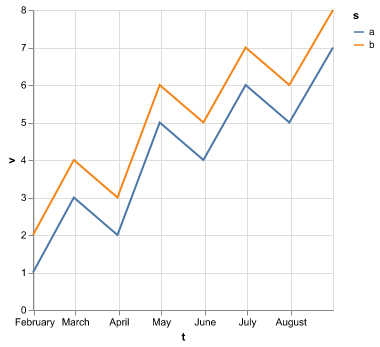
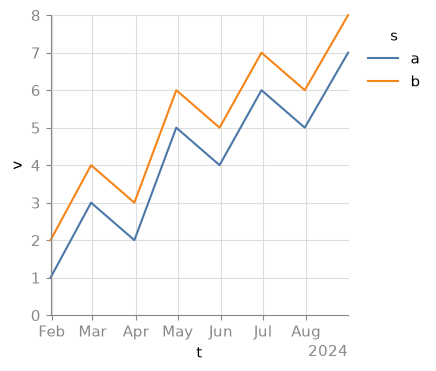
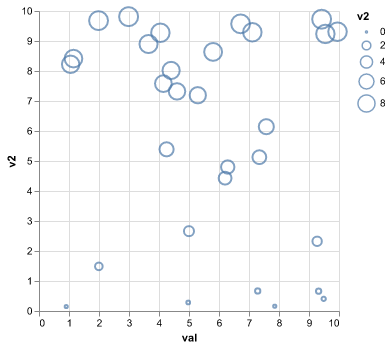
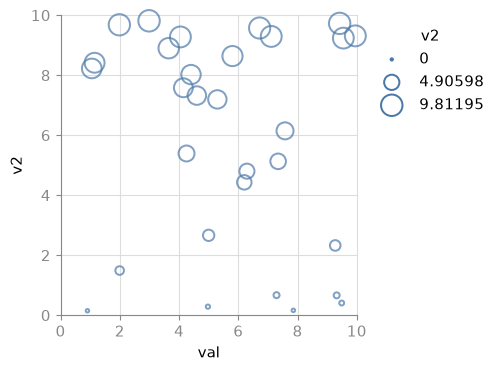
Each pair shows the same Altair chart rendered by Vega-Lite's own renderer (left) and by mpl-altair (right). The goal is a semantic match, not a pixel match, so tick placement and label formatting differ where matplotlib's own conventions apply.
| Altair (vl-convert) | mpl-altair |
|---|---|
 |
 |
 |
 |
 |
 |
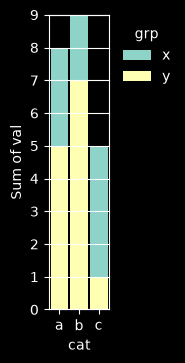
Because the output is a real matplotlib figure, any matplotlib style restyles the whole chart. This is the same stacked bar converted with style="dark_background":
Quickstart
import altair as alt
import pandas as pd
import mplaltair

df = pd.DataFrame({"cat": ["a", "b", "c"], "val": [3, 7, 5]})
chart = alt.Chart(df).mark_bar().encode(x="cat:N", y="val:Q")

fig = mplaltair.convert(chart)
fig.savefig("bar.png")
convert() also accepts a raw Vega-Lite spec dict, an ax= to draw into (for embedding in a subplot grid), and a style= kwarg:
fig, (ax1, ax2) = plt.subplots(1, 2)
mplaltair.convert(chart1, ax=ax1)
mplaltair.convert(chart2, ax=ax2, style="dark_background")
style="vega-lite"(default): mpl-altair's bundled Vega-Lite-ish style sheet.style=Noneorstyle="none": no style context is applied; the chart uses whatever mpl style/rcParams are already active in your session.- Anything else (
style="dark_background",style="/path/to/my.mplstyle", ...): passed straight through toplt.style.context(...).
Using it as an Altair renderer
mpl-altair also registers itself as an Altair renderer, so chart objects display as matplotlib-rendered PNGs (for example, in a Jupyter notebook):
import mplaltair
mplaltair.enable()

chart  # displays as a matplotlib PNG instead of the default Vega-Lite renderer
How it works
Altair charts are specified in Vega-Lite, a high-level grammar of graphics. mpl-altair does not reimplement Vega-Lite's semantics. Instead it reuses the real Vega-Lite compiler and the real Vega dataflow engine to do all the hard work, and only translates the fully resolved result into matplotlib calls:
Altair chart (chart.to_dict())
  -> vl-convert: Vega-Lite spec -> Vega spec       (compiles all VL semantics/defaults)
  -> vegafusion: pre_transform_spec()               (evaluates transforms, inlines data)
  -> mpl-altair: reads the resolved scales/marks/axes/legends
  -> matplotlib calls, in data coordinates          (mpl owns axes, ticks, legends, layout)
This is why mpl-altair can support most standard Altair chart types without reimplementing Vega-Lite's scale, stacking, and binning logic from scratch: by the time mpl-altair sees the spec, vl-convert and vegafusion have already resolved it down to concrete rows, scale domains, and per-mark encodings. mpl-altair's job is just to walk that resolved structure and call the matching matplotlib function (ax.bar, ax.scatter, ax.plot, and so on).
Philosophy
matplotlib owns the axes, ticks, legends, and styling. mpl-altair does not chase pixel-for-pixel fidelity with Vega-Lite's own renderer.
Concretely:
- Positions and data extents come from Vega-Lite's resolved scale domains, but tick placement, tick formatting, gridlines, and legend layout are matplotlib's own (
AutoLocator,ConciseDateFormatter,ax.legend,fig.colorbar, and so on). - Colors follow matplotlib style, not Vega-Lite's rendering. A categorical color scale pulls from the active mpl
prop_cycle; a continuous color scale pulls fromrcParams['image.cmap']; Vega-Lite's compiled-in default mark color resolves to mpl's'C0'so a plain, uncolored bar or point chart also restyles with the active mpl style. - The goal is a semantic match: same data extents, same categories, same stacking order, same legend content, same colors-per-series. Not a pixel match against Vega-Lite's SVG/canvas renderer.
If you want the classic Vega-Lite look, that's the default (mplaltair ships a vega-lite mpl style sheet, applied automatically). If you want your own house style, pass any matplotlib style name or your own style sheet, or use style=None to inherit whatever mpl style is already active in your session.
Supported
- Marks: bar (simple, stacked, grouped), histogram (binned bar), point/circle/square (scatter), line (single and multi-series), area (stacked), tick, rule.
- Layered charts (multiple marks sharing one set of scales), through the same code path as a single mark, with no extra handling needed.
- Scales: linear, log, sqrt, time, band, point, ordinal/nominal.
- Encodings: x, y, color (categorical -> mpl prop cycle, continuous -> colormap + colorbar), size (scatter), shape is not yet implemented.
- Legends: categorical color/fill legends, continuous color colorbars, size legends (3-point proxy legend).
zero/nicedomain flags,d3-style binning, temporal axes with mpl'sConciseDateFormatter.
Not supported (prototype scope)
geoshape,text, andarcmarks.- Independently-resolved dual-axis charts (
resolve_scale(y="independent")) -- not handled; each scale/mark is walked independently with no special detection, so results are undefined rather than validated or rejected. - Exact tick-format fidelity to Vega-Lite's
d3-formatstrings (best-effort translation of trivial cases; mpl's own default formatting otherwise).
Unsupported or unrecognized spec shapes raise a warning and skip the offending piece rather than silently guessing or crashing the whole render. Larger missing pieces and known rendering issues are tracked on the issue tracker: faceting and concat (#1), interactivity and reactive signals (#2), and boundary gridline rendering (#3).
Gallery
scripts/gallery.py renders about a dozen representative charts through both mpl-altair and the reference vl-convert PNG renderer, side by side, into scripts/out/gallery.html, plus one extra row showing a chart re-themed with style="dark_background". Run it and open the HTML file in a browser:
MPLBACKEND=Agg uv run python scripts/gallery.py
open scripts/out/gallery.html
Tests
MPLBACKEND=Agg uv run pytest -q
1 maintainer

Metadata
1 maintainer
Release files for mpl-altair 0.1.0
For a detailed explanation of source distributions (sdists) and built distributions (wheels), please see the package formats documentation.
Source distribution (sdist)
| File | Size | Uploaded | Provenance | Actions |
|---|---|---|---|---|
| mpl_altair-0.1.0.tar.gz | 42.5 kB | Without provenance | Details for mpl_altair-0.1.0.tar.gz |
Built distribution (wheel)
| File | Interpreter | ABI | Platform | Actions Reset |
|---|---|---|---|---|
| mpl_altair-0.1.0-py3-none-any.whl | Python 3 | none | any | Details for mpl_altair-0.1.0-py3-none-any.whl |
Total release size: 90.3 kB
Release files / mpl_altair-0.1.0.tar.gz
| Download URL | mpl_altair-0.1.0.tar.gz |
|---|---|
| Size | 42.5 kB |
| Tags | Source |
|
SHA-256 checksum How to use checksums |
481b2cd7ff3ed26ae31f09c21d3f57b53aee8f1c93ac79380fc6fc4b8471b837
|
|
BLAKE2b-256 checksum How to use checksums |
fc5221a9224bb1f2e58d1142d06b8964673c662cefee2497065f67cf814edf54
|
| Upload date | |
|
Uploaded using Trusted Publishing? What is trusted publishing? |
Yes |
| Uploaded via |
uv/0.11.29 {"installer":{"name":"uv","version":"0.11.29","subcommand":["publish"]},"python":null,"implementation":{"name":null,"version":null},"distro":{"name":"Ubuntu","version":"24.04","id":"noble","libc":null},"system":{"name":null,"release":null},"cpu":null,"openssl_version":null,"setuptools_version":null,"rustc_version":null,"ci":true}
|
Release files / mpl_altair-0.1.0-py3-none-any.whl
| Download URL | mpl_altair-0.1.0-py3-none-any.whl |
|---|---|
| Size | 47.9 kB |
| Tags | Python 3 |
|
SHA-256 checksum How to use checksums |
641740b1a5c80e103222e4df5ea0be267bebdedc1f5e9a2fc095211dd03f36c9
|
|
BLAKE2b-256 checksum How to use checksums |
dccdab53ed47e5b805db79847a23b31a4642d587114f7c1ff37abea78d5ad815
|
| Upload date | |
|
Uploaded using Trusted Publishing? What is trusted publishing? |
Yes |
| Uploaded via |
uv/0.11.29 {"installer":{"name":"uv","version":"0.11.29","subcommand":["publish"]},"python":null,"implementation":{"name":null,"version":null},"distro":{"name":"Ubuntu","version":"24.04","id":"noble","libc":null},"system":{"name":null,"release":null},"cpu":null,"openssl_version":null,"setuptools_version":null,"rustc_version":null,"ci":true}
|
Security for mpl-altair 0.1.0
Provenance
Provenance describes where a file came from. On PyPI, provenance is shared via attestations, which provide a verifiable record of the build or publishing details. View details, limitations and caveats.
No provenance found
None of the files in this release were uploaded with provenance metadata.
A note on package security
PyPI is a repository for distributing packages, not a service for auditing them. While third-party security researchers and our staff do their best to detect and remove malicious packages, PyPI cannot guarantee the quality, security or suitability of any given package.
To learn more about protecting yourself from malicious actors, visit our package security documentation.













