
mpl_fontkit

- Use font from google fonts
- Use icon from font awesome
- Set the font and use it easily
- Helpful error message to get your font name right
Install
pip install mpl_fontkit
Quick Start
Install Google Fonts
import mpl_fontkit as fk

# https://fonts.google.com/specimen/Lato?query=Lato
fk.install("Lato")
If the font does not available in matplotlib, this will download from Google and add it to matplotlib.
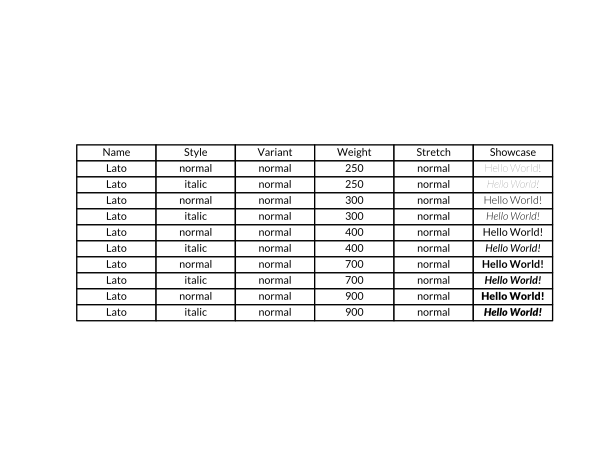
To check available styles for a font
fk.font_table("Lato")
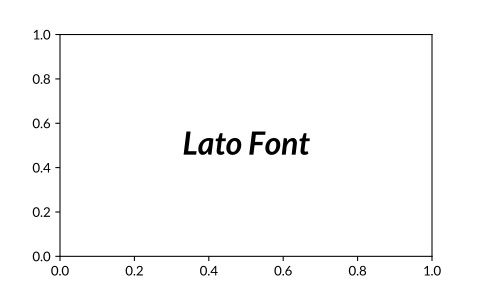
And then you are ready to use it in your plots
import matplotlib.pyplot as plt
plt.text("Lato Font", fontdict={"style": "italic", "weight": 700, "size": 24})
Install Font Awesome
To install font awesome and use it in your plot.
fk.install_fontawesome()

plt.text(.5, .5, "\uf58b\uf005\uf59b", fontfamily="Font Awesome 6 Free")
The font awesome is available as Font Awesome 6 Free and
Font Awesome 6 Brands, the name of icon is encoded as unicode.
You can search for icons and get the unicode here.

Set a font globally
To set a font manually.
This will update the rcParams for you.
import mpl_fontkit as fk

fk.set_font("Lato")
Most of the time when you can't get the font to work simply because the font name is not the same as the file name. You can just type a fuzzy name, we will try to find a similar name and show you in the error message.
import mpl_fontkit as fk

fk.set_font("Lat")
LookupError: Cannot find Lat, do you mean: Lato.
    Use `.list_fonts()` to list all the available fonts.
Get available fonts
fk.list_fonts()
['Agency FB',
 'Algerian',
 'Arial',
 'Arial Rounded MT Bold',
 'Bahnschrift',
 'Baskerville Old Face',
 'Bauhaus 93',
 ...]
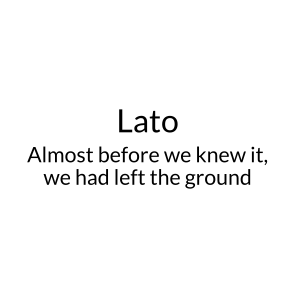
What fonts look like?
Show one font
fk.show("Lato")
Show all fonts at once
fk.show_fonts()
1 maintainer

Release files for mpl_fontkit 0.5.1
For a detailed explanation of source distributions (sdists) and built distributions (wheels), please see the package formats documentation.
Source distribution (sdist)
| File | Size | Uploaded | |
|---|---|---|---|
| mpl_fontkit-0.5.1.tar.gz | 46.4 kB | Details |
Built distribution (wheel)
| File | Interpreter | ABI | Platform | Reset |
|---|---|---|---|---|
| mpl_fontkit-0.5.1-py3-none-any.whl | Python 3 | none | any | Details |
Total release size: 51.9 kB
Release files / mpl_fontkit-0.5.1.tar.gz
| Download URL | mpl_fontkit-0.5.1.tar.gz |
|---|---|
| Size | 46.4 kB |
| Tags | Source |
|
SHA-256 checksum How to use checksums |
8f23b529c5db435b2125c3a66324a243cf2f49d0fe65927de5f7604c69fc2200
|
|
BLAKE2b-256 checksum How to use checksums |
c5ed6e2a08f0f67ed21d9c1676e98b90b49ee3051e25d75f0bd9e32769e6a590
|
| Upload date | |
|
Uploaded using Trusted Publishing? What is trusted publishing? |
No |
| Uploaded via |
python-requests/2.31.0
|
Release files / mpl_fontkit-0.5.1-py3-none-any.whl
| Download URL | mpl_fontkit-0.5.1-py3-none-any.whl |
|---|---|
| Size | 5.5 kB |
| Tags | Python 3 |
|
SHA-256 checksum How to use checksums |
162bdb75b9f27021a97fc997a62c81e001f8caa36ebe6d8df1595d7385af5b86
|
|
BLAKE2b-256 checksum How to use checksums |
fa1f87298a2ff57b282f50ee42168b79905614c976bd6c43eedb3c96aa9785b8
|
| Upload date | |
|
Uploaded using Trusted Publishing? What is trusted publishing? |
No |
| Uploaded via |
python-requests/2.31.0
|














