
Classic Stock Charts in Python

Project description
Classic Stock Charts in Python
Create classic technical analysis stock charts in Python with minimal code.
The library is built around matplotlib
and supports both pandas and polars DataFrames.
Charts can be defined using a declarative interface,
based on a set of drawing primitives like Candlesticks, Volume
and technical indicators like SMA, EMA, RSI, ROC, MACD, etc ...
Warning: This project is experimental and the interface is likely to change. For a related project with a mature api you may want to look into mplfinance.
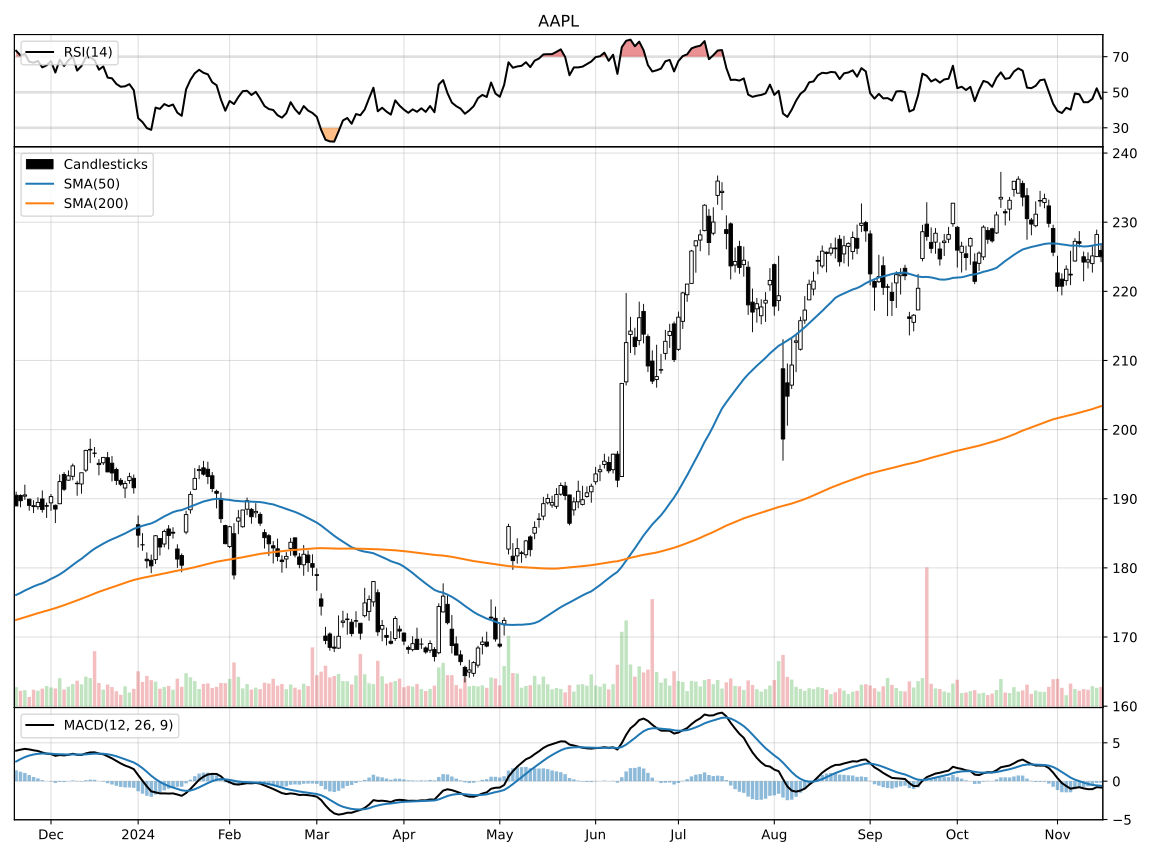
Typical Usage
# Candlesticks chart with SMA, RSI and MACD indicators

import yfinance as yf

from mplchart.chart import Chart
from mplchart.primitives import Candlesticks, Volume, Pane, LinePlot
from mplchart.indicators import SMA, RSI, MACD

from mplchart.utils import normalize_prices

ticker = 'AAPL'
prices = normalize_prices(yf.Ticker(ticker).history('5y'))

Chart(prices, title=ticker, max_bars=250).plot(
    Candlesticks(), Volume(), SMA(50), SMA(200),
    Pane("above", yticks=(30, 50, 70)),
    RSI(14) @ LinePlot(overbought=70, oversold=30),
    Pane("below"),
    MACD(),
).show()
Conventions
Prices data is expected to be a pandas or polars DataFrame
with columns open, high, low, close, volume
and a datetime column named date or datetime (or a datetime index for pandas).
Note:
Chartand all indicators require lowercase column names. Usenormalize_pricesfrommplchart.utilsto normalize your DataFrame before use:from mplchart.utils import normalize_prices prices = normalize_prices(yf.Ticker(ticker).history('5y'))
Drawing Primitives
The library contains drawing primitives that can be used like an indicator in the plot api. Primitives are classes and must be instantiated as objects before being used with the plot api.
# Candlesticks chart

from mplchart.chart import Chart
from mplchart.primitives import Candlesticks

Chart(prices, title=title, max_bars=250).plot(
    Candlesticks()
).show()
The main drawing primitives are :
Candlesticksfor candlestick plotsOHLCfor open, high, low, close bar plotsPricefor price line plotsVolumefor volume bar plotsPaneto switch to a different pane (above or below)LinePlotdraw an indicator as line plotAreaPlotdraw an indicator as area plotBarPlotdraw an indicator as bar plotZigZaglines between pivot pointsPeaksto mark peaks and valleysHLineto draw a horizontal reference line on the current paneVLineto draw a vertical line across all panes at a given date
Builtin Indicators
The library includes some standard technical analysis indicators for pandas DataFrames. Indicators are classes and must be instantiated as objects before being used with the plot api.
Some of the indicators included are:
SMASimple Moving AverageEMAExponential Moving AverageWMAWeighted Moving AverageHMAHull Moving AverageRMARolling Moving Average (Wilder's)DEMADouble Exponential Moving AverageTEMATriple Exponential Moving AverageMOMMomentumROCRate of ChangeRSIRelative Strength IndexADXAverage Directional IndexDMIDirectional Movement IndexMACDMoving Average Convergence DivergencePPOPrice Percentage OscillatorBOPBalance of PowerCMFChaikin Money FlowMFIMoney Flow IndexSTOCHStochastic OscillatorTRANGETrue RangeATRAverage True RangeNATRNormalized Average True RangeBBANDSBollinger BandsBBPBollinger Bands PercentBBWBollinger Bands WidthKELTNERKeltner ChannelDONCHIANDonchian ChannelMIDPRICEMidpoint PriceTYPPRICETypical PriceWCLPRICEWeighted Close Price
Use @ to bind an indicator to a rendering primitive, and | to chain indicators:
SMA(50) @ LinePlot(style="dashed", color="red")   # bind indicator to primitive
SMA(50) | ROC(1)                                   # chain indicators
# Customizing indicator style with LinePlot

from mplchart.indicators import SMA, EMA, ROC
from mplchart.primitives import Candlesticks, LinePlot

indicators = [
    Candlesticks(),
    SMA(20) @ LinePlot(style="dashed", color="red", alpha=0.5, width=3)
]

Chart(prices).plot(indicators)
If the indicator returns a DataFrame instead of a Series, specify an item (column name) in the primitive.
Indicators are callables — apply one directly with indicator(prices) or prices.pipe(indicator).
For boolean / arithmetic composition, wrap an indicator with as_expr() to obtain a
pandas Expression (requires pandas ≥ 3.0). Multi-output indicators take an item
argument to select one column:
RSI(14).as_expr() < 30                     # pandas Expression
MACD().as_expr("macdhist") > 0             # select histogram column

Stripes(MACD().as_expr("macdhist") > 0)    # use as a binding condition
Polars Expressions
For polars DataFrames, the expressions subpackage provides polars Expr factories
as an alternative to the indicator pattern.
These can be used directly with chart.plot().
# Candlesticks chart with polars expressions

from mplchart.chart import Chart
from mplchart.primitives import Candlesticks, Volume, Pane, LinePlot
from mplchart.expressions import SMA, EMA, RSI, MACD

Chart(prices, title=ticker, max_bars=250).plot(
    Candlesticks(), Volume(), SMA(50), SMA(200),
    Pane("above", yticks=(30, 50, 70)),
    RSI() @ LinePlot(overbought=70, oversold=30),
    Pane("below"),
    MACD(),
).show()
Expressions are plain polars.Expr values — they can be composed with standard polars operators,
passed to df.select(), or used anywhere polars expressions are accepted.
Use @ to bind an expression to a rendering primitive:
from mplchart.primitives import LinePlot, AreaPlot
from mplchart.expressions import SMA, RSI

SMA(50) @ LinePlot(color="red")    # expression → primitive
RSI(14) @ AreaPlot(color="blue")   # expression → primitive
Talib Functions
If you have ta-lib installed you can use its abstract functions as indicators. They are created by calling Function with the name of the function and its parameters. Ta-lib functions work with both pandas and polars backends.
# Candlesticks chart with talib functions

from mplchart.primitives import Candlesticks
from talib.abstract import Function

indicators = [
    Candlesticks(),
    Function('SMA', 50),
    Function('SMA', 200),
]

Chart(prices).plot(indicators).show()
Examples
Example notebooks live in the examples/ folder — see the examples README for the full list.
Installation
pip install mplchart
The indicators module requires pandas; the expressions module requires polars.
If either is already in your environment, mplchart will use it automatically.
The [pandas], [polars], and [all] extras are just a convenience — they
install pandas or polars alongside mplchart, nothing more:
pip install mplchart[pandas]
pip install mplchart[polars]
pip install mplchart[all]
Dependencies
Required:
- python >= 3.10
- matplotlib
- numpy
- pyarrow
Optional extras:
[pandas]— pandas[polars]— polars[all]— pandas and polars
Related Projects & Resources
- stockcharts.com - Classic stock charts and technical analysis reference
- mplfinance - Matplotlib utilities for the visualization, and visual analysis, of financial data
- matplotlib - Matplotlib: plotting with Python
- pandas - Flexible and powerful data analysis / manipulation library for Python
- polars - Fast DataFrame library for Python
- yfinance - Download market data from Yahoo! Finance's API
Release history Release notifications | RSS feed


Download files
Download the file for your platform. If you're not sure which to choose, learn more about installing packages.
Source Distributions
Built Distribution
Filter files by name, interpreter, ABI, and platform.
If you're not sure about the file name format, learn more about wheel file names.
Copy a direct link to the current filters
File details
Details for the file mplchart-0.0.36-py3-none-any.whl.
File metadata
- Download URL: mplchart-0.0.36-py3-none-any.whl
- Upload date:
- Size: 604.3 kB
- Tags: Python 3
- Uploaded using Trusted Publishing? No
- Uploaded via: twine/6.2.0 CPython/3.11.14
File hashes
| Algorithm | Hash digest | |
|---|---|---|
| SHA256 |
6ade195d8eabda25c46b5230df9eb4605c8a5b8c5180fea748a53fe84914194f
|
|
| MD5 |
d6cc7f35680279da4962971db2985938
|
|
| BLAKE2b-256 |
207545cd72545cd01f8c22e5810be9755442bd2304a804a9e05b1394643c53dd
|






