
Mpatplotlib Layout
Easily create axes layouts for complex matplotlib figures.
Dependencies
- python >= 3.7.0
- matplotlib >= 3.4
Example
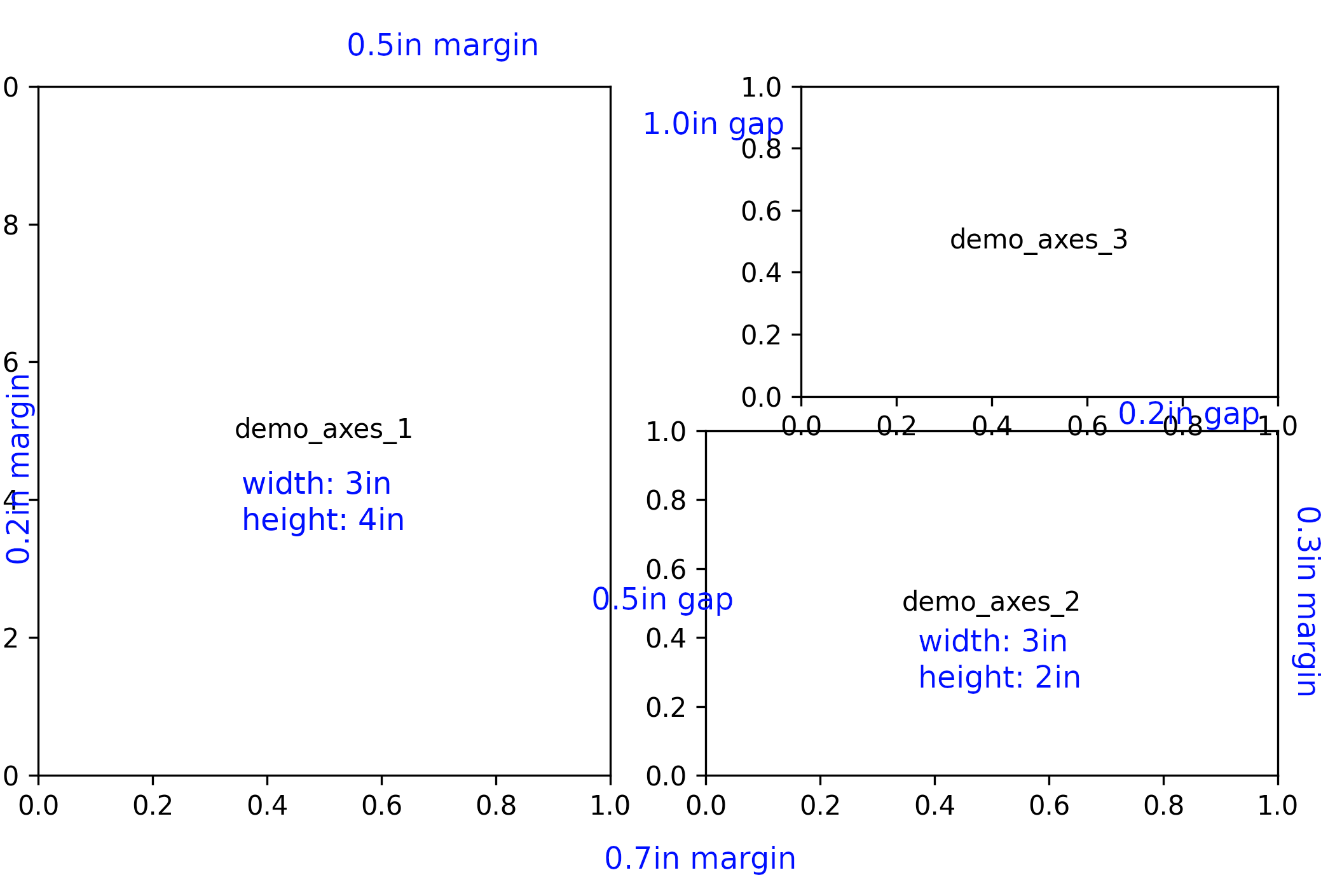
This package allows easy and programmable creation of matplotlib figure layouts using the actual size and relative positioning of axes. This is useful for complex, multi-axes figures, especially those with non-grid arrangements.
This piece of example tends to create a figure layout with below schematics:
import matplotlib
import matplotlib.pyplot
from mpllayout import LayoutCreator


lc = LayoutCreator(
	left_margin=0.2,  # padding inches to the left
	right_margin=0.3,  # padding inches to the right
	top_margin=0.5,  # padding inches on the top
	bottom_margin=0.7,  # padding inches at the bottom
)

# add the first axes (axes_1) to the layout, align axes_1's bottomleft corner
# to the figure's bottomleft corner (before adding margins)
axes_1 = lc.add_frame(
	"demo_axes_1",  # the key to retrieve matplotlib.axes.Axes objects later
)
axes_1.set_anchor("bottomleft")  # set the
axes_1.set_size(3, 4)  # in inches


# next, add a second axes (axes_2) to the layout, and position the axes_2's
# bottomleft 0.5 inches to the right of axes_1's bottomright corner
# then set the size of axes_2
axes_2 = lc.add_frame("demo_axes_2")
axes_2.set_anchor(
	"bottomleft",  # the anchor of axes_2 to set
	axes_1, "bottomright",  # the reference anchor of an already-existing axes
	offsets=(0.5, 0.0),  # x and y offsets in relative to the reference anchor
	# offsets are in inches
)
axes_2.set_size(3, 2)


# next, add a third axes (axes_3) to the layout, and position the axes_3's
# topleft corner 1.0 inches to the right of axes_1's topright corner, and its
# bottomright corner 0.2 inches above axes_2's topright corner.
#
# with both topleft and bottomright corners set, the size can be determined
# automatically. if size was manually sepcified but is different than the
# calculated size, an error will be raised
axes_3 = lc.add_frame("demo_axes_3")
axes_3.set_anchor("topleft", axes_1, "topright", offsets=(1.0, 0.0))
axes_3.set_anchor("bottomright", axes_2, "topright", offsets=(0, 0.2))


# create the layout
layout = lc.create_figure_layout()
figure = layout["figure"]  # figure is a reserved key referring to the
# matplotlib.figure.Figure object hosting all the axes


# now use matplotlib to draw something and show the figure
ax1 = layout["demo_axes_1"]  # retrieve the axes object using the previous key
ax1.text(0.5, 0.5, "demo_axes_1", transform=ax1.transAxes,
	ha="center", va="center")
ax2 = layout["demo_axes_2"]
ax2.text(0.5, 0.5, "demo_axes_2", transform=ax2.transAxes,
	ha="center", va="center")
ax3 = layout["demo_axes_3"]
ax3.text(0.5, 0.5, "demo_axes_3", transform=ax3.transAxes,
	ha="center", va="center")


# show the figure
matplotlib.pyplot.show()
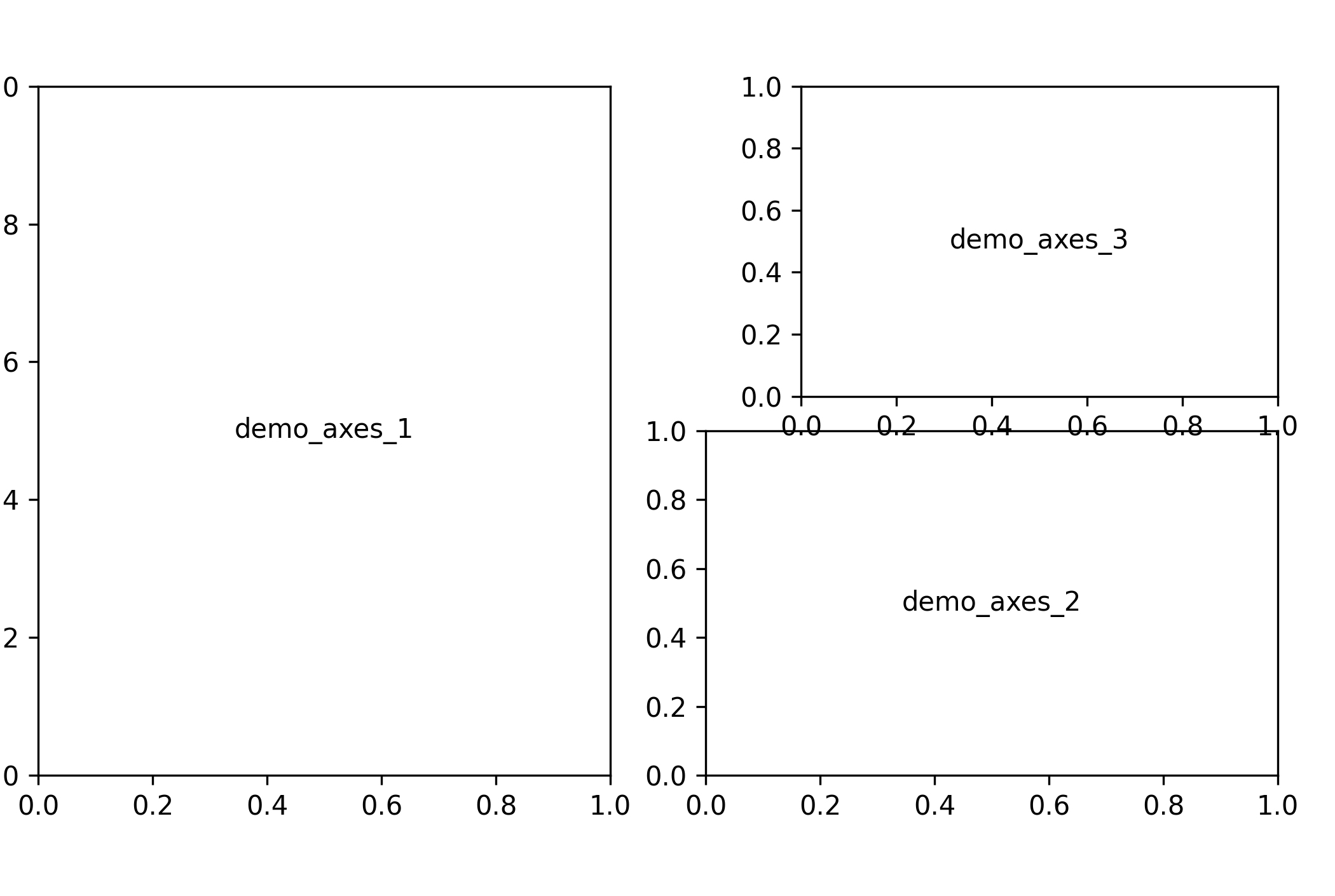
This will generate a figure looks like below:
1 maintainer

Metadata
1 maintainer
Release files for mpllayout 0.1.3
For a detailed explanation of source distributions (sdists) and built distributions (wheels), please see the package formats documentation.
Source distribution (sdist)
| File | Size | Uploaded | Provenance | Actions |
|---|---|---|---|---|
| mpllayout-0.1.3.tar.gz | 30.8 kB | Without provenance | Details for mpllayout-0.1.3.tar.gz |
Built distribution (wheel)
| File | Interpreter | ABI | Platform | Actions Reset |
|---|---|---|---|---|
| mpllayout-0.1.3-py3-none-any.whl | Python 3 | none | any | Details for mpllayout-0.1.3-py3-none-any.whl |
Total release size: 59.3 kB
Release files / mpllayout-0.1.3.tar.gz
| Download URL | mpllayout-0.1.3.tar.gz |
|---|---|
| Size | 30.8 kB |
| Tags | Source |
|
SHA-256 checksum How to use checksums |
ee7c3766140e7ddfd6a65d0a615d99a7230bf85e4e3d18b12bd3cf281a2a0780
|
|
BLAKE2b-256 checksum How to use checksums |
1b4a9f1acf614252aac3d1e9b28c7542fcf8a0ab6e6ded6019b6c66420ff9c73
|
| Upload date | |
|
Uploaded using Trusted Publishing? What is trusted publishing? |
No |
| Uploaded via |
twine/4.0.2 CPython/3.10.4
|
Release files / mpllayout-0.1.3-py3-none-any.whl
| Download URL | mpllayout-0.1.3-py3-none-any.whl |
|---|---|
| Size | 28.5 kB |
| Tags | Python 3 |
|
SHA-256 checksum How to use checksums |
f61f344276010384a6e4155458da42d017a854618a9db1a1e2639cfa71132182
|
|
BLAKE2b-256 checksum How to use checksums |
f0bd1518ad75f5bea4415db99ca190b0d296d576b8fe3b0ef5ec2f4b023c3389
|
| Upload date | |
|
Uploaded using Trusted Publishing? What is trusted publishing? |
No |
| Uploaded via |
twine/4.0.2 CPython/3.10.4
|
Security for mpllayout 0.1.3
Provenance
Provenance describes where a file came from. On PyPI, provenance is shared via attestations, which provide a verifiable record of the build or publishing details. View details, limitations and caveats.
No provenance found
None of the files in this release were uploaded with provenance metadata.
A note on package security
PyPI is a repository for distributing packages, not a service for auditing them. While third-party security researchers and our staff do their best to detect and remove malicious packages, PyPI cannot guarantee the quality, security or suitability of any given package.
To learn more about protecting yourself from malicious actors, visit our package security documentation.













