
mprod_package






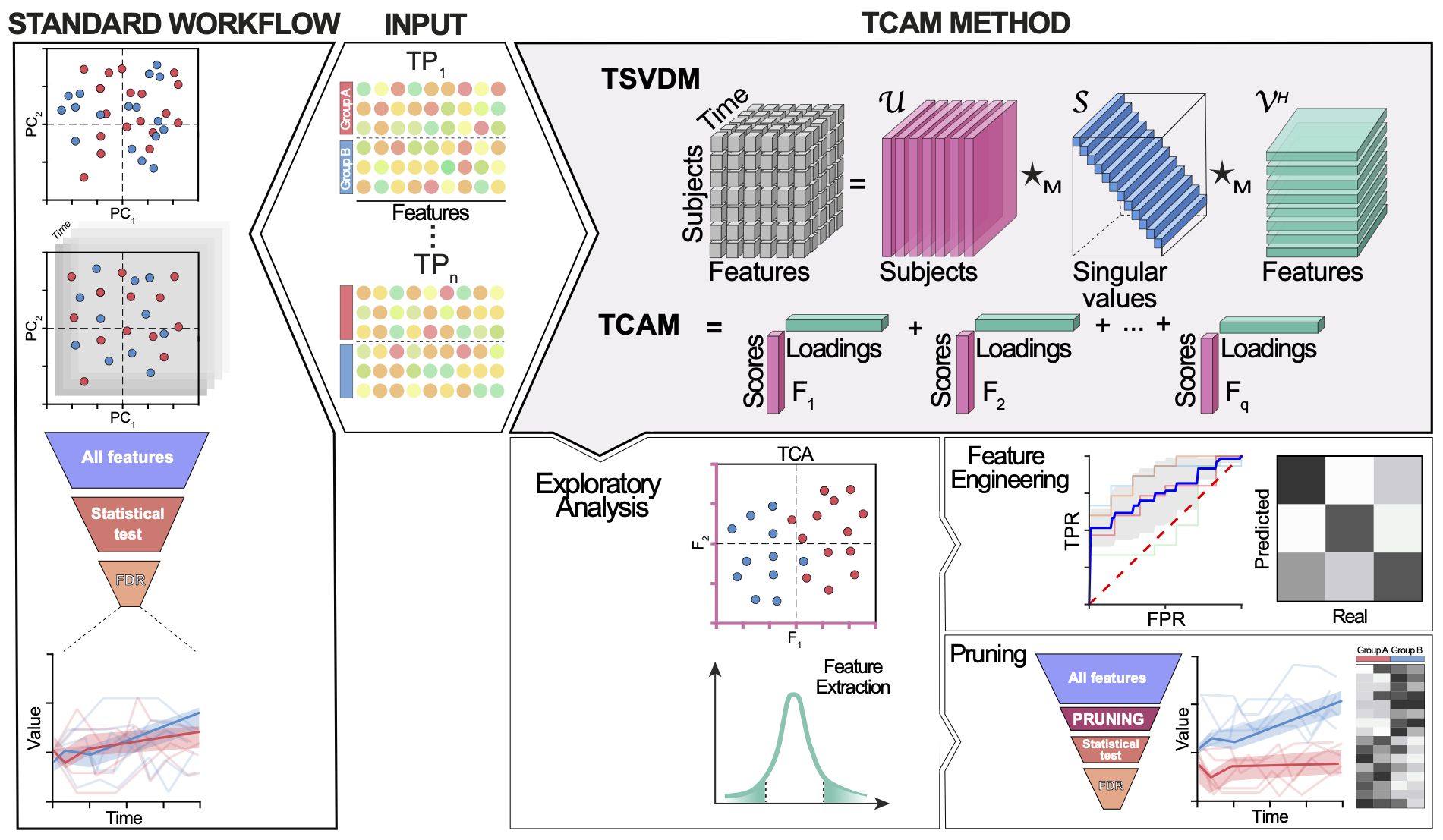
Software implementation for tensor-tensor m-product framework [1]. The library currently contains tubal QR and tSVDM decompositions, and the TCAM method for dimensionality reduction.
Installation
Conda
The mprod-package is hosted in conda-forge channel.
conda install -c conda-forge mprod-package
pip
pip install mprod-package
See mprod-packages pypi entry
From source
- Make sure that all dependencies listed in
requirements.txtfile are installed . - Clone the repository, then from the package directory, run
pip install -e .
The dependencies in requirements.txt are stated with exact versions used for locally test mprod-package, these packages were obtained from conda-forge channel.
import pandas as pd

file_path = "https://raw.githubusercontent.com/UriaMorP/" \
            "tcam_analysis_notebooks/main/Schirmer2018/Schirmer2018.tsv"

data_table = pd.read_csv(file_path, index_col=[0,1], sep="\t"
                       , dtype={'Week':int})
data_table = data_table.loc[:,data_table.median() > 1e-7]
data_table.rename(columns= {k:f"Fature_{e+1}" for e,k in enumerate(data_table.columns)}, inplace=True)
data_table.shape

%matplotlib inline
How to use TCAM
Given with a pandas.DataFrame of the data as below, with 2-level index, where the first level as subject identifier (mouse, human, image) and the second level of the index denotes sample repetition identity, in this case - the week during experiment, in which the sample was collected.
display(data_table.iloc[:2,:2].round(3))
| Fature_1 | Fature_2 | ||
|---|---|---|---|
| SubjectID | Week | ||
| P_10343 | 0 | 0.001 | 0.023 |
| 4 | 0.020 | 0.000 |
Shape the data into tensor
We use the table2tensor helper function to transform a 2-level (multi)-indexed pandas.DataFrame into a 3rd order tensor.
from mprod import table2tensor
data_tensor, map1, map3 =  table2tensor(data_table)
To inspect table2tensor operation, we use the resulting "mode mappings"; map1 and map3 associating each line in the input table to it's coordinates in the resulting tensor.
In the following example, we use the mappings to extract the tensor coordinates corresponding to subject P_7218's sample from week 52
(data_tensor[map1['P_7218'],:, map3[52]] == data_table.loc[('P_7218',52)].values).all() # True
Applying TCAM
from mprod.dimensionality_reduction import TCAM

tca = TCAM()
tca_trans = tca.fit_transform(data_tensor)
And that's all there is to it... Really!
Note how similar the code above to what we would have written if we were to apply scikit-lean's PCA to the initial tabular data:
from sklearn.decomposition import PCA

pca = PCA()
pca_trans = pca.fit_transform(data_table)
The similarity between TCAMs interface to that of scikit-learn's PCA is not coincidental.
We did our best in order to make TCAM as familiar as possible, and allow for high compatibility of TCAM with the existing Python ML framework.
Accessing properties of the transformation
tca_loadings = tca.mode2_loadings  # Obtain TCAM loadings
pca_loadings = pca.components_     # Obtain PCA loadings

tca_var = tca.explained_variance_ratio_*100 # % explained variation per TCA factor
pca_var = pca.explained_variance_ratio_*100 # % explained variation per TCA factor

tca_df = pd.DataFrame(tca_trans)   # Cast TCA scores to dataframe
tca_df.rename(index = dict(map(reversed, map1.items()))
              , inplace = True)    # use the inverse of map1 to denote each row
                                   # of the TCAM scores with it's subject ID

pca_df = pd.DataFrame(pca_trans)   # Cast PCA scores to dataframe
pca_df.index = data_table.index    # anotate PC scores with sample names
References
[1] Misha E. Kilmer, Lior Horesh, Haim Avron, and Elizabeth Newman. Tensor-tensor algebra for optimal representation and compression of multiway data. Proceedings of the National Academy of Sciences, 118(28):e2015851118, jul 2021.
1 maintainer

Metadata
1 maintainer
Release files for mprod-package 0.0.6
For a detailed explanation of source distributions (sdists) and built distributions (wheels), please see the package formats documentation.
Source distribution (sdist)
| File | Size | Uploaded | |
|---|---|---|---|
| mprod_package-0.0.6.tar.gz | 25.2 kB | Details |
Built distribution (wheel)
| File | Interpreter | ABI | Platform | Reset |
|---|---|---|---|---|
| mprod_package-0.0.6-py3-none-any.whl | Python 3 | none | any | Details |
Total release size: 55.0 kB
Release files / mprod_package-0.0.6.tar.gz
| Download URL | mprod_package-0.0.6.tar.gz |
|---|---|
| Size | 25.2 kB |
| Tags | Source |
|
SHA-256 checksum How to use checksums |
f2d26612acedd9a1090fb37b0295af7f1eb7f8f2e97e2117790ba3f9d5b70e64
|
|
BLAKE2b-256 checksum How to use checksums |
9ecdb86e1d08d5b5e4aa64a98b19c4e662590767350b02835ec2cabdc9df2cdc
|
| Upload date | |
|
Uploaded using Trusted Publishing? What is trusted publishing? |
No |
| Uploaded via |
twine/7.0.0 CPython/3.14.8
|
Release files / mprod_package-0.0.6-py3-none-any.whl
| Download URL | mprod_package-0.0.6-py3-none-any.whl |
|---|---|
| Size | 29.8 kB |
| Tags | Python 3 |
|
SHA-256 checksum How to use checksums |
85d571496fb39a0ba72a673b611878f5ad1d76590335c3f8c966812f9c7a4e9b
|
|
BLAKE2b-256 checksum How to use checksums |
68d8087139e7e9f69aaca189a2d97d14751bddc773dfe36d74ae8e42230b8704
|
| Upload date | |
|
Uploaded using Trusted Publishing? What is trusted publishing? |
No |
| Uploaded via |
twine/7.0.0 CPython/3.14.8
|














