
MQTT Tools
MQTT tools in Python 3.7 and later.
Both the client and the broker implements MQTT version 5.0 using asyncio.
Client features:
Subscribe to and publish QoS level 0 topics.
Broker session resume (or clean start support) for less initial communication.
Topic aliases for smaller publish packets.
monitor, subscribe and publish command line commands.
Broker features:
Subscribe to and publish QoS level 0 topics.
Session resume (or clean start support) for less initial communication. Session state storage in RAM.
broker command line command.
Limitations:
There are lots of limitations in both the client and the broker. Here are a few of them:
QoS level 1 and 2 messages are not supported. A session state storage is required to do so, both in the client and the broker.
Authentication is not supported.
MQTT version 5.0 specification: https://docs.oasis-open.org/mqtt/mqtt/v5.0/os/mqtt-v5.0-os.html
Project homepage: https://github.com/eerimoq/mqttools
Documentation: https://mqttools.readthedocs.io
Installation
pip install mqttoolsExamples
There are plenty of examples in the examples folder.
Command line
Subscribe
Connect to given MQTT broker and subscribe to a topic. All received messages are printed to standard output.
$ mqttools subscribe /test/#
Connecting to 'localhost:1883'.
Connected.
Topic:   /test
Message: 11
Topic:   /test/mqttools/foo
Message: bar
Publish
Connect to given MQTT broker and publish a message to a topic.
$ mqttools publish /test/mqttools/foo bar
Connecting to 'localhost:1883'.

Published 1 message(s) in 0 seconds from 1 concurrent task(s).
Publish multiple messages as quickly as possible with --count to benchmark the client and the broker.
$ mqttools publish --count 100 /test/mqttools/foo
Connecting to 'localhost:1883'.

Published 100 message(s) in 0.39 seconds from 10 concurrent task(s).
Monitor
Connect to given MQTT broker and monitor given topics in a text based user interface.
$ mqttools monitor /test/#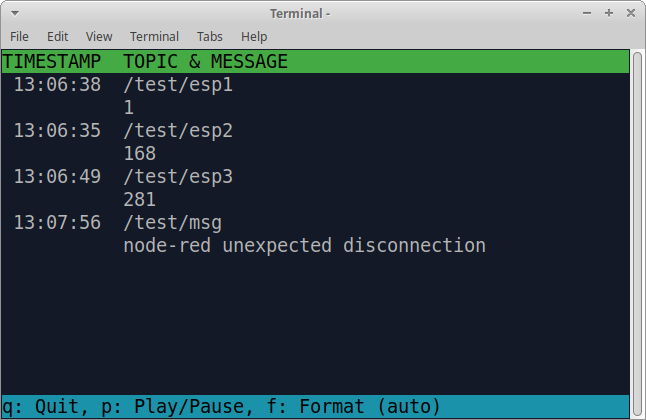
The menu at the bottom of the monitor shows the available commands.
Quit: Quit the monitor. Ctrl-C can be used as well.
Play/Pause: Toggle between playing and paused (or running and freezed).
Format: Message formatting; auto, binary or text.
Broker
Start a broker to serve clients.
$ mqttools brokerScripting
Subscribe
An example connecting to an MQTT broker, subscribing to the topic /test/#, and printing all published messaged.
import asyncio
import mqttools

async def subscriber():
    client = mqttools.Client('localhost', 1883)

    await client.start()
    await client.subscribe('/test/#')

    while True:
        message = await client.messages.get()

        if message is None:
            print('Broker connection lost!')
            break

        print(f'Topic:   {message.topic}')
        print(f'Message: {message.message}')

asyncio.run(subscriber())
Publish
An example connecting to an MQTT broker and publishing the message bar to the topic /test/mqttools/foo.
import asyncio
import mqttools

async def publisher():
    async with mqttools.Client('localhost', 1883) as client:
        client.publish(mqttools.Message('/test/mqttools/foo', b'bar'))

asyncio.run(publisher())1 maintainer

Metadata
1 maintainer
Release files for mqttools 0.50.0
For a detailed explanation of source distributions (sdists) and built distributions (wheels), please see the package formats documentation.
Source distribution (sdist)
| File | Size | Uploaded | |
|---|---|---|---|
| mqttools-0.50.0.tar.gz | 34.3 kB | Details |
Release files / mqttools-0.50.0.tar.gz
| Download URL | mqttools-0.50.0.tar.gz |
|---|---|
| Size | 34.3 kB |
| Tags | Source |
|
SHA-256 checksum How to use checksums |
15ec79cb836852c44d3d9d3d3fc3175694912b2d410ac53ef920e7cfd467861c
|
|
BLAKE2b-256 checksum How to use checksums |
6c70059f9a5e7b905ddfa9676493effa6d4cb3815981b28976428737b0206692
|
| Upload date | |
|
Uploaded using Trusted Publishing? What is trusted publishing? |
No |
| Uploaded via |
twine/3.7.1 importlib_metadata/4.10.0 pkginfo/1.8.2 requests/2.26.0 requests-toolbelt/0.9.1 tqdm/4.62.3 CPython/3.9.9
|














