
MRI processing toolkit.

Project description
MRI-Toolkit
MRI-toolkit provides a set of features dedicated to MRI data post-processing and analysis.
The implementation is inspired by gMRI2FEM, and some of the code is taken from that project. However, MRI-toolkit is designed to be more modular and extensible, with a focus on providing a user-friendly command-line interface (CLI) for common MRI processing tasks.
Installation
pip install mritk
Documentation
The documentation is available at https://scientificcomputing.github.io/mri-toolkit/. It includes detailed usage instructions, API references, and examples.
Quick Start
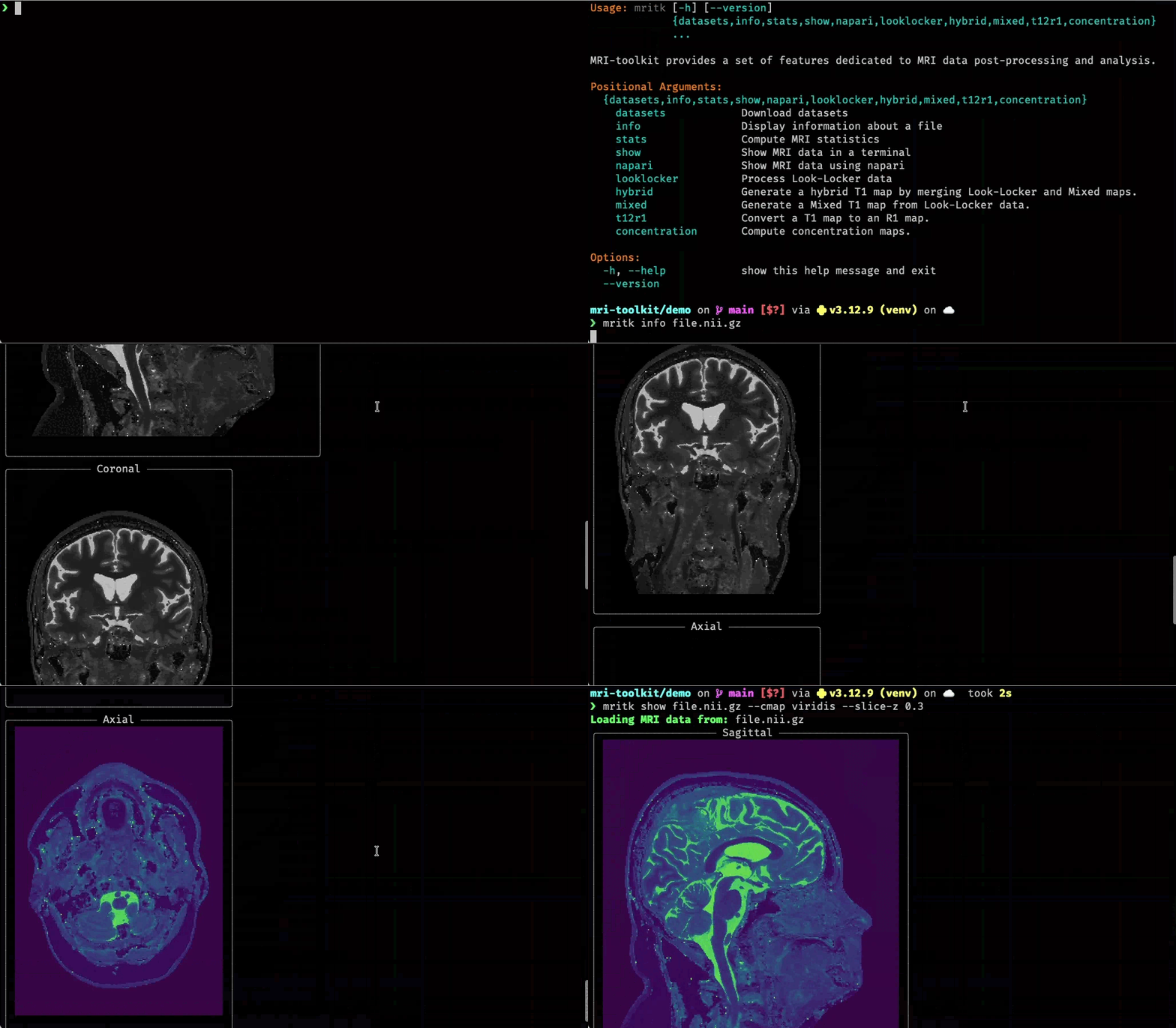
To get started with mri-toolkit, you can use the command-line interface (CLI) to inspect and analyze your MRI data.
Features
-
File Inspection: detailed NIfTI header analysis (affine, voxel size, shape).
-
$T_1$ Mapping: Estimate $T_1$ relaxation times using Look-Locker or Mixed sequences, and seamlessly merge them into comprehensive Hybrid $T_1$ maps.
-
$R_1$ Relaxation Rates: Convert $T_1$ maps into $R_1$ relaxation rate maps for linear scaling with tracer concentrations.
-
Concentration Mapping: Calculate the spatial distribution of contrast agents (e.g., gadobutrol) utilizing pre- and post-contrast $T_1$ or $R_1$ maps.
-
Statistics: Compute comprehensive statistics (volume, mean, median, std, percentiles) for MRI regions based on segmentation maps.
-
Visualization:
-
Terminal: View orthogonal slices (Sagittal, Coronal, Axial) directly in your console.
-
Napari: Launch the Napari viewer for interactive 3D inspection.
-
-
Data Management: Utilities to download datasets.
Contributing
Contributions to MRI-toolkit are welcome! If you have an idea for a new feature, improvement, or bug fix, please open an issue or submit a pull request on GitHub. For more details on how to contribute, please see the Contributing Guide.
License
MRI-toolkit is licensed under the MIT License. See the LICENSE file for more information.


Download files
Download the file for your platform. If you're not sure which to choose, learn more about installing packages.
Source Distribution
Built Distribution
Filter files by name, interpreter, ABI, and platform.
If you're not sure about the file name format, learn more about wheel file names.
Copy a direct link to the current filters
File details
Details for the file mritk-0.4.2.tar.gz.
File metadata
- Download URL: mritk-0.4.2.tar.gz
- Upload date:
- Size: 74.6 kB
- Tags: Source
- Uploaded using Trusted Publishing? No
- Uploaded via: uv/0.11.7 {"installer":{"name":"uv","version":"0.11.7","subcommand":["publish"]},"python":null,"implementation":{"name":null,"version":null},"distro":{"name":"macOS","version":null,"id":null,"libc":null},"system":{"name":null,"release":null},"cpu":null,"openssl_version":null,"setuptools_version":null,"rustc_version":null,"ci":null}
File hashes
| Algorithm | Hash digest | |
|---|---|---|
| SHA256 |
bababceb46adab0b84a8b8d4e5122a66122ad1f188b8fffbf63f6b5344e23739
|
|
| MD5 |
3ba6f6fc089f110ea51e535b86f42732
|
|
| BLAKE2b-256 |
674eab88b2b8303adf096b1dbc7f4ed58ec6e32473dea4979a33d2979ecb1bf8
|
File details
Details for the file mritk-0.4.2-py3-none-any.whl.
File metadata
- Download URL: mritk-0.4.2-py3-none-any.whl
- Upload date:
- Size: 62.6 kB
- Tags: Python 3
- Uploaded using Trusted Publishing? No
- Uploaded via: uv/0.11.7 {"installer":{"name":"uv","version":"0.11.7","subcommand":["publish"]},"python":null,"implementation":{"name":null,"version":null},"distro":{"name":"macOS","version":null,"id":null,"libc":null},"system":{"name":null,"release":null},"cpu":null,"openssl_version":null,"setuptools_version":null,"rustc_version":null,"ci":null}
File hashes
| Algorithm | Hash digest | |
|---|---|---|
| SHA256 |
3655835ae70ded9b41a1013e68c5abe275dc2c42b21eb6a632e9ccffc2515825
|
|
| MD5 |
6349f3cee4cb6e88e3b4f5a547dba12c
|
|
| BLAKE2b-256 |
7793f4b41236302c306ff852ad85e048f87012c1d88ff2c503f0aac336cf04f1
|






