
MRX-AniWorld-Downloader is a WebUI-only tool for downloading anime and series from AniWorld, SerienStream and FilmPalast. The CLI has been removed — start with 'aniworld' to launch the web interface directly.
Verified details
These details have been verified by PyPIProject links
GitHub Statistics
Maintainers

Project description
MRX-AniWorld Downloader
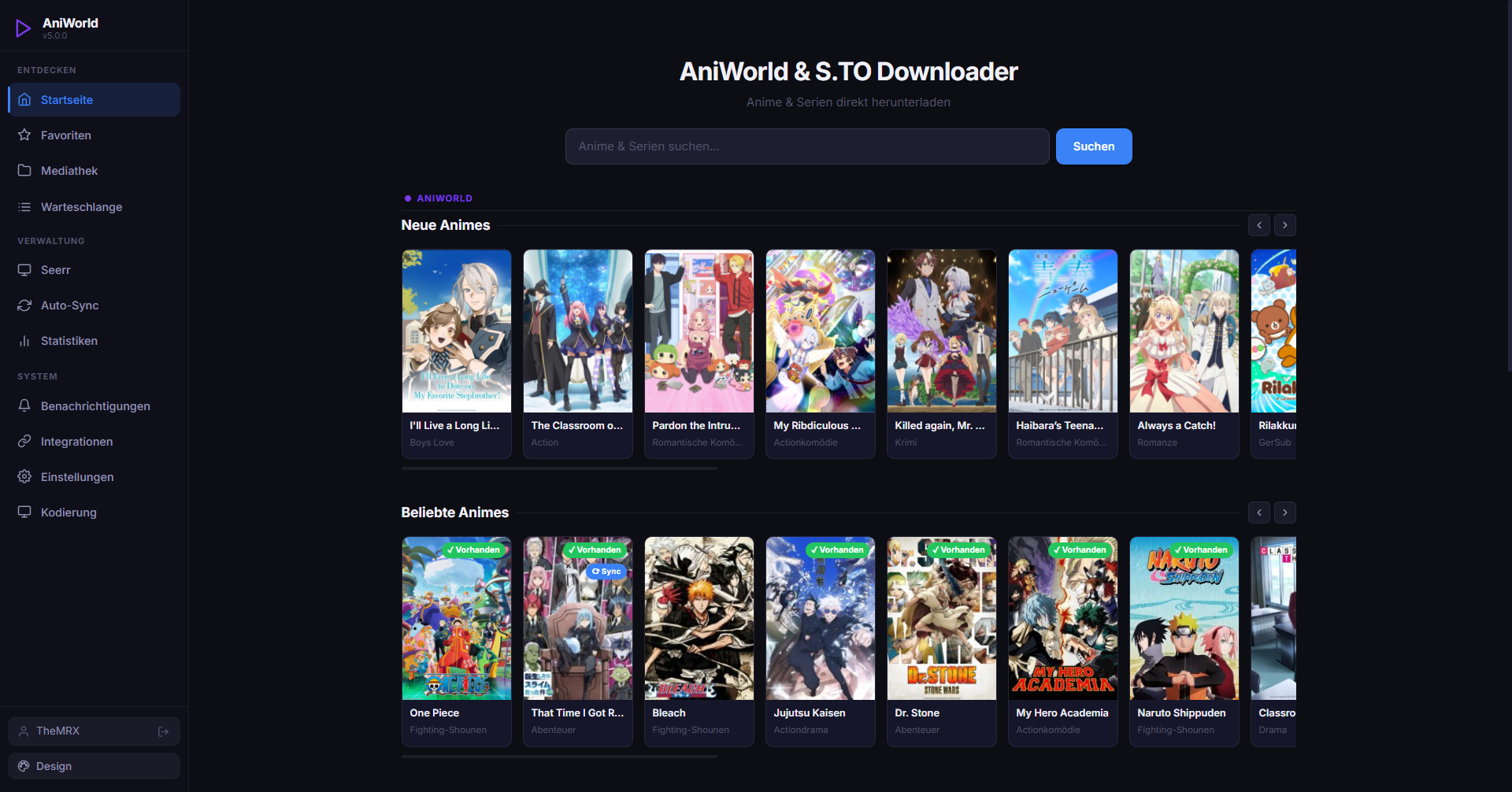
MRX-AniWorld Downloader is a cross-platform WebUI tool for downloading anime from aniworld.to, series from s.to, and movies from filmpalast.to. It runs on Windows, macOS, and Linux.
This project is a fork of the original AniWorld-Downloader by phoenixthrush, SiroxCW and Tmaster055 — maintained and extended here by TheMRX13 and Domekologe.
Note: The CLI has been completely removed. This project is now WebUI-only. Run
aniworldto launch the web interface directly — no flags needed.




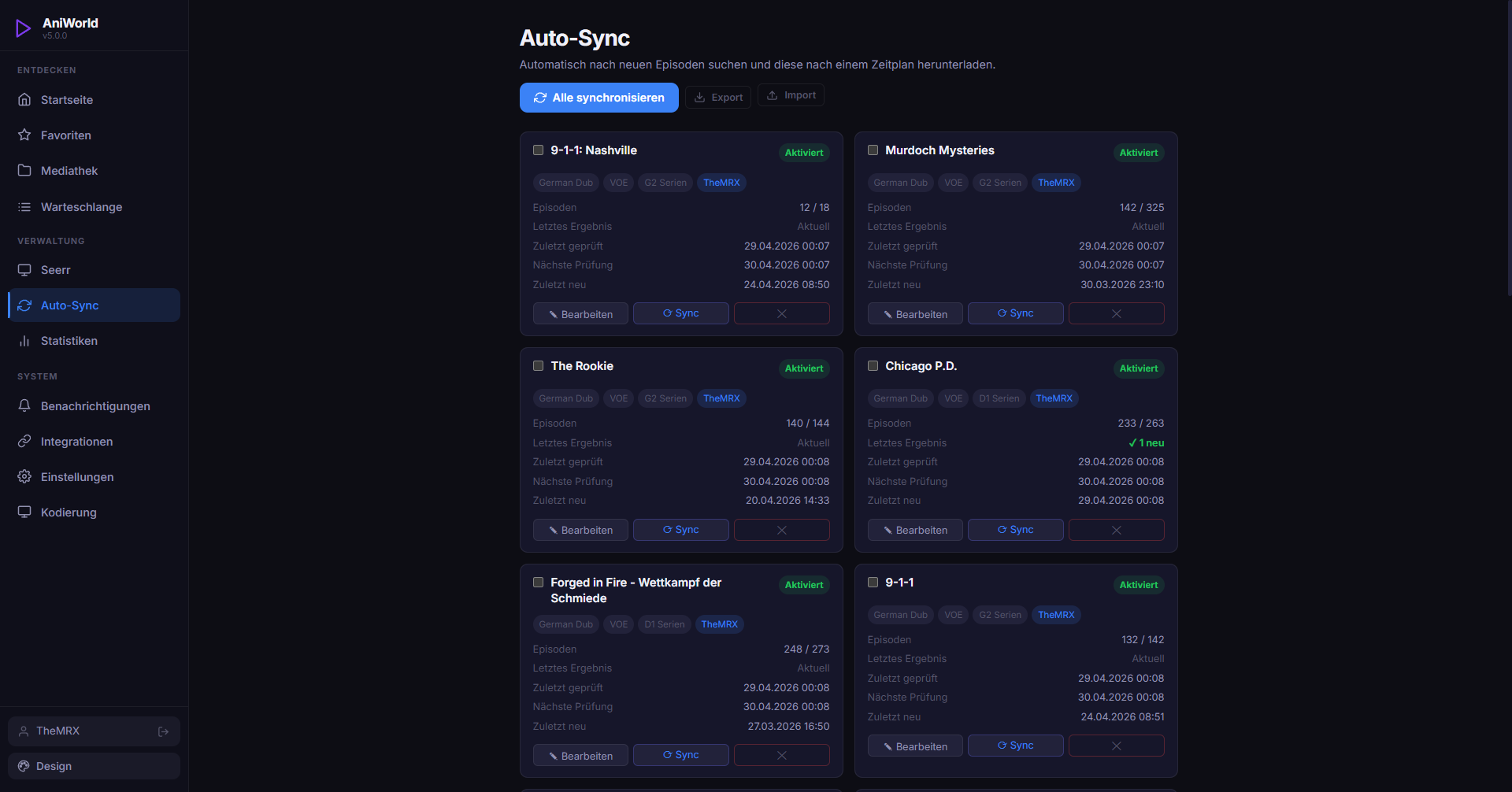
| WebUI (Landing Page) | WebUI (Auto-Sync) |
|---|---|
 |
 |
TL;DR - Quick Start
# Install latest stable release (recommended)
pip install mrx-aniworld

# Install latest development commit (may be unstable)
pip install --upgrade "mrx-aniworld @ git+https://github.com/TheMRX13/MRX-AniWorld-Downloader.git@models"

# Launch AniWorld Downloader (starts WebUI directly)
aniworld

# Use a custom port
aniworld -wP 9090

# Expose on all interfaces (required for LAN, Docker, or nginx reverse proxy)
aniworld -wH 0.0.0.0

# Combined: custom port + expose
aniworld -wH 0.0.0.0 -wP 9090
Installed version: Run
pip show mrx-aniworldto see your installed version. Release installs show a plain version number (e.g.2.1.6), dev installs show the base version plus the commit hash (e.g.2.1.6-dev+abc1234).
⚠️ Requirements: ffmpeg must be installed and available in your system PATH for the downloader to work properly.
The WebUI starts on 127.0.0.1 (localhost) with authentication enabled by default. Open your browser and navigate to http://localhost:8080 (or your custom port).
Exposing to LAN, Docker, or a reverse proxy (nginx): By default the app only listens on localhost. To make it reachable from other devices or containers, add
-wH 0.0.0.0. Docker's-pflag still controls which ports are published to the host —0.0.0.0only affects what the process inside the container binds to.
No
.envfile needed. All settings are configured directly in the WebUI under Settings. Existing.envfiles from previous versions are automatically imported into the database on first start.
CLI Removed
The CLI (interactive menu, direct URL downloads, SyncPlay, AniSkip, Anime4K flags) has been fully removed in this fork. All functionality is available through the WebUI. The only command-line flags are:
| Flag | Description |
|---|---|
-wP / --web-port |
Port for the web UI (default: 8080) |
-wH / --web-host |
Host/IP to bind to (default: 127.0.0.1). Use 0.0.0.0 for Docker, LAN, or nginx reverse proxy |
-wN / --no-browser |
Don't open the browser automatically on startup |
-d / --debug |
Enable debug logging |
Still in Development
This project is actively being improved. Current work in progress includes:
- Multi-Language Support — UI currently German only, English and other languages planned
- More Extractors — additional video host support beyond the current providers
- Live Transcode / In-Browser Playback — watch downloaded files directly in the UI
- Discord Rich Presence — show what you're currently watching on your Discord profile
- More Sources — additional anime, series and movie providers (open a feature request)
- AutoSync Episode Filter — configure per job which seasons/episodes to sync, skip specials/OVAs
- Provider Fallback Order — automatically try the next provider if the primary one fails
- Calendar View — show upcoming episode air dates for AutoSync jobs based on TMDB data
- Bandwidth Limit / Download Time Window — throttle speed or restrict downloads to specific hours
- Download History — searchable log of all completed downloads with date, size and duration
- Generic Outgoing Webhook — send a configurable POST request on download completion (Home Assistant, n8n, etc.)
- Subtitle Support — additional language and subtitle download options
- Integrated VPN/Proxy — download through VPN or proxy servers to increase privacy
Planned Extractors
- Veev
Features
Web Interface
- Browse & Search – Explore and search titles from AniWorld, SerienStream and FilmPalast in a modern UI
- Download Queue – Manage active, queued, and completed downloads in real time
- Media Library – Browse your downloaded files in a built-in file explorer with series/season/episode tree view
- Favourites – Bookmark series and access them quickly from a dedicated page
- AutoSync – Automatically check for new episodes and download them on a schedule; import/export sync jobs as JSON
- Statistics – View detailed download activity: total episodes, storage used, and more
- Encoding Settings – Configure FFmpeg encoding mode (Stream Copy, H.264, H.265/HEVC) with hardware acceleration support (NVENC, VAAPI, VideoToolbox) and quality presets
- Push Notifications – Get notified on completed downloads via Web Push, Telegram, Pushover, Discord, or WhatsApp
- CineInfo – Enrich series cards and detail views with TMDB metadata: streaming providers, FSK age ratings, genres, and audience scores
- Jellyfin / Plex Integration – Automatically trigger a library refresh after each download
- Seerr Integration – Connect to Jellyseerr or Overseerr to view and process pending media requests directly in the UI
- Settings – All configuration is done through the WebUI — no
.envfile needed. Settings are organized in tabs: General, Downloads, Auto-Sync, Network, Authentication, API, and Updates - Authentication & SSO – Always-on local authentication with multi-user support and roles; optional OIDC Single Sign-On (Keycloak, Authentik, Google, etc.) configurable entirely from the UI
- Network Exposure – Binds to
127.0.0.1by default; use-wH 0.0.0.0to expose on all interfaces (required for Docker/LAN/nginx setups) - API – Full REST API for programmatic access to all download and queue features
- Docker Ready – Deploy easily using Docker or Docker Compose
- Anime Upscaling – Upscaling Animes out of the box with Anime4K
Core Download Engine
- Downloading – Grab full series, individual seasons, or single episodes for offline viewing
- Multiple Providers – Stream from various sources on aniworld.to, s.to and filmpalast.to
- Language Preferences – Switch between German Dub, English Sub, or German Sub
- Muxing – Automatically combine video and audio streams into a single file
Supported Site Providers
These are the websites you can pass URLs from:
| Site | URL | Status | Notes |
|---|---|---|---|
| AniWorld | aniworld.to | ✅ Working | Anime, German/English dub & sub |
| SerienStream | s.to | ✅ Working | Series, German/English dub |
| FilmPalast | filmpalast.to | ✅ Working | Movies, German dub |
Supported Video Extractors
These are the video hosters used behind the scenes to deliver the stream:
| Extractor | Status | Last Tested |
|---|---|---|
| VOE | ✅ Working | 04/26 |
| Vidoza | ✅ Working | 04/26 |
| Vidmoly | ✅ Working | 04/26 |
| Filemoon | ✅ Working | 04/26 |
| Doodstream | ✅ Working | 04/26 |
| Vidara | ✅ Working | 04/26 |
| Vidsonic | ⏳ Not Implemented | — |
| Upbolt | ⏳ Not Implemented | — |
| Streamtape | ⏳ Not Implemented | — |
| LoadX | ⏳ Not Implemented | — |
| Luluvdo | ⏳ Not Implemented | — |
| Veev | ⏳ Not Implemented | — |
Currently Prioritized Extractors per Site
- AniWorld – VOE, Filemoon, Vidmoly
- SerienStream – VOE, Vidoza
- FilmPalast – VOE (soon Vidara and Vidsonic)
Docker
The Docker image is available on the GitHub Container Registry and gets automatically updated on every release:
docker pull ghcr.io/themrx13/mrx-aniworld-downloader:latest
Running the Container
- macOS / Linux (bash/zsh):
docker run -it --rm \
  -p 8080:8080 \
  -v "${PWD}/Downloads:/app/Downloads" \
  -v aniworld-data:/home/aniworld/.aniworld \
  ghcr.io/themrx13/mrx-aniworld-downloader:latest
- Windows (PowerShell):
docker run -it --rm `
  -p 8080:8080 `
  -v "${PWD}\Downloads:/app/Downloads" `
  -v aniworld-data:/home/aniworld/.aniworld `
  ghcr.io/themrx13/mrx-aniworld-downloader:latest
Note: Mount your local
Downloadsfolder to/app/Downloadsin the container to save downloaded episodes, and mount a volume (likeaniworld-data) to/home/aniworld/.aniworldto persist the configuration and database (e.g. users, settings, and download queue). The WebUI is available athttp://localhost:8080.
Docker / Reverse Proxy (nginx): The app binds to
127.0.0.1by default, which is only reachable inside the container. If you're using a reverse proxy (e.g. nginx in a separate container) or want LAN access, you must bind to0.0.0.0by passing the-wHflag:aniworld -wH 0.0.0.0 -wP 8080Docker's
-p 8080:8080port mapping still controls which ports are exposed to the host —0.0.0.0only affects inter-container/LAN reachability.
Docker Compose (with Web UI)
Start AniWorld Downloader using Docker Compose:
docker-compose up -d --build
This command will:
- Build the Docker image if it hasn't been built yet
- Start the container in detached mode (
-d) - Launch the WebUI automatically
- Automatically restart the container unless stopped manually (
restart: unless-stopped)
To stop the container:
docker-compose down
All settings (language, provider, SSO, reverse proxy URL, etc.) are configured via the WebUI after first launch — no
.envfile or environment variables required. Seedocker-compose.yamlfor optional automation via environment variables (e.g. pre-creating an admin account).
Contributing
Contributions to MRX-AniWorld Downloader are highly appreciated! You can help improve the project in several ways:
- Report Bugs – Identify and report issues to improve functionality
- Suggest Features – Share ideas to expand the tool's capabilities
- Submit Pull Requests – Contribute code to fix bugs or add new features
- Improve Documentation – Help enhance user guides, tutorials, and technical documentation
Before submitting contributions, please check the repository for existing issues or feature requests to avoid duplicates. You're also welcome to discuss ideas on our Discord before opening a PR.
Credits
MRX-AniWorld Downloader builds upon the work of several outstanding open-source projects and individuals:
Original Authors
- phoenixthrush – Original creator of AniWorld-Downloader
- SiroxCW – Core contributor to the original codebase
- Tmaster055 – Core contributor to the original codebase
Libraries & Tools
- mpv – A versatile media player used for seamless video streaming
- Flask – Web framework powering the WebUI
- Waitress – Production WSGI server
Other Cool Projects
-
Jellyfin AniWorld Downloader by SiroxCW – A Jellyfin plugin that lets you browse and download anime & series directly from AniWorld, fully integrated into your media server.
-
AniBridge by Zzackllack – A minimal FastAPI service that bridges anime and series streaming catalogues (AniWorld, SerienStream/s.to, MegaKino) with automation tools.
Support
If you need help with MRX-AniWorld Downloader, you have several options:
- Join the Discord Server – the fastest way to get help, ask questions, and chat with other users
- Submit an issue on the GitHub Issues page – preferred for installation problems, bug reports, or feature requests, as it helps others benefit from shared solutions
If you find MRX-AniWorld Downloader useful, please star the repository on GitHub. Your support is greatly appreciated and motivates continued development.
Thank you for using MRX-AniWorld Downloader!
Legal Disclaimer
MRX-AniWorld Downloader is a client-side tool that enables access to content hosted on third-party websites. It does not host, upload, store, or distribute any media itself.
This software is not intended to promote piracy or copyright infringement. You are solely responsible for how you use MRX-AniWorld Downloader and for ensuring that your use complies with applicable laws and the terms of service of the websites you access.
The developer provides this project "as is" and is not responsible for:
- Third-party content
- External links
- The availability, accuracy, legality, or reliability of any third-party service
If you have concerns about specifi
Project details
Verified details
These details have been verified by PyPIProject links
GitHub Statistics
Maintainers
Release history Release notifications | RSS feed


Download files
Download the file for your platform. If you're not sure which to choose, learn more about installing packages.
Source Distribution
Built Distribution
Filter files by name, interpreter, ABI, and platform.
If you're not sure about the file name format, learn more about wheel file names.
Copy a direct link to the current filters
File details
Details for the file mrx_aniworld-2.3.0.tar.gz.
File metadata
- Download URL: mrx_aniworld-2.3.0.tar.gz
- Upload date:
- Size: 1.2 MB
- Tags: Source
- Uploaded using Trusted Publishing? Yes
- Uploaded via: twine/6.1.0 CPython/3.13.12
File hashes
| Algorithm | Hash digest | |
|---|---|---|
| SHA256 |
f440b35c0b99c1ee91947add4a81680543e471c57b742472551b2eea88ef5e4c
|
|
| MD5 |
74e8c2a3473350d774038c7ffc76c322
|
|
| BLAKE2b-256 |
a8dcb87873c5f2250b9b14d1132a3df4c8710075a9d9dfe021576cb8d79205f5
|
Provenance
The following attestation bundles were made for mrx_aniworld-2.3.0.tar.gz:
Publisher:
auto-tag.yaml on TheMRX13/MRX-AniWorld-Downloader
-
Statement:
-
Statement type:
https://in-toto.io/Statement/v1 -
Predicate type:
https://docs.pypi.org/attestations/publish/v1 -
Subject name:
mrx_aniworld-2.3.0.tar.gz -
Subject digest:
f440b35c0b99c1ee91947add4a81680543e471c57b742472551b2eea88ef5e4c - Sigstore transparency entry: 1695479576
- Sigstore integration time:
-
Permalink:
TheMRX13/MRX-AniWorld-Downloader@dc2828d626f2ce095b02f7ddbee53e4daab27154 -
Branch / Tag:
refs/heads/models - Owner: https://github.com/TheMRX13
-
Access:
public
-
Token Issuer:
https://token.actions.githubusercontent.com -
Runner Environment:
github-hosted -
Publication workflow:
auto-tag.yaml@dc2828d626f2ce095b02f7ddbee53e4daab27154 -
Trigger Event:
push
-
Statement type:
File details
Details for the file mrx_aniworld-2.3.0-py3-none-any.whl.
File metadata
- Download URL: mrx_aniworld-2.3.0-py3-none-any.whl
- Upload date:
- Size: 1.3 MB
- Tags: Python 3
- Uploaded using Trusted Publishing? Yes
- Uploaded via: twine/6.1.0 CPython/3.13.12
File hashes
| Algorithm | Hash digest | |
|---|---|---|
| SHA256 |
243cc21ef0aef0bfa7702a4ad42e3bcb684bccffe95512a09936e71b7393a812
|
|
| MD5 |
19fd01250d09275bb0e61d2acae50aea
|
|
| BLAKE2b-256 |
43125efb4f0ebcc8f0c590d9ca3fa0d594a9e437b7619c487596af05531219fe
|
Provenance
The following attestation bundles were made for mrx_aniworld-2.3.0-py3-none-any.whl:
Publisher:
auto-tag.yaml on TheMRX13/MRX-AniWorld-Downloader
-
Statement:
-
Statement type:
https://in-toto.io/Statement/v1 -
Predicate type:
https://docs.pypi.org/attestations/publish/v1 -
Subject name:
mrx_aniworld-2.3.0-py3-none-any.whl -
Subject digest:
243cc21ef0aef0bfa7702a4ad42e3bcb684bccffe95512a09936e71b7393a812 - Sigstore transparency entry: 1695479696
- Sigstore integration time:
-
Permalink:
TheMRX13/MRX-AniWorld-Downloader@dc2828d626f2ce095b02f7ddbee53e4daab27154 -
Branch / Tag:
refs/heads/models - Owner: https://github.com/TheMRX13
-
Access:
public
-
Token Issuer:
https://token.actions.githubusercontent.com -
Runner Environment:
github-hosted -
Publication workflow:
auto-tag.yaml@dc2828d626f2ce095b02f7ddbee53e4daab27154 -
Trigger Event:
push
-
Statement type:






