
Machine readable zone (MRZ) reading SDK for passport, Visa, ID card and travel document.

Project description
Python MRZ Scanner SDK
A Python wrapper for Machine Readable Zone (MRZ) detection and parsing using the Dynamsoft Capture Vision SDK. Supports multiple document types including passports, ID cards, visas, and travel documents across Windows, Linux, and macOS platforms.

Note: This is an unofficial, community-maintained wrapper. For the most reliable and fully-supported solution, consider the official Dynamsoft Capture Vision Bundle.
🚀 Quick Links
📊 Feature Comparison
| Feature | Community Wrapper | Official Dynamsoft SDK |
|---|---|---|
| Support | Community-driven | ✅ Official Dynamsoft support |
| Documentation | Enhanced README with examples | ✅ Comprehensive online documentation |
| API Coverage | Core MRZ features | ✅ Full API coverage |
| Updates | May lag behind | ✅ Latest features first |
| Testing | Limited environments | ✅ Thoroughly tested |
| Ease of Use | ✅ Simple, intuitive API | More verbose API |
| Cross-platform | ✅ Windows, Linux, macOS | ✅ Windows, Linux, macOS |
🎯 Supported MRZ Types
- TD1: ID cards (3 lines, 30 characters each)
- TD2: ID cards (2 lines, 36 characters each)
- TD3: Passports (2 lines, 44 characters each)
- MRVA/MRVB: Visas (2 lines, 44/36 characters)
🔧 Installation
Requirements
-
Python 3.x
-
OpenCV (for UI display)
pip install opencv-python
-
Dynamsoft Capture Vision Bundle SDK
pip install dynamsoft-capture-vision-bundle
Build from Source
# Source distribution
python setup.py sdist

# Build wheel
python setup.py bdist_wheel
🏃♂️ Quick Start
Basic Usage
import mrzscanner

# 1. Initialize license (required)
error_code, error_msg = mrzscanner.initLicense("YOUR_LICENSE_KEY")
if error_code != 0:
    print(f"License error: {error_msg}")
    exit(1)

# 2. Create scanner instance
scanner = mrzscanner.createInstance()

# 3. Detect MRZ from image
results = scanner.decodeFile("passport.jpg")

# 4. Process results
for mrz in results:
    print(f"Document Type: {mrz.doc_type}")
    print(f"Document ID: {mrz.doc_id}")
    print(f"Name: {mrz.given_name} {mrz.surname}")
    print(f"Nationality: {mrz.nationality}")
    print(f"Date of Birth: {mrz.date_of_birth}")
    print(f"Expiry Date: {mrz.date_of_expiry}")
    print("-" * 40)
Real-time Camera Processing
import cv2
import mrzscanner

# Initialize
mrzscanner.initLicense("YOUR_LICENSE_KEY")
scanner = mrzscanner.createInstance()

def on_mrz_detected(mrzs):
    """Callback for real-time MRZ detection"""
    for mrz in mrzs:
        print(f"🔍 Found: {mrz.doc_type} - {mrz.doc_id}")

# Set up async processing
scanner.addAsyncListener(on_mrz_detected)

# Camera stream
cap = cv2.VideoCapture(0)
while True:
    ret, frame = cap.read()
    if ret:
        # Queue frame for async processing
        scanner.decodeMatAsync(frame)

        cv2.imshow('MRZ Scanner', frame)
        if cv2.waitKey(1) & 0xFF == ord('q'):
            break

cap.release()
cv2.destroyAllWindows()
scanner.clearAsyncListener()
📋 Command Line Usage
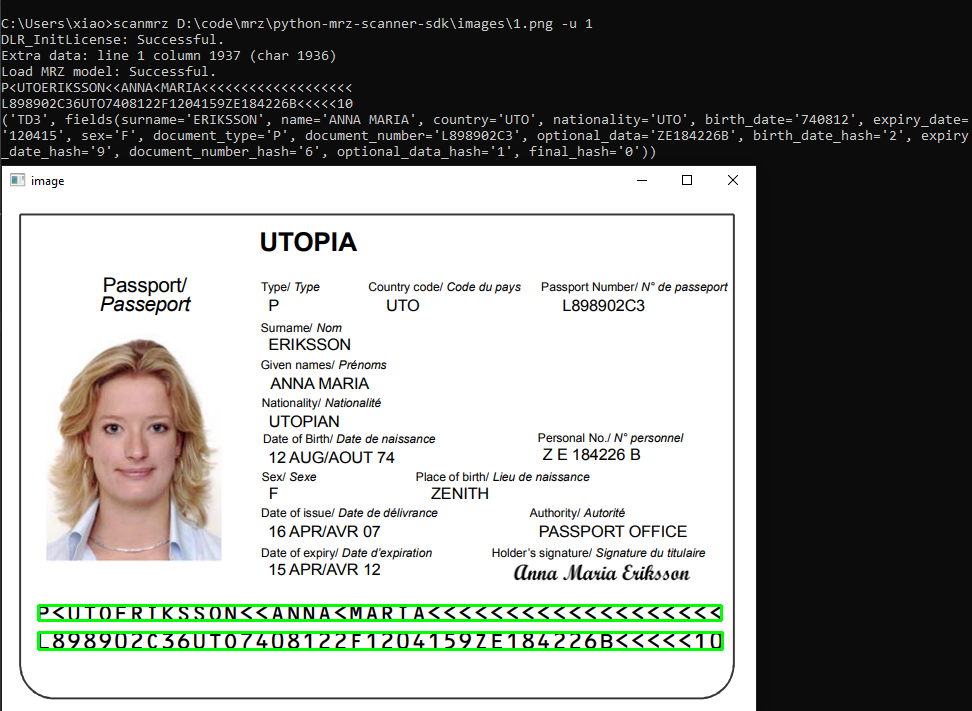
The package includes a command-line tool for quick MRZ scanning:
# Scan from image file
scanmrz <file-name> -l <license-key>

# Scan with UI display
scanmrz <file-name> -u 1 -l <license-key>
📚 API Reference
Core Classes
MrzScanner
The main class for MRZ detection operations.
scanner = mrzscanner.createInstance()
Synchronous Methods:
decodeFile(file_path: str) -> List[MrzResult]- Detect MRZ from image filedecodeMat(mat: np.ndarray) -> List[MrzResult]- Detect MRZ from OpenCV matrixdecodeBytes(bytes, width, height, stride, pixel_format) -> List[MrzResult]- Detect MRZ from raw bytes
Asynchronous Methods:
addAsyncListener(callback: Callable) -> None- Start async processing with callbackdecodeMatAsync(mat: np.ndarray) -> None- Queue OpenCV matrix for async processingdecodeBytesAsync(bytes, width, height, stride, pixel_format) -> None- Queue raw bytes for async processingclearAsyncListener() -> None- Stop async processing
MrzResult
Container for detected MRZ information and location.
Attributes:
doc_type: str- Document type (e.g., "MRTD_TD3_PASSPORT")doc_id: str- Document number/IDsurname: str- Primary identifier (surname)given_name: str- Secondary identifier (given names)nationality: str- Nationality code (3-letter)issuer: str- Issuing country/organizationgender: str- Gender ("M", "F", or "<")date_of_birth: str- Date of birth (YYMMDD)date_of_expiry: str- Expiry date (YYMMDD)raw_text: List[str]- Raw MRZ text linesx1, y1, x2, y2, x3, y3, x4, y4: float- Corner coordinates
Methods:
to_string() -> str- Human-readable string representation
Utility Functions
# License management
error_code, error_msg = mrzscanner.initLicense("LICENSE_KEY")

# Scanner creation
scanner = mrzscanner.createInstance()

# Format conversion
image_data = mrzscanner.convertMat2ImageData(opencv_mat)
image_data = mrzscanner.wrapImageData(width, height, stride, pixel_format, bytes)
Release history Release notifications | RSS feed


Download files
Download the file for your platform. If you're not sure which to choose, learn more about installing packages.
Source Distribution
Built Distribution
Filter files by name, interpreter, ABI, and platform.
If you're not sure about the file name format, learn more about wheel file names.
Copy a direct link to the current filters
File details
Details for the file mrz_scanner_sdk-4.0.0.tar.gz.
File metadata
- Download URL: mrz_scanner_sdk-4.0.0.tar.gz
- Upload date:
- Size: 14.9 kB
- Tags: Source
- Uploaded using Trusted Publishing? No
- Uploaded via: twine/6.2.0 CPython/3.9.24
File hashes
| Algorithm | Hash digest | |
|---|---|---|
| SHA256 |
d61fa2e6b36ec720ffdfed374feee1447b7728611eecd6a80e6a06a33d30e9f3
|
|
| MD5 |
809aa6fb1cb866468ec7ca7ff1e97f7a
|
|
| BLAKE2b-256 |
f459d1290df604dbfe14e5d8603dc64a212fdc8f451b5350fa9c6ae06325ff24
|
File details
Details for the file mrz_scanner_sdk-4.0.0-py3-none-any.whl.
File metadata
- Download URL: mrz_scanner_sdk-4.0.0-py3-none-any.whl
- Upload date:
- Size: 16.1 kB
- Tags: Python 3
- Uploaded using Trusted Publishing? No
- Uploaded via: twine/6.2.0 CPython/3.9.24
File hashes
| Algorithm | Hash digest | |
|---|---|---|
| SHA256 |
098784e1afa112ceb24269da6b2622f0e87fe4e54f98b25ec5e18612da1af8dc
|
|
| MD5 |
4c61f2b5d6c50f050e8cbae86a7875e6
|
|
| BLAKE2b-256 |
86be097bf3a508a7044a89a2fd2ce7480a29d211402b919cc77860baad35f17a
|






