
MS-AutoQC
MS-AutoQC is an all-in-one solution for automated quality control of liquid chromatography-mass spectrometry (LC-MS) data, both during and after data acquisition.
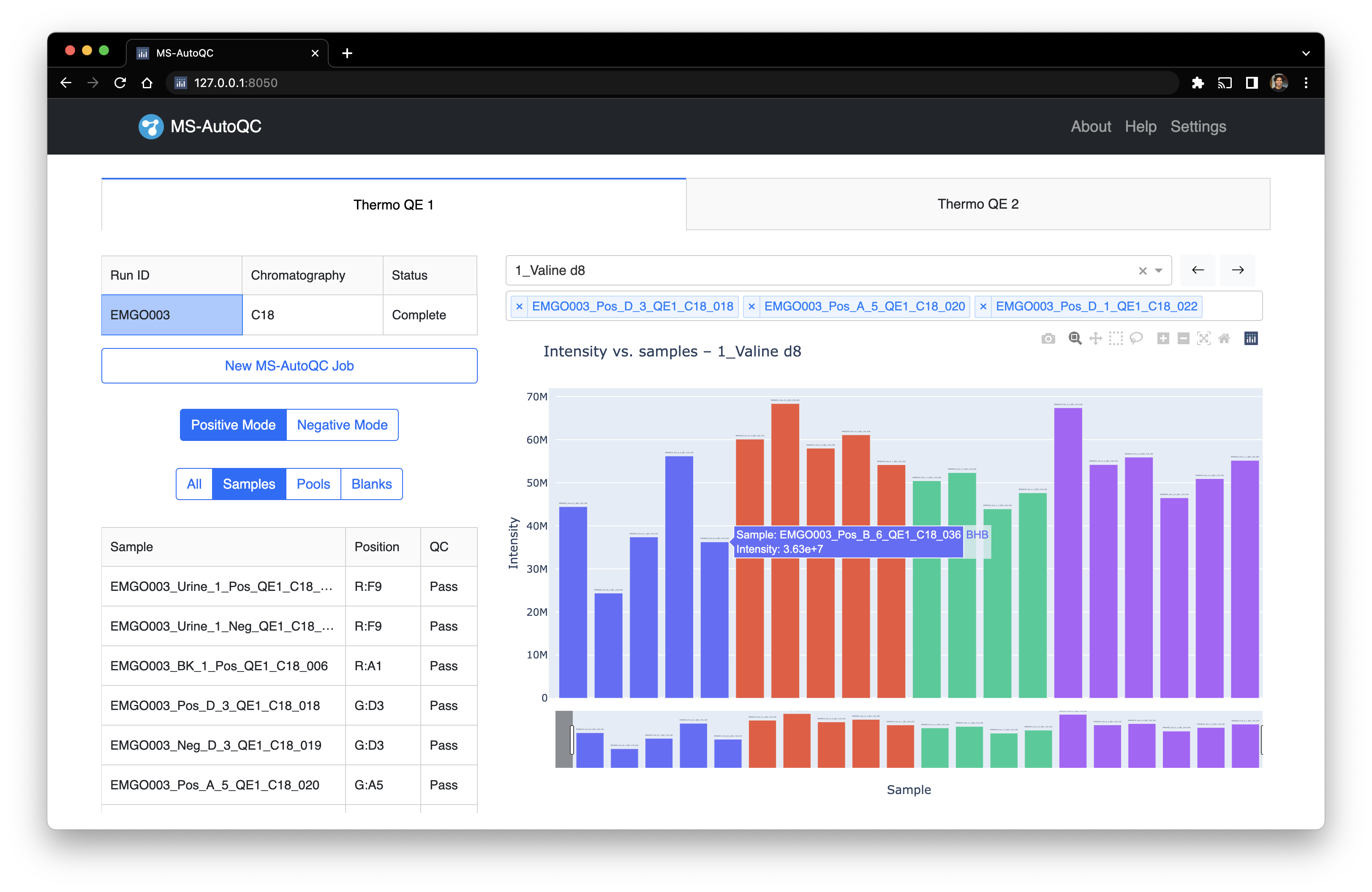
It offers a fast, straightforward approach to ensure collection of high-quality data, allowing for less time investigating raw data and more time conducting experiments.
Developed at the Mass Spectrometry Platform of CZ Biohub San Francisco, MS-AutoQC provides a host of key features to streamline untargeted metabolomics research, such as:
- Automated and user-defined quality control checks during instrument runs
- Realtime updates on QC fails in the form of Slack or email notifications
- Interactive data visualization of internal standard retention time, m/z, and intensity across samples
- Google Drive cloud sync and secure, Google-authenticated access to QC results from any device
Requirements
MS-AutoQC was designed to run on Windows platforms because of its dependency on MSConvert for vendor format data conversion and MS-DIAL for data processing and identification. However, MacOS users can still use MS-AutoQC to monitor / view their instrument run data.
In addition, MS-AutoQC requires Python 3.8+ and various Python packages, including Pandas, SQLAlchemy, Plotly, Dash, Bootstrap, Watchdog, Google API, and Slack API. These are installed automatically during setup.
Note: Installation of Python and various Python packages on MS instrument computers comes at no risk. For extra security and peace of mind, you can opt to install MS-AutoQC in a virtual environment. To learn more, please read the installation guide.
Installation
Installing MS-AutoQC is easy. Simply open your Terminal or Command Prompt and type:
pip install ms-autoqc
Python dependencies are installed automatically, but dependencies such as MSConvert and MS-DIAL will need to be installed manually. Check out the installation guide for more details.
If necessary, you can download and install MS-AutoQC v1.0.0 manually from GitHub – although we strongly recommend using pip!
Please keep in mind that MS-AutoQC is still in beta development. If you encounter a bug or issue, please report it by opening an issue on GitHub.
Supported Vendors
MS-AutoQC was designed to be a universal, open-source solution for data quality control. Because MSConvert converts raw acquired data into open mzML format before routing it to the data processing pipeline, the package will work seamlessly with data of all vendor formats.
However, MS-AutoQC has only been tested extensively on Thermo Fisher mass spectrometers and Thermo RAW files. As such, it is expected that there may be bugs / issues with processing data of other vendor formats.
We are welcome to collaboration! If you would like to help us comprehensively test support on Agilent / Bruker / Sciex / Waters instruments, please send an email to brian.defelice@czbiohub.org.
3 maintainers


Metadata
3 maintainers
Release files for ms-autoqc 1.0.1
For a detailed explanation of source distributions (sdists) and built distributions (wheels), please see the package formats documentation.
Source distribution (sdist)
| File | Size | Uploaded | Provenance | Actions |
|---|---|---|---|---|
| ms-autoqc-1.0.1.tar.gz | 115.5 kB | Without provenance | Details for ms-autoqc-1.0.1.tar.gz |
Built distribution (wheel)
| File | Interpreter | ABI | Platform | Actions Reset |
|---|---|---|---|---|
| ms_autoqc-1.0.1-py3-none-any.whl | Python 3 | none | any | Details for ms_autoqc-1.0.1-py3-none-any.whl |
Total release size: 230.7 kB
Release files / ms-autoqc-1.0.1.tar.gz
| Download URL | ms-autoqc-1.0.1.tar.gz |
|---|---|
| Size | 115.5 kB |
| Tags | Source |
|
SHA-256 checksum How to use checksums |
b845e239e259e06be015cd26d371be44056d632d7c0eaaaeb855fedbe0fde506
|
|
BLAKE2b-256 checksum How to use checksums |
df297d09f597215a5b9b61c3038f3720d74ab59dad81b0752ef1200d5d75f559
|
| Upload date | |
|
Uploaded using Trusted Publishing? What is trusted publishing? |
No |
| Uploaded via |
twine/4.0.2 CPython/3.11.2
|
Release files / ms_autoqc-1.0.1-py3-none-any.whl
| Download URL | ms_autoqc-1.0.1-py3-none-any.whl |
|---|---|
| Size | 115.2 kB |
| Tags | Python 3 |
|
SHA-256 checksum How to use checksums |
d1ff384793315e370c18468a30a0b3523f064bf235f990832f338745b0e4e713
|
|
BLAKE2b-256 checksum How to use checksums |
32ea57bcbbdb5a5bcdc3b857cee145bfd4a900f8876f177548fc54dd7aa722dd
|
| Upload date | |
|
Uploaded using Trusted Publishing? What is trusted publishing? |
No |
| Uploaded via |
twine/4.0.2 CPython/3.11.2
|
Security for ms-autoqc 1.0.1
Provenance
Provenance describes where a file came from. On PyPI, provenance is shared via attestations, which provide a verifiable record of the build or publishing details. View details, limitations and caveats.
No provenance found
None of the files in this release were uploaded with provenance metadata.
A note on package security
PyPI is a repository for distributing packages, not a service for auditing them. While third-party security researchers and our staff do their best to detect and remove malicious packages, PyPI cannot guarantee the quality, security or suitability of any given package.
To learn more about protecting yourself from malicious actors, visit our package security documentation.













