
A Model Context Protocol server for interacting with Rememberizer Vector Store (https://docs.rememberizer.ai/developer/vector-stores).

Project description
Rememberizer Vector Store MCP Server
A Model Context Protocol server for LLMs to interact with Rememberizer Vector Store.
Components
Resources
The server provides access to your Vector Store's documents in Rememberizer.
Tools
-
rememberizer_vectordb_search- Search for documents in your Vector Store by semantic similarity
- Input:
q(string): Up to a 400-word sentence to find semantically similar chunks of knowledgen(integer, optional): Number of similar documents to return (default: 5)
-
rememberizer_vectordb_agentic_search- Search for documents in your Vector Store by semantic similarity with LLM Agents augmentation
- Input:
query(string): Up to a 400-word sentence to find semantically similar chunks of knowledge. This query can be augmented by our LLM Agents for better results.n_chunks(integer, optional): Number of similar documents to return (default: 5)user_context(string, optional): The additional context for the query. You might need to summarize the conversation up to this point for better context-awared results (default: None)
-
rememberizer_vectordb_list_documents- Retrieves a paginated list of all documents
- Input:
page(integer, optional): Page number for pagination, starts at 1 (default: 1)page_size(integer, optional): Number of documents per page, range 1-1000 (default: 100)
- Returns: List of documents
-
rememberizer_vectordb_information- Get information of your Vector Store
- Input: None required
- Returns: Vector Store information details
-
rememberizer_vectordb_create_document- Create a new document for your Vector Store
- Input:
text(string): The content of the documentdocument_name(integer, optional): A name for the document
-
rememberizer_vectordb_delete_document- Delete a document from your Vector Store
- Input:
document_id(integer): The ID of the document you want to delete
-
rememberizer_vectordb_modify_document- Change the name of your Vector Store document
- Input:
document_id(integer): The ID of the document you want to modify
Installation
Via mcp-get.com: Use mcp-get command to automatically set up the Rememberizer MCP Vector Store MCP Server.
npx @michaellatman/mcp-get@latest install mcp-rememberizer-vectordb
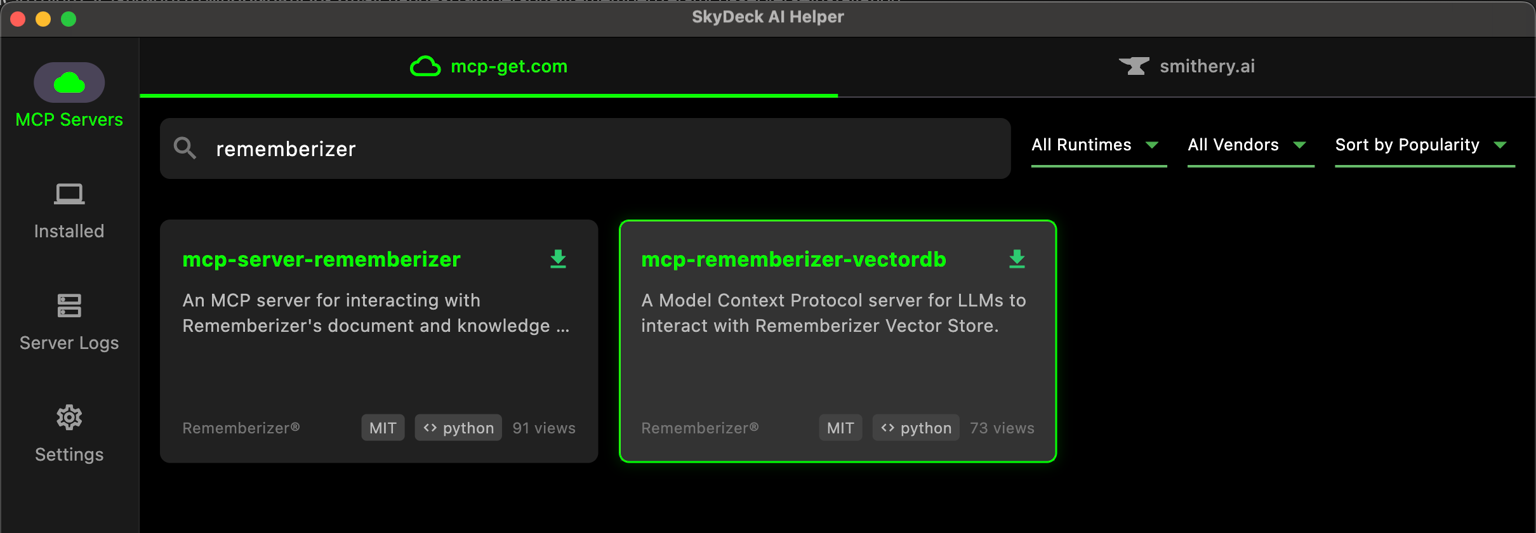
Via SkyDeck AI Helper App: If you have SkyDeck AI Helper app installed, you can search for "Rememberizer" and install the mcp-rememberizer-vectordb.
Configuration
Environment Variables
The following environment variables are required:
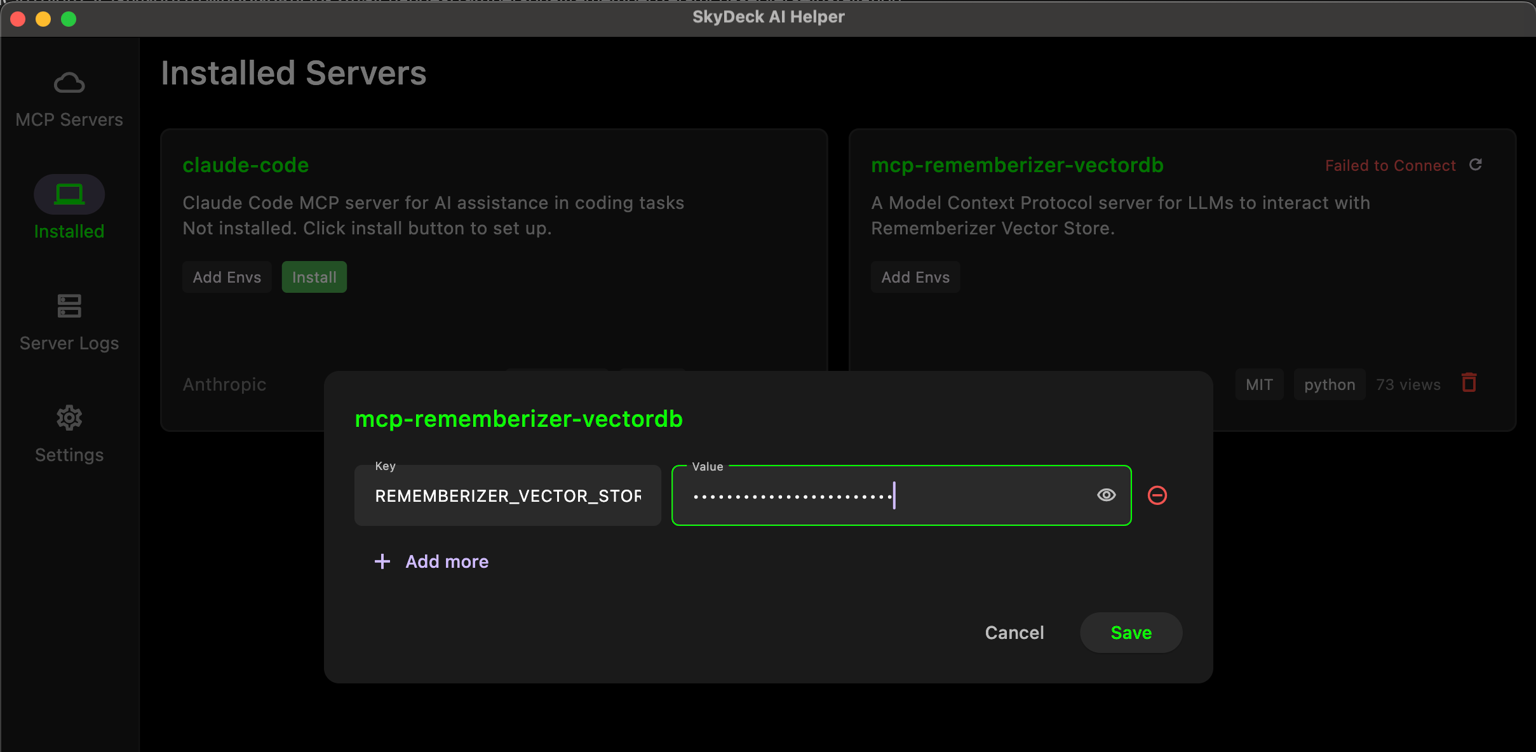
REMEMBERIZER_VECTOR_STORE_API_KEY: Your Rememberizer Vector Store API token
You can register an API key by create your own Vector Store in Rememberizer.
Usage with Claude Desktop
Add this to your claude_desktop_config.json:
"mcpServers": {
  "rememberizer": {
      "command": "uvx",
      "args": ["mcp-rememberizer-vectordb"],
      "env": {
        "REMEMBERIZER_VECTOR_STORE_API_KEY": "your_rememberizer_api_token"
      }
    },
}
Usage with SkyDeck AI Helper App
Add the env REMEMBERIZER_VECTOR_STORE_API_KEY to mcp-rememberizer-vectordb.
License
This MCP server is licensed under the Apache License 2.0. This means you are free to use, modify, and distribute the software, subject to the terms and conditions of the Apache License. For more details, please see the LICENSE file in the project repository.


Download files
Download the file for your platform. If you're not sure which to choose, learn more about installing packages.
Source Distribution
Built Distribution
Filter files by name, interpreter, ABI, and platform.
If you're not sure about the file name format, learn more about wheel file names.
Copy a direct link to the current filters
File details
Details for the file mseep_mcp_rememberizer_vectordb-0.1.1.tar.gz.
File metadata
- Download URL: mseep_mcp_rememberizer_vectordb-0.1.1.tar.gz
- Upload date:
- Size: 11.4 kB
- Tags: Source
- Uploaded using Trusted Publishing? No
- Uploaded via: twine/6.1.0 CPython/3.11.12
File hashes
| Algorithm | Hash digest | |
|---|---|---|
| SHA256 |
ead29d522dc57dc3eb4b0b5bad1fa6325411ce866c7f0954d8b7e3ff0ca1c365
|
|
| MD5 |
8cb4d5d3b782d87a052d7298f48e162e
|
|
| BLAKE2b-256 |
8642673f97051ee3e84738b1891ad251f0e9b8ee5fc2ff21f1dcac423cbc99c9
|
File details
Details for the file mseep_mcp_rememberizer_vectordb-0.1.1-py3-none-any.whl.
File metadata
- Download URL: mseep_mcp_rememberizer_vectordb-0.1.1-py3-none-any.whl
- Upload date:
- Size: 11.3 kB
- Tags: Python 3
- Uploaded using Trusted Publishing? No
- Uploaded via: twine/6.1.0 CPython/3.11.12
File hashes
| Algorithm | Hash digest | |
|---|---|---|
| SHA256 |
e4c12f179c9e4c6a68f99893e569f7ea3c975fcec1dac54568680c40d50024c0
|
|
| MD5 |
413998c4c55c743ba24d8b167b85e9e9
|
|
| BLAKE2b-256 |
8c74d1ac4aa96e2b9902ad4373d2573ccd7f892a3f173869a77244c74a6f6cff
|






