
Map Tiles Downloader
For Meshtastic & MeshCore
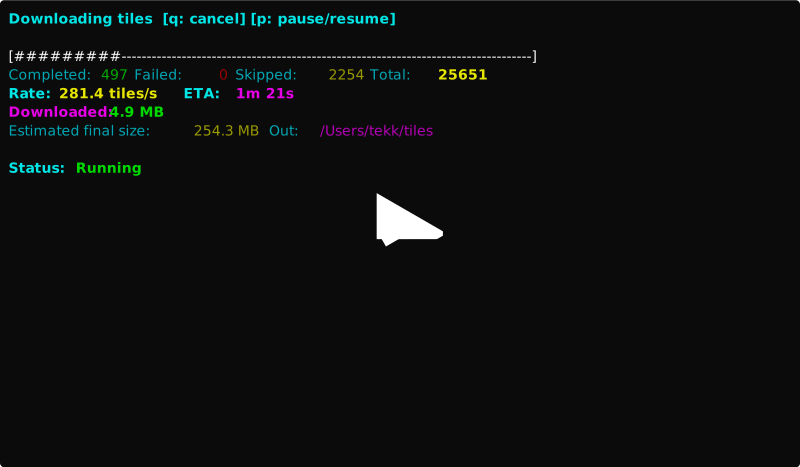
This app helps you fetch map tiles quickly, for offline use. You can pick places using a simple text interface, choose tiles provider and map style, and then download the exact areas that you need. It shows download progress, speed, ETA, and estimates how much disk space will the maps use.




Install with pipx (recommended)
pipx installs Python apps into isolated environments and exposes the commands on your PATH.
macOS (Homebrew)
brew install pipx
pipx ensurepath # then restart your terminal
pipx install mt-downloader
mt-downloader  # or: map-tiles-downloader
Windows (winget)
First install latest Python from the Windows Store.
Then in Windows Terminal, run (one by one):
pip install pipx
python -m pipx ensurepath # then close and restart the Terminal
pipx install mt-downloader
mt-downloader
Docker
A Dockerfile is included. Build the image once, then run it interactively and mount a host directory at /maps to keep the downloaded tiles on your machine:
docker build -t mt-downloader .
docker run --rm -it -v "$PWD/maps:/maps" mt-downloader
To use the non-interactive subcommands:
docker run --rm -it -v "$PWD/maps:/maps" mt-downloader \
  bbox 45.9668 5.7767 48.3068 8.7167 --max-zoom 12 -o /maps/out
For Thunderforest, pass your API key with -e:
docker run --rm -it -e THUNDERFOREST_API_KEY="your_key_here" \
  -v "$PWD/maps:/maps" mt-downloader
By default the image installs the version pinned in the Dockerfile. To build against a different release, pass --build-arg MT_DOWNLOADER_VERSION=x.y.z.
Pre-compiled binaries
Download the installer/pre-compiled binaries from the Github Releases page.
Source code
The source code lives in the GitHub repository: tekk/map-tiles-downloader.
If you want to compile yourself
First, install the project into a virtual environment. Then launch the interactive interface and follow the prompts. Select one or more continents, countries, and regions, choose a provider (Thunderforest or OpenStreetMap), set zoom levels, and pick an output directory. If the provider needs an API key you’ll be asked for it.
MacOS / Linux
python3 -m venv .venv
source .venv/bin/activate
pip install -r requirements.txt
pip install . # note the dot at the end of command
mt-downloader
Windows
In Powershell in Windows Terminal (not cmd), run:
python -m venv .venv
.\.venv\Scripts\Activate.ps1
pip install -r .\requirements.txt
pip install . # note the dot at the end of command
mt-downloader
If you need to automate, or prefer commands instead of the guided interface, there are bbox and kml subcommands (beta). Bounding box mode lets you fetch tiles for a given rectangle. KML mode expands points and routes into small areas around each location.
mt-downloader bbox SOUTH WEST NORTH EAST --max-zoom 12 -o ~/maps/out
mt-downloader kml /path/to/file.kml --max-zoom 12 -o ~/maps/out
For Thunderforest, set your API key once per session, or pass it with -k.
export THUNDERFOREST_API_KEY="your_key_here"
You can also preview a download without fetching data to see how many tiles you’ll get.
mt-downloader bbox 45.9668 5.7767 48.3068 8.7167 --max-zoom 12 --dry-run
That’s all you need. Launch the TUI, pick areas, and the downloader will handle the rest.
Region names
The region picker uses the geonamescache library for its area data. US states are listed by their proper names (e.g. California, Texas). For other countries, the library doesn't ship subdivision names, so each first-level region is labeled with its raw geonames admin1 code plus a hint of the most populous city it contains, for example:
- Canada:
08 (around Toronto)— Ontario - Poland:
78 (around Warsaw)— Mazowieckie - Germany:
02 (around Munich)— Bavaria
The numeric code matches the adm1 dropdown under the Hierarchy tab on geonames.org, so you can cross-check the exact administrative region if needed.
Contributing
I'll be very happy for any kind of contributions. Feel free to fork and make a PR, or open an issue. I'll try to maintain this project as long as I'll have enough spare time to do so.
This project is created and maintained with :heart: by tekk.
1 maintainer

Metadata
1 maintainer
Release files for mt-downloader 1.3.6
For a detailed explanation of source distributions (sdists) and built distributions (wheels), please see the package formats documentation.
Source distribution (sdist)
| File | Size | Uploaded | |
|---|---|---|---|
| mt_downloader-1.3.6.tar.gz | 38.6 kB | Details |
Built distribution (wheel)
| File | Interpreter | ABI | Platform | Reset |
|---|---|---|---|---|
| mt_downloader-1.3.6-py3-none-any.whl | Python 3 | none | any | Details |
Total release size: 65.6 kB
Release files / mt_downloader-1.3.6.tar.gz
| Download URL | mt_downloader-1.3.6.tar.gz |
|---|---|
| Size | 38.6 kB |
| Tags | Source |
|
SHA-256 checksum How to use checksums |
02bd2bfcb7fe60af61eb941b4622eb7cf56a55f6800e605d1924bfdd32c5e3ef
|
|
BLAKE2b-256 checksum How to use checksums |
2c6573b02bb69bed23ea9c0264616381d3d58c66a528ed9f7bebb9cbefed2163
|
| Upload date | |
|
Uploaded using Trusted Publishing? What is trusted publishing? |
No |
| Uploaded via |
twine/6.2.0 CPython/3.14.4
|
Release files / mt_downloader-1.3.6-py3-none-any.whl
| Download URL | mt_downloader-1.3.6-py3-none-any.whl |
|---|---|
| Size | 27.0 kB |
| Tags | Python 3 |
|
SHA-256 checksum How to use checksums |
56be30397b2d96f04e04c4e780b21ef3cc1c2bcb0160c2d4c7a84b1f057eded2
|
|
BLAKE2b-256 checksum How to use checksums |
611bbfc0fe228cd42997762ed771be9c8d94293bcdbbc78ccd4ab66b7dbe7eea
|
| Upload date | |
|
Uploaded using Trusted Publishing? What is trusted publishing? |
No |
| Uploaded via |
twine/6.2.0 CPython/3.14.4
|














