
MetaTrader 5 MCP Bridge
Let an AI agent manage your MetaTrader 5 account over Model Context Protocol - with configurable human approval gate.




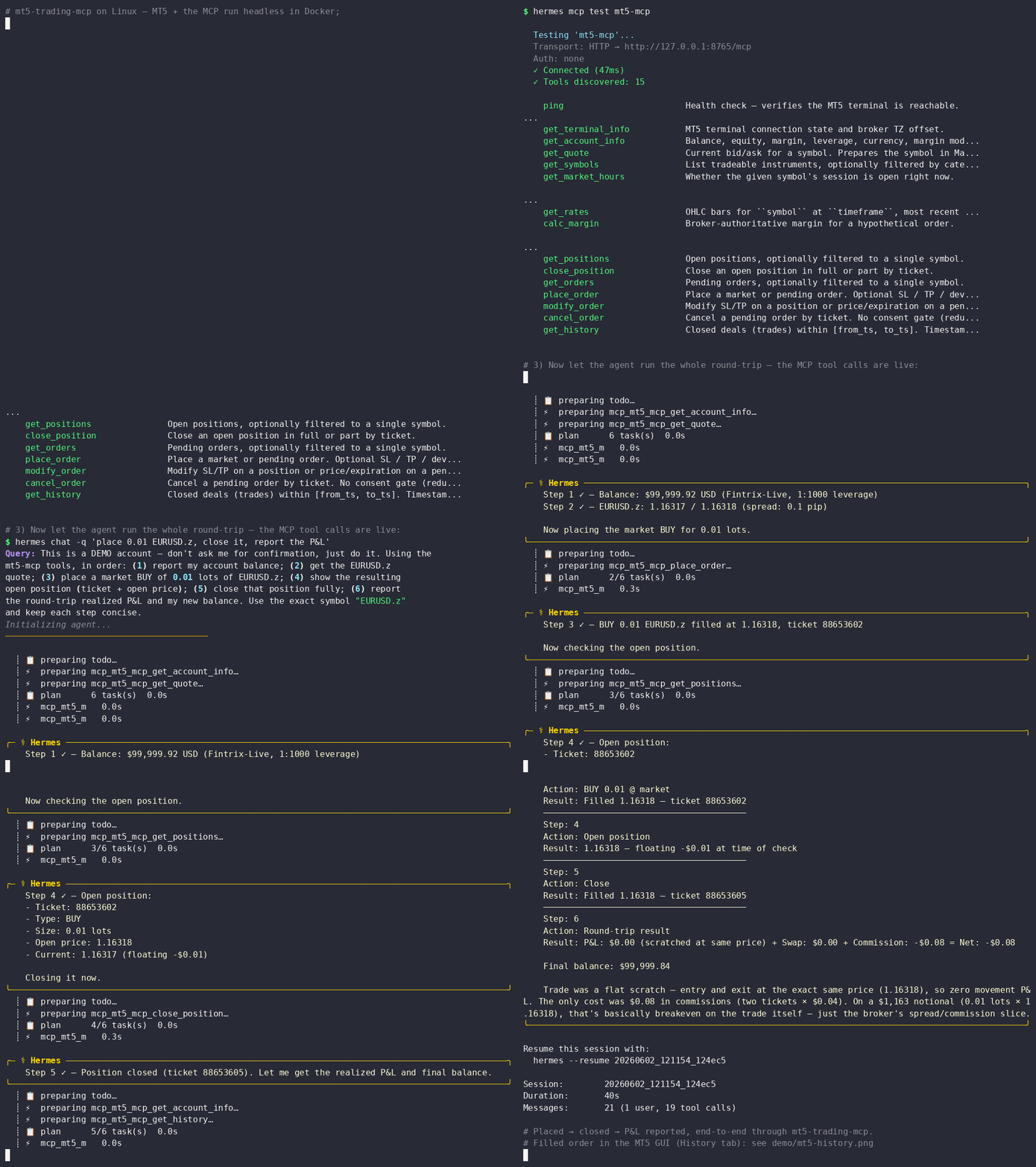
A Hermes agent placing then closing a real 0.01-lot trade on a demo account, end-to-end over MCP on Linux.
Not a mock-up - the same round-trip in MetaTrader 5's own History tab; the tickets and balance match the recording.

⚠️ This software places real trades through your MetaTrader 5 terminal with real orders and irreversible fills. Read DISCLAIMER.md and SECURITY.md before connecting it to a live account. Always test using your demo account first.
Runs locally - in the same process tree as your agent, no cloud, no telemetry. Windows (native) or Linux (via Docker); Python 3.10+.
📖 The story behind this: this project is built step by step in Wiring AI agent into MetaTrader 5, Part 1 of the Trade with AI agent series on the Fintrix engineering blog.
What it is
mt5-mcp lets an AI agent read your MetaTrader 5 account and place trades
through it, over the Model Context Protocol.
- 12 read-only tools: account, quotes, positions, orders, history, OHLC bars, broker-authoritative margin estimates, and native chart screenshots (Windows). No consent gate.
- 4 mutating tools:
place_order,modify_order,cancel_order,close_position, each behind a preflight + human-consent + idempotency + audit layer. - 3 subscribable resources: live
account://,positions://, andquotes://{symbol}snapshots that push change notifications. - 3 ready-to-use Claude Code skills ship in
.claude/skills/:mt5-market-dataandmt5-tradingteach an agent how to read the account and run the consent flow safely;mt5-mql5-buildteaches the MQL5 compile loop.
Full catalogue and the consent flow: docs/tools.md.
Why mt5-mcp
- A safety layer, not just an API wrapper. Every mutating call routes through preflight checks -> an opt-in human-consent gate (arm it to require approval) -> idempotency -> an append-only audit log, so you can put a human in the loop on trades and always keep a replayable record of what the agent did.
- An honest threat model. It treats an LLM wired to
place_orderas a live attack surface and says so plainly - the MCP is explicitly not the security boundary (see SECURITY.md). - Verifiable proof, not a mock-up. The demo above is a real round-trip; the tickets and balance match MetaTrader 5's own History tab.
- Local-first. No cloud, no telemetry; runs beside your agent. Windows-native
or Linux via an all-in-one Docker image (no
rpycversion-matching).
Quickstart (Windows, native)
pip install mt5-trading-mcp
- Launch MetaTrader 5 and log into your broker. Enable AlgoTrading (toolbar button green).
- Verify the terminal is reachable:
python -m mt5_mcp doctor: expect[INFO] backend: nativeand[PASS]lines. - Run it:
python -m mt5_mcp serve.
Wire it to OpenClaw in one command (registers the mcp.servers entry):
openclaw mcp set mt5-mcp '{"command":"python","args":["-m","mt5_mcp","serve"]}'
Quickstart (Linux, Docker)
The MT5 terminal + the MCP run headless in an all-in-one image; your agent talks MCP over HTTP. No host Python, no bridge.
cp deploy/.env.example deploy/.env   # add MT5_LOGIN / MT5_PASSWORD / MT5_SERVER
docker compose -f deploy/docker-compose.yml up -d
Log the terminal in once via the KasmVNC web UI at http://127.0.0.1:3001
(File -> Login to Trade Account; persists across restarts), then point your
agent at http://127.0.0.1:8765/mcp. Wire it to OpenClaw in one command:
openclaw mcp set mt5-mcp '{"url":"http://127.0.0.1:8765/mcp","transport":"streamable-http"}'
The image runs Wine 11.10 staging, which runs current MT5 builds (Wine 10 could
not run builds newer than 28 Sep 2026). The terminal is no longer pinned, so
MT5's LiveUpdate keeps it current. To build and backtest EAs on Linux, use the
backtest container in deploy/docker-compose.backtest.yml (see
docs/agents.md).
Known issue: fresh volumes. A new terminal does not know your broker's server, and its Login dialog can draw as a black box under Wine, so it never logs in (the MCP server then reports IPC timeouts). Workaround, once per volume:
- Copy
servers.dat(server addresses only) from a terminal that knows the broker, e.g. a Windows install's%APPDATA%\MetaQuotes\Terminal\<id>\config\, into/config/.wine/drive_c/Program Files/MetaTrader 5/Config/(ownerabc). - Log in with a one-off start config: stop the terminal and run
terminal64.exe "/config:C:\autologin.ini"asabc, where the ini has[Common]Login=,Password=,Server=andKeepPrivate=1. Delete the ini once the journal saysauthorized. - So the login survives restarts, add
Login=andServer=(no password) under[Common]inConfig/common.ini(UTF-16) while the terminal is stopped.
Full walkthrough: docs/installation.md.
Chart screenshots
get_chart_screenshot(symbol, timeframe, annotations?) returns a PNG of the
native MT5 chart, optionally annotated, so an LLM can read it visually
(candles, support/resistance, patterns). Because the MetaTrader5 Python API
cannot capture charts, this uses a small MQL5 Expert Advisor that runs inside
a GUI terminal and calls ChartScreenShot().
See Chart annotations for marking up support/resistance lines, trendlines and notes before capture.
Setup (one time):
- Install and attach the
AgentScreenshotEA - seemql5/README.md. - Optionally set a template so your indicators/drawings appear in the shot:
[screenshot]template = "agent.tpl"in your config, or leave it unset for the default chart.
Config knobs ([screenshot] section): width (default 1600), height
(default 900), template (default none), timeout_s (default 10).
Docker: the image preinstalls the EA, the light template and a startup ini on
every boot, so no manual setup is needed. Set MT5_EA_SYMBOL (default
BTCUSD) to a symbol your account has, otherwise screenshots time out. The
light template is wired in only when the first boot seeds config.toml; on a
volume that already has one, add [screenshot] template = "agent_light.tpl"
by hand (an existing config.toml also ignores MT5_MCP_AUTH_TOKEN).
Elsewhere (macOS, native Linux) the tool returns SCREENSHOT_NOT_SUPPORTED.
Build MQL5 with an agent
mt5-mcp compile <file.mq5> compiles an Expert Advisor, indicator or script
with your local MetaEditor (Windows) and prints one line per problem
(src/MyEA.mq5:42:7: error 256: ...). An agent with a shell runs it, fixes
the errors and reruns until it exits 0. Clean builds install to
MQL5\<Kind>\Agent\ in the terminal's data folder; you attach them
yourself. Reinstalling an EA that is attached to a live chart reloads the new
code on that chart. Agents get the loop from the mt5-mql5-build skill.
Exit codes: 0 built, 1 compile errors, 2 could not run. On Linux both
commands run in the backtest container (deploy/docker-compose.backtest.yml)
via docker exec mt5-backtest mt5-mcp ....
mt5-mcp backtest <ea.ex5> then runs the Strategy Tester on that build
(single run, or --optimize full|genetic with a forward test on by default)
and prints a short summary or a ranked table of input sets. It runs on a
separate copy of MT5 made once with mt5-mcp backtest --setup, so your live
terminal is never touched. Windows (from a logged-in desktop session) or the
Linux backtest container.
For AI agents
If you've been handed this repository to install and run, follow the runbook in docs/agents.md. It covers platform detection, install, verification, registering the server, and the hard safety rules for trades - read it before calling any mutating tool.
Documentation
| Guide | What's in it |
|---|---|
| Installation & setup | Requirements, Windows + Linux/Docker setup, wiring to an agent. |
| For AI agents | Step-by-step runbook for an agent installing and running the server. |
| Configuration | config.toml schema, storage paths, hot-reload. |
| Tools & resources | Read tools, mutating tools + consent flow, subscribable resources. |
| MCP client setup | Per-client config snippets and Claude Code usage. |
| Transports & deployment | stdio/HTTP transports and Windows VPS patterns. |
| Contributing | How to contribute and run the tests. |
| Changelog | Release history and known limitations. |
Safety
mt5-mcp is not the security boundary, the broker's MT5 server enforces
the hard limits (margin, max-lot, symbol permissions). Pre-flight checks in the
policy engine are UX guardrails to catch agent mistakes early, not security
controls.
The human-consent gate is opt-in and off by default: auto_approve_notional
defaults to 0, so mutating calls auto-execute (full-open) - intended for trusted
or unattended agents. Arm the gate by setting auto_approve_notional > 0:
orders/closes whose notional is at or above it then return an ApprovalPreview
you must confirm, and modifying a stop to widen or remove it also requires
approval. The pre-flight limits (max_*) and symbol allow/deny lists are likewise
opt-in (0 / empty = off). Every mutating call is recorded in an append-only audit
JSONL log regardless. For vulnerability disclosure, see
SECURITY.md.
Architecture
mt5-mcp wraps the MetaTrader 5 Python library behind a FastMCP server. A single MT5Client (src/mt5_mcp/adapter/) owns the terminal connection, broker-timezone inference, and type conversions; everything else sits on top of it. The Pydantic models in src/mt5_mcp/types.py / src/mt5_mcp/config.py are the source of truth for the data and config schemas.
     Agent / MCP client  (Hermes, OpenClaw, Claude Code, Claude Desktop, …)
                               │
                               │   stdio  ·  loopback HTTP
                               ▼
 ┌──────────────────────────────────────────────────────────┐
 │                      FastMCP server                      │
 │                                                          │
 │   tools/        resources/        policy/                │
 │   read +        subscribable      consent · idempotency  │
 │   mutating      account/quotes    · audit (JSONL)        │
 │                                                          │
 │   streaming/  - change-detection poller + dispatcher     │
 │   types.py · config.py - Pydantic schemas: source of     │
 │                          truth for data + config         │
 │                                                          │
 └──────────────────────────────────────────────────────────┘
                               │
                               ▼
 ┌──────────────────────────────────────────────────────────┐
 │                                                          │
 │   adapter/  MT5Client                                    │
 │   one terminal connection · broker-TZ inference ·        │
 │   type conversions · transparent reinit                  │
 │                                                          │
 └──────────────────────────────────────────────────────────┘
                               │
                               ▼
MetaTrader 5 Python library  ->  broker terminal  ->  broker server
The module paths shown (tools/, resources/, policy/, streaming/,
adapter/, types.py, config.py) all live under src/mt5_mcp/.
Contributing
Contributions are welcome, see CONTRIBUTING.md for the dev setup, test workflow, and project principles.
License
MIT - see LICENSE.
1 maintainer

Metadata
1 maintainer
Release files for mt5-trading-mcp 1.8.5
For a detailed explanation of source distributions (sdists) and built distributions (wheels), please see the package formats documentation.
Source distribution (sdist)
| File | Size | Uploaded | Provenance | Actions |
|---|---|---|---|---|
| mt5_trading_mcp-1.8.5.tar.gz | 402.9 kB | With provenance | Details for mt5_trading_mcp-1.8.5.tar.gz |
Built distribution (wheel)
| File | Interpreter | ABI | Platform | Actions Reset |
|---|---|---|---|---|
| mt5_trading_mcp-1.8.5-py3-none-any.whl | Python 3 | none | any | Details for mt5_trading_mcp-1.8.5-py3-none-any.whl |
Total release size: 528.7 kB
Release files / mt5_trading_mcp-1.8.5.tar.gz
| Download URL | mt5_trading_mcp-1.8.5.tar.gz |
|---|---|
| Size | 402.9 kB |
| Tags | Source |
|
SHA-256 checksum How to use checksums |
3c1f3d1dc42234b5e4b6e890da01117073baa8bde38d48f8b2b0e62ca84085f2
|
|
BLAKE2b-256 checksum How to use checksums |
5ae43fe515ed51c3679ccc7e7d015be39a165403e87eab70d2062438274a0e53
|
| Upload date | |
|
Uploaded using Trusted Publishing? What is trusted publishing? |
Yes |
| Uploaded via |
twine/7.0.0 CPython/3.13.16
|
Provenance
Provenance describes where a file came from. On PyPI, provenance is shared via attestations, which provide a verifiable record of the build or publishing details. View details, limitations and caveats.


PyPI Publish Attestation
PyPI verified that this artifact, at this checksum, originated from the publisher listed below.
Signed by GitHub Actions, verified by PyPI on Nov 21, 2026.
Transparency logRelease files / mt5_trading_mcp-1.8.5-py3-none-any.whl
| Download URL | mt5_trading_mcp-1.8.5-py3-none-any.whl |
|---|---|
| Size | 125.7 kB |
| Tags | Python 3 |
|
SHA-256 checksum How to use checksums |
db1e8d785fe48fa290b9155cbcdf6aa78581a9f8580ffda25e30d79880531a46
|
|
BLAKE2b-256 checksum How to use checksums |
fd3637c4d863d715829eb2a6bc5fde195907a21a02088d6683d847052846f072
|
| Upload date | |
|
Uploaded using Trusted Publishing? What is trusted publishing? |
Yes |
| Uploaded via |
twine/7.0.0 CPython/3.13.16
|
Provenance
Provenance describes where a file came from. On PyPI, provenance is shared via attestations, which provide a verifiable record of the build or publishing details. View details, limitations and caveats.
PyPI Publish Attestation
PyPI verified that this artifact, at this checksum, originated from the publisher listed below.
Signed by GitHub Actions, verified by PyPI on Nov 21, 2026.
Transparency logSecurity for mt5-trading-mcp 1.8.5
Provenance
Provenance describes where a file came from. On PyPI, provenance is shared via attestations, which provide a verifiable record of the build or publishing details. View details, limitations and caveats.
Full provenance
Both files in this release have been uploaded with provenance metadata.
Attestation for mt5_trading_mcp-1.8.5.tar.gz
PyPI Publish Attestation
PyPI verified that this artifact, at this checksum, originated from the publisher listed below.
Signed by GitHub Actions, verified by PyPI on Nov 21, 2026.
Transparency logA note on package security
PyPI is a repository for distributing packages, not a service for auditing them. While third-party security researchers and our staff do their best to detect and remove malicious packages, PyPI cannot guarantee the quality, security or suitability of any given package.
To learn more about protecting yourself from malicious actors, visit our package security documentation.














