
MTGScan


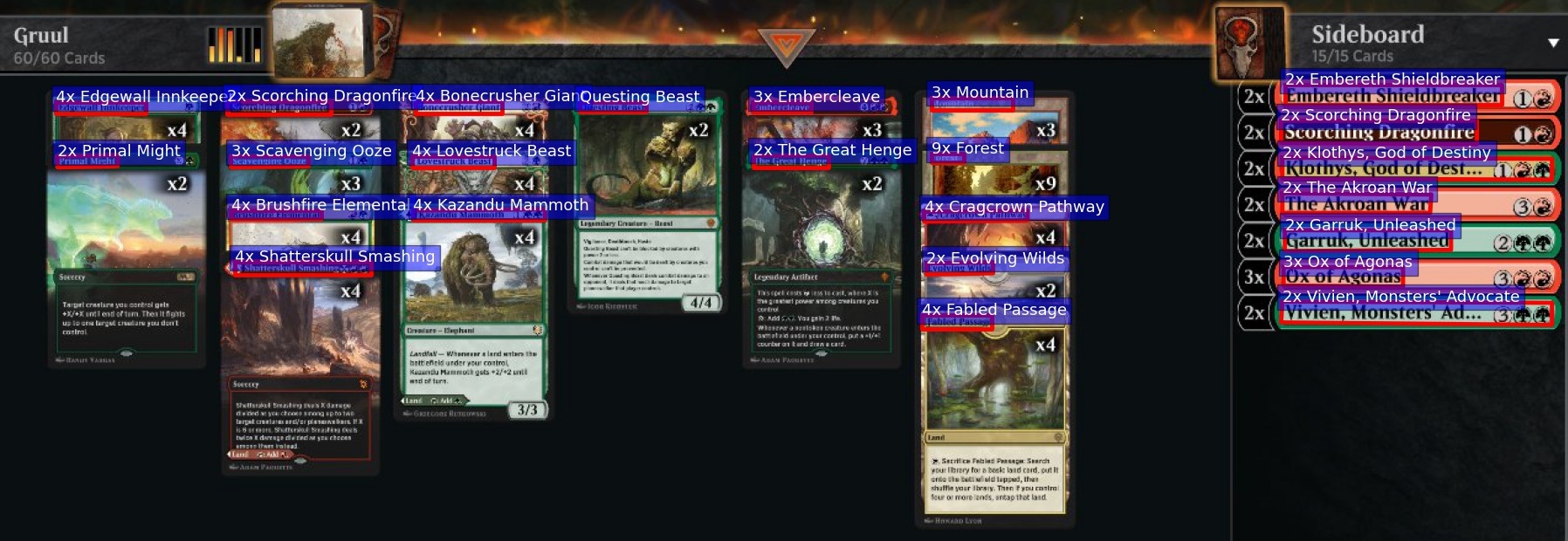
MTGScan uses OCR recognition to list Magic cards from an image.
After OCR, cards are looked up in a dictionnary provided by MTGJSON, using fuzzy search with SymSpell.
Try the Web App
  flowchart LR;
  subgraph "Browser"
    C1[Client];
    C2[Client];
    C3[Client];
  end
  subgraph "Frontend"
    F((Flask Server));
  end
  subgraph "Backend"
    W1[Celery Worker<br>using mtgscan];
    W2[Celery Worker<br>using mtgscan];
  end
  subgraph "Cloud"
    A[Azure Read OCR];
  end
  C1 <-->|Socket.IO| F;
  C2 <-->|Socket.IO| F;
  C3 <-->|Socket.IO| F;
  F <-->|RedisMQ| W1;
  F <-->|RedisMQ| W2;
  W1 <-->|API| A;
  W2 <-->|API| A;
Prerequisites
- Python >= 3.7
- Credentials for the required OCR (e.g Azure Computer Vision Read API)
Installation
... with Poetry
poetry install
... with requirements
pip install -r requirements.txt
... with pip
pip install mtgscan
OCR
Currently, only Azure OCR is supported. To add an OCR, inherit mtgscan.ocr.OCR.
Azure
API subscription key and endpoint must be stored in environment variables AZURE_VISION_KEY and AZURE_VISION_ENDPOINT respectively.
Steps:
- Subscribre for a free Azure account: https://azure.microsoft.com/free/cognitive-services
- Create a Computer Vision resource: https://portal.azure.com/#create/Microsoft.CognitiveServicesComputerVision
- Get your key and endpoint
Tests
Every test case is stored in a separated folder in tests/samples/ containing:
- image.*: image of Magic cards
- deck.txt: decklist of the cards on the image
To run every test:
poetry run python tests/test.py
This produces the following outputs, for each sample and OCR:
- statistics about number of cards found, number of errors...
- test.log: informations about the run
- errors.txt: history of the number of errors made by the OCR
- box_texts.txt: output of the OCR
Basic usage
Let's retrieve the decklist from the following screenshot:
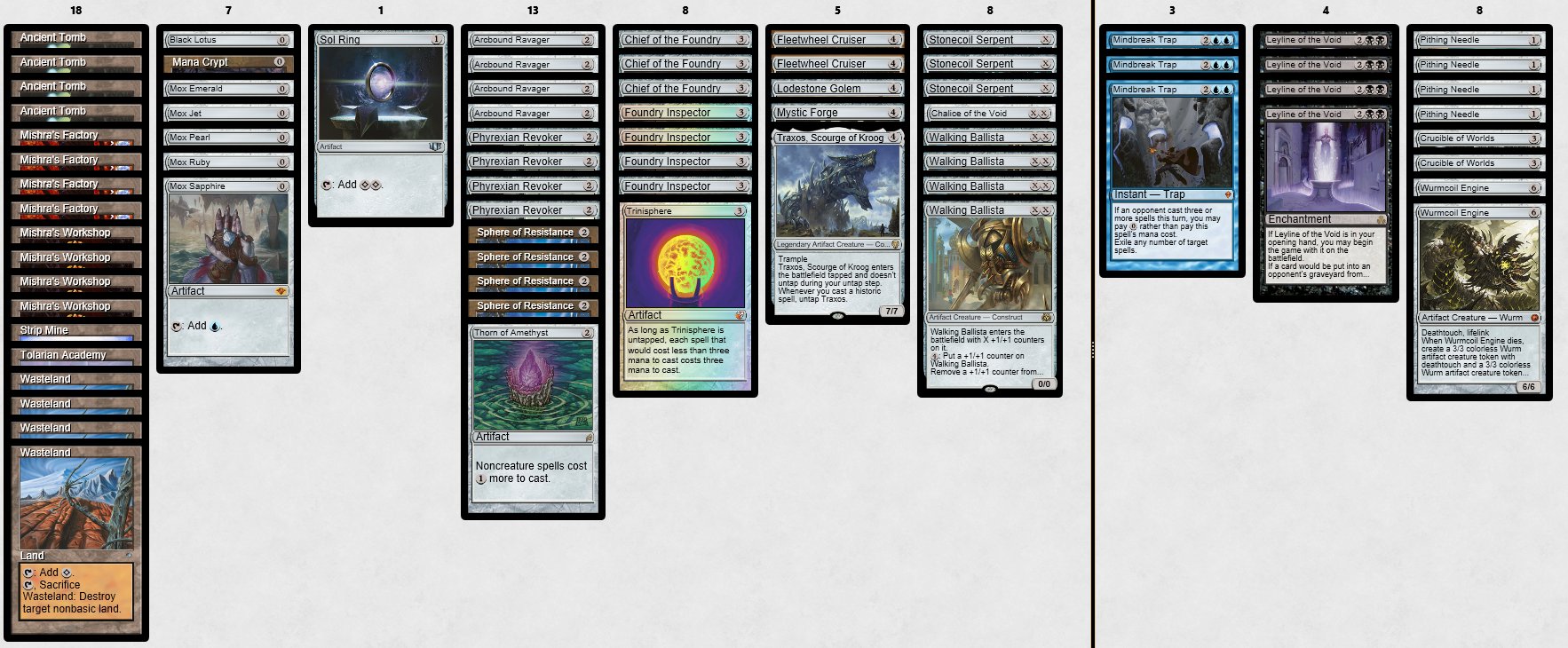
from mtgscan.text import MagicRecognition
from mtgscan.ocr.azure import Azure

azure = Azure()
rec = MagicRecognition(file_all_cards="all_cards.txt", file_keywords="Keywords.json")  # download card files from mtgjson if missing
box_texts = azure.image_to_box_texts("https://user-images.githubusercontent.com/49362475/105632710-fa07a180-5e54-11eb-91bb-c4710ef8168f.jpeg")
deck = rec.box_texts_to_deck(box_texts)
print(deck)
Output:
4 Ancient Tomb
4 Mishra's Factory
4 Mishra's Workshop
1 Strip Mine
1 Tolarian Academy
4 Wasteland
1 Sacrifice
1 Mox Ruby
1 Mox Emerald
1 Mox Jet
1 Mox Pearl
1 Mox Sapphire
1 Black Lotus
1 Mana Crypt
1 Sol Ring
4 Phyrexian Revoker
4 Arcbound Ravager
1 Thorn of Amethyst
4 Sphere of Resistance
4 Foundry Inspector
3 Chief of the Foundry
1 Trinisphere
1 Lodestone Golem
1 Mystic Forge
2 Fleetwheel Cruiser
1 Traxos, Scourge of Kroog
4 Walking Ballista
3 Stonecoil Serpent
1 Chalice of the Void

3 Mindbreak Trap
4 Leyline of the Void
2 Crucible of Worlds
4 Pithing Needle
2 Wurmcoil Engine
Task list
- Tested on MTGO, Arena and IRL (simple) images
- Handle sideboard (only on the right side)
- Support for stacked cards
- Add and compare OCR (GCP, AWS...)
1 maintainer

Metadata
1 maintainer
Release files for mtgscan 1.0.8
For a detailed explanation of source distributions (sdists) and built distributions (wheels), please see the package formats documentation.
Source distribution (sdist)
| File | Size | Uploaded | Provenance | Actions |
|---|---|---|---|---|
| mtgscan-1.0.8.tar.gz | 11.1 kB | Without provenance | Details for mtgscan-1.0.8.tar.gz |
Built distribution (wheel)
| File | Interpreter | ABI | Platform | Actions Reset |
|---|---|---|---|---|
| mtgscan-1.0.8-py3-none-any.whl | Python 3 | none | any | Details for mtgscan-1.0.8-py3-none-any.whl |
Total release size: 21.2 kB
Release files / mtgscan-1.0.8.tar.gz
| Download URL | mtgscan-1.0.8.tar.gz |
|---|---|
| Size | 11.1 kB |
| Tags | Source |
|
SHA-256 checksum How to use checksums |
caba317e06497d788db909e7068a6fa87a404d0d1be5d73eb81c6c73140fe036
|
|
BLAKE2b-256 checksum How to use checksums |
3fbc207c3ff26a26ca588a81a0b40340b37668d1445a6ad47be04f57aea6621a
|
| Upload date | |
|
Uploaded using Trusted Publishing? What is trusted publishing? |
No |
| Uploaded via |
poetry/1.1.14 CPython/3.10.5 Linux/5.15.50-1-MANJARO
|
Release files / mtgscan-1.0.8-py3-none-any.whl
| Download URL | mtgscan-1.0.8-py3-none-any.whl |
|---|---|
| Size | 10.1 kB |
| Tags | Python 3 |
|
SHA-256 checksum How to use checksums |
12d6b222f378d3a675d5ae7acbfc6f5084702258ecafa77075dea567c59320ff
|
|
BLAKE2b-256 checksum How to use checksums |
6e20fde9edc6454fdfa6563a86286208c5a2bda22cde678bb8abf3fdcb654e36
|
| Upload date | |
|
Uploaded using Trusted Publishing? What is trusted publishing? |
No |
| Uploaded via |
poetry/1.1.14 CPython/3.10.5 Linux/5.15.50-1-MANJARO
|
Security for mtgscan 1.0.8
Provenance
Provenance describes where a file came from. On PyPI, provenance is shared via attestations, which provide a verifiable record of the build or publishing details. View details, limitations and caveats.
No provenance found
None of the files in this release were uploaded with provenance metadata.
A note on package security
PyPI is a repository for distributing packages, not a service for auditing them. While third-party security researchers and our staff do their best to detect and remove malicious packages, PyPI cannot guarantee the quality, security or suitability of any given package.
To learn more about protecting yourself from malicious actors, visit our package security documentation.














