
mtp-manager
Minimal terminal UI for managing telemt on Debian, Ubuntu, Fedora, and Arch Linux







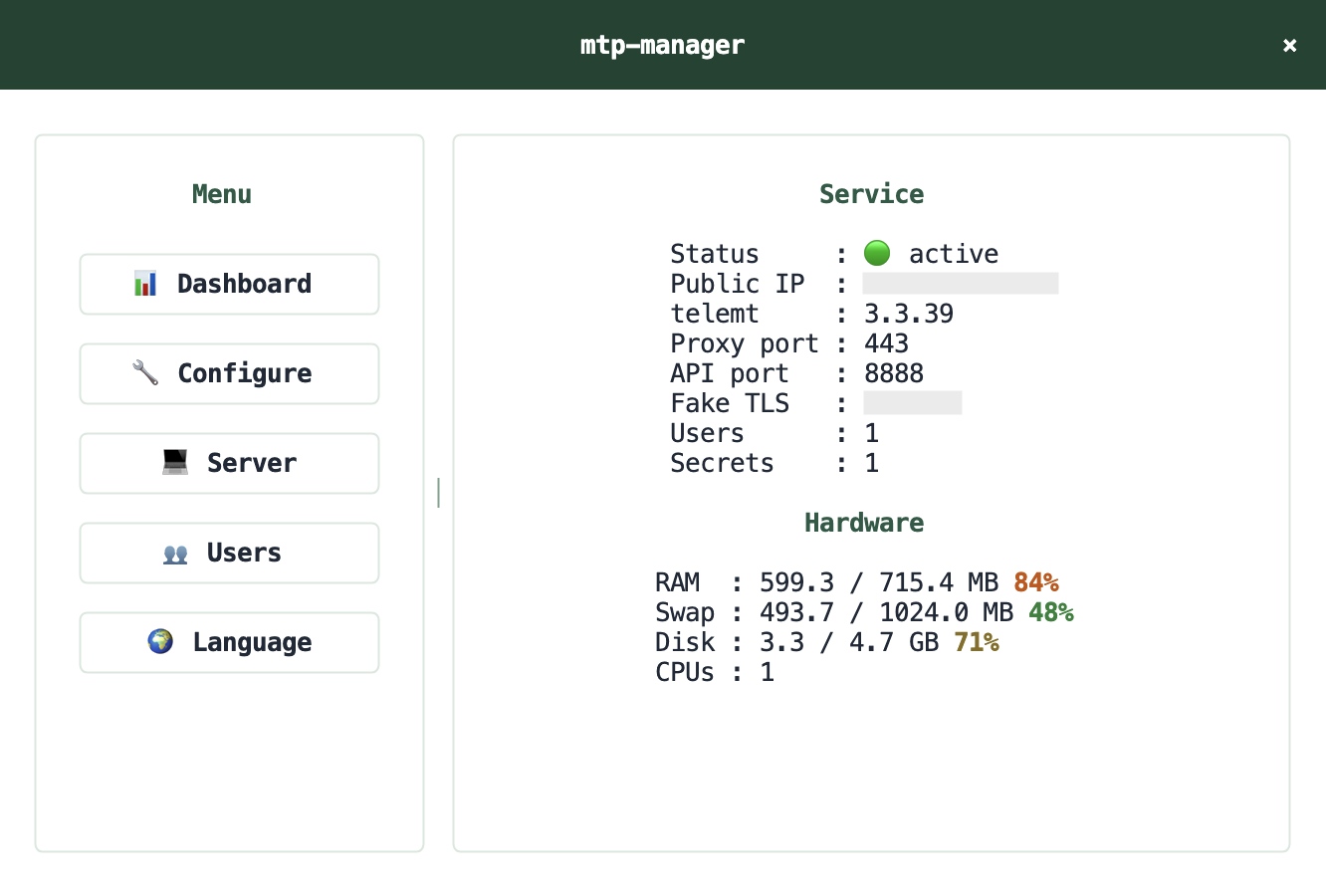
Overview
mtp-manager is a lightweight TUI for installing, configuring, and operating a telemt-based MTProto proxy with Fake TLS support. It is designed for small VPS setups where a compact workflow matters more than a large control panel.
Highlights
- install and update
telemt - install a specific tag or commit
- manage users and secrets
- export
raw,dd, andeelinks - inspect service status and logs
- run cleanup tasks for logs, cache, and runtime artifacts
- switch the interface between English, Russian, and Chinese
Request Flow
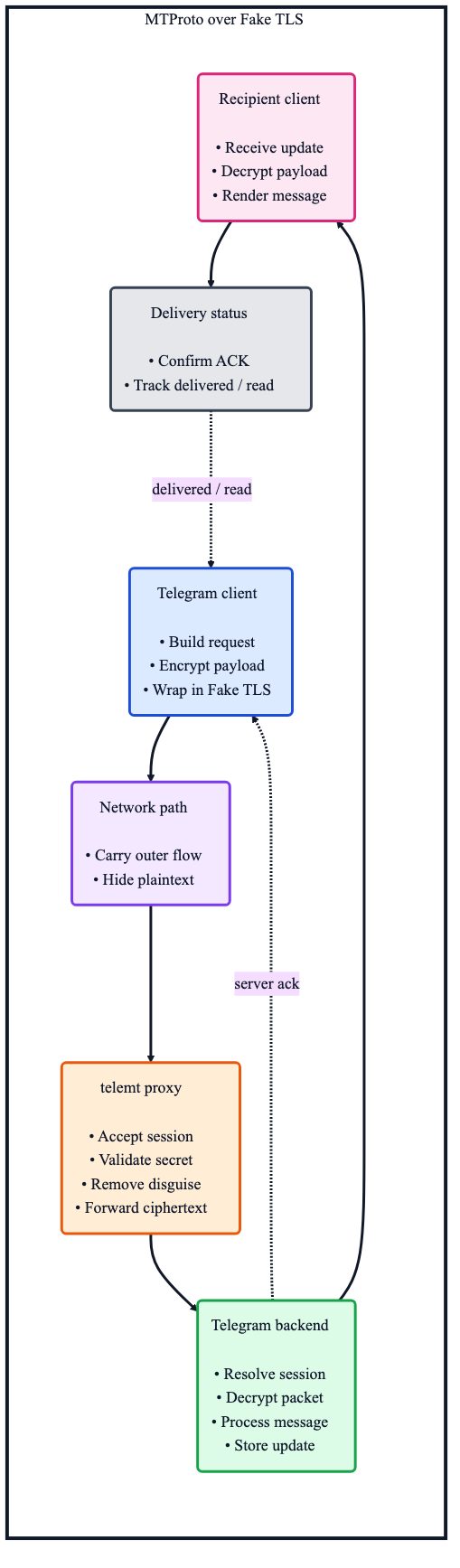
The diagram below shows the high-level path of an MTProto message when telemt is used as the proxy layer with Fake TLS enabled.
Installation
From PyPI
Install the latest published version from PyPI:
python3 -m pip install mtp-manager
Run the application:
mtp-manager
mtp-managerperforms system-level operations such as service management, firewall updates, and cleanup tasks, so it is typically expected to run with root privileges.
From source
Clone the repository and use the bootstrap script:
source setup.sh
mtp-manager
setup.sh is meant to be sourced from bash or zsh. It prepares .venv, installs the project in editable mode, validates the entrypoint, and activates the environment in the current shell.
Requirements
- Python
3.11+ - Debian, Ubuntu, Fedora, or Arch Linux
systemd- root privileges for install, service, firewall, and cleanup operations
Project Layout
| Path | Purpose |
|---|---|
src/app.py |
CLI entrypoint and internal service commands |
src/bootstrap.py |
Dependency wiring and startup migration glue |
src/controller.py |
Application actions used by the TUI |
src/infra/ |
shell, locale, storage, firewall, public IP, systemd |
src/models/ |
typed domain models |
src/services/ |
install, runtime, diagnostics, cleanup, inventory |
src/ui/backend.py |
UI backend abstraction used by the app entrypoint |
src/ui/textual_app.py |
main TUI orchestration |
src/ui/modals.py |
modal screens and shared popup UI |
src/ui/dashboard.py |
dashboard rendering and host metrics |
src/ui/actions.py |
action definitions and menu helpers |
src/ui/lists.py |
sections, users, and secrets list helpers |
src/i18n/ |
English, Russian, and Chinese catalogs |
Managed Paths
| Path | Purpose |
|---|---|
/etc/mtp-manager |
managed config directory |
/var/lib/mtp-manager |
app data |
/opt/telemt |
installed telemt binary |
/etc/systemd/system/telemt.service |
main service unit |
/etc/systemd/system/telemt-config-refresh.* |
config refresh service and timer |
/etc/systemd/system/mtp-manager-cleanup.* |
cleanup service and timer |
Notes
- shell execution is routed through the infra layer
- generated files are written atomically
- managed
systemdunits invoke the installedmtp-managerentrypoint - migration logic for older
mtproxylayouts is included
1 maintainer

Release files for mtp-manager 1.0.0
For a detailed explanation of source distributions (sdists) and built distributions (wheels), please see the package formats documentation.
Source distribution (sdist)
| File | Size | Uploaded | |
|---|---|---|---|
| mtp_manager-1.0.0.tar.gz | 75.5 kB | Details |
Built distribution (wheel)
| File | Interpreter | ABI | Platform | Reset |
|---|---|---|---|---|
| mtp_manager-1.0.0-py3-none-any.whl | Python 3 | none | any | Details |
Total release size: 163.8 kB
Release files / mtp_manager-1.0.0.tar.gz
| Download URL | mtp_manager-1.0.0.tar.gz |
|---|---|
| Size | 75.5 kB |
| Tags | Source |
|
SHA-256 checksum How to use checksums |
1610a3d564fa8ac695891eefda13c0053c21362fab759a87ef1fd8813f4807dc
|
|
BLAKE2b-256 checksum How to use checksums |
6af11ac93315e44e464a9eea54b5e9261e09372965869fb813b94797b8c3f3fe
|
| Upload date | |
|
Uploaded using Trusted Publishing? What is trusted publishing? |
No |
| Uploaded via |
twine/6.2.0 CPython/3.13.5
|
Release files / mtp_manager-1.0.0-py3-none-any.whl
| Download URL | mtp_manager-1.0.0-py3-none-any.whl |
|---|---|
| Size | 88.3 kB |
| Tags | Python 3 |
|
SHA-256 checksum How to use checksums |
6b11a646129c20d7c2582d5cf1574a1940c33cf4cd691c978dbe9959d19aa017
|
|
BLAKE2b-256 checksum How to use checksums |
8c9e908bf854c99764bb06ad3a4ff2fc9118354cc6782c8d8d5dd05027be9d87
|
| Upload date | |
|
Uploaded using Trusted Publishing? What is trusted publishing? |
No |
| Uploaded via |
twine/6.2.0 CPython/3.13.5
|













