
Python API for interacting with the MUD Autonomous World framework

Project description
mud-aw.py 🧱🐍
A Python API for MUD worlds
Python tools for:
- Querying MUD tables
- Creating Python game wrappers
- Interacting with MUD worlds
Use Cases
- Create data dashboards for MUD worlds
- Automate in-game actions
- Build game-specific libraries for player interactions
Installation
pip install mud-aw.py
or build from source
cd mud-aw.py
pip install -e .
Key Components
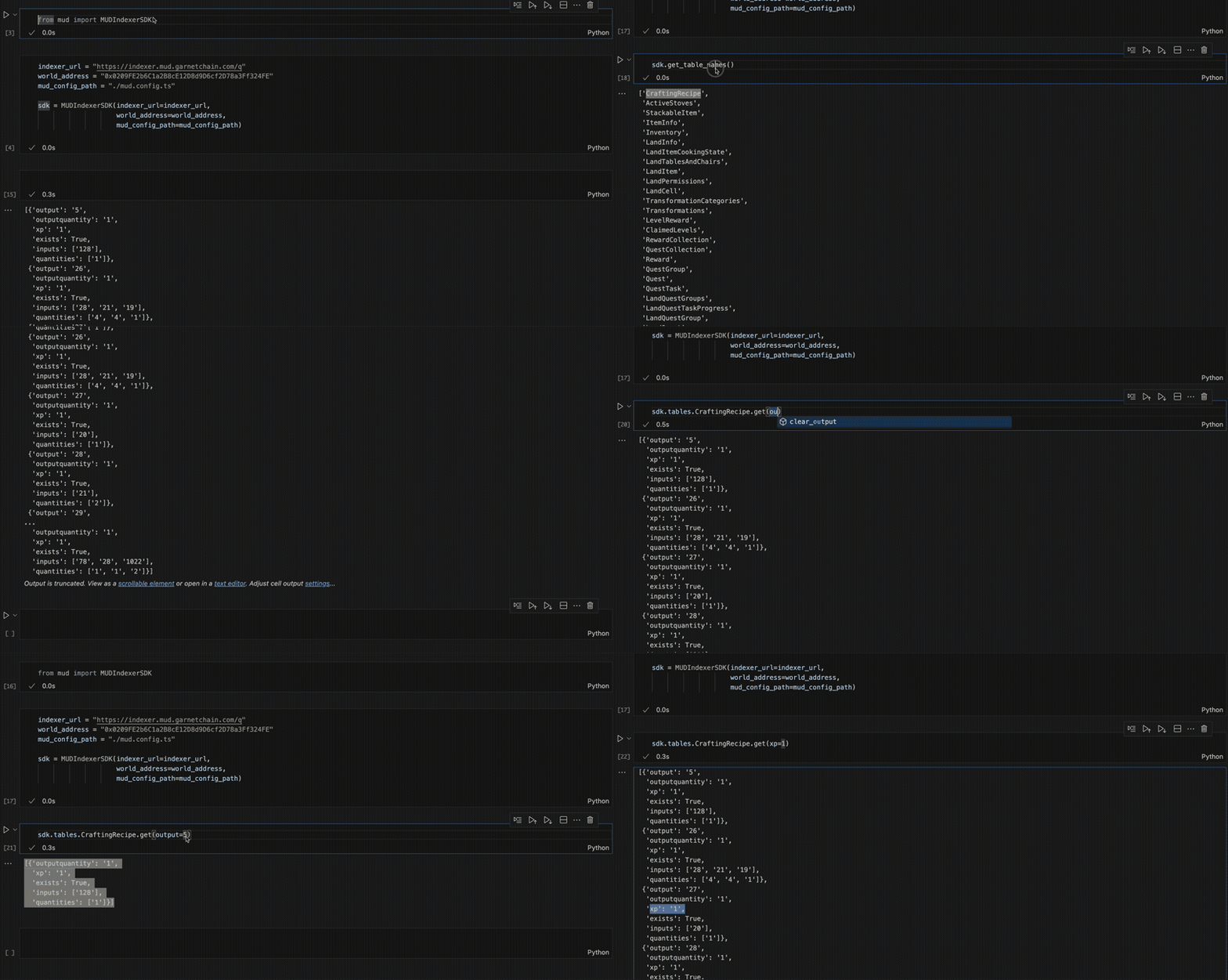
MUD Indexer SDK
The MUD Indexer SDK provides a simplified interface for querying MUD tables.
Inputs:
- MUD Indexer URL
- World Address
- Path to the
mud.config.tsfile
World Class
The World class allows you to interact with a MUD world and its smart contract functions. It dynamically registers functions based on the ABI, providing type-safe access and auto-completion in your IDE.
Features:
- Smart Contract Integration: Interact with world contract functions directly.
- Dynamic Typing: Input arguments and return types are dynamically typed based on the ABI.
- Integrated Indexer: Optionally link the MUD Indexer for seamless access to table data.
Player Class
The Player class simplifies interactions with a MUD world for a specific player. It can:
- Derive the player address from a private key
- Automatically sign and send transactions
- Dynamically wrap world functions for player-specific interactions
Usage
1. Initialize the World
The World class connects to a MUD world and optionally integrates the MUD Indexer.
from mud import World

abi_dir = "./path/to/abi"
rpc = "https://rpc.mudchain.com"
world_address = "0x123...abc"
indexer_url = "https://indexer.mudchain.com"
mud_config_path = "./path/to/mud.config.ts"

# Initialize the World with an optional indexer
world = World(
    rpc=rpc,
    world_address=world_address,
    abi_dir=abi_dir,
    indexer_url=indexer_url,
    mud_config_path=mud_config_path
)
2. Access Contract Functions
Functions from the world's ABI are dynamically registered on the World instance with type-safe signatures.
# Call a smart contract function directly
land_items = world.getLandItems(user="0x123...")
print(land_items)

# Use IDE auto-completion for arguments and types
world.placeItem(x=1, y=2, z=3, itemId=42)
3. Query Tables with the Indexer
If the world is linked to a MUD Indexer, you can query tables directly.
# Fetch all entries from the Inventory table
inventories = world.indexer.Inventory.get()

# Filter entries by playerId and itemId
player_inventory = world.indexer.Inventory.get(playerId=PLAYER_ID, itemId=ITEM_ID)

# Limit results
limited_inventories = world.indexer.Inventory.get(limit=500)
4. Initialize a Player
The Player class wraps interactions for a specific player.
from mud import Player

private_key = "0xYourPrivateKey"

# Initialize the Player
player = Player(private_key=private_key)

# Link the World to the Player
player.add_world(world, "cafecosmos")

# Call functions directly through the Player
player.cafecosmos.placeItem(x=1, y=1, z=1, itemId=100)
You can also load the private key from an environment variable:
player = Player(env_key_name="PLAYER1")
Features
- Dynamic Table Registration: Automatically register tables and schemas defined in a MUD configuration file.
- SQL-like Queries: Query tables with filtering.
- Smart Contract Interactions: Access world contract functions dynamically.
- Player-Specific Wrappers: Automate transactions and player actions.
Contributing
- Fork the repository.
- Create a new feature branch.
- Submit a pull request.


Download files
Download the file for your platform. If you're not sure which to choose, learn more about installing packages.
Source Distribution
Built Distribution
Filter files by name, interpreter, ABI, and platform.
If you're not sure about the file name format, learn more about wheel file names.
Copy a direct link to the current filters
File details
Details for the file mud-aw.py-0.12.tar.gz.
File metadata
- Download URL: mud-aw.py-0.12.tar.gz
- Upload date:
- Size: 8.6 kB
- Tags: Source
- Uploaded using Trusted Publishing? No
- Uploaded via: twine/6.0.1 CPython/3.9.20
File hashes
| Algorithm | Hash digest | |
|---|---|---|
| SHA256 |
bbc0e5a7cb82a5a7cea8c669e2f4cf3e05fb70431036ff7ad23d5b9b23c6ba6a
|
|
| MD5 |
09a238e08e50fb7dcadd1d218385f23d
|
|
| BLAKE2b-256 |
841590b19713b19d7fa6137c9167458ad1c435d71d0a82548e8ac1e8dceab2f0
|
File details
Details for the file mud_aw.py-0.12-py3-none-any.whl.
File metadata
- Download URL: mud_aw.py-0.12-py3-none-any.whl
- Upload date:
- Size: 8.5 kB
- Tags: Python 3
- Uploaded using Trusted Publishing? No
- Uploaded via: twine/6.0.1 CPython/3.9.20
File hashes
| Algorithm | Hash digest | |
|---|---|---|
| SHA256 |
5d8901aeea56294f2dcb6d4798c868657d111775c056df54c2aed349d6cdd373
|
|
| MD5 |
f40cad2ad12a4f66bdf8739ae2a7661a
|
|
| BLAKE2b-256 |
820913ef42a3f6411906d6056a0fff62d2aaeefbde1f3ce55d61a046991324ed
|






