
Multi-User Disk USage scanner and reporter. Quickly figure out where a specific user has left files on a shared disk by showing cumulative (recursive) directory sizes and letting the user drill down in a file-explorer like Textual TUI showing only their files.
Verified details
These details have been verified by PyPIProject links
GitHub Statistics
Maintainers

Project description
mudus
Multi-User Disk USage scanner and reporter.
Quickly figure out where a specific user has left files on a shared disk by showing cumulative (recursive) directory sizes and letting the user drill down in a file-explorer like Textual TUI showing only their files.
On a large shared HPC system with many shared project folders it is easy to forget some terrabytes of result files deep in some directory hierarchy. A year later, when the system admininistrator complains that the disk quotas are nearing 100% full, you have no idea where to start cleaning up old analysis results. Normal disk usage tools shows directory sizes for all files, but you should only clean up your own messes, so you need a more specialized tool. Also, if every user has to perform a recursive file-system scan to figure out where they left files then the shared storage server, which was allready a bit sad due to having a nearly full disk, will not be better off by getting hammered by metadata requests ...
mudus lets the system administrator periodically update a database and then every user can see their own files without running any full file-system scan themselves.
The downside is that the effect of cleaning up is not reflected in the database before the next scan is performed.
Using mudus
You must first run mudus scan to build a database of cumulative/recursive directory contents.
The database is stored separately for each user (file owner) and group.
After scanning, you (or any other user) can use the mudus view command to explore the database and figure out in which part of the large shared file system you forgot you had left a bunch of data.
Scanning
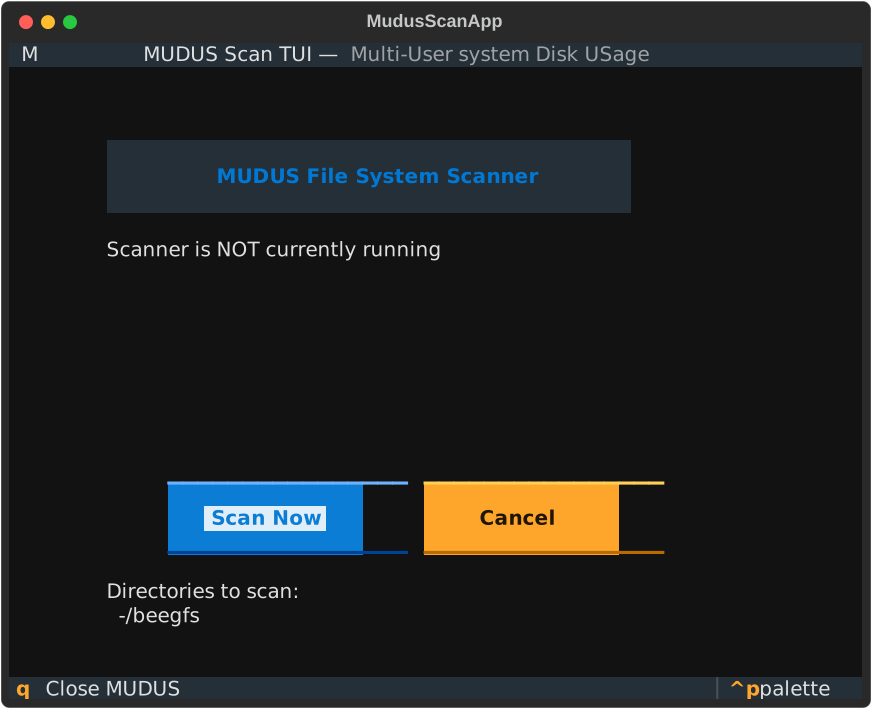
You can launch a visual scanner using mudus scan or run in non-iteractive mode by adding the --non-interactive flag. Run with the --help flag to see all options.
If you are sharing the disk usage database with others you probably want to set the MUDUS_DB_DIR
environmental variable to point to a shared directory where the disk usage database can be stored.
Non-interactive example:
export MUDUS_DB_DIR="/shared/.cache/mudus"
mudus scan --scan-dir /shared/dir_a --scan-dir /shared/dir_b --non-interactive
Interactive example:
Viewing the disk-usage database
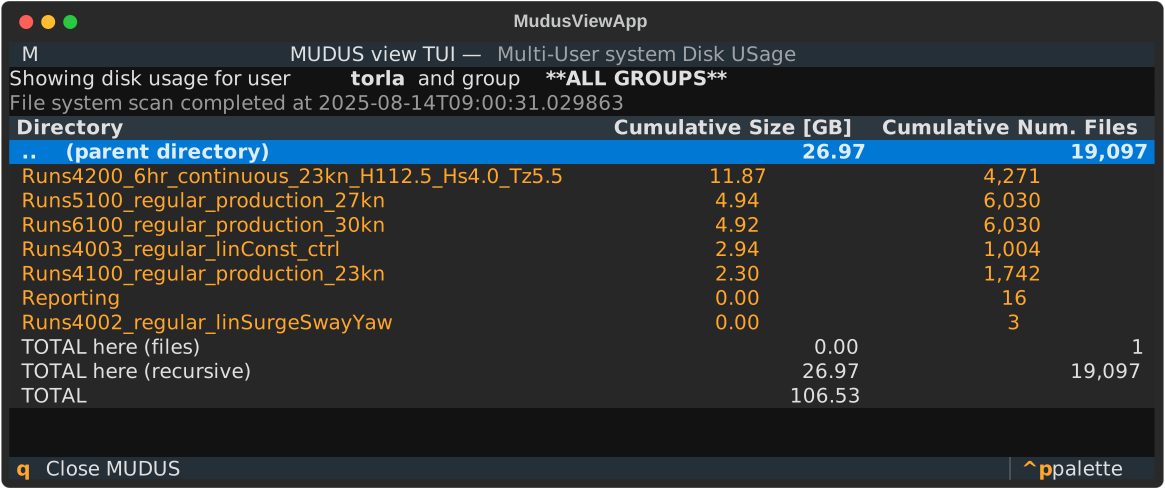
Use the mudus command (short for mudus view) to show your disk usage and drill down into sub-directories to figure out where you have forgotten to clean out a closed project on a shared drive or something like that. You can navigate by the arrow keys or enter directories by pressing Enter. The q key will quit the program.
Example of the Textual-based TUI:
Installation
You can install and run mudus directly with pipx mudus or uvx mudus if you have pipx or uv installed.
You can also pip install mudus and launch it as python -m mudus.
Alternatives
There are many great alternatives to mudus if you are on a single-user system, or you do not care about who owns the files, just the overall disk usage. One fast and easy tool is dua interactive which integrates the scan and view commands. It spins up a bunch of threads to quickly wakl the file system, so it can be unpopular on shared HPC systems where hammering the shared storage servers whenever you feel like it may not be the best idea.
Roadmap
The following items are on the mudus development roadmap:
-
Show group instead of user: You may want to see the disk usage for a given group instead of a given user. This should be a relatively small addition.
-
Deeper file-system integration:
mudushas support for pluggable disk scanners. Currently the Pythonscandirmethod is the only implementation, but deeper integration into relevant file systems (BeeGFS Hive??) may speed up the file-system scan and reduce the load on metadata servers etc.
License, Copyright, and Contributing
mudus is (c) Tormod Landet, DNV, and released under an Apache 2.0 license. It was developed to help manage our internal HPC resources at DNV and is not an official DNV tool and comes with absolutely no waranty, support, or guarantees of any kind. Use at your own risk.
Issues and pull requests are welcome, but beware that any replies will come when I have time at work, which may be next week or next year depending on how busy it is and how far down on the list of priorities such a relatively niche tool is at the moment (probably quite far down...). I write this not to discourage contributions or bug reports, but please do not be sad if I take a while to reply!
Project details
Verified details
These details have been verified by PyPIProject links
GitHub Statistics
Maintainers
Release history Release notifications | RSS feed


Download files
Download the file for your platform. If you're not sure which to choose, learn more about installing packages.
Source Distribution
Built Distribution
Filter files by name, interpreter, ABI, and platform.
If you're not sure about the file name format, learn more about wheel file names.
Copy a direct link to the current filters
File details
Details for the file mudus-0.9.0.tar.gz.
File metadata
- Download URL: mudus-0.9.0.tar.gz
- Upload date:
- Size: 26.2 kB
- Tags: Source
- Uploaded using Trusted Publishing? Yes
- Uploaded via: uv/0.8.10
File hashes
| Algorithm | Hash digest | |
|---|---|---|
| SHA256 |
6b338e71581977fe7380bffd300fa31c23712adda63e0264bb7ff2ec169db29a
|
|
| MD5 |
4dd017925f8067d9ed9a18f367a1723a
|
|
| BLAKE2b-256 |
2165d763bb957e0a1327f72e24843716fcb98d7e7125dcf891e7ac6ca6aa201f
|
File details
Details for the file mudus-0.9.0-py3-none-any.whl.
File metadata
- Download URL: mudus-0.9.0-py3-none-any.whl
- Upload date:
- Size: 24.5 kB
- Tags: Python 3
- Uploaded using Trusted Publishing? Yes
- Uploaded via: uv/0.8.10
File hashes
| Algorithm | Hash digest | |
|---|---|---|
| SHA256 |
d045099e5e0c913cefba4c42a3d5fe601e82df34bc46a2cc2cf8d6a3d83dcfdc
|
|
| MD5 |
50bdb67c6873bd0b2404df27b820b57c
|
|
| BLAKE2b-256 |
e2bc6040ce4cdf7a7d45eee8600acde7c217b5ac5e79b8a591661db2d42ac555
|






