
Muffin-Admin



An admin interface for Muffin applications.
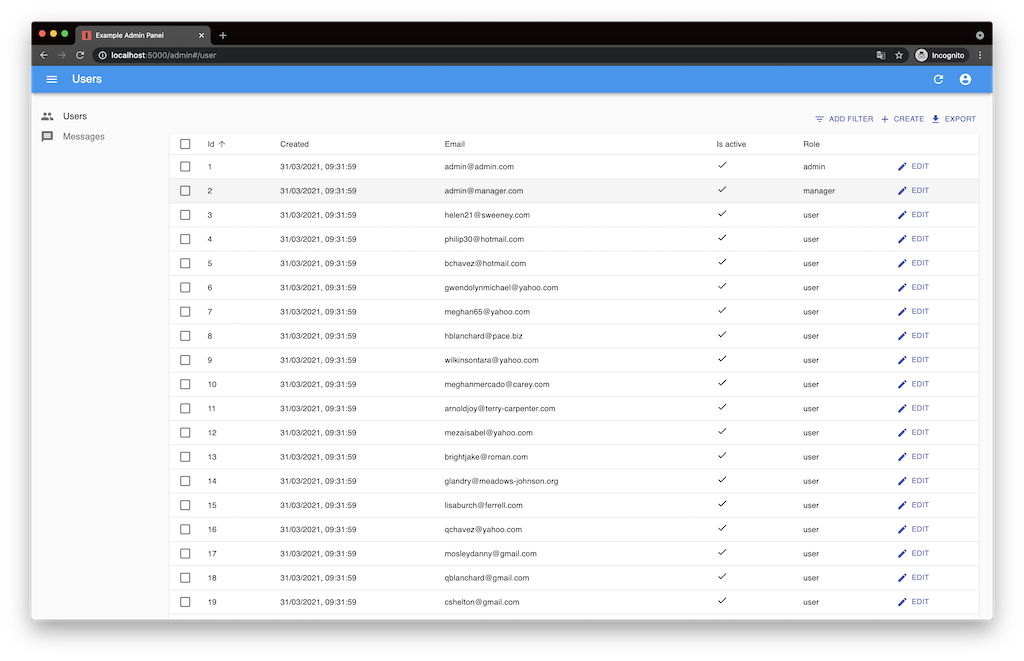
It mounts a react-admin single page app on top of Muffin-Rest resources, so a resource that already has a REST API gets list, create, edit and delete screens without writing any JavaScript.
Features
- Resources for Peewee ORM and SQLAlchemy Core through Muffin-Rest
- Filtering, sorting and pagination for list views
- Custom actions, dashboard cards and authorization hooks
Requirements
- Python >= 3.11 (tested on 3.11, 3.12, 3.13, 3.14 and 3.15)
- Muffin >= 3.0
- Muffin-Rest >= 14.2
Muffin 3 keeps handler routes as (paths, methods, hosts) tuples and Muffin-Rest 14.2 follows
it; older releases are not supported.
Installation
pip install muffin-admin
With SQLAlchemy Core support:
pip install muffin-admin[sqlalchemy]
With Peewee ORM support:
pip install muffin-admin[peewee]
Usage
Initialize the admin:
from muffin_admin import Plugin

admin = Plugin(**options)
Initialize admin handlers (example for Peewee ORM):
from muffin_admin import PWAdminHandler


@admin.route
class UserResource(PWAdminHandler):
    """Create Admin Resource for the User model."""

    class Meta(PWAdminHandler.Meta):
        """Tune the resource."""

        # Peewee Model for the admin resource
        model = User

        # Filters
        filters = "email", "created", "is_active", "role"

        # Tune serialization/deserialization schemas
        schema_meta = {
            "load_only": ("password",),
            "dump_only": ("created",),
        }

        # Columns to show
        columns = "id", "email", "is_active", "role", "created"

        # Custom Material-UI icon
        icon = "People"
Connect admin to a Muffin application:
admin.setup(app, **options)
More examples live in the example directory of the repository.
Authentication
Decorate an authentication function with admin.check_auth:
@admin.check_auth
async def auth(request):
    """Fake authorization method. Just checks for an auth token exists in request."""
    return request.headers.get("authorization")
Register a function to return user's information:
@admin.get_identity
async def ident(request):
    """Get current user information. Just an example."""
    user_id = request.headers.get("authorization")
    user = User.select().where(User.id == user_id).first()
    if user:
        return {"id": user.id, "fullName": user.email}
Implement a login handler for the standard react-admin auth page:
@admin.login
async def login(request):
    """Login a user."""
    data = await request.data()
    user = (
        User.select()
        .where(User.email == data["username"], User.password == data["password"])
        .first()
    )
    return ResponseJSON(user and user.id)
Dashboard
Decorate a function with admin.dashboard to fill the admin start page:
@admin.dashboard
async def dashboard(request):
    """Render dashboard cards."""
    return [
        [
            {"title": "App config", "value": [(key, str(value)) for key, value in app.cfg]},
            {"title": "Request headers", "value": dict(request.headers)},
        ],
    ]
A list of blocks is rendered as a row of cards. A value given as a list of lists is rendered as
a table, any other value as JSON.
Custom actions
An action is a handler method decorated with AdminHandler.action (or with the ORM specific
subclass). The admin renders a button for every decorated method:
from muffin_admin import PWAdminHandler


@admin.route
class UserResource(PWAdminHandler):
    class Meta(PWAdminHandler.Meta):
        model = User

    @PWAdminHandler.action("/user/disable", label="Disable Users", view="bulk")
    async def disable_users(self, request, resource=None):
        """Mark selected users as inactive."""
        ids = request.query.getall("ids")
        await User.update(is_active=False).where(User.email << ids)
        return {"status": True, "ids": ids}

    @PWAdminHandler.action("/user/{id}/admin", view="show")
    async def mark_admin(self, request, resource=None):
        ...
The decorator accepts the following arguments:
| Argument | Description |
|---|---|
paths |
One or more URL paths for the action |
methods |
HTTP methods allowed for the route, by default any method |
hosts |
A host name (or a list of names) to bind the route to |
view |
Where to show the button: list, show or bulk |
icon |
Material-UI icon name |
label |
Button label, the humanized method name by default |
schema |
Marshmallow schema; the admin renders a form and passes the validated data as the data argument |
help |
A link to an action help page |
confirm |
Ask for confirmation before the request, either True or a message |
file |
Serve the response as a file download (list and show views only) |
Any other keyword argument is passed to react-admin as an action property.
Restrict an action to an HTTP method and a domain:
@PWAdminHandler.action("/user/greet", methods=("POST",), hosts="example.com", view="list")
async def greet(self, request, resource=None):
    ...
An action with a schema receives the validated payload:
@PWAdminHandler.action(
    "/user/greet",
    "/user/{id}/greet",
    label="Greeter",
    view=["list", "show"],
    schema=GreetSchema,
)
async def greet(self, request, resource=None, data=None):
    return {"status": True, "message": f"Hello {data.name}"}
Configuration options
| Option | Default value | Description |
|---|---|---|
prefix |
"/admin" |
Admin's HTTP URL prefix |
title |
"Muffin-Admin" |
Admin's title |
main_js_url |
"{prefix}/main.js" |
A link to main JS file |
custom_js_url |
"" |
A link to custom JS file |
custom_css_url |
"" |
A link to custom CSS file |
login_url |
None |
An HTTP URL for your custom login page |
logout_url |
None |
An HTTP URL for your custom logout page |
menu_sort |
True |
Sort menu items |
auth_storage |
"localstorage" |
Where to keep authorization information (localstorage|cookies) |
auth_storage_name |
"muffin_admin_auth" |
Localstorage/Cookie name for authentication info |
app_bar_links |
[{"url": "/", "icon": "Home", "title": "Home"}] |
Appbar links |
mutation_mode |
"optimistic" |
React-Admin edit mutation mode (pessimistic|optimistic|undoable) |
help |
None |
A link to the admin help page |
locales |
None |
Translations for react-admin, merged with the handler locales |
Bug tracker
If you have any suggestions, bug reports or annoyances please report them to the issue tracker at https://github.com/klen/muffin-admin/issues
Contributing
Development of Muffin-Admin happens at https://github.com/klen/muffin-admin
Contributors:
- Kirill Klenov (@klen)
License
Licensed under a MIT license.
1 maintainer

Metadata
1 maintainer
Release files for muffin-admin 13.3.0
For a detailed explanation of source distributions (sdists) and built distributions (wheels), please see the package formats documentation.
Source distribution (sdist)
| File | Size | Uploaded | Provenance | |
|---|---|---|---|---|
| muffin_admin-13.3.0.tar.gz | 1.1 MB | Without provenance | Details |
Built distribution (wheel)
| File | Interpreter | ABI | Platform | Reset |
|---|---|---|---|---|
| muffin_admin-13.3.0-py3-none-any.whl | Python 3 | none | any | Details |
Total release size: 2.3 MB
Release files / muffin_admin-13.3.0.tar.gz
| Download URL | muffin_admin-13.3.0.tar.gz |
|---|---|
| Size | 1.1 MB |
| Tags | Source |
|
SHA-256 checksum How to use checksums |
1a27c2234a56ca4c6bed22914c9cfd4feeda6b35be33d5ebbac05d9d3e741324
|
|
BLAKE2b-256 checksum How to use checksums |
656a66909afe3b4c70a272bbedbeb6a2fdd5260afdb5a43758129b7c81566812
|
| Upload date | |
|
Uploaded using Trusted Publishing? What is trusted publishing? |
No |
| Uploaded via |
uv/0.13.1 {"installer":{"name":"uv","version":"0.13.1","subcommand":["publish"]},"python":null,"implementation":{"name":null,"version":null},"distro":{"name":"Ubuntu","version":"24.04","id":"noble","libc":null},"system":{"name":null,"release":null},"cpu":null,"openssl_version":null,"setuptools_version":null,"rustc_version":null,"ci":true}
|
Release files / muffin_admin-13.3.0-py3-none-any.whl
| Download URL | muffin_admin-13.3.0-py3-none-any.whl |
|---|---|
| Size | 1.1 MB |
| Tags | Python 3 |
|
SHA-256 checksum How to use checksums |
3815c078fbfc002cb37fbf02ae788c456b6e33eaa6b4589a4654d88131024d66
|
|
BLAKE2b-256 checksum How to use checksums |
ad05a536d4a5be574432ecf9270df720e30067baee77490f1f858642c917abdd
|
| Upload date | |
|
Uploaded using Trusted Publishing? What is trusted publishing? |
No |
| Uploaded via |
uv/0.13.1 {"installer":{"name":"uv","version":"0.13.1","subcommand":["publish"]},"python":null,"implementation":{"name":null,"version":null},"distro":{"name":"Ubuntu","version":"24.04","id":"noble","libc":null},"system":{"name":null,"release":null},"cpu":null,"openssl_version":null,"setuptools_version":null,"rustc_version":null,"ci":true}
|
Security for muffin-admin 13.3.0
Provenance
Provenance describes where a file came from. On PyPI, provenance is shared via attestations, which provide a verifiable record of the build or publishing details. View details, limitations and caveats.
No provenance found
None of the files in this release were uploaded with provenance metadata.
A note on package security
PyPI is a repository for distributing packages, not a service for auditing them. While third-party security researchers and our staff do their best to detect and remove malicious packages, PyPI cannot guarantee the quality, security or suitability of any given package.














