
mulder
🏆 1st Place - SANS Institute Find Evil Hackathon 2026
Mulder takes a directory of forensic evidence (disk images, memory dumps, PCAPs, event logs) and runs a five-phase autonomous investigation with hard quality gates between each phase. It produces structured incident reports with MITRE ATT&CK mappings, IOC exports, and a full audit trail. An adversarial "Alternative Narrative" phase challenges every finding before the report is generated. All tool invocations go through typed MCP interfaces - never through a shell - and an append-only audit log validates every evidence citation at the API boundary, making findings with fabricated evidence citations structurally impossible to submit.
Results
Four autonomous investigations against real forensic datasets, unmodified from tool output. Each case has an interactive HTML report on GitHub Pages (sidebar navigation, dark/light theme, audit trail). See the examples index for all report links.
| Case | Systems | Evidence | Sources | Tool Calls | Findings | Runtime | Tokens | Report |
|---|---|---|---|---|---|---|---|---|
| Rocba | 1 | ~8 GB | 67 | 292 | 7 (1 high) | 66 min | 313K | HTML |
| SRL-2015 | 4 | ~30 GB | 159 | 610 | 29 (4 crit, 9 high) | 126 min | 300K | HTML |
| SRL-2018 | 11 | ~120 GB | 457 | 1,508 | 55 (11 crit, 19 high) | 336 min | 698K | HTML |
| NIST Data Leakage | 4 | ~8 GB | 88 | 723 | 33 (15 high) | 102 min | 330K | HTML |
The NIST Data Leakage case has a detailed accuracy report validated against published NIST ground truth: 60% full match, 90% detection rate, 5% false positive rate. The single false positive involved incorrect causal attribution (blaming CCleaner for artifact destruction when the answer key confirms it was launched and closed without action).
How It Works
Each investigation runs through five phases with quality gates between them. Phases 2-4 use a plan-and-execute pipeline with three specialized roles (planner, executor, analyst) that can optionally be assigned to different models for cost optimization.
- Catalog - scan evidence directory, classify file types, identify distinct systems
- Extraction - run applicable forensic tools per system, index results into FTS5 database
- Cross-System Analysis - correlate events across systems, map MITRE ATT&CK techniques, deduplicate findings
- Alternative Narrative - challenge the primary narrative with counter-evidence, test alternative hypotheses, audit for tool and evidence coverage gaps
- Report - write the investigation narrative, generate Markdown/HTML reports, export IOCs and ATT&CK Navigator layers
Each gate validates structural criteria (minimum sources indexed, findings submitted, MITRE mappings present, audit tools invoked). Failed gates trigger bounded phase retries; single-agent retries include gap-specific remediation instructions. See Architecture for the full pipeline design.
Key Design Decisions
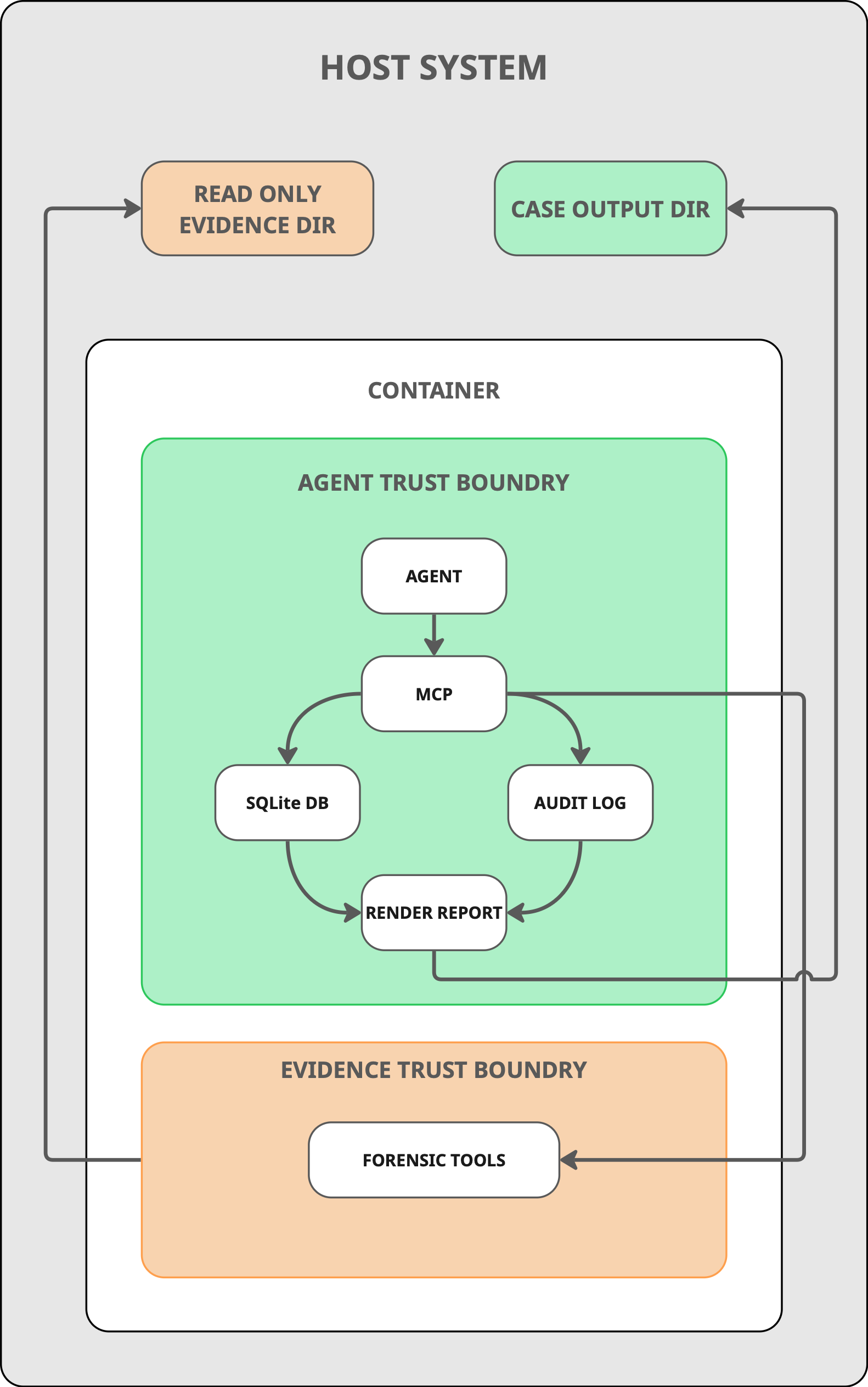
No shell access, no built-in tools. All 140+ tool invocations go through typed MCP interfaces with validated parameters. Every Claude Code built-in tool (Bash, Read, Grep, Glob, Write, Edit, WebFetch, WebSearch, ...) is disabled for every agent session, so the agent never gets a shell, never reads evidence or writes the workspace outside the audit log, and never reaches the network. Every action is auditable and every parameter is constrained to its declared type.
Anti-hallucination at the API boundary. Every finding must cite evidence_refs that are real tool_call_id values from the append-only audit log. The MCP server validates these references at submission time and rejects findings that cite nonexistent tool calls. Timestamps are validated as ISO-8601 and auto-nullified when they appear fabricated. This is enforced architecturally, not by prompting.
Adversarial self-review. Phase 4 explicitly challenges the primary narrative before report generation. It formulates counter-hypotheses, searches for disconfirming evidence, and runs coverage audits to identify which tools were applicable but never invoked and which evidence sources were indexed but never cited.
Token efficiency. The SRL-2018 investigation (11 systems, 120 GB, 1,508 tool calls across 336 minutes) consumed 698K tokens. For cost optimization, the three pipeline roles (planner, executor, analyst) can be assigned to different models - routing mechanical tool-calling to a cheaper model while preserving reasoning quality for analysis.
Quick Start
Install natively (SIFT Workstation, Debian/Ubuntu)
sudo apt install git sleuthkit yara p7zip-full binutils
pipx install "mulder-dfir[forensics]"
mulder setup
mulder investigate /path/to/evidence my-case-id
pipx installs mulder into its own isolated virtualenv and puts the mulder command on your PATH; uv tool install "mulder-dfir[forensics]" works identically. The forensics extra pulls in Zircolite's runtime dependencies. If mulder is not found afterwards, open a new terminal — Ubuntu only adds ~/.local/bin to PATH at login, and only if it already existed.
On first run mulder creates a working directory at ~/.mulder/workspace (override with --cwd or MULDER_CWD) and writes a default .mcp.json into it. Case databases and reports go to ~/.mulder/cases (override with --db-dir).
mulder setup downloads everything mulder owns - rule sets, signatures, and helper binaries - in one run (~2.2 GB, no sudo, refuses to run as root). It pins the same versions the container image uses. The rest of the forensic toolchain (Sleuth Kit, plaso, Zeek, dotnet) is your OS's job; SIFT already provides all of it except the yara binary above. See the Usage Guide for the full picture. The container remains available if you would rather not install anything at all.
Run with Docker (everything preinstalled)
docker pull ghcr.io/calebevans/mulder:1.5.2
mkdir -p ~/mulder-cases

docker run -it --privileged \
  -v /path/to/evidence:/evidence:ro \
  -v ~/mulder-cases:/home/mulder/.mulder/cases \
  -e ANTHROPIC_API_KEY=$ANTHROPIC_API_KEY \
  ghcr.io/calebevans/mulder:1.5.2
mulder investigate /evidence my-case-id
For Vertex AI, Amazon Bedrock, non-Anthropic models via LiteLLM, and full CLI options, see the Usage Guide.
Use as an MCP server
Add to claude_desktop_config.json / .mcp.json:
{
  "mcpServers": {
    "mulder": {
      "type": "stdio",
      "command": "mulder",
      "args": ["serve"]
    }
  }
}
Without installing first, uvx mulder-dfir serve works too.
Case Briefing (Optional)
Drop a MULDER.md file in your evidence directory to provide case context:
## What We Know
- The network was breached on March 15
- Suspect account: jsmith

## What We're Looking For
- How did the attacker gain initial access?
- Was data exfiltrated?
The briefing is injected into every investigation phase, guiding tool selection, analysis focus, and report framing. See the Usage Guide for details.
Forensic Tools
Mulder integrates 35+ open-source forensic tools exposed as 140+ typed MCP operations:
| Category | Tools |
|---|---|
| Memory | Volatility 3 (14 plugins) |
| Disk | Sleuthkit, Plaso, foremost, PhotoRec, Scalpel |
| Windows artifacts | EZ Tools (Prefetch, Amcache, ShimCache, MFT, USN Journal, Jump Lists, Shellbags, SRUM), RegRipper, Hayabusa (3,700+ Sigma rules), Chainsaw |
| Event logs | python-evtx, Zircolite |
| Network | tshark, Zeek, Suricata, tcpflow, tcpxtract |
| Malware | YARA, CAPA, FLOSS, ClamAV, radare2, Detect-It-Easy * |
| Documents | oletools, PDF tools, pst-utils |
| Mobile | ALEAPP, iLEAPP, MVT |
| Other | bulk_extractor, binwalk, ExifTool, ssdeep, hashdeep, steghide, Hindsight |
* Detect-It-Easy is supported but not bundled: its .deb pulls in ten libqt5* packages for a CLI that draws nothing. run_detect_it_easy uses it if diec is on $PATH, and reports it as missing otherwise. Packing is still flagged without it — triage_binary checks section entropy, RWX permissions, known packer section names and import-table shape.
Full API reference: Tool Manifest
Output
Each investigation produces:
- Markdown and HTML reports - executive summary, attack timeline, findings with MITRE ATT&CK mappings, IOC tables, and audit trail (example HTML reports)
- Per-case SQLite database - FTS5 full-text search across all indexed evidence
- Append-only audit log - JSONL recording every tool invocation with BLAKE2b output hashes
- Optional exports - STIX 2.1 IOC bundle, CSV IOC list, and MITRE ATT&CK Navigator layer via
mulder export-iocsandmulder export-navigator
Documentation
| Document | Description |
|---|---|
| Usage Guide | Installation, providers, CLI reference, Docker configuration |
| Architecture | System design, pipeline phases, quality gates, data flow |
| Tool Manifest | API reference for all MCP tools |
| Adding Tools | Contributor guide for adding new forensic tools |
| Glossary | Terminology and definitions |
License
Apache-2.0
1 maintainer

Metadata
1 maintainer
Release files for mulder-dfir 1.5.2
For a detailed explanation of source distributions (sdists) and built distributions (wheels), please see the package formats documentation.
Source distribution (sdist)
| File | Size | Uploaded | |
|---|---|---|---|
| mulder_dfir-1.5.2.tar.gz | 664.2 kB | Details |
Built distribution (wheel)
| File | Interpreter | ABI | Platform | Reset |
|---|---|---|---|---|
| mulder_dfir-1.5.2-py3-none-any.whl | Python 3 | none | any | Details |
Total release size: 1.2 MB
Release files / mulder_dfir-1.5.2.tar.gz
| Download URL | mulder_dfir-1.5.2.tar.gz |
|---|---|
| Size | 664.2 kB |
| Tags | Source |
|
SHA-256 checksum How to use checksums |
333530f055167982c8da0ea99963d63f56ba53af7c5a19f0f1d195e2eaf27a57
|
|
BLAKE2b-256 checksum How to use checksums |
6a4d95653d2566010d393f5614f643a6216a4e7c719116503dbbd46dfcdc0094
|
| Upload date | |
|
Uploaded using Trusted Publishing? What is trusted publishing? |
Yes |
| Uploaded via |
twine/7.0.0 CPython/3.13.14
|
Provenance
Provenance describes where a file came from. On PyPI, provenance is shared via attestations, which provide a verifiable record of the build or publishing details. View details, limitations and caveats.


PyPI Publish Attestation
PyPI verified that this artifact, at this checksum, originated from the publisher listed below.
Signed by GitHub Actions, verified by PyPI on Sep 19, 2026.
Transparency logRelease files / mulder_dfir-1.5.2-py3-none-any.whl
| Download URL | mulder_dfir-1.5.2-py3-none-any.whl |
|---|---|
| Size | 525.5 kB |
| Tags | Python 3 |
|
SHA-256 checksum How to use checksums |
f19d4d9a5345cc1ead570aebf4a30c4740902a98b2ab812699556d266909662d
|
|
BLAKE2b-256 checksum How to use checksums |
f024c7983a4a83fca20e0a6952b1aae5ff3ab77967d5b0b73f9880ba1fcbd71c
|
| Upload date | |
|
Uploaded using Trusted Publishing? What is trusted publishing? |
Yes |
| Uploaded via |
twine/7.0.0 CPython/3.13.14
|
Provenance
Provenance describes where a file came from. On PyPI, provenance is shared via attestations, which provide a verifiable record of the build or publishing details. View details, limitations and caveats.
PyPI Publish Attestation
PyPI verified that this artifact, at this checksum, originated from the publisher listed below.
Signed by GitHub Actions, verified by PyPI on Sep 19, 2026.
Transparency log













