
Multi-Input Medical Image Machine Learning Toolkit
The Multi-Input Medical Image Machine Learning Toolkit (MultiMedImageML) is a library of Pytorch functions that can encode multiple 3D images (designed specifically for brain images) and offer a single- or multi-label output, such as a disease detection.
Thus, with a dataset of brain images and labels, you can train a model to predict dementia or multiple sclerosis from multiple input brain images.
To install Multi Med Image ML, simply type into a standard UNIX terminal
pip install multi-med-image-ml
Overview
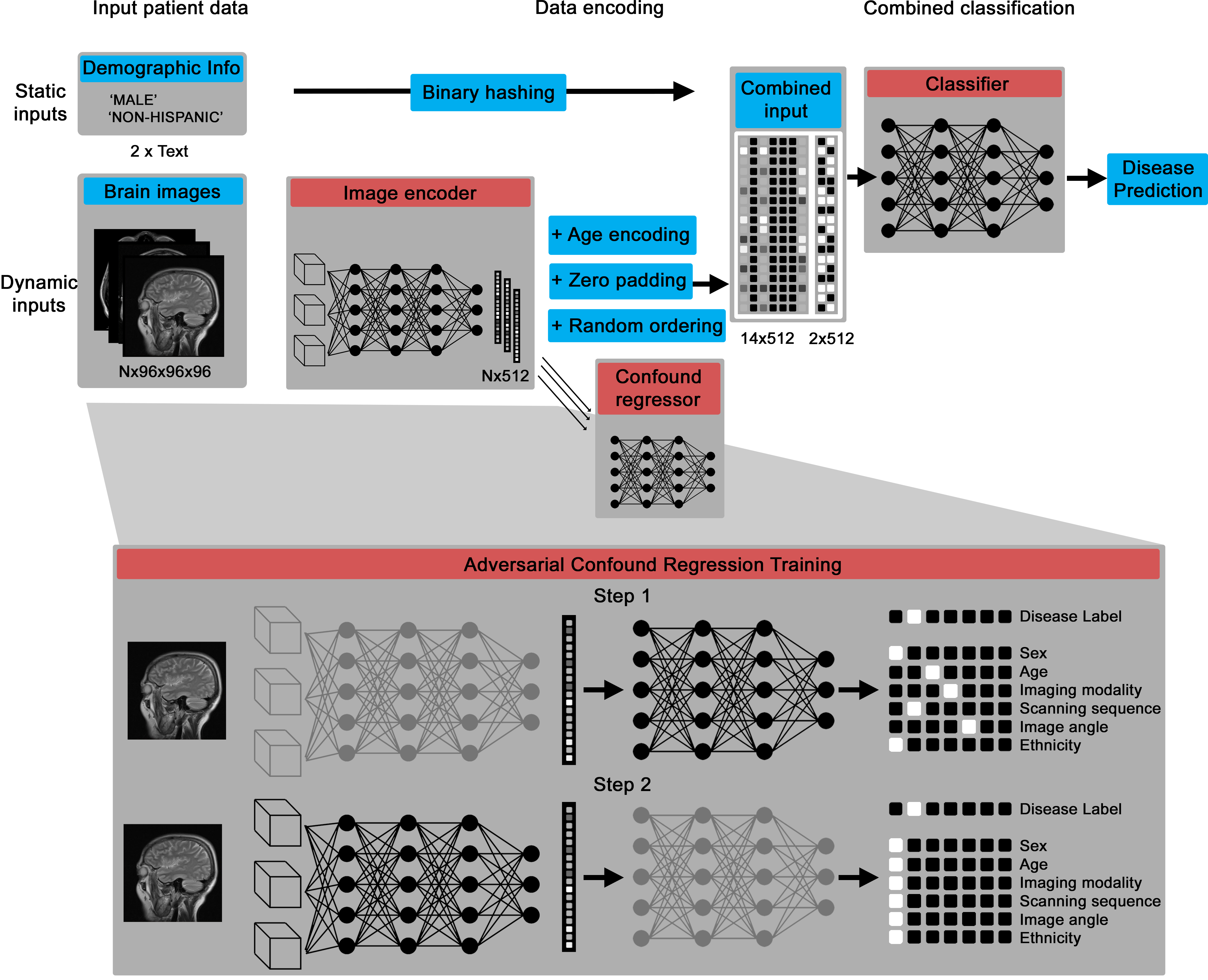
The core deep learning architecture is a Pytorch model that can take in variable numbers of 3D images (between one and 14 by default), then encodes them into a numerical vector and, through an adversarial training process, creates an intermediate representation that contains information about disease biomarkers but not confounds, like patient age and scanning site.
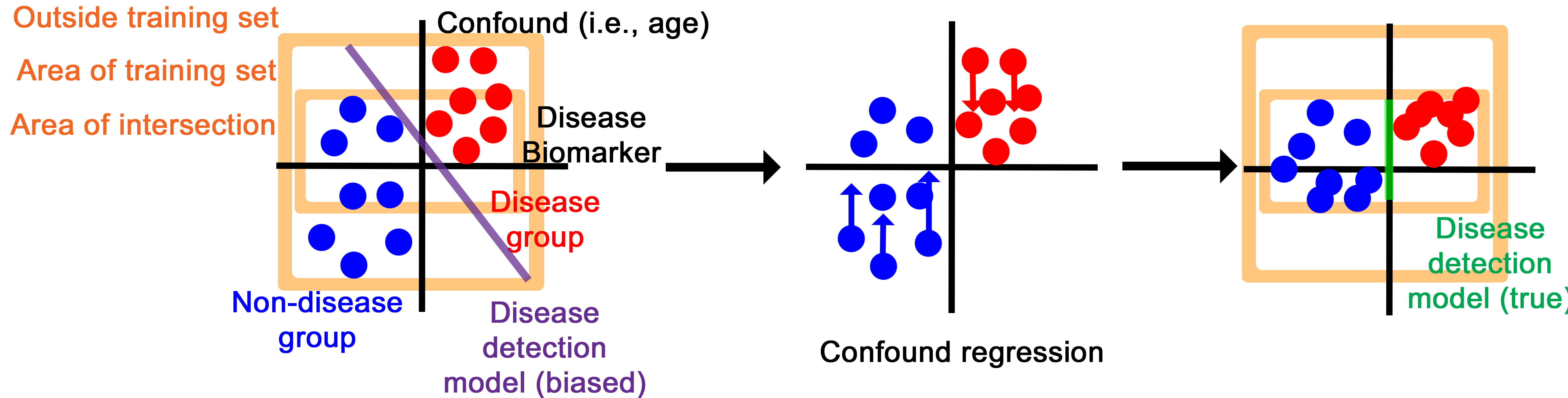
The confound regression process essentially disguises the intermediary representation to have disease biomarker features while imitating the confounding features of other groups.
Getting Started
See the Documentation.
Datasets
This may be used with either public benchmark datasets of brain images or internal hospital records, so long as they're represented as DICOM or NIFTI images. It was largely tested on ADNI and data internal to MGH. If they're represented as DICOM images, they are converted to NIFTI with metadata represented as a JSON file using dcm2niix. They may be further converted to NPY files, which are resized to a specific dimension, with the metadata represented in a pandas dataframe.
The MedImageLoader builds up this representation automatically, but it is space-intensive to do so.
Data may be represented with a folder structure.
.
└── control
    ├── 941_S_7051
    │   ├── Axial_3TE_T2_STAR
    │   │   └── 2022-03-07_11_03_03.0
    │   │       ├── I1553008
    │   │       │   ├── I1553008_Axial_3TE_T2_STAR_20220307110304_5_e3_ph.json
    │   │       │   └── I1553008_Axial_3TE_T2_STAR_20220307110304_5_e3_ph.nii.gz
    │   │       └── I1553014
    │   │           ├── I1553014_Axial_3TE_T2_STAR_20220307110304_5_ph.json
    │   │           └── I1553014_Axial_3TE_T2_STAR_20220307110304_5_ph.nii.gz
    │   ├── HighResHippocampus
    │   │   └── 2022-03-07_11_03_03.0
    │   │       └── I1553013
    │   │           ├── I1553013_HighResHippocampus_20220307110304_11.json
    │   │           └── I1553013_HighResHippocampus_20220307110304_11.nii.gz
    │   └── Sagittal_3D_FLAIR
    │       └── 2022-03-07_11_03_03.0
    │           └── I1553012
    │               ├── I1553012_Sagittal_3D_FLAIR_20220307110304_3.json
    │               └── I1553012_Sagittal_3D_FLAIR_20220307110304_3.nii.gz
    └── 941_S_7087
        ├── Axial_3D_PASL__Eyes_Open_
        │   └── 2022-06-15_14_38_03.0
        │       └── I1591322
        │           ├── I1591322_Axial_3D_PASL_(Eyes_Open)_20220615143803_6.json
        │           └── I1591322_Axial_3D_PASL_(Eyes_Open)_20220615143803_6.nii.gz
        └── Perfusion_Weighted
            └── 2022-06-15_14_38_03.0
                └── I1591323
                    ├── I1591323_Axial_3D_PASL_(Eyes_Open)_20220615143803_7.json
                    └── I1591323_Axial_3D_PASL_(Eyes_Open)_20220615143803_7.nii.gz
In the case of the above folder structure, "/path/to/control" may simply be input into the MedImageLoader function. For multiple labels, "/path/to/test", "/path/to/test2", and so on, may also be input.
Labels and Confounds
MIMIM enables for the representation of labels to classify by and confounds to regress. Confounds are represented as strings and labels can be represented as either strings or the input folder structure to MedImageLoader.
1 maintainer

Release files for multi-med-image-ml 1.0.1
For a detailed explanation of source distributions (sdists) and built distributions (wheels), please see the package formats documentation.
Source distribution (sdist)
| File | Size | Uploaded | |
|---|---|---|---|
| multi_med_image_ml-1.0.1.tar.gz | 4.1 MB | Details |
Built distribution (wheel)
| File | Interpreter | ABI | Platform | Reset |
|---|---|---|---|---|
| multi_med_image_ml-1.0.1-py3-none-any.whl | Python 3 | none | any | Details |
Total release size: 4.8 MB
Release files / multi_med_image_ml-1.0.1.tar.gz
| Download URL | multi_med_image_ml-1.0.1.tar.gz |
|---|---|
| Size | 4.1 MB |
| Tags | Source |
|
SHA-256 checksum How to use checksums |
4cb8b32d8828c7d6f0027f9bc0009008f1ebc002bfe396146dd05e8ccc8b84b1
|
|
BLAKE2b-256 checksum How to use checksums |
cb9ff919cb27a106a97c4495beea5952e8cac5c154400e6483c40982d72b31fc
|
| Upload date | |
|
Uploaded using Trusted Publishing? What is trusted publishing? |
Yes |
| Uploaded via |
twine/6.0.1 CPython/3.12.8
|
Provenance
Provenance describes where a file came from. On PyPI, provenance is shared via attestations, which provide a verifiable record of the build or publishing details. View details, limitations and caveats.


PyPI Publish Attestation
PyPI verified that this artifact, at this checksum, originated from the publisher listed below.
Signed by GitHub Actions, verified by PyPI on Dec 16, 2024.
Transparency logRelease files / multi_med_image_ml-1.0.1-py3-none-any.whl
| Download URL | multi_med_image_ml-1.0.1-py3-none-any.whl |
|---|---|
| Size | 739.1 kB |
| Tags | Python 3 |
|
SHA-256 checksum How to use checksums |
3237ff560ef9350a06e15b3aaec1a8016e39cca79cfcbaaa6ab8955e5d608d6e
|
|
BLAKE2b-256 checksum How to use checksums |
9a52711ffbea58ad83beb7c85fa4b52aea783101c8aad647f0a42297984c0b3e
|
| Upload date | |
|
Uploaded using Trusted Publishing? What is trusted publishing? |
Yes |
| Uploaded via |
twine/6.0.1 CPython/3.12.8
|
Provenance
Provenance describes where a file came from. On PyPI, provenance is shared via attestations, which provide a verifiable record of the build or publishing details. View details, limitations and caveats.
PyPI Publish Attestation
PyPI verified that this artifact, at this checksum, originated from the publisher listed below.
Signed by GitHub Actions, verified by PyPI on Dec 16, 2024.
Transparency log













