
multiSSH3
Introduction
multiSSH3 is a fast, flexible way to run commands and move files across many hosts in parallel, while watching everything live.
Use it from the CLI for quick fleet actions or import it as a Python module for automation and orchestration.
multiSSH3 understands host groups from env files, expands ranges, reuses SSH sessions, and presents clean outputs for human or machine (json / table).
Demo Video

https://github.com/user-attachments/assets/5121bb20-4b32-4000-8081-2ad39571781e
Screenshots
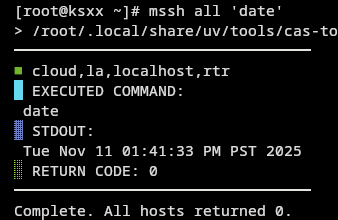
Running date on host group all
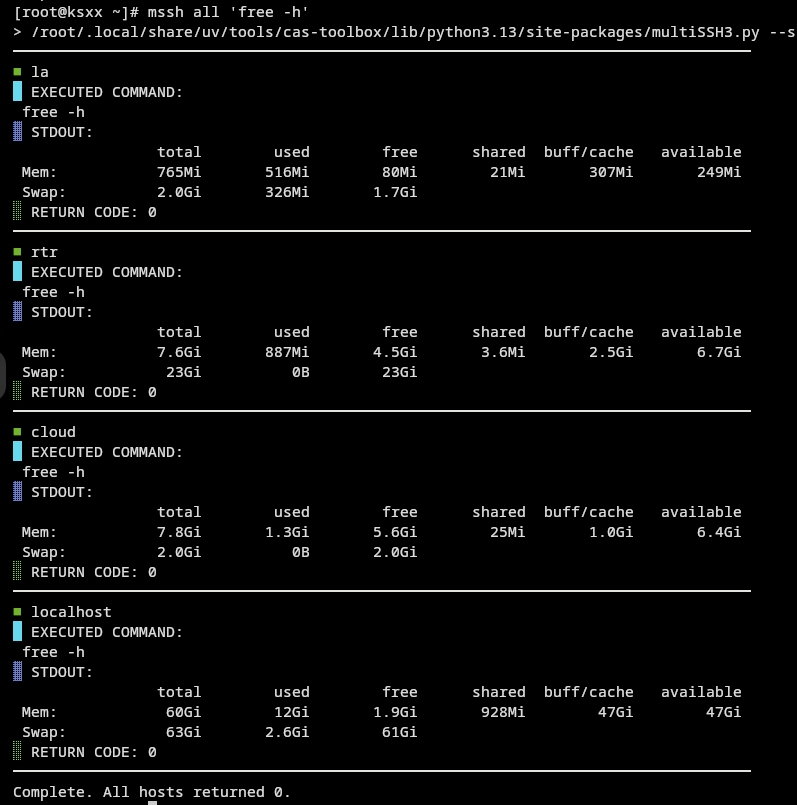
Running free on host group all
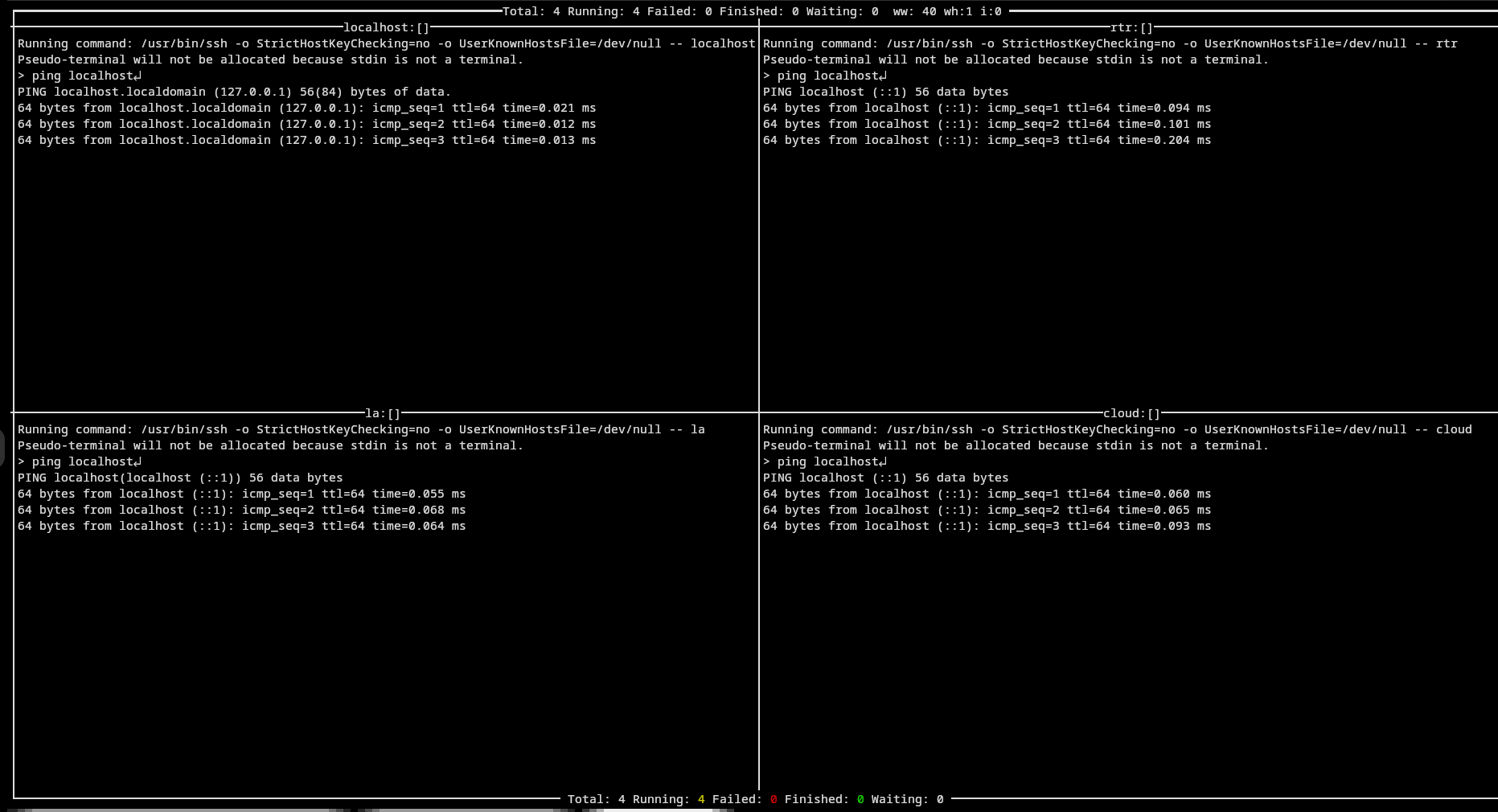
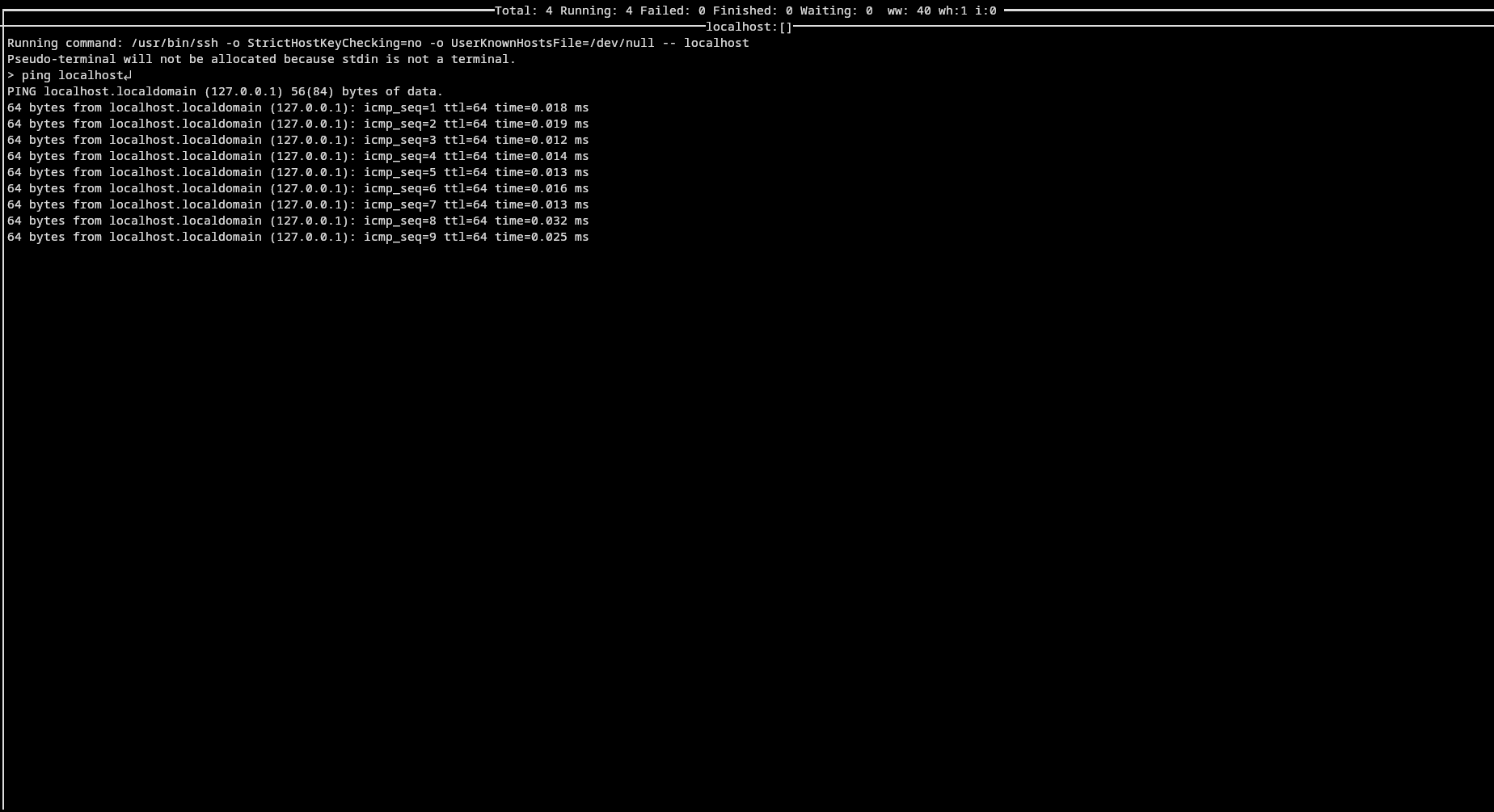
Running ping on host group all
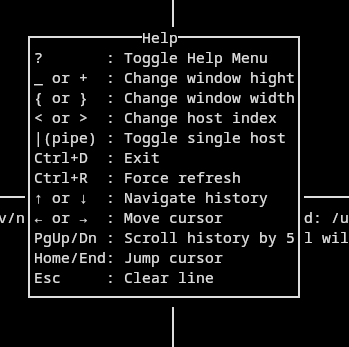
Curses Help Window within curses display
Curses single window mode with key '|'
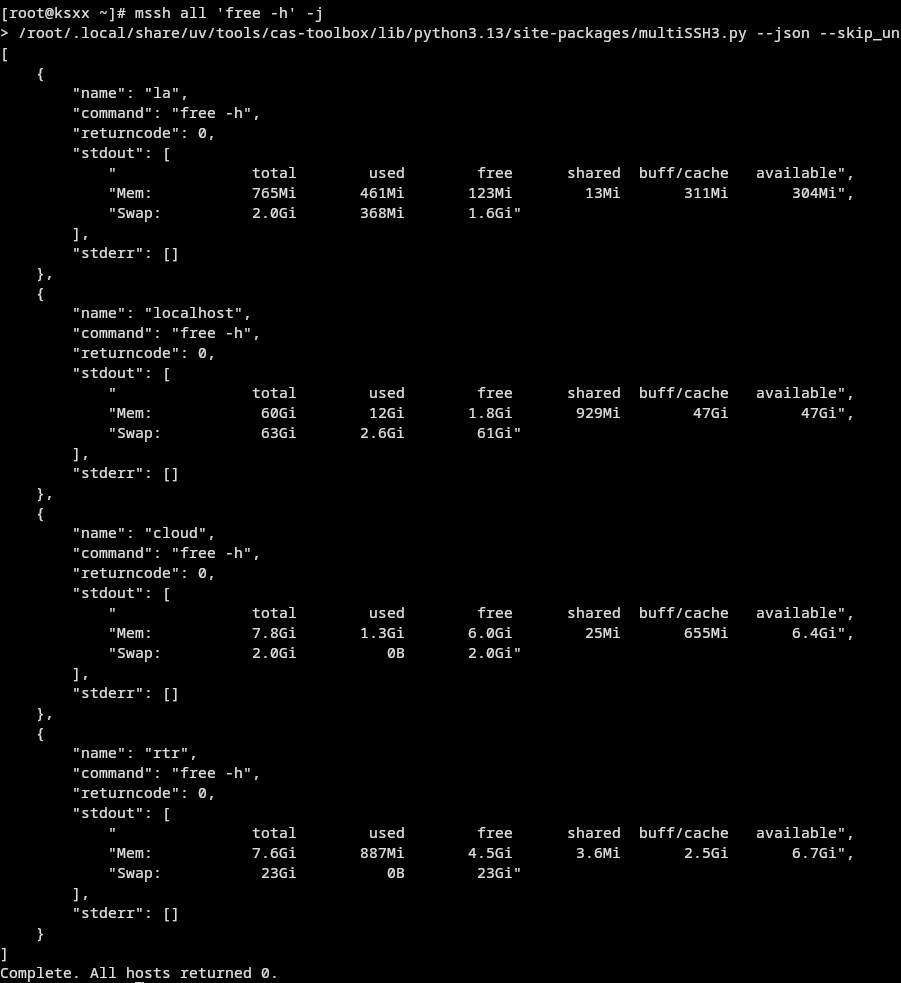
Running free -h on host group all with json output
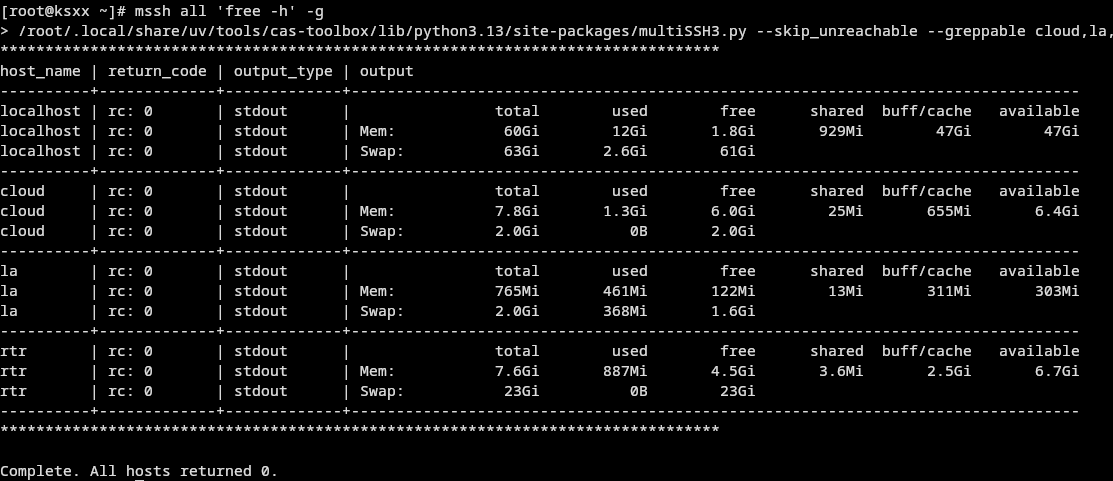
Running free -h on host group all with greppable table output
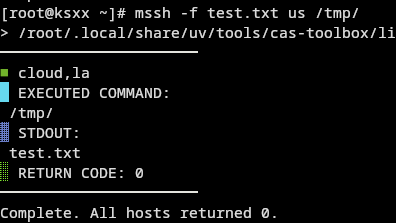
Broadcasting ./test.txt to host group us at /tmp/test.txt
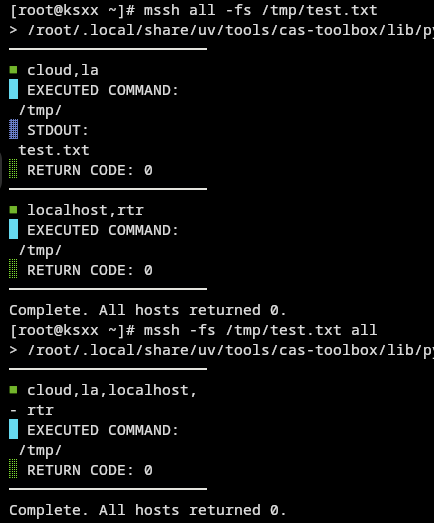
Syncing /tmp/test.txt from local machine to host group all (at /tmp/test.txt)
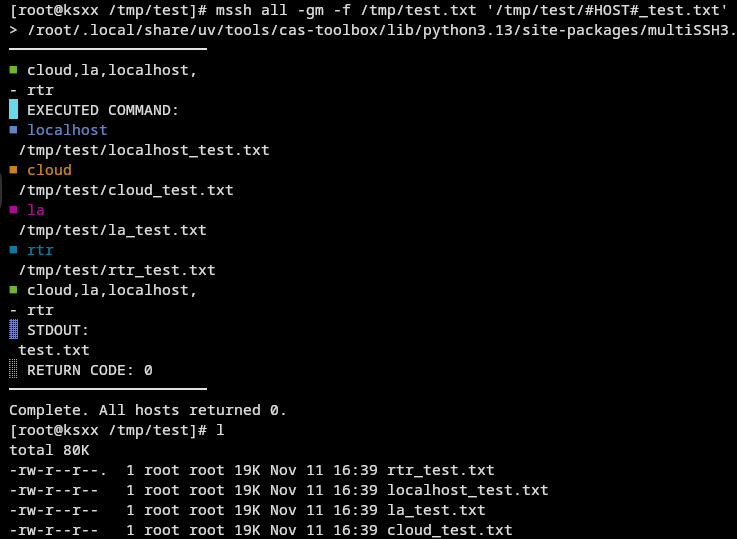
Gathering /tmp/test.txt from host group all to local machine at /tmp/test/<hostname>_test.txt
Running power status using ipmitool on host group all with IPMI interface prefixing
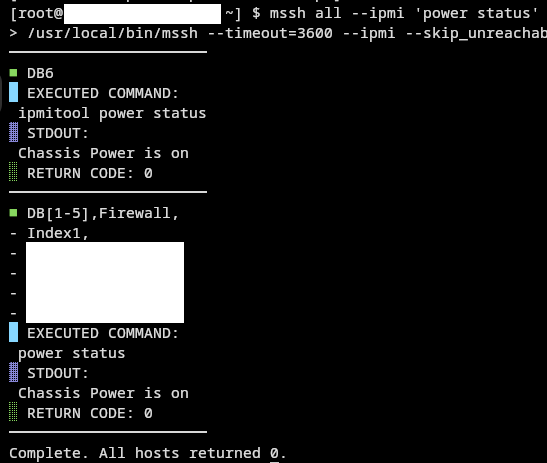
Note:
DB6in image does not have IPMI over ethernet connection. It had failed back to runningipmitoolover ssh.
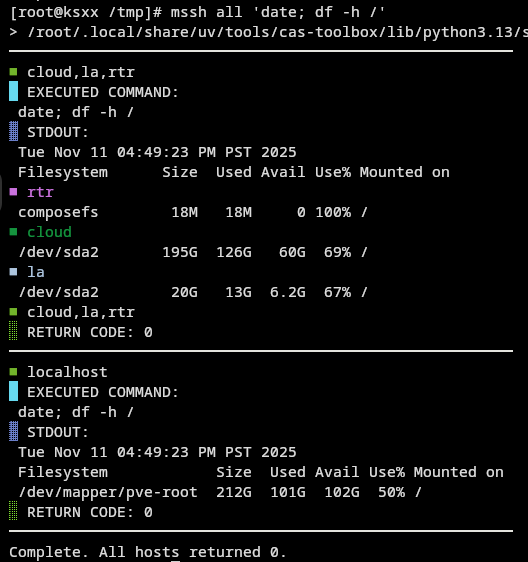
Running date; df -h on host group all showing the N-Host Diff (threshold 0.6, the default then; it is 0.9 now)
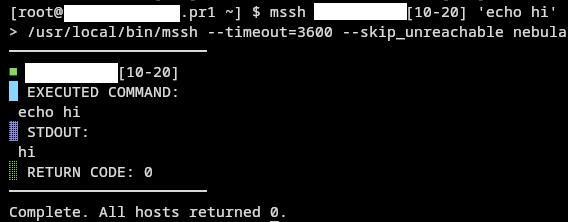
Running echo hi on host range <hostname>[10-20]*
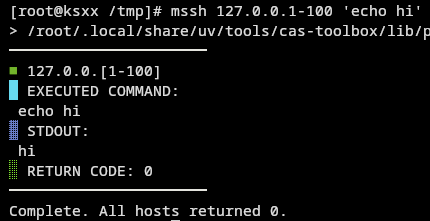
Running echo hi on host range 127.0.0.1-100
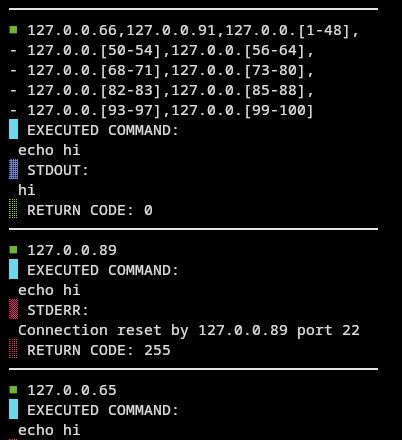
Summary shown with some hosts reporting error
Command syntax / output / runtime comparism with Ansible ad-hoc
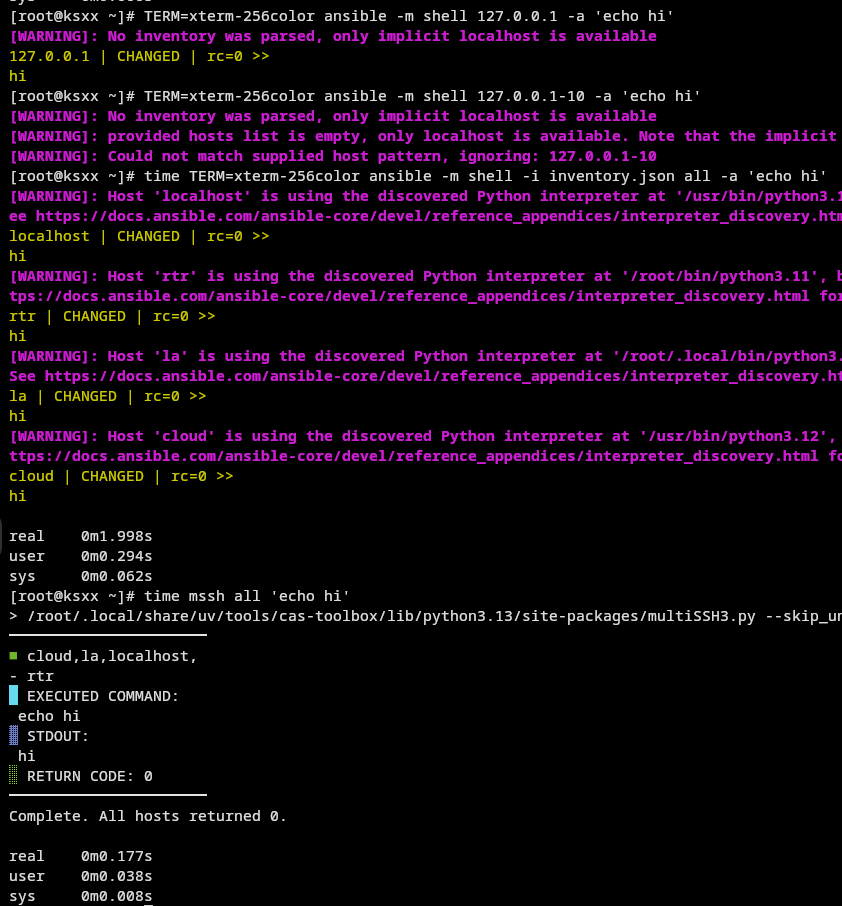
Note: if you like to use ansible, you will likely be running playbooks. This comparison is just for showing ansible is not for running ad-hoc commands.
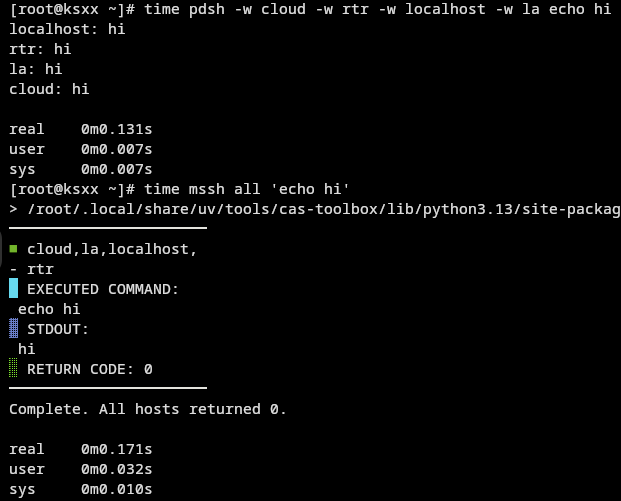
Command syntax / Runtime comparism with pdsh
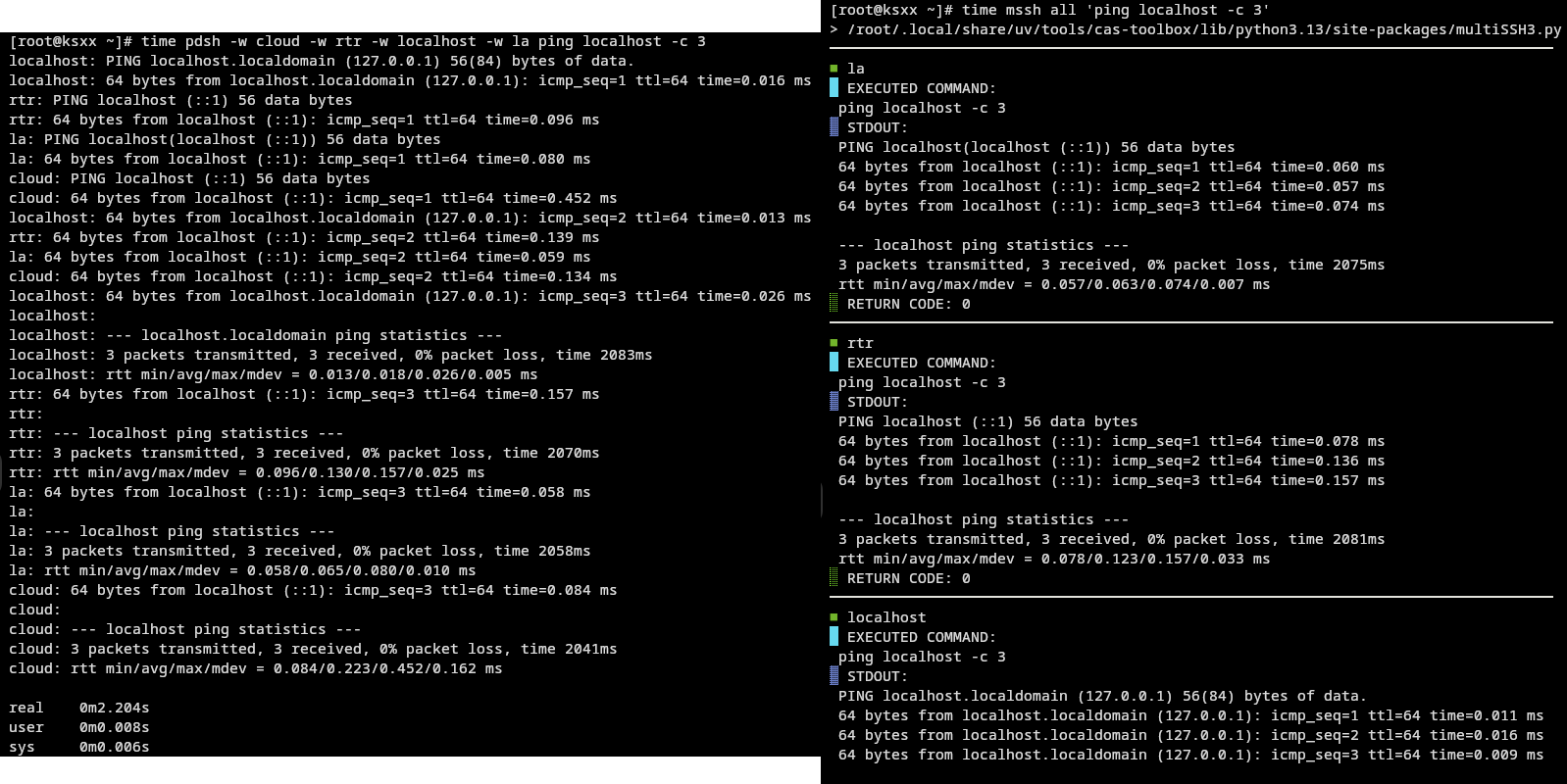
Output comparism with pdsh
Highlights
-
Run commands on many hosts simultaneously and asynchronously ( configurable max connections )
-
Live interactive curses UI with per-host status. ( send input to all hosts asynchronously )
-
Broadcast / gather files (rsync -> scp), with --file_sync syntaxic sugar
-
Host discovery via env variables, files, ranges, and DNS; smart cached skip of unreachable hosts
-
IPMI support with interface IP prefixing and SSH fallback
-
Concurrency tuned for large fleets with resource-aware throttling
-
Easily persist defaults via config files; ControlMaster config helper for speed
-
Importable as a Python module for automation frameworks
-
No client side code / dependencies! ( calling system ssh / rsync / scp )
-
Support windows with openssh (server and client) !
Why use it?
-
If you think ansible is too slow
-
If you think ansible is too clunky / cluttered
-
If you think pdsh is too complicated / simple
-
If you think pdsh output is too messy
-
See progress in real time, not after-the-fact logs
-
Operate at scale without drowning your terminal
-
Keep your host definitions in simple env files and ranges ( customizable groupable DNS )
-
Drop-in for scripts: stable exit codes, compact summaries, and capable to produce machine-friendly output
Install
Install via
pip install multiSSH3
multiSSH3 will be in cli available as
mssh
mssh3
multissh
multissh3
multiSSH3
It also installs mssh-complete, the shell autocomplete engine behind mssh --completion (see Autocomplete).
Need Python 3.6+
Configuration
Config File Chain
multissh treat config files as definable default values.
Configed values can be inspected by simply running
mssh -h
to print the help message with current default values. Passwords are the exception: for -p and -ip it only says whether one is set.
Defaults are read from the following chain map stored as json files, top ones overwrite the bottom ones.:
CONFIG_FILE_CHAIN |
|---|
~/multiSSH3.config.json |
~/.multiSSH3.config.json |
~/.config/multiSSH3/multiSSH3.config.json |
/etc/multiSSH3.d/multiSSH3.config.json |
/etc/multiSSH3.config.json |
The current directory is not searched: a cloned repo or an unpacked archive could otherwise change any setting, including which
sshruns. Use--config_fileto load a config file from there; mssh prints a note when./multiSSH3.config.jsonexists (read automatically up to 6.26).Config and env files found on these default paths are only loaded when they are owned by you or root and nobody else can write to them (group write is fine when the group is your own private group). Others are skipped with a warning that shows the
chmodfix. Files you name with--config_file,--env_fileor--env_filesare always loaded.
--store_config_filewrites the file readable by you only (0600), as it can hold passwords. The/etclocations above are written0644so every user can read them. An existing file's permissions are only ever tightened, and a file whose permissions cannot be restricted is left untouched (the config is printed instead).A config file that is a symlink (e.g. into a dotfiles repository) is written through the link; its backup (
.bak, the default answer when the file exists) is a copy next to the link. Undersudo, a config of the user who ran sudo (their file, their symlink, or a new one in a directory of theirs) is looked at, backed up and written with that user's rights: their link is written through where they may write the file it points to, the.bakand a new config are theirs, and a home on NFS that squashes root works. Where that user may not write, the config is printed instead. A link of anyone else (but root) is not followed. Undersudo -E, mssh runs as root and does not load your own~/.multiSSH3.config.json(a file of another user), so--store_config_filewrites the system configs' settings plus the command line, and your earlier settings are left in the.bak(limitations).The file is replaced in one step: a temporary file beside it, with the old file's owner and group where they can be kept, is renamed over it, so with
oa full disk leaves the old one; with the defaultbthe old one is the.bak. Witho(overwrite), and for a config reached through a symlink, a file of another user is written only when its owner can be kept (as root); otherwise the config is printed instead, also when you may write the file through an ACL (limitations). With the defaultb, a config that is not a symlink is moved to the.bakand the new one keeps its owner and group where that can be kept (the owner only as root; the group as anyone, for a file of yours); otherwise it is yours.Each value is checked against the type of the setting's default. Values whose meaning is clear are converted (
"true"/"false","yes"/"no"for true / false settings, numbers written as strings, a list of host names forDEFAULT_HOSTS); anything else, such as"DEFAULT_TIMEOUT": "fifty"or an encoding Python does not know, is ignored with a warning naming the file and the key, and the setting keeps its value from the rest of the chain (no warning when a more specific file sets that key anyway).nullfor a string setting means its default (DEFAULT_HOSTS: nullisall). A file that is not a JSON object is skipped the same way.--config_fileapplies a file exactly as the chain does,_sshPath,DEFAULT_ENV_FILEandERROR_MESSAGES_TO_IGNOREincluded.
Generating / Storing Config File
To store / generate a config file with the current command line options, you can use
mssh --store_config_file [STORE_CONFIG_FILE_PATH]
--generate_config_fileprints the same config (the built-in defaults, the config files mssh loaded and the command line options) as JSON to stdout and writes no file.--generate_config_file > PATHsaves it, but with your shell's file mode (often readable by everyone), while--store_config_filewrites it readable by you only.
--config_file PATHdoes not choose where--generate_config_filewrites: it only names a config file to load. APATHthat does not exist getsWarning: Config file 'PATH' not found, ignoring it.and the config is still printed to stdout.When the file exists,
--store_config_fileasks whether to overwrite it, move it toPATH.bakfirst (the answer after 10 seconds) or stop. Given--generate_config_fileas well, it overwrites the file without asking and without a backup.
Without a path,
--store_config_filewrites to the config file mssh loaded, or to~/.multiSSH3.config.jsonif none was loaded.
You can modify the json file or use command line arguments to update values and store them as defaults.
mssh --timeout 180 --store_config_file
will store
...
"DEFAULT_CLI_TIMEOUT": "180"
...
into ~/.multiSSH3.config.json (or the config file mssh loaded)
If you want to store password, it will be a plain text password in this config file. This will be better to supply it everytime as a CLI argument but you should really consider setting up public-key authentication.
On some systems, scp / rsync will require you use public-key authentication to work.
Host Key Checking
By default mssh does not check host keys. Every ssh, scp and rsync (through --rsh) it runs gets -o StrictHostKeyChecking=no -o UserKnownHostsFile=/dev/null: any host key is accepted and none is remembered, so a key that changes goes unnoticed (ssh's Warning: Permanently added ... line is left out of the output). This keeps large or often reinstalled fleets from stopping at host key questions, but mssh cannot tell a host from a machine pretending to be it. Someone who can redirect the connection (a forged DNS or ARP answer, a taken-over IP address) receives the commands you run and answers them, and with -p (sshpass) receives the password itself.
To have host keys checked, add this to your config file:
"SSH_STRICT_HOST_KEY_CHECKING": true
mssh then passes neither option, and ssh checks host keys against ~/.ssh/known_hosts as your ssh config says (StrictHostKeyChecking, ask by default in OpenSSH). Since mssh talks to many hosts at once, add their keys to ~/.ssh/known_hosts beforehand (after checking the fingerprints), or set StrictHostKeyChecking accept-new in ~/.ssh/config to trust a host's key on the first connection and refuse a different one later. There is no command line option for it; --store_config_file keeps the setting once it is in a config file. A script that imports multiSSH3 can set multiSSH3.SSH_STRICT_HOST_KEY_CHECKING = True.
--copy_idgivesssh-copy-idthe same two options (see-ci, --copy_id), so new nodes need no host key answer; withSSH_STRICT_HOST_KEY_CHECKINGtrue it checks host keys as your ssh config says.
SSH ControlMaster Configuration
Note: you probably want to set presistent ssh connections to speed up each connection events.
You can add the following to your ~/.ssh/config file to enable ControlMaster with a 1 hour persistence by running
mssh --add_control_master_config
# Added by multiSSH3.py to speed up subsequent connections (mssh --add_control_master_config).
# ssh keeps one connection per host open for an hour after its last use and shares it. Its socket
# goes in /run/user/<uid> while you have a login session, else in /dev/shm/multiSSH3-<uid> when that
# is a directory only you can write to (su, sudo, cron, containers); with neither, ssh does not share.
Match exec "/bin/sh -c 'u=$(id -u) || exit 1; test -O /run/user/$u -a -w /run/user/$u'"
  ControlPath /run/user/%i/ssh_sockets_%C
Match exec "/bin/sh -c 'u=$(id -u) || exit 1; test -O /run/user/$u -a -w /run/user/$u && exit 1; d=/dev/shm/multiSSH3-$u; test -d $d || mkdir -m 700 $d 2>/dev/null; test -O $d || exit 1; case $(ls -ld $d) in drwx?-??-*) ;; *) exit 1;; esac'"
  ControlPath /dev/shm/multiSSH3-%i/ssh_sockets_%C
Host *
  ControlMaster auto
  ControlPersist 3600
# End of the block added by multiSSH3.py
The block applies to every ssh you run, not only mssh's. ssh fails outright (exit 255, nothing run) when the directory of its ControlPath is missing, so each Match exec line checks its directory first:
/run/user/<uid>, the per-user directory systemd keeps while you have a login session.- Else
/dev/shm/multiSSH3-<uid>(undersu,sudo, cron and in containers): mssh's runtime directory there, created with mode 0700 when missing, and used only if it is yours and nobody else can write to it. ssh trusts whatever listens where it looks for its master and hands it your terminal. - Else ssh connects without sharing, as without the block (also on systems that have neither).
The sockets never go in your home directory: on clusters it is often NFS, GPFS or Lustre, where unix sockets may not work. The checks run in /bin/sh whatever your login shell (csh and fish too) and work with OpenSSH 7.4 and later. ssh runs each Match exec with your $SHELL -c, twice per ssh: that adds about 2 ms with bash, more with shells that read startup files for -c (tcsh reads .cshrc and /etc/profile.d/*.csh, fish its config.fish), and with a $SHELL that is not an executable every ssh fails. The checks also run when the autocomplete's background checker calls ssh -G; they only look at local directories (and may create /dev/shm/multiSSH3-<uid>).
Under sudo, a ~/.ssh and ~/.ssh/config of the user who ran sudo are written with their rights, and a new ~/.ssh is theirs. A ~/.ssh/config that is a symlink of anyone else (but root, or that user under sudo) is not followed: mssh prints Error adding ControlMaster configuration: ... is a symlink owned by someone else, not writing through it and changes nothing.
Up to multiSSH3 6.31 the block was Host * with ControlPath /run/user/%i/ssh_sockets_%C, which makes every ssh fail where /run/user/<uid> is missing. Run mssh --add_control_master_config again: it replaces that block, and only it, keeping the rest of the file and its permissions as they were. Running it once more changes nothing.
IPMI Logins
With -M, --ipmi, mssh logs in to each host's BMC with one IPMI definition after another until one works. A definition is a dict with any of username, password, args, ipmi_method, interface_ip_prefix and retry_lockout_time (what -iu, -ip, -ia, -im, -mpre and -irlt set), and hostname_keyword: a definition with one is only tried on hosts whose name contains it.
A wrong login can count towards the BMC locking the account, so mssh tries each login once, and only logins you gave it, in this order:
- The command line's, when it has any of
-iu,-ip,-ia,-im,-mpreor-irlt: theDEFAULT_IPMI_*values with those options applied. DEFAULT_IPMI_DEFINITIONS(config file), in order. A key a definition leaves out comes from theDEFAULT_IPMI_*values, or from the command line when it gives that option:-ia='-I lanplus'reaches every definition without its ownargs.DEFAULT_IPMI_USERNAME/DEFAULT_IPMI_PASSWORD(config file), when step 1 did not try them.
When a definition of step 2 applies to the host, the login of step 1 or 3 is only tried if -iu or -ip is given, or if a config file sets DEFAULT_IPMI_PASSWORD and the login is not admin / admin. A configured password admin counts (root / admin is the login of some boards); a DEFAULT_IPMI_USERNAME without a password only fills in the definitions that leave their username out. admin / admin itself, the built-in login (which --generate_config_file and --store_config_file write out too), is only tried on a host nothing else is configured for, or when typed as -iu admin -ip admin. To try it after your logins, list it: {"username": "admin", "password": "admin"}.
| Config file | Command line | Logins tried, in order |
|---|---|---|
| nothing | admin/admin |
|
"DEFAULT_IPMI_USERNAME": "ADMIN", "DEFAULT_IPMI_PASSWORD": "pw" |
ADMIN/pw |
|
| the same | -iu root |
root/pw |
"DEFAULT_IPMI_DEFINITIONS": [{"username": "u1", "password": "p1"}, {"username": "u2", "password": "p2"}] |
u1/p1, u2/p2 |
|
| the same | -iu root -ip pw |
root/pw, u1/p1, u2/p2 |
| the same | -ia='-I lanplus' |
u1/p1, u2/p2, both with -I lanplus |
DEFAULT_IPMI_USERNAME, DEFAULT_IPMI_PASSWORD and DEFAULT_IPMI_DEFINITIONS as above |
u1/p1, u2/p2, ADMIN/pw |
|
"DEFAULT_IPMI_USERNAME": "root", "DEFAULT_IPMI_PASSWORD": "admin" and the definitions above |
u1/p1, u2/p2, root/admin |
|
"DEFAULT_IPMI_USERNAME": "root", "DEFAULT_IPMI_DEFINITIONS": [{"password": "p1"}, {"password": "p2"}] |
root/p1, root/p2 |
|
"DEFAULT_IPMI_DEFINITIONS": [{"hostname_keyword": "gpu", "username": "root", "password": "x"}] |
root/x on gpu01, admin/admin on cpu01 |
A host that fails every login then gets ipmitool run on it over ssh (see -M, --ipmi), once: mssh does not run a command line it already ran on that host.
--store_config_file stores the command line's IPMI options as the DEFAULT_IPMI_* values and keeps your DEFAULT_IPMI_DEFINITIONS. A definition in the list with all seven keys equal to the DEFAULT_IPMI_* values or to the built-in ones is not a login of its own: it marks where the DEFAULT_IPMI_* login goes. mssh writes one there (the list starts with one, and --store_config_file puts it first when the command line had IPMI options, as they were tried first). Config files written by mssh 6.31 and earlier can hold such a copy of the built-in admin / admin definition: it is read the same way, so it no longer makes mssh try admin / admin before your login.
Environment Variables for Hostname Aliases
multissh3 is able to read hostname grouping / aliases from environment variables.
By default mssh reads env variables and recursive resolves them if specified with a hostname that is not be able to be resolved from /etc/hosts. This functions as a pseudo dns service for hostname grouping.
Use
[0-9],[0-f],[a-Z]ranges in the hostname strings for range expansion.
Use
,to separate multiple hostnames / hostname groups.
Hostname Resolution Logic
First, mssh will expand [a-b] ranges in the hostname strings.
- Check if an IPv4 range is given
- Expand using ipv4 range expansion logic.
- Return
- Check if range given is all numerical
- Expand using numerical expansion logic.
- Resolve hostnames
- Return
- Check if range given is all hex characters
- Expand using hex expansion logic.
- Resolve hostnames
- Return
- Else
- Expand using alphanumeric expansion logic.
- Resolve hostnames
- Return
When hostname need to be resolved, mssh will check in the following order:
- Return if it is an ipv4 address
- Return if hostname is in the hosts file (
/etc/hosts, or--host_file): its first IPv4 address there, else its first IPv6 address - If
-C, --no_envis not specified and hostname is in current terminal environment variables- Redo the whole range -> hostname resolution logic with the resolved env variable value.
- hostname is in map generated from env_file(s) specified by
--env_files ENV_FILES- Redo the whole range -> hostname resolution logic with the resolved env variable value.
- Lookup using
socket.getaddrinfo()to query dns server ( IPv4 preferred, IPv6 accepted ). Names are looked up in parallel. - If the ssh config (
ssh -G) maps the name to anotherHostNameor through aProxyJump/ProxyCommand, it is valid (#IP#uses theHostName's address when it resolves ). A catch-all block such asHost *only counts when it gives the name aHostNamethat resolves (e.g.HostName %h.corp.example), so typos are still rejected.
TLDR:
ipv4 address expansion -> range expansion -> identify ipv4 -> resolve using environment variables ( if not no_env ) -> env map from env_files -> remote hostname resolution
An alias's value is split into hosts as the hosts argument is (,, spaces, ;, ...). An alias with an empty value (eu='') stands for no hosts.
A member can name its user: with dbs="postgres@db1,db2", mssh logs in to db1 as postgres, and -u changes only db2's user. A user typed with the alias replaces it: mssh root@dbs logs in to both as root, as a user on the command line wins over ssh config's User.
Inside its own expansion, directly or through other aliases, an alias's name is not expanded again but taken as a host name, as bash does with aliases: web="web,web-b" runs on the host web and on web-b. When no host has that name, mssh reports the loop and runs on the rest: Error: alias loop through 'web' (web -> app -> web): 'web' is not a valid hostname or IP address!
Default Env Files
Because command environment variables take precedence over env files, you can specify
-C, --no_envor set"DEFAULT_NO_ENV": truein config file to disable environment variable lookup.
Use
-ef ENV_FILE, --env_file ENV_FILEto specify a single env file to replace the default env file lookup chain. ( Only this file will be used. )
Use
-efs ENV_FILES, --env_files ENV_FILESto append files to the end of the default env file lookup chain. ( Files will be loaded first to last. )
DEFAULT_ENV_FILES |
|---|
/etc/profile.d/hosts.sh |
~/.bashrc |
~/.zshrc |
~/host.env |
~/hosts.env |
Later files take precedence over earlier files.
The current directory is not searched, as files there could redirect host aliases. Use
--env_files hosts.envto add one. mssh points this out when a host name it cannot find is defined in./.env,./host.envor./hosts.env(read automatically up to 6.26).
Example Env Hostname File
An example hostname alias file will look like:
us_east='100.100.0.1-3,us_east_prod_[1-5]'
us_central=""
us_west="100.101.0.1-2,us_west_prod_[a-c]_[1-3]"
us="$us_east,$us_central,$us_west"
asia="100.90.0-1.1-9"
eu=''
rhel8="$asia,$us_east"
all="$us,$asia,$eu"
( You can use bash replacements for grouping. )
Hostname Range Expansion
mssh is also able to recognize ip blocks / number blocks / hex blocks / character blocks directly.
For example:
mssh testrig[1-10] lsblk
mssh ww[a-c],10.100.0.* 'cat /etc/fstab' 'sed -i "/lustre/d" /etc/fstab' 'cat /etc/fstab'
A range needs both ends: node[1-] or node[-3] is not expanded, and mssh rejects it as an invalid host name.
A host you give that names no host at all, such as a range counting down ( node[10-1], 10.0.0.20-10 ) or an empty alias, is an error like a name that does not resolve: mssh says why, counts it as a failed host and lists it in failed_hosts. When none of the hosts you gave names a host, mssh stops with Exiting: no hosts to run on without running anything. Empty groups inside an alias ( like eu='' in the example above ) are fine. If -X, --skip_hosts excludes every host, mssh warns.
Misc Features
Interactive Inputs
It also supports interactive inputs. ( and able to async boardcast to all supplied hosts )
mssh www bash
mssh cache all inputs and send them to all hosts when they are ready to receive inputs. What you type goes to the commands' input, not to ssh's own questions (see below).
Password, Passphrase and Host Key Questions
ssh asks for a password, a key passphrase or to confirm a new host key on your terminal. mssh lets it only when one command runs at a time without the curses display: -nw with one host, or -nw -m 1 to answer each host in turn. Otherwise ssh runs without a terminal and fails at once with its reason, such as Permission denied (publickey,password). or Host key verification failed.: behind the curses display its questions would be hidden and the run would never end, and several ssh asking at once would split what you type between them and could show a typed password on screen.
After the output, a Note: line on stderr names the hosts whose ssh wanted a password (or a key passphrase) it could not ask for. For many hosts, use ssh keys (ssh-agent for a key with a passphrase) or -p (needs sshpass), and with SSH_STRICT_HOST_KEY_CHECKING add new hosts' keys to known_hosts first. Ctrl-C still stops the commands: mssh stops them itself, as it does for -t.
Without a terminal, ssh would send each password it cannot ask for empty, three times per host, and every one is a failed login in the host's auth log (fail2ban). So mssh then gives ssh, scp and rsync -o NumberOfPasswordPrompts=0, except with -p and when SSH_ASKPASS_REQUIRE tells ssh to ask through an askpass program. A ProxyJump host's ssh does not get it: if that host may want a password, set NumberOfPasswordPrompts 0 for it in your ssh config.
Input is typed into the curses display, so it needs a terminal on stdin as well as on stdout. When stdin is redirected (< file, a pipe, a while read loop, xargs), mssh shows no curses display, leaves stdin unread, and commands get /dev/null as their input, as with --no_watch.
Piping the Output
The output is printed when the commands finish, so it can be piped like any command's:
mssh all 'dmesg' | less
If the reader exits before reading all of it (| head, or q in less), mssh stops quietly as other command line tools do: no further commands or --repeat runs start, and the exit code still counts the hosts that failed in what ran. If that happens before anything has run (the output of -h, -V, a usage error or --generate_config_file), SIGPIPE ends mssh as it ends other tools: the shell reports 141, a program that starts mssh with Python's subprocess sees -13, and on Windows the exit code is 120 (limitations).
Curses Window Size Control
By default, it will try to fit everything inside your window.
DEFAULT_WINDOW_WIDTH = 40
DEFAULT_WINDOW_HEIGHT = 1
While leaving minimum 40 characters / 1 line for each host display by default. You can modify this by using -ww WINDOW_WIDTH, --window_width WINDOW_WIDTH and -wh WINDOW_HEIGHT, --window_height WINDOW_HEIGHT.
It is also possible to modify the window size within curses display by pressing keys:
? or F1 : Toggle Help Menu
_ or +  : Change window hight
{ or }  : Change window width
< or >  : Change host index
|(pipe) : Toggle single host
Ctrl+D  : Exit
Ctrl+R  : Force refresh
↑ or ↓  : Navigate history
← or →  : Move cursor
PgUp/Dn : Scroll history by 5
Home/End: Jump cursor
Esc     : Clear / hide view
Escclears the input line. On an empty input line it hides the live view; the commands keep running and their output is printed when they finish. While the terminal is under 3 rows the display shows "Terminal too small" and Esc waits until it is bigger (limitations). The live view leaves out ssh's own notices, as the output at the end does (ERROR_MESSAGES_TO_IGNORE): mssh does not keep the hosts' keys, so ssh saysWarning: Permanently added ...on every connection, and a quiet command's window showed only that. You can also toggle this help in curses by pressing?orF1. The one-character keys (?,_,+,{,},<,>,|) act only on an empty input line; after you have typed something they are typed like any other character, so a?can still reach the hosts.F1toggles the help at any time.
Command String Replacement
mssh will replace some magic strings in the command string with host specific values.
| Magic String | Description |
|---|---|
#HOST# |
Replaced with the expanded name /IP |
#HOSTNAME# |
Replaced with the expanded name / IP |
#USER# |
Replaced with the username |
#USERNAME# |
Replaced with the username |
#ID# |
Replaced with the ID of the host obj |
#I# |
Replaced with the index of the host |
#UUID# |
Replaced with the UUID of the host |
#RESOLVEDNAME# |
Replaced with the resolved name |
#IP# |
Replaced with the resolved IP |
Note:
#HOST#and#HOSTNAME#are the supplied hostname / ip before any resolution.
Note: Resolved name is the IP / Hostname with user appended and ip prefix applied. This is what got used to connect to the host.
When a Host Does Not Answer
mssh has ssh, scp, rsync's ssh and ssh-copy-id give up on a host that takes the connection but never answers (an overloaded or hung sshd), or that stops answering while its command runs (it went off the network):
-o ConnectTimeout=30: when connecting and sshd's first words take longer than 30 s, the host fails withConnection timed out during banner exchange(older OpenSSH:ssh: connect to host ... Connection timed out), return code 255, and counts as unreachable. A file copy takes twice as long, mssh tries scp after rsync failed.-o ServerAliveInterval=15 -o ServerAliveCountMax=4: after about 60 s without an answer from a connected host, it fails withTimeout, server ... not responding., return code 255. A command that prints nothing for a long time is not affected: sshd answers the keepalives.
Change the values with DEFAULT_SSH_CONNECT_TIMEOUT, DEFAULT_SSH_SERVER_ALIVE_INTERVAL and DEFAULT_SSH_SERVER_ALIVE_COUNT_MAX in the config file; 0 leaves the option to ssh (without a keepalive interval, mssh does not pass its count either).
Your own -ea values win: ssh uses the first value it gets, and mssh puts its options after the ones in -ea, so -ea '-o ConnectTimeout=120' sets 120. An -ea keepalive interval still gets mssh's count (-ea '-o ServerAliveInterval=60': 4 x 60 s). Options in your ssh config (~/.ssh/config, /etc/ssh/ssh_config, or a file given with -ea '-F FILE') do not win: a command-line -o beats the ssh config, and mssh's are command-line options. Set the DEFAULT_SSH_* values instead, or 0 to leave an option to your ssh config (limitations).
A shared connection (ControlMaster, see SSH ControlMaster Configuration) does the keepalive of the ssh that opened it. One mssh opened gives up on a host that went away, and the next ssh connects anew (where ConnectTimeout applies). One that a plain ssh without ServerAliveInterval in your ssh config opened does not notice: commands through it wait until the kernel gives up on the connection, which takes about 15 minutes on Linux. Setting ServerAliveInterval in your ssh config covers those too.
Autocomplete
mssh completes hosts, options, option values and remote commands when you press TAB, in bash, zsh and fish.
mssh --completion install     # set it up for the shell you run this from
mssh --completion uninstall   # remove it again
mssh --completion bash        # or print the script (bash, zsh or fish)
Install writes the script to ~/.local/share/multiSSH3/ and adds a marked block that loads it to ~/.bashrc (bash) or $ZDOTDIR/.zshrc (zsh, which install asks, so a ZDOTDIR set in ~/.zshenv counts; ~/.zshrc when ZDOTDIR is not set); for fish it writes files under ~/.config/fish/ ($XDG_CONFIG_HOME/fish/ when that is set). It prints every file it changes, and leaves alone a script file in its way that mssh did not write. Uninstall removes exactly what install added. A zsh completion dump (.zcompdump) written while the script was loaded still maps mssh to the removed _mssh; uninstall names such a file, for you to delete, and zsh makes a new one. bash login shells (ssh logins, macOS terminals) read ~/.bash_profile, ~/.bash_login or ~/.profile instead of ~/.bashrc; those usually load ~/.bashrc, and install prints the line to add when yours does not.
A new block is appended to your rc file; changing or removing it replaces the file in one step, so a full disk or quota leaves it as it was. A link stays a link (the file it points to is the one changed), and the file keeps its permissions and owner (not ACLs or other extended attributes). If the block's # >>> mssh completion >>> or # <<< mssh completion <<< line is missing or repeated, install and uninstall change nothing and print the line numbers to fix by hand. When mssh may not change the file (read-only, or linked into a read-only store as home-manager does, or not a regular file, such as a link to /dev/null), or cannot replace it safely to change a block (bind-mounted, hard-linked, or another user's), it leaves the file as it is and prints the lines to add, replace or delete by hand.
- Hosts: host strings you typed before, env file aliases,
/etc/hosts, ssh configHostentries,known_hostsand the ARP table. Large clusters are offered as ranges (node[0001-2000]) until what you typed narrows them down. Hosts mssh recently found unreachable come last (with the user this line gives them:root@node05andnode05are told apart). - Options and values: option names, and values you used before (
-u,-t, ...). Paths complete as files. Passwords are never completed or shown, the ones in your config file included. - Commands: commands from your mssh history, the rest of a command from this machine's own completion (
mssh grp systemctl rest<TAB>; in bash as bash-completion completessudo CMD, with a few gaps in limitations), and the magic strings (#HOST#, ...). A command typed as separate words gets the next words of commands you ran, with the quotes they ran with ('ssh*'comes as\'ssh\*\', so the remote shell gets the same command), never a word holding a space: mssh runs each word as its own command when one of them holds a space, so type such a command in quotes (mssh grp "grep 'connection refused' /var/log/syslog"). A local file name holding whitespace or a shell character goes in quoted for this shell, which is wrong for the remote command (my\ filerunsmy fileas a command of its own,a\&bmakes the remote shell runb), and TAB inside a quoted argument (mssh grp cat 'my f<TAB>) offers nothing useful; both are to be fixed after 6.40 (limitations, limitations).
Ranking uses the rest of the line on both sides of the cursor: after mssh gpu[01-16] " the commands you run on those hosts come first, and in the hosts of mssh ▮ "systemctl restart slurmd" the hosts you restarted slurmd on come first.
Completion never removes what you typed, prints nothing, and falls back to the shell's normal completion when anything is slow or missing.
In bash with readline's completion-ignore-case on (set completion-ignore-case on in ~/.inputrc, or bind at any time: it is read at every TAB), what you typed matches in any case, and the candidate's own spelling goes in: mssh storage-e<TAB> gives Storage-East. Names differing only in case stay different names, as mssh compares host, alias and user names exactly; when they alone are left, which readline cannot tell apart, the one in the case you typed goes in, else the most likely. The words of a command before the one being completed and the directories of a path stay as typed, and an option name typed in its own case is never turned into another (-S stays -S, never -s). Letters match as your locale lowers them: in a non-UTF-8 locale (LANG=C, or a locale the system lacks) only ASCII letters, in a Turkish UTF-8 one I goes with ı and İ with i.
In zsh, TAB needs zsh's completion system: compinit has to run when zsh starts, before or after the mssh block in ~/.zshrc (oh-my-zsh, prezto and the like run it, and so does Ubuntu's /etc/zsh/zshrc). mssh --completion install says so when ~/.zshrc does not seem to start it. Grey suggestions, warnings and Ctrl-R work without it.
It learns from an index of your history and hosts, kept in mssh's private runtime directory ($XDG_RUNTIME_DIR/multiSSH3, else /run/user/<uid>/multiSSH3, /dev/shm/multiSSH3-<uid> or multiSSH3-<uid> in the temp dir) and rebuilt in the background when its sources change. mssh --completion install builds it right away. A reboot clears it, and an upgrade that changes its format (6.39) makes it unreadable: the first TAB after either starts the build and, until the index is ready (about a second for a long history), offers options, the remote command's own completion and what your shell history holds. mssh-complete rebuild rebuilds it now. From a source checkout, python3 tests/replay.py replays your history and shows how much typing completion saves.
Grey suggestions
While you type an mssh line, the most likely rest of it shows in grey after the cursor: the rest of the line when one past invocation clearly fits, only the rest of the current word when only that is clear, or the start every known value shares when none is (what TAB would insert), nothing when mssh is not sure. → (or End, Ctrl-F) takes all of it, Alt-→ / Ctrl-→ / Alt-F one word. Enter runs only what you typed.
-
zsh: built in; with zsh-autosuggestions loaded, mssh becomes its first strategy on mssh lines. With
setopt sh_glob(oremulate sh) in~/.zshrc, grey text comes only through zsh-autosuggestions, and zsh shows no warnings (below): zsh'sadd-zle-hook-widget, which both need, finds no hooks under that option. -
bash with ble.sh: built in, as ble.sh's first suggestion source.
-
plain bash (4.4 or later): turn on the mssh line editor, which takes over after you type an mssh name and a space, and hands the line back to readline on any key it does not handle (↑, Ctrl-K, ...) or when you delete into
mssh:mssh --completion install bash editor
Installing again keeps it on;
mssh --completion uninstall bash, thenmssh --completion install bash, turns it off. -
fish: fish's own suggestions already use mssh's completion.
Ctrl-R
Ctrl-R on an mssh line opens a menu below the prompt with the candidates for the word under the cursor (hosts, commands for those hosts, option values), how often and how long ago you used them; Tab switches to whole past invocations, the ones mssh's history holds (limitations). Type or paste to filter, ↑/↓ to move, Enter to insert, Esc to leave the line as it was. On any other line Ctrl-R does what it did before (readline's search, fzf, atuin, ...).
A paste only filters, nothing in it runs, whether or not the terminal marks it as pasted (bracketed paste). Unmarked pastes are told by timing: a line break with another one less than 50 ms behind it was pasted. So Enter pressed twice within 50 ms, or Enter and the next line's keys arriving together over a laggy link, filter instead of choosing (press Enter again). Other keys typed right after Enter follow the choice, as typed.
In plain bash, mssh takes over Ctrl-R only when it can call the old binding on other lines. It leaves Ctrl-R alone when Ctrl-R is unbound, and on bash 4.2 when Ctrl-R runs a shell command bound with bind -x (fzf's key bindings do this), as bash 4.2 cannot list such bindings. Ctrl-R then does what it did before on every line, mssh lines included: there is no menu, and without the line editor (bash 4.4 or later) the warnings are not shown either. TAB completion works as usual. On bash 4.2, Ctrl-R bound to readline's search or to a macro is taken over as on newer versions. On bash 4.2 and 4.3 the menu is drawn without your prompt beside it (limitations).
Warnings before Enter
While you type an mssh line, words already typed that mssh would trip over are marked, and one line under the prompt says why. Nothing is ever blocked: Enter runs what you typed.
- Unknown host: a name mssh would reject (no IP, alias or hosts-file entry, not in DNS, not mapped by your ssh config), with the host you probably meant:
gpu017: unknown host — did you mean gpu17? - Range surprises: a range or alias with members mssh would reject:
node[1-16]: 9 of 16 hosts unknown (node1, node2, node3, …) — did you mean node[01-16]?. Past 4,096 names, a name a range makes twice is counted twice (limitations). Braces the shell expands make several words of the hosts, and mssh runs the second as the command:node{1,2}: the shell makes 2 words of this; mssh would run node2 as the command — did you mean node1,node2? - Unreachable host: one that failed in your recent mssh runs (
will be skippedwith-su), or that answered ping recently and stopped. Like mssh, the warning tellsroot@node05(typed so, or with-u root) apart fromnode05. - Conflicting options: two options mssh refuses together, an option given twice, or one that does nothing on this line (
-iu does nothing: only used with --ipmi). - Options inside an unquoted remote command: mssh reads its options anywhere on the line, so a word of an unquoted remote command that names an mssh option is that option, and any other word starting with
-stops mssh with an error:-u is mssh's --username here — quote the command: 'journalctl -u slurmd'. Options after a quoted command (mssh web1 'uptime' -q) are mssh's, as meant, and are not marked. Unlike other warnings, this one also marks the word you are typing when it is the line's last word and already an mssh option (mssh all df -h), as Enter would run the line as it stands.
A hosts word the shell may rewrite before mssh runs is not checked, the hosts beside the rewritten part included ($NODES, $NODES,gpu017, $USER@gpu017, $(cat hosts.txt), `...`, ~, !$, fish's (...), braces in a word with quotes, and such words in single quotes too): mssh gets what the shell makes of them, or something the check cannot tell. The brace warning covers lists and number sequences; letter sequences (n{a..c}) and steps (n{1..10..3}) get none (limitations).
zsh, bash with ble.sh and the plain-bash line editor mark the words and show the reason; fish 4 prints the reason under the line after a space; fish 3 and plain bash without the editor list the warnings at the top of the Ctrl-R menu.
With zsh-syntax-highlighting before zsh 5.9 (or before its 0.8), source it last in .zshrc, as it asks: loaded later (a plugin manager's deferred loading), it removes the marks and the grey text's colour at every key.
Hosts are checked in the background by mssh-complete probe: DNS, ssh -G (which prints what your ssh config says about the name) and ping. It never connects or logs in to a host itself, so it cannot trip fail2ban. One exception comes from your ssh config: ssh -G runs the commands of Match exec lines, so a Match exec command that contacts the host (such as nc -z %h 22 to choose a jump host) runs for every host name you type, before Enter. Check ~/.ssh/config and /etc/ssh/ssh_config (and the files they Include) if fail2ban matters. The prober runs at low priority, as many checks at once as mssh's own max_connections allows. What it learns lives in mssh's runtime directory ($XDG_RUNTIME_DIR/multiSSH3, else /run/user/<uid>/multiSSH3, /dev/shm/multiSSH3-<uid> or the temp dir) and is gone after a reboot. It remembers when up to 10 000 hosts last answered ping, for a day (longer when MSSH_COMPLETE_PING_TTL or mssh's unreachable host expiry is longer); -uhe above that on the line finds no older answers. From a source checkout, python3 tests/replay.py --diagnostics replays your history and lists the hosts mssh would reject.
| Environment variable | Effect |
|---|---|
MSSH_COMPLETE_TIMEOUT |
Seconds the shell waits for an answer (default 0.3) |
MSSH_COMPLETE_START_TIMEOUT |
seconds the shell waits for the Ctrl-R menu (and bash's line editor) to open (default 2); past that, Ctrl-R does what it did before and space is a space. Ctrl-C while it opens keeps the line. A menu that opens later leaves the terminal alone |
MSSH_COMPLETE_GHOST_TIMEOUT |
ble.sh only: milliseconds a grey suggestion may take (default 300) |
MSSH_COMPLETE_SHELL_HISTORY |
Lines of shell history sent along (default 1000) |
MSSH_COMPLETE_EDITOR |
1 turns on the plain-bash mssh line editor (install bash editor sets it) |
MSSH_COMPLETE_PING_TTL |
Seconds a host that answered ping is expected to keep answering (default: mssh's unreachable host expiry, 600) |
MSSH_COMPLETE_DEBUG |
1 logs errors to complete.log in the cache directory |
Tested with bash 4.2 to 5.3, zsh 5.5 to 5.9 (with
compinitloaded; zsh-autosuggestions 0.7.1; zsh-syntax-highlighting 0.7.1 and 0.8.0), fish 3.3 to 4.0 and the 2026-09-08 ble.sh nightly. On fish 2, install succeeds but the glue registers nothing (limitations). Since 6.28 mssh records hosts in its history as typed; older history lines hold them expanded.
After upgrading mssh, run
mssh --completion installagain to get the new shell glue. Glue from an older mssh keeps working, without the newer features; glue from before 6.37 (bash) or 6.38 (zsh, fish) does not tell the completer your locale, so the Ctrl-R menu and the warnings are drawn in ASCII until you do (limitations).
The plain-bash editor binds the space key, so every space typed in bash runs a tiny shell function; Ctrl-R becomes a key macro (the binding it replaced is called for other lines). Uninstall restores both in new shells. Such a function also fires bash's DEBUG trap, which some tools take for the start of a command: a command timer kept with the DEBUG trap (as some prompts keep theirs) counts from the first space typed instead of from Enter, and the preexec hooks of bash-preexec (used by atuin and iTerm2's shell integration) may run at that space, before the line is complete.
In plain bash (without ble.sh), Ctrl-R and the line editor take their keys at the first prompt, through
PROMPT_COMMAND. WherePROMPT_COMMANDis read-only (some audit setups on shared clusters make it so), they are left out without a message; TAB completion still works.
The bash glue runs with
nocasematchoff and gives you your setting back when it returns; withshopt -s nocasematchon, a Ctrl-C during a TAB can leave it off (limitations). Underbind TAB:menu-complete, and picked from ble.sh's menu, mssh's words beside the words of a command like git (which asks for no space,--format=beside--oneline) go in without a space (limitations). Where python-argcomplete's global completer (complete -D) is set, a remote command with no completion file completes local file names, as with bash-completion alone: mssh never runs a local program named like the remote command (limitations).
With ble.sh, one of mssh's remote words (from its history) that names a directory on this machine goes in with
/and no space (limitations), and a remote~/...path from mssh's history goes in with a bare~, which this shell expands to your local home (limitations); plain bash keeps the space and inserts\~.
With ble.sh, a word that ble.sh splits at an
=or:after a quote, a backslash or an expansion ("a"=b,$V:x) is read as in 6.39; a~after such a split comes back as this machine's home (limitations). On bash 4.3 and 4.4, a remote command's-o noquoteis not seen, so the local file names completed for it are quoted (limitations). With zsh before 5.8, a Ctrl-C during a completion query now and then reaches the query instead of the shell, as in 6.39; a fix is planned for the change after 6.40 (limitations).
Options
Here details the options for multiSSH3 6.31 @ 2026-10-13
Options can go before, between or after the hosts and the command words. -- ends the options: the word after it is the hosts, unless they came before it, and every later word is a command word, even one that starts with -:
mssh web1 -- ls -la              # runs "ls -la" on web1 (without "--", -la is an unknown option)
mssh -q -- web1 grep -r TODO /srv
This is how Python 3.12.8+ reads
--, and mssh reads it the same way on every Python. Up to mssh 6.31, older Pythons (before 3.12.8, and 3.13.0) read the options after a--again when it came before the hosts:mssh -- web1 -u rootset the username there.
-u, --username USERNAME | DEFAULT_USERNAME
- You can specify the username for all hosts using this option and / or specifying username@hostname per host in the host list.
-p, --password PASSWORD | DEFAULT_PASSWORD
- You can specify the password for all hosts using this option. Although it is recommended to use SSH keys / store password in config file for authentication.
-pneedssshpass, which types the password when ssh asks for it and answers nothing else. When ssh asks again or asks about a host key, sshpass gives up without a word, and mssh says why next to the return code: 5 the password was not accepted, 6 ssh asked whether to trust a host key that is not inknown_hosts(the host's own withSSH_STRICT_HOST_KEY_CHECKINGtrue, else a ProxyJump host's), 7known_hostshas a different key for the host's IP address. A command of yours that prints nothing can exit with the same codes, so the line saysunless the command itself exited with N; withSSH_STRICT_HOST_KEY_CHECKINGfalse and no ProxyJump (or ProxyCommand) in the ssh config, 6 and 7 can only be the command's and mssh adds nothing.- Warning: by default mssh does not check host keys, so the password goes to whichever machine answers at the host's address. See Host Key Checking.
- mssh never shows or stores the password: the
> mssh ...line and the history file (-hf, default~/.mssh_history) list it as-p -, so running either again asks for it. Typed on mssh's own command line, though, it can be seen by other local users (inps) and lands in your shell history. To keep it off the command line,-p -asks for it on the terminal (nothing is echoed; without a terminal, or without an answer, mssh stops before running anything), or setMSSH_PASSWORDin the environment, orDEFAULT_PASSWORDin a config file (plain text, so keep that file private).-pon the command line wins overMSSH_PASSWORD, which wins overDEFAULT_PASSWORD; neither of those two is listed in the> mssh ...line or the history, as a replay gets them again, and--store_config_filedoes not writeMSSH_PASSWORDinto the config. - mssh does not show the passwords from your config file:
-hand the autocomplete only say whether one is set, the> mssh ...line and the history leave them out, and the commands the TUI,--debugand--copy_idshow have***in their place. Only--generate_config_file(and--store_config_filewhen it cannot write the file) print the config itself, passwords included. They reachsshpassandipmitool, as a password typed on the command line does, through their environment (sshpass -e,ipmitool -EwithIPMI_PASSWORDandIPMITOOL_PASSWORD), which other local users cannot read, not as argumentspsshows them.redfishtoolhas no such option: it gets its password as an argument, visible inpswhile it runs.
-k, --key, --identity [KEY] | DEFAULT_IDENTITY_FILE
- You can specify the identity file or folder to use for public key authentication. If a folder is specified, it will search for a key file inside the folder.
- A
~at the start of the path means$HOME, as for the rest of mssh, also where$HOMEis not your home directory in the passwd file (sudo -E, containers ): ssh is given the key file mssh found there. The history file keeps the~. - This option implies
--use_key. - If this option is not specified but
--use_keyis specified, it will search for identity files inDEFAULT_IDENTITY_FILE. - If no value is specified, it will search
DEFAULT_SSH_KEY_SEARCH_PATH. - ssh then logs in with that key only (
-o IdentitiesOnly=yes), not first with every key in your ssh-agent: with six or more there, sshd ends the login (Too many authentication failures) before the key is tried. A key held by the agent is still used when the file given is it or its.pub. A key file that does not exist is passed to ssh as before, which then uses the agent's keys.
-uk, --use_key | DEFAULT_USE_KEY
- Attempt to use public key authentication to connect to the hosts.
- Will search for identity file in
DEFAULT_IDENTITY_FILEif--identityis not specified.
-ea, --extraargs EXTRAARGS | DEFAULT_EXTRA_ARGS
- Extra arguments to pass to the ssh / rsync / scp command. Put in one string for multiple arguments.
- The word after
-eais its value, also when it starts with-:-ea '-p 2222',-ea -A. Quote an option together with its value: with-ea -p 2222the quotes were forgotten, and mssh stops, as it does for a password option there. ( mssh 6.34 and older need-ea='-p 2222', which still works. ) - The string is split into arguments as a shell would: quote an argument that contains spaces.
- For a file copy with rsync, ssh's options that take a value go to the ssh that rsync runs, and the other arguments to rsync: the option followed by its value as the next word (
-o ConnectTimeout=5,-p 2222,-i FILE,-J HOST,-F FILE,-l USER, ...), or-oName=valueand-pPORT. scp takes ssh's options itself; ssh's-p PORTis given to it as-P PORT. - Example:
mssh -ea '-p 2222' allServers uptime
mssh -ea="--delete" -f ./data/ allServers /tmp/data/
mssh -ea="-o ProxyCommand='ssh -W %h:%p bastion'" allServers uptime
-11, --oneonone | DEFAULT_ONE_ON_ONE
- Run commands in one-on-one mode, where each command corresponds to each host, front to back.
- Hosts are taken in the order they are given. A range or an environment variable expands in ascending order in its place, e.g.
b,a[1-2]pairs the commands withb,a1,a2. - Hosts skipped with
-X, --skip_hostsare left out before pairing, so give one command per remaining host. An unreachable host keeps its command, which is skipped. - If command list length is not equal to expanded host list length, an error will be raised.
-f, --file FILE | None
- The file to be copied to the hosts. Use -f multiple times to copy multiple files.
- When file is specified, the command(s) will be treated as the destination path(s) on the remote hosts.
- A path that exists is copied as written, glob characters in its name included (
report[1].txt); any other is expanded as a glob, so a quoted glob (-f '*.log') is expanded by mssh. - Files are copied with rsync when it is installed on this machine, else with scp as with
-W, --scp. - rsync writes each file under a temporary name and renames it into place once it is complete, so a running program can be replaced and nobody reads a half-written file.
- A copy that is stopped (
-t, Ctrl-C, a lost connection) leaves the old file in place and keeps the part already copied in a.rsync-partialdirectory beside it; the next copy of that file continues from there and removes the directory. - rsync connects with the same ssh program and options as mssh's other commands,
-kidentity file included. A host given as an IPv6 address is written in brackets for rsync and scp (root@[fd00::5]:/dest/). - As with rsync, a directory given with a trailing slash (
./data/) copies its contents into the destination, one without (./data) copies the directory itself into it. - A source that is a symbolic link to a file is copied as that file, under the link's name, as scp does (rsync's
--copy-links). Links inside a directory stay links, so a link is copied as a link, with a warning before the copy, when it points to a directory or to nothing, or when a directory is copied in the same run (--copy-linkswould follow the links inside it too). - A host where rsync could not run (rsync is not installed there or could not start, an rsync turned down mssh's options as macOS's rsync 2.6.9 does, or ssh failed to connect) is retried with scp, laying the files out as rsync would have: scp copies the entries of a
./data/directory, and a lone directory goes inside the destination directory (scp fails if that directory does not exist, instead of creating it). Not retried: an empty./data/(scp has nothing to copy), a./data/with more entries than scp's command line holds (about 1 MB of names) and, in gather mode, a remotedir/source going into a local directory that exists or with other sources (scp would copy the directory itself into it). A gather retried with scp of a remote directory named without a slash, into a local destination that does not exist, puts its files in the destination itself, where rsync puts the directory inside it (limitations). - rsync keeps extended attributes (
-X). Where the destination cannot keep them (NFSv3, vfat, ...), rsync copies the files and fails with 23; mssh then runs rsync once more without-X, a quick pass that ends with the copy's own result, and warns that the attributes were not copied. - Any other rsync failure, such as 23 (some files were not transferred) or 24 (some files vanished), is the host's result, with rsync's return code.
- rsync copies files as they are: permissions, times, owner and group (
-a). Owner and group go by name: on a host that knows the same user name, the file belongs to that user whatever its uid there; only for a name the host does not know is the number kept, so a file of uid 1000 here belongs to whoever is uid 1000 there. Owners are only set when the receiving side is root: when mssh logs in to the hosts as root (with-G, when mssh runs as root here). Logged in as another user, the files belong to that user, keeping only groups that user is in. scp (-W, and the retry above) keeps no owners: new files belong to the user it logs in as.
-s, -fs, --file_sync [FILE_SYNC] | DEFAULT_FILE_SYNC
- Operate in file sync mode, sync path in
<COMMANDS>from this machine to<HOSTS>. - Treat
--file <FILE>and<COMMANDS>both as source and source - Destination path will be inferred from source path ( Absolute Path ).
- Each path is copied on its own, so a path that is a symbolic link to a file is copied as that file (see
-f): a link such as/etc/localtimebecomes a plain copy of the file it points to. -fscan also be followed by a path, a syntaxic sugar for specifying the path after the option.- Example:
mssh -fs -- allServers ./data/ # is equivalent to
mssh -fs ./data/ allServers # is equivalent to
mssh -fs -f ./data/ allServers # is equivalent to
# if the cwd is at /tmp,
mssh -f ./data/ allServers /tmp/data/
-W, --scp | DEFAULT_SCP
- Use scp for copying files by default instead of trying rsync.
- Can speed up operation if we know rsync will not be available on remote hosts.
- scp's own rules apply: a trailing slash makes no difference,
./data/copies the directory itself (to/dest/datawhen/destexists). - Remote paths are taken as written, as rsync takes them, spaces and characters such as
'or$included; a remote source keeps its glob characters (/var/log/*.log). scp's legacy protocol (the default before OpenSSH 9.0, or-O) hands remote paths to the host's shell, so mssh puts a backslash before each character the shell reads specially. To know which protocol the local scp uses, mssh runs it once with-vand a stand-in for ssh that connects nowhere.
-G, -gm, --gather_mode | False
- Gather files from the hosts instead of sending files to the hosts.
- Will send remote files specified in
<FILE>to local path specified in<COMMANDS>. - Likely you will need to combine with the Command String Replacement feature to let each host transfer to a different local path.
- A source that rsync brings back as a symbolic link (it is one on the host, as
/etc/os-releaseis on Debian) would point into this machine, or nowhere: mssh copies it again as the file it points to (--copy-links), as on push. A link to a directory, or one that points to nothing on the host, stays the link, with a warning (and, for a link to nothing, rsync's exit code 23). Not for adir/or glob source, nor when the local destination is itself a link.
-t, --timeout TIMEOUT | DEFAULT_CLI_TIMEOUT
- Idle timeout in seconds: a host's command is stopped when it has printed nothing for this long. A command that keeps printing is not stopped, however long it runs.
- When using 0, timeout is disabled.
- mssh stops only its own ssh ( or scp, rsync, ... ) on this machine, as Ctrl-C does. Without a terminal, the command on the host gets no signal: it runs on until it ends, or until it next writes output to the closed connection. The host shows
Timeout!and what was stopped, with return code 124; a host stopped by Ctrl-C showsCtrl C detected, Emergency Stop!and return code 130. To have the command end with its connection, give it a terminal with-ea=-tt( for commands, not file copies ): its stdout and stderr then come as one stream. - For CLI interface, will use
DEFAULT_CLI_TIMEOUTas default. - For module interface, will use
DEFAULT_TIMEOUTas default. - Without
-ta host that does not answer still cannot hold up the run, ssh gives up on it (When a Host Does Not Answer).
-T, --use_script_timeout | False
- In CLI, use
DEFAULT_TIMEOUTas timeout value instead ofDEFAULT_CLI_TIMEOUT. - This is to emulate the module interface behavior as if using in a script.
-r, --repeat REPEAT | DEFAULT_REPEAT
- Repeat the commands for a number of times.
- Commands will be repeated in sequence for the specified number of times.
- Between repeats, it will wait for
--interval INTERVALseconds.
-i, --interval INTERVAL | DEFAULT_INTERVAL
- Interval between command repeats in seconds.
- Only effective when
REPEATis greater than 1. - mssh waits only between repeats: the first run starts at once, and nothing waits after the last one.
-M, --ipmi | DEFAULT_IPMI
- Use ipmitool to run the command instead of ssh.
- Will strip
ipmitoolfrom the start of the command if it is present. Without a command, runspower status. - Will replace the host's resolved IP address header with
DEFAULT_IPMI_INTERFACE_IP_PREFIXin this mode - Ex:
10.0.0.1+DEFAULT_IPMI_INTERFACE_IP_PREFIX='192.168'->192.168.0.1 - If a login fails, mssh tries the next IPMI definition that applies to the host (see
DEFAULT_IPMI_DEFINITIONSin All Changable Config Options), then falls back to ssh: it logs in to the host itself (with-u/-pwhen given, at the-preaddress rather than the-mpreone) and runsipmitool <command>there. Withoutipmitoolon this machine it goes to ssh at once. - Which IPMI logins it tries, and in which order: see IPMI Logins.
IPMI logins default to
admin/admin. Unless-iu/-ipor a config file say otherwise, mssh runsipmitool -U admin -P adminagainst every host's BMC.-u/-p(DEFAULT_USERNAME/DEFAULT_PASSWORD) are not used for IPMI logins, only for the ssh fallback. A wrong password can count towards a BMC's lockout, so give the right ones:
- on the command line:
mssh -M -iu USER -ip PASSWORD ...(tried before any other definition), or- stored:
mssh -iu USER -ip PASSWORD --store_config_file, which writesDEFAULT_IPMI_USERNAME,DEFAULT_IPMI_PASSWORDand a matchingDEFAULT_IPMI_DEFINITIONS.
-mpre, --ipmi_interface_ip_prefix IPMI_INTERFACE_IP_PREFIX | DEFAULT_IPMI_INTERFACE_IP_PREFIX
- The prefix of the IPMI interfaces. Will replace the resolved IP address with the given prefix when using ipmi mode.
- This will take precedence over
INTERFACE_IP_PREFIXwhen in ipmi mode. - Ex:
10.0.0.1+-mpre '192.168'(or'192.168.') ->192.168.0.1
-pre, --interface_ip_prefix INTERFACE_IP_PREFIX | DEFAULT_INTERFACE_IP_PREFIX
- The prefix of the for the interfaces. Will replace the resolved IP address with the given prefix when connecting to the host.
- Will prioritize
IPMI_INTERFACE_IP_PREFIXif it exists when in ipmi mode. - Ex:
10.0.0.1+-pre '172.30'(or'172.30.') ->172.30.0.1 - Only IPv4 addresses are rewritten. mssh connects to hosts without one by name, and says which before the run.
-iu, --ipmi_username IPMI_USERNAME | DEFAULT_IPMI_USERNAME
- The username ipmitool (or redfishtool) logs in to the hosts' BMCs with, in
--ipmimode. - Defaults to
admin. It does not fall back to-u/DEFAULT_USERNAME: see the note under-M, --ipmi. - With
-im ssh_ipmitoolit is the ssh login name instead.
-ip, --ipmi_password IPMI_PASSWORD | DEFAULT_IPMI_PASSWORD
- The password ipmitool (or redfishtool) logs in to the hosts' BMCs with, in
--ipmimode. - Defaults to
admin. It does not fall back to-p/DEFAULT_PASSWORD: see the note under-M, --ipmi. - With
-im ssh_ipmitoolit is the ssh password instead (sent with sshpass). - It is left out of the
> mssh ...line and the history file (not even as-p -is for-p), and when it is given, so are-iu,-ia,-im,-mpreand-irlt: with the configured password they would make a login you did not give, tried on every BMC (each failed login counts towards the BMC locking the account). A replayed history line tries the configured logins, as--ipmialone does; give the IPMI options again to use yours.
-ia, --ipmi_args IPMI_ARGS | DEFAULT_IPMI_ARGS
- Extra arguments for ipmitool (or redfishtool) in
--ipmimode, in one string, placed as they are before the command.-eaarguments only go to ssh / scp / rsync. - Ex:
mssh -M -ia '-I lanplus' bmc[1-4] 'power status'runsipmitool -H <address> -U <user> -E -I lanplus power status, with the password in its environment. The word after-iais its value, also when it starts with-; quote an option together with its value ( mssh 6.34 and older need-ia='-I lanplus').
-im, --ipmi_method IPMI_METHOD | DEFAULT_IPMI_METHOD
- How
--ipmireaches a host:ipmitool(default): runsipmitool -H <address> -U <user> -E [IPMI_ARGS] <command>on this machine;-Ereads the password from the environment mssh gives it.redfish: runsredfishtool -S Always -a -r <address> -u <user> -p <password> [IPMI_ARGS] <command>on this machine (Systemswithout a command).ssh_ipmitool: logs in to the host over ssh with the IPMI username and password (-iu/-ip, soadmin/adminunless set) and runsipmitool <command>there.
- Any other value fails with
IPMI method ... not supported!.
-irlt, --ipmi_retry_lockout_time IPMI_RETRY_LOCKOUT_TIME | DEFAULT_IPMI_RETRY_LOCKOUT_TIME
- Seconds to wait after a failed login that reached the BMC before the next attempt on that host (the next IPMI definition or the ssh fallback), so a BMC that locks an account after failed logins can unlock it first.
- Failures that never reached a BMC (timeouts, no route, connection refused, ...) do not wait.
-1(default) or0: never wait.
-S, -q, -nw, --no_watch | DEFAULT_NO_WATCH
- Disable the curses terminal display and only print the output.
- Note this will not be 'quiet mode' traditionally, please use
-Q, -no, --quiet, --no_outputto disable output. - Useful in scripting to reduce runtime and terminal flashing.
- With one host, or with
-m 1, ssh can ask for passwords, passphrases and host keys on your terminal; otherwise it cannot. See Password, Passphrase and Host Key Questions.
-ww, --window_width WINDOW_WIDTH | DEFAULT_WINDOW_WIDTH
- The minimum character length of the curses window.
- Default is 40 characters.
- Will try to fit as many hosts as possible in the terminal window while leaving at least this many characters for each host display.
- You can modify this value in curses display by pressing
{or}.
-wh, --window_height WINDOW_HEIGHT | DEFAULT_WINDOW_HEIGHT
- The minimum line height of the curses window.
- Default is 1 line.
- Will try to fit as many hosts as possible in the terminal window while leaving at least this many lines for each host display.
- You can modify this value in curses display by pressing
_or+. - When the terminal is smaller than
ww * whallows for every host, fewer hosts are shown at a time (at least one), and</>rotate through the rest.
-B, -sw, --single_window | DEFAULT_SINGLE_WINDOW
- Use a single window mode for curses display.
- This shows a single large window for a host for detailed monitoring.
- You can rotate between hosts by pressing
<or>in curses display. ( also works in non single window mode ) - You can toggle single window mode in curses display by pressing
|( pipe ).
-R, -eo, --error_only | DEFAULT_ERROR_ONLY
- Print
Successif all hosts returns zero. - Only print output for the hosts that returns non-zero.
- Useful in scripting to reduce output.
-Q, -no, --no_output, --quiet | DEFAULT_NO_OUTPUT
- Do not print any output.
- Note: if using without
--no_watch, the curses display will still be shown. - Useful in scripting when failure is expected.
- Note: return code will still be returned correctly unless
-Z, -rz, --return_zerois specified.
-Z, -rz, --return_zero | DEFAULT_RETURN_ZERO
- Return 0 even if there are errors.
- Useful in scripting when failure is expected and bash is set to exit when error occurs.
- Not when mssh itself is stopped: SIGTERM (
kill, a batch scheduler, a service manager), SIGHUP (the terminal closing, unless started withnohup) or SIGQUIT (Ctrl-\) kills the running commands, starts no more and exits with 143, 129 or 131.
-C, --no_env | DEFAULT_NO_ENV
- Do not load the command line environment variables for hostname resolution.
- Only use
/etc/hosts-> env files specified in--env_files ENV_FILES-> DNS for hostname resolution. - Useful when environment variables can interfere with hostname resolution ( for example not reloading environment variables after refreshing them ).
-ef, --env_file ENV_FILE | None
- Replace the env file look up chain with this env_file. ( Still work with
--no_env) - Only this file will be used for env file hostname resolution.
- Useful when you want to use a specific env file for hostname resolution.
-efs, --env_files ENV_FILES | DEFAULT_ENV_FILES
- The files to load the environment variables for hostname resolution.
- Can specify multiple. Load first to last. ( Still work with
--no_env) - Useful when you want to add additional env files for hostname resolution.
-m, --max_connections MAX_CONNECTIONS | DEFAULT_MAX_CONNECTIONS
- The maximum number of concurrent connections to establish.
- Default is 4 * cpu_count connections.
- Useful for limiting the number of simultaneous SSH connections to avoid overwhelming the compute resources / security limits
- Note: mssh will open at least 3 files per connection. By default some linux systems will only set the ulimit -n to 1024 files. This means about 300 connections can be opened simultaneously. You can increase the ulimit -n value to allow more connections if needed.
- You will observe
Warning: The number of maximum connections {max_connections} is larger than estimated limit {estimated_limit} .....if the max connections is larger than estimated limit. - mssh will also throttle thread generation if the estimated limit is lower than
2 * max_connectionsto avoid hitting the file descriptor limit as python will use some file descriptors when setting up threads.
- You will observe
- Note: mssh runs the hosts on at most this many threads, however many hosts there are (with
--ipmi, one thread per host: a host waiting out an IPMI lockout runs nothing). Each connection also needs its ssh process and two threads reading its output, about 4 processes / threads in all. Under a process / thread limit (ulimit -u, a container's pids limit) too low for that, mssh starts fewer threads, and a host that cannot start its ssh or threads waits for the running commands to end (Warning: Too many processes or threads. retrying...): the hosts run fewer at a time.- You will observe
Warning: The system allows no more threads (ulimit -u, pids limit), running the hosts at most N at a time.when it does.
- You will observe
- Behind a bastion (
ssh -J, orProxyJumpin~/.ssh/config), every connection goes through the bastion's sshd, and itsMaxStartups(default10:30:100) turns away connections that have not logged in yet once more than 10 are opening: 30% of new ones, rising to all of them at 100. mssh opens up to-mconnections at once, so with the default some hosts fail withkex_exchange_identification: read: Connection reset by peer/Connection closed by UNKNOWN port 65535(exit code 255). The same can happen on a host many clients connect to at once.- mssh tries such a host again, up to 3 times, 0.2 to 3 s later, when ssh's lines show the connection was dropped before login (
kex_exchange_identification: ...,Connection closed by ... port ...; a reset counts only after thekex_exchange_identificationline, as a reset reads the same after login) and nothing else was printed, on stdout or stderr. OpenSSH 8.0 (RHEL 8) is covered. A command that may have started is not run again, unless it printed nothing and its own ssh to another host was turned away the same way (limitations). rsync runs are tried again when they received nothing, as they only sync again. - When hosts still fail this way, a hint after the summary says how many and why. Use
-m 10(or fewer) for runs through a bastion, or raiseMaxStartupson it.
- mssh tries such a host again, up to 3 times, 0.2 to 3 s later, when ssh's lines show the connection was dropped before login (
-j, --json | DEFAULT_JSON_OUTPUT
- Output in json format.
- Will also respect
-R, -eo, --error_onlyand-Q, -no, --quiet, --no_outputoptions. - Every host has its own entry, also when hosts return the same output. ( The default output shows such hosts once, as
node[1-3]; json and greppable output merged them too in 6.05 to 6.31. )
-w, --success_hosts | DEFAULT_SUCCESS_HOSTS
- By default, a summary of failed hosts is printed.
- Use this option to also print the hosts that succeeded in summary as well.
- Useful when you want to do something with the succeeded hosts later.
- Note: you can directly use the failed / succeeded host list string as it should be fully compatible with mssh host input.
-P, -g, --greppable, --table | DEFAULT_GREPPABLE_OUTPUT
- Output in greppable table.
- Each line contains: Hostname / Resolved Name / Return Code / Output Type/ Output
- Note a host can have multiple lines if the output contains multiple lines.
- Every host has its own lines, also when hosts return the same output, so grepping for a host finds them.
- Useful in a script if we are piping the output to a log file for later grepping.
-x, -su, --skip_unreachable | DEFAULT_SKIP_UNREACHABLE
- Skip unreachable hosts.
- Note: a host whose command hits
-t, --timeoutbefore printing anything is considered unreachable: mssh cannot tell a host that never answers from a command that is quiet from the start. A host that printed something answered, so it is not. - By default mssh set this to true to speed up operations on large host lists with some unreachable hosts.
- Unreachable hosts will be tried again when their timeout expires.
- A skipped host is not run and counts as a failed host: it shows return code 255 ( what ssh returns when it cannot connect ) with a line saying it was skipped, and the summary lists it after
failed_hosts:asSkipped N hosts unreachable in a recent run, without trying them: .... So mssh does not exit 0 or printSuccesswhen it skipped a host. - mssh stores the current run unreachable hosts in memory and if
skip_unreachableis true, it will store them inunavailable_hosts.csvin mssh's private runtime directory:$XDG_RUNTIME_DIR/multiSSH3, else/run/user/<uid>/multiSSH3,/dev/shm/multiSSH3-<uid>, or amultiSSH3-<uid>folder in the system temp folder (the first that only you can write to, or could make). mssh reads them back from that one only, not from a later place an older session left them in. Reading sets that directory up as writing does (mode 0700, created when missing), so the two cannot disagree (limitations). If none can be used, they are only kept for the current run. - To force mssh to not use unreachable hosts from previous runs, you can use
-a, -nsu, --no_skip_unreachableto setskip_unreachableto false.
-a, -nsu, --no_skip_unreachable | not DEFAULT_SKIP_UNREACHABLE
- Do not skip unreachable hosts.
- This forms an mutually exclusive pair with
-x, -su, --skip_unreachable. - This option sets
skip_unreachableto false.
-uhe, --unavailable_host_expiry UNAVAILABLE_HOST_EXPIRY | DEFAULT_UNAVAILABLE_HOST_EXPIRY
- The expiry time in seconds for unreachable hosts stored in the temperary unavailable hosts file.
- Default is 600 seconds ( 10 minutes ).
- Note: because mssh stores a hostname: expire_time pair in the unavailable hosts file, opeartor is able to use different expiry time for different runs to control how long unreachable hosts are skipped and they will be expired at the correct time.
- Note: mssh stores the expire time in monotonic time, which restarts at every boot, so the file also records the boot it was written in and a file from an earlier boot is ignored (the temp folder can survive a reboot). Without a boot id to compare, a file holding an entry that expires further away than
unavailable_host_expiryis taken to be from an earlier boot.
-X, -sh, --skip_hosts SKIP_HOSTS | DEFAULT_SKIP_HOSTS
- A comma separated list of hosts to skip.
- This field will be expanded in the same way as the host list.
- Useful when you want to skip some hosts temporarily without modifying the host list.
--generate_config_file | False
- Print the config (the built-in defaults, the config files mssh loaded and the current command line options) as JSON to stdout, and exit when no command is given. No file is written.
- With
--store_config_file, writes that file instead, overwriting an existing one without asking and without a backup.
--config_file [CONFIG_FILE] | None
- Additional config file path to load options from.
- Will be loaded last thus overwriting other config file values.
- Use without value to use
multiSSH3.config.jsonin the current working directory. - It only names a file to read, also with
--generate_config_file, which still prints to stdout. ACONFIG_FILEthat does not exist getsWarning: Config file 'CONFIG_FILE' not found, ignoring it.and is not created.
--store_config_file [STORE_CONFIG_FILE] | None
- Store the current command line options to a config file: what
--generate_config_fileprints, readable by you only (0600, or0644for the/etclocations). - Without a path, writes to the config file mssh loaded, or to
~/.multiSSH3.config.jsonif none was loaded. - If the file exists, asks whether to overwrite it, move it to
STORE_CONFIG_FILE.bakfirst (the answer after 10 seconds) or stop.
--debug | False
- Enable debug mode.
- Print host specific debug messages to hosts's stderr.
-ci, --copy_id | False
copy_idmode, usessh-copy-idto copy public key to the hosts.- Will use the identity file if specified in
-k, --key, --identity [KEY]as the key to install. - Will respect
-u, --usernameand-p, --passwordoptions for username and password. With-pandsshpass, the hosts get the key at once; without them,ssh-copy-idasks for the password on the terminal, one host after the other, and Ctrl-C stops before the next host. With-p, a Ctrl-C while ssh still connects can leave an empty~/.ssh/ssh-copy-id.XXXXXXXXXXbehind (rmdir ~/.ssh/ssh-copy-id.*; limitations). ssh-copy-idchecks host keys as every ssh mssh runs does: unlessSSH_STRICT_HOST_KEY_CHECKINGis true, it gets-o StrictHostKeyChecking=no -o UserKnownHostsFile=/dev/null, so new nodes, not yet inknown_hosts, need no answer to a host key question (with-p, sshpass cannot give one). WithSSH_STRICT_HOST_KEY_CHECKINGtrue, it checks them as your ssh config says.- From
-ea, --extraargsit gets what everyssh-copy-idtakes (that of OpenSSH 7.4 on CentOS 7 and later):-oand-p, and ssh's-Jas-o ProxyJump=. The other words are left out: ssh's-i(the-iofssh-copy-idnames the key to install),-F(thessh-copy-idof OpenSSH 8.0 and older fails on it) and rsync's options. - A host
ssh-copy-idfailed on is a failed host: it counts towards the exit code and is listed infailed_hosts, also when a command runs after the copy. Without a command, mssh exits with 127 if it finds nossh-copy-id. - Example:
mssh -ci -u admin -p 'PASSWORD' newnode[01-20]
-I, -nh, --no_history | DEFAULT_NO_HISTORY
- Do not store command history.
- By default, mssh store command history in
HISTORY_FILE. - Useful in scripts when you do not want to store command history.
-hf, --history_file HISTORY_FILE | DEFAULT_HISTORY_FILE
- The file to store command history.
- By default, mssh store command history in
~/.mssh_history, readable by its owner only. Passwords are not stored (see-p). - The history file is a TSV ( tab separated values ) file with each line containing: timestamp, mssh_path, options, hosts, commands.
- A line records the command so that replaying it (the Ctrl-R picker,
mssh-complete) runs it the same way: the hosts as typed and every option that changes what runs, where, or what is shown; a flag when it is on, an option with a value when the value is not the default (the config files'DEFAULT_*).-T,-uk(or-kwith a folder),--scriptand-s PATHare recorded as the timeout, key file and options they chose,--config_fileand--host_filewith their absolute paths. Not recorded:-ip(and with it the other IPMI options, see-ip), and--generate_config_file,--store_config_fileand--add_control_master_config, which do something besides the run. The> mssh ...line mssh prints at start lists the same options.
--script | False
- Script mode, syntatic sugar for
-SCRIPTor--no_watch --skip_unreachable --no_env --no_history --greppable --error_only. - Useful when using mssh in shell scripts.
-e, --encoding ENCODING | DEFAULT_ENCODING
- The encoding to use for decoding the output from the hosts.
- Default is
utf-8. - Characters the local terminal's encoding cannot show (for example under
LANG=Cwith Python 3.6) are printed as escapes like\u2713. - An encoding Python cannot decode text with (unknown, or a codec such as
rot13) is refused before any host runs.
-dt, --diff_display_threshold DIFF_DISPLAY_THRESHOLD | DEFAULT_DIFF_DISPLAY_THRESHOLD
- How alike the outputs of hosts must be (0 to 1, roughly the share of lines they have in common) to be shown as one block in N-body diff display mode: the lines they share are shown once, and the lines only some of them printed are shown under the names of those hosts.
- Hosts with the same output are always shown once. Default
0.9. - Useful when the outputs are large and mostly similar.
- Set to 0.0 to always use diff display mode.
- Set to 1.0 to never use diff display mode (only the same outputs are merged).
- Only for the normal output, not
-jor-P. - Note: This uses custom N-body diff algorithm. Uses some memory.
--force_truecolor | DEFAULT_FORCE_TRUECOLOR
- Force enable truecolor support in curses display.
- Useful when your terminal supports truecolor but is not detected correctly.
--add_control_master_config | False
- Add ControlMaster configuration to your
~/.ssh/configfile to enable persistent ssh connections. - This will help speed up connections to multiple hosts.
- The configuration added, and where ssh puts its sockets, is described in SSH ControlMaster Configuration.
- Run it again to replace the block multiSSH3 6.31 and older added, which makes ssh fail where
/run/user/<uid>is missing.
--host_file HOST_FILE | DEFAULT_HOST_FILE
- The hosts file mssh looks host names up in before DNS ( see Hostname Resolution Logic ). Default:
/etc/hosts. - In the format of
/etc/hosts: an IP address, then its names, per line. Text after#is a comment, and lines that do not start with an IP address are skipped. - A name listed more than once gets its first IPv4 address, else its first IPv6 address.
- It is not a list of hosts to run on. mssh warns when the file does not exist or has no address lines.
- mssh uses these addresses for
#IP#,-preand to check host names. ssh is still given the host name ( or the-preaddress ), so it must find the name on its own ( DNS,/etc/hosts,~/.ssh/config).
--completion ARG [ARG ...] | None
- Shell autocomplete:
install [SHELL] [editor],uninstall [SHELL], or print the glue forbash,zshorfish. See Autocomplete.
-V, --version | False
- Print the version of multiSSH3 and exit.
- Will also print the found system binary for calling when setting up connections.
Exit Codes
mssh exits with the number of failed hosts, so 0 means every host ran the command and returned 0. A failed host is one that:
- returned non-zero ( counted once, however many commands or
-r, --repeatruns it failed ), - was skipped because it was unreachable in a recent run ( see
-x, --skip_unreachable), - or is a host name that does not resolve, or a host you gave that names no host ( like
node[10-1]).
The count stops at 255, as an exit status only has 8 bits. -Z, --return_zero makes it 0. When no host is left to run on ( every host you gave is one of the last kind ), mssh stops with Exiting: no hosts to run on and the same count. If -X, --skip_hosts excludes every host, nothing runs, mssh warns and exits 0.
Before anything runs, mssh can also stop with: 2 for a bad option, 66 when the -f, --file sources are not found, 255 when -11, --oneonone gets a different number of commands and hosts, and 1 for Ctrl-C.
The return code shown for each host is the command's own, or: 255 when ssh could not connect ( or the host was skipped as unreachable ), 124 when -t, --timeout stopped it, 130 when Ctrl-C stopped it ( the first Ctrl-C also keeps hosts still waiting for a connection slot from starting: they say Not started: Ctrl C ), and -1 for an error in mssh itself.
Usage
Use mssh --help for more info.
Remote commands with options
mssh reads its options anywhere on the line, also among the words after the hosts. Quote a remote command that has options of its own, so it reaches mssh as one word:
mssh web1 'ls -la /var/log'
mssh web1 "bash -c 'echo \$HOSTNAME'"
mssh gpu[01-16] 'tail -n 50 /var/log/slurmd.log' -q   # -q is mssh's own: no curses window
Left unquoted, a word starting with - is read by mssh:
- A word that names an mssh option is that option:
mssh web1 df -hprints mssh's help,mssh web1 journalctl -u slurmdconnects as userslurmd(-u, --username),mssh web1 tail -f /var/log/xcopies this machine's/var/log/xto the hosts, astail(-f, --file), andmssh web1 ps -auxreads-a -u x. This is also what lets mssh's options follow the command (mssh web1 uptime -q). - Any other word stops mssh with an error (
mssh web1 ls -la:unrecognized arguments: -la) that says to quote the command. On Python 3.6, mssh warns and adds such words to the commands instead.
So that a remote command's option is never taken silently:
-
The autocomplete marks such a word before you press Enter, also the word you are still typing at the end of the line (see Warnings before Enter). It sees your quotes, so options after a quoted command are not marked.
-
mssh itself prints a note on stderr before it runs:
Note: mssh read -h after the command 'df' as its own option (--help: mssh prints its help and runs nothing). If it was meant for df, quote the command: mssh all 'df -h'By then the shell has removed the quotes, so mssh cannot tell
mssh web1 'uptime' -qfrommssh web1 uptime -q. It says nothing where the line shows the option was meant for mssh: after a command word holding a space or a shell character (|&;<>()$, quotes, backslash), which only quotes could give it, as inmssh gpu[01-16] 'tail -n 50 /var/log/slurmd.log' -q; and for flags that only change how mssh shows the output (-q,-j,-g,-Q,-R,-w,-B,-Z,-I,--debug,--force_truecolor) after the command's last word. Options that take a value (-t 30),-h,-Vand flags that change what runs (-a,-ci,-M,-G, ...) are noted. To give mssh options without a note, put them before the hosts:mssh -q -t 30 web1 uptime.
Option names count in full only: --user is not --username and -c is not -ci, so mssh web1 bash -c 'echo hi' stops with an error instead of running ssh-copy-id. Short options can still be written together (-qj is -q -j, -SCRIPT is -S -C -R -I -P -T) and take their value attached (-uroot, -t30).
Putting the command after -- is no substitute for quotes: every word after the hosts is a command of its own, so mssh web1 -- bash -c 'echo hi' runs bash, -c and echo hi one after another (when each word is a single word, as in mssh web1 -- ls -la, mssh asks whether to join them).
Below is a sample help message output from multiSSH3 6.40 @ 2026-11-01 (no config file, 120 columns; the lines after the options list the programs found on that machine)
$ mssh -h
usage: mssh [-h] [-u USERNAME] [-p PASSWORD] [-k [IDENTITY_FILE]] [-uk] [-ea EXTRAARGS] [-11] [-f FILE]
            [-s [FILE_SYNC]] [-W] [-G] [-t TIMEOUT] [-T] [-r REPEAT] [-i INTERVAL] [-M]
            [-mpre IPMI_INTERFACE_IP_PREFIX] [-pre INTERFACE_IP_PREFIX] [-iu IPMI_USERNAME] [-ip IPMI_PASSWORD]
            [-ia IPMI_ARGS] [-im IPMI_METHOD] [-irlt IPMI_RETRY_LOCKOUT_TIME] [-S] [-ww WINDOW_WIDTH]
            [-wh WINDOW_HEIGHT] [-B] [-R] [-Q] [-Z] [-C] [-ef ENV_FILE] [-efs ENV_FILES] [-m MAX_CONNECTIONS] [-j]
            [-w] [-P] [-x | -a] [-uhe UNAVAILABLE_HOST_EXPIRY] [-X SKIP_HOSTS] [--generate_config_file]
            [--config_file [CONFIG_FILE]] [--store_config_file [STORE_CONFIG_FILE]] [--debug] [-ci] [-I]
            [-hf HISTORY_FILE] [--script] [-e ENCODING] [-dt DIFF_DISPLAY_THRESHOLD] [--force_truecolor]
            [--add_control_master_config] [--host_file HOST_FILE] [--completion ARG [ARG ...]] [-V]
            [hosts] [commands ...]

Run a command on multiple hosts, Use #HOST# or #HOSTNAME# to replace the host name in the command.

positional arguments:
  hosts                 Hosts to run the command on, use "," to seperate hosts. (default: all)
  commands              the command to run on the hosts / the destination of the files #HOST# or #HOSTNAME# will be replaced with the host name.

options:
  -h, --help            show this help message and exit
  -u, --username USERNAME
                        The general username to use to connect to the hosts via ssh. Will get overwrote by individual username@host if specified. (default: None)
  -p, --password PASSWORD
                        The password to use to connect to the hosts via ssh, "-p -" to be asked for it, or set MSSH_PASSWORD. (default: none)
  -k, --identity_file, --key, --identity [IDENTITY_FILE]
                        The identity file to use to connect to the hosts. Implies --use_key. Specify a folder for program to search for a key. Use option without value to use ~/.ssh/ (default: None)
  -uk, --use_key        Attempt to use public key file to connect to the hosts. (default: False)
  -ea, --extraargs EXTRAARGS
                        Extra arguments to pass to the ssh / rsync / scp command. (Use -ia for ipmi arguments) Put in one string for multiple arguments. The word after -ea is its value, also when it starts with "-": quote an option with its value. Ex. -ea "-p 2222 -A" (default: None)
  -11, --oneonone       Run one corresponding command on each host. (default: False)
  -f, --file FILE       The file to be copied to the hosts. Use -f multiple times to copy multiple files
  -s, -fs, --file_sync [FILE_SYNC]
                        Operate in file sync mode, sync path in <COMMANDS> from this machine to <HOSTS>. Treat --file <FILE> and <COMMANDS> both as source and source and destination will be the same in this mode. Infer destination from source path. (default: False)
  -W, --scp             Use scp for copying files instead of rsync. Need to use this on windows. (default: False)
  -G, -gm, --gather_mode
                        Gather files from the hosts instead of sending files to the hosts. Will send remote files specified in <FILE> to local path specified in <COMMANDS>  (default: False)
  -t, --timeout TIMEOUT
                        Idle timeout in seconds: stop a host's command after this long without output. Set default value via DEFAULT_CLI_TIMEOUT in config file. Use 0 for disabling timeout. (default: 0)
  -T, --use_script_timeout
                        Use shortened timeout suitable to use in a script. Set value via DEFAULT_TIMEOUT field in config file. (current: 50)
  -r, --repeat REPEAT   Repeat the command for a number of times (default: 1)
  -i, --interval INTERVAL
                        Interval between repeats in seconds (default: 0)
  -M, --ipmi            Use ipmitool to run the command. (default: False)
  -mpre, --ipmi_interface_ip_prefix IPMI_INTERFACE_IP_PREFIX
                        The prefix of the IPMI interfaces (default: )
  -pre, --interface_ip_prefix INTERFACE_IP_PREFIX
                        The prefix of the for the interfaces (default: None)
  -iu, --ipmi_username IPMI_USERNAME
                        The username to use to connect to the hosts via ipmi. (default: admin)
  -ip, --ipmi_password IPMI_PASSWORD
                        The password to use to connect to the hosts via ipmi. (default: set, not shown)
  -ia, --ipmi_args IPMI_ARGS
                        The arguments passed to ipmitool to use to connect to the hosts via ipmi. The word after -ia is its value, also when it starts with "-": quote an option with its value. Ex. -ia "-I lanplus" (default: )
  -im, --ipmi_method IPMI_METHOD
                        The method to use to connect to the hosts via ipmi. (default: ipmitool)
  -irlt, --ipmi_retry_lockout_time IPMI_RETRY_LOCKOUT_TIME
                        The time in seconds to retry the lockout of the hosts via ipmi. (default: -1)
  -S, -q, -nw, --no_watch
                        Quiet mode, no curses watch, only print the output. (default: False)
  -ww, --window_width WINDOW_WIDTH
                        The minimum character length of the curses window. (default: 40)
  -wh, --window_height WINDOW_HEIGHT
                        The minimum line height of the curses window. (default: 1)
  -B, -sw, --single_window
                        Use a single window for all hosts. (default: False)
  -R, -eo, --error_only
                        Only print the error output. (default: False)
  -Q, -no, --no_output, --quiet
                        Do not print the output. (default: False)
  -Z, -rz, --return_zero
                        Return 0 even if there are errors. (default: False)
  -C, --no_env          Do not load the command line environment variables. (default: False)
  -ef, --env_file ENV_FILE
                        Replace the env file look up chain with this env_file. ( Still work with --no_env ) (default: None)
  -efs, --env_files ENV_FILES
                        The files to load the mssh file based environment variables from. Can specify multiple. Load first to last. ( Still work with --no_env ) (default: [])
  -m, --max_connections MAX_CONNECTIONS
                        Max number of connections to use (default: 4 * cpu_count)
  -j, --json            Output in json format. (default: False)
  -w, --success_hosts   Output the hosts that succeeded in summary as well. (default: False)
  -P, -g, --greppable, --table
                        Output in greppable table. (default: False)
  -x, -su, --skip_unreachable
                        Skip unreachable hosts. Note: Hosts that time out before printing anything are considered unreachable. Note: multiple command sequence will still auto skip unreachable hosts. (default: True)
  -a, -nsu, --no_skip_unreachable
                        Do not skip unreachable hosts. Note: Hosts that time out before printing anything are considered unreachable. Note: multiple command sequence will still auto skip unreachable hosts. (default: False)
  -uhe, --unavailable_host_expiry UNAVAILABLE_HOST_EXPIRY
                        Time in seconds to expire the unavailable hosts (default: 600)
  -X, -sh, --skip_hosts SKIP_HOSTS
                        Skip the hosts in the list. (default: None)
  --generate_config_file
                        Restore / generate using the build-in default configs with default config file chain and command line argument to write to --store_config_file / stdout
  --config_file [CONFIG_FILE]
                        Load additional config file to apply, Warning: will over write CLI options. Use without a path will use multiSSH3.config.json
  --store_config_file [STORE_CONFIG_FILE]
                        Refresh / store the specified config file with new params and command line args into the config file. Defaults to the first config file found in search path: /home/user/.multiSSH3.config.json
  --debug               Print debug information
  -ci, --copy_id        Copy the ssh id to the hosts
  -I, -nh, --no_history
                        Do not record the command to history. Default: False
  -hf, --history_file HISTORY_FILE
                        The file to store the history. (default: ~/.mssh_history)
  --script              Run the command in script mode, short for -SCRIPT or --no_watch --skip_unreachable --no_env --no_history --greppable --error_only
  -e, --encoding ENCODING
                        The encoding to use for the output. (default: utf-8)
  -dt, --diff_display_threshold DIFF_DISPLAY_THRESHOLD
                        The threshold of lines to display the diff when files differ. {0-1} Set to 0 to always display the diff. Set to 1 to disable diff. (Only merge same) (default: 0.9)
  --force_truecolor     Force truecolor output even when not in a truecolor terminal. (default: False)
  --add_control_master_config
                        Add ControlMaster configuration to ~/.ssh/config to speed up multiple connections to the same host.
  --host_file HOST_FILE
                        The hosts file mssh looks host names up in before DNS, in the format of /etc/hosts (an IP address, then names, per line). Not a list of hosts to run on. Default: /etc/hosts
  --completion ARG [ARG ...]
                        Shell autocomplete: print the glue for bash, zsh or fish, or "install [SHELL] [editor]" / "uninstall [SHELL]" it for the current user ("editor": the plain-bash mssh line editor)
  -V, --version         show program's version number and exit

Terminal color capability: 24bit
Found bins:
{'/usr/bin/ipmitool',
 '/usr/bin/rsync',
 '/usr/bin/scp',
 '/usr/bin/sh',
 '/usr/bin/ssh',
 '/usr/bin/ssh-copy-id',
 '/usr/bin/sshpass'}
Missing bins:
{'redfishtool'}
Config file chain:
['~/multiSSH3.config.json',
 '~/.multiSSH3.config.json',
 '~/.config/multiSSH3/multiSSH3.config.json',
 '/etc/multiSSH3.d/multiSSH3.config.json',
 '/etc/multiSSH3.config.json']
Hosts Env files searched:
['/etc/profile.d/hosts.sh',
 '~/.bashrc',
 '~/.zshrc',
 '~/host.env',
 '~/hosts.env']

mssh reads words starting with '-' as its own options, also after the hosts. To pass options to the remote command, quote the whole command: mssh web1 'ls -la'
Note: The default values can be modified / updated in the Config file.
Importing as a Module
You can also import multiSSH3 as a module in your python scripts.
Host Object
The Host object represents a host and its command execution state. The main execution function run_command_on_hosts returns a list of Host objects.
class Host:
	def __init__(self, name, command, files = None,ipmi = False,interface_ip_prefix = None,scp=False,extraargs=None,gatherMode=False,identity_file=None,shell=False,i = -1,uuid=uuid.uuid4(),ip = None):
		self.name = name # the name of the host (hostname or IP address)
		self.command = command # the command to run on the host
		self.returncode = None # the return code of the command
		self.output = [] # the output of the command for curses
		self.stdout = [] # the stdout of the command
		self.stderr = [] # the stderr of the command
		self.lineNumToPrintSet = set() # line numbers to reprint
		self.lastUpdateTime = time.monotonic() # the last time the output was updated
		self.lastPrintedUpdateTime = 0 # the last time the output was printed
		self.files = files # the files to be copied to the host
		self.ipmi = ipmi # whether to use ipmi to connect to the host
		self.shell = shell # whether to use shell to run the command
		self.interface_ip_prefix = interface_ip_prefix # the prefix of the ip address of the interface to be used to connect to the host
		self.scp = scp # whether to use scp to copy files to the host
		self.gatherMode = gatherMode # whether the host is in gather mode
		self.extraargs = extraargs # extra arguments to be passed to ssh
		self.resolvedName = None # the resolved IP address of the host
		# also store a globally unique integer i from 0
		self.i = i if i != -1 else _get_i()
		self.uuid = uuid
		self.identity_file = identity_file
		self.ip = ip if ip else getIP(name)
		self.current_color_pair = [-1, -1, 1]
		self.output_buffer = io.BytesIO()
		self.stdout_buffer = io.BytesIO()
		self.stderr_buffer = io.BytesIO()
		self.thread = None
		self.interactive_stdin = False # forward the curses TUI key presses to stdin (set while the TUI runs), else /dev/null
		self.skipped = False # True when mssh did not run the command: the host was unreachable in a recent run
A host skipped because it was unreachable in a recent run ( see -x, --skip_unreachable ) is in the returned list without being run: its skipped is True, its returncode is 255 and its stderr says why. start_run_on_hosts() does not start it.
Example:
import multiSSH3
ethReachableHosts = multiSSH3.run_command_on_hosts(nodesToCheck,['echo hi'],return_unfinished = True) # return_unfinished will return the host objects immediately without waiting for all hosts to finish.
ipmiReachableHosts = multiSSH3.run_command_on_hosts(nodesToCheck,['power status'], timeout = timeout, ipmi=True, password=password, skip_unreachable=False) # ipmi command
# You can use blocks like the following block to wait on a specific host list to finish ( That does respect timeout even if the host is hanging )
# Following block also implement an exponential backoff.
sleep_interval = 0.0001
while any([host.returncode is None for host in ethReachableHosts]):
  time.sleep(sleep_interval)  # avoid busy-waiting
  if sleep_interval < 0.01:
    sleep_interval *= 1.1
# You can also use join_threads to wait on all running threads ( including timedout hanging threads )
multiSSH3.join_threads()
...
run_command_on_hosts Function
The run_command_on_hosts function includes almost all the options available in the CLI. ( some options modify the global variables and can be set before calling the function. )
def run_command_on_hosts(hosts = DEFAULT_HOSTS,commands = None,oneonone = DEFAULT_ONE_ON_ONE, timeout = DEFAULT_TIMEOUT,password = DEFAULT_PASSWORD,no_watch = DEFAULT_NO_WATCH,json = DEFAULT_JSON_MODE,called = _DEFAULT_CALLED,max_connections=DEFAULT_MAX_CONNECTIONS,file = None,ipmi = DEFAULT_IPMI,interface_ip_prefix = DEFAULT_INTERFACE_IP_PREFIX,return_unfinished = _DEFAULT_RETURN_UNFINISHED,scp=DEFAULT_SCP,gather_mode = False,username=DEFAULT_USERNAME,extraargs=DEFAULT_EXTRA_ARGS,skip_unreachable=DEFAULT_SKIP_UNREACHABLE,no_env=DEFAULT_NO_ENV,greppable=DEFAULT_GREPPABLE_MODE,will_update_unreachable_hosts=_DEFAULT_UPDATE_UNREACHABLE_HOSTS,no_start=_DEFAULT_NO_START,skip_hosts = DEFAULT_SKIP_HOSTS, window_width = DEFAULT_WINDOW_WIDTH, window_height = DEFAULT_WINDOW_HEIGHT,single_window = DEFAULT_SINGLE_WINDOW,file_sync = False,error_only = DEFAULT_ERROR_ONLY,quiet = False,identity_file = DEFAULT_IDENTITY_FILE,copy_id = False, unavailable_host_expiry = DEFAULT_UNAVAILABLE_HOST_EXPIRY,no_history = True,history_file = DEFAULT_HISTORY_FILE,
):
	"""
	Run commands on multiple hosts via SSH or IPMI.

	Parameters:
		hosts (str or iterable): Hosts to run the command on. Can be a string (comma/space-separated) or iterable. Default: DEFAULT_HOSTS.
		commands (list or None): List of commands to run on the hosts. If files are used, defines the destination. Default: None.
		oneonone (bool): If True, run each command on the corresponding host (1:1 mapping). Default: DEFAULT_ONE_ON_ONE.
		timeout (int): Idle timeout: stop a host's command after this many seconds without output. Default: DEFAULT_TIMEOUT.
		password (str): Password for SSH/IPMI authentication. Default: DEFAULT_PASSWORD.
		no_watch (bool): If True, do not use curses TUI; just print output. Default: DEFAULT_NO_WATCH.
		json (bool): If True, output results in JSON format. Default: DEFAULT_JSON_MODE.
		called (bool): If True, function is called programmatically (not CLI). Default: _DEFAULT_CALLED.
		max_connections (int): Maximum concurrent SSH sessions. Default: 4 * os.cpu_count().
		file (list or None): Files to copy to hosts. Default: None.
		ipmi (bool): Use IPMI instead of SSH. Default: DEFAULT_IPMI.
		interface_ip_prefix (str or None): Override IP prefix for host connection. Default: DEFAULT_INTERFACE_IP_PREFIX.
		return_unfinished (bool): If True, return hosts even if not finished. Default: _DEFAULT_RETURN_UNFINISHED.
		scp (bool): Use scp for file transfer (instead of rsync). Default: DEFAULT_SCP.
		gather_mode (bool): Gather files from hosts (pull mode). Default: False.
		username (str or None): Username for SSH/IPMI. Default: DEFAULT_USERNAME.
		extraargs (str or list or None): Extra args for SSH/SCP/rsync. Default: DEFAULT_EXTRA_ARGS.
		skip_unreachable (bool): Skip hosts marked as unreachable. Default: DEFAULT_SKIP_UNREACHABLE.
		no_env (bool): Do not load environment variables from shell. Default: DEFAULT_NO_ENV.
		greppable (bool): Output in greppable table format. Default: DEFAULT_GREPPABLE_MODE.
		will_update_unreachable_hosts (bool): Update global unreachable hosts file. Default: _DEFAULT_UPDATE_UNREACHABLE_HOSTS.
		no_start (bool): If True, return Host objects without running commands. Default: _DEFAULT_NO_START.
		skip_hosts (str or None): Hosts to skip. Default: DEFAULT_SKIP_HOSTS.
		window_width (int): Minimum width per curses window. Default: DEFAULT_WINDOW_WIDTH.
		window_height (int): Minimum height per curses window. Default: DEFAULT_WINDOW_HEIGHT.
		single_window (bool): Use a single curses window for all hosts. Default: DEFAULT_SINGLE_WINDOW.
		file_sync (bool): Enable file sync mode (sync directories). Default: DEFAULT_FILE_SYNC.
		error_only (bool): Only print error output. Default: DEFAULT_ERROR_ONLY.
		quiet (bool): Suppress all output (overrides other output options). Default: False.
		identity_file (str or None): SSH identity file. Default: DEFAULT_IDENTITY_FILE.
		copy_id (bool): Use ssh-copy-id to copy public key to hosts first. Without commands, the ssh-copy-id runs are returned as the hosts. Default: False.
		unavailable_host_expiry (int): Seconds to keep hosts marked as unavailable. Default: DEFAULT_UNAVAILABLE_HOST_EXPIRY.
		no_history (bool): Do not record command history. Default: True.
		history_file (str): File to store command history. Default: DEFAULT_HISTORY_FILE.

	Returns:
		list: List of Host objects representing each host/command run.
	"""
All Changable Config Options ( Global Variables )
Update these values in the config file to change the default behavior of multiSSH3.
Values with leading
_will not be included in the config file generated by mssh but are respected when set in the config file.
AUTHOR = 'Yufei Pan'
AUTHOR_EMAIL = 'pan@zopyr.us'
DEFAULT_HOSTS = 'all'
DEFAULT_USERNAME = None
DEFAULT_PASSWORD = ''
DEFAULT_IDENTITY_FILE = None
DEFAULT_SSH_KEY_SEARCH_PATH = '~/.ssh/'
DEFAULT_USE_KEY = False
DEFAULT_EXTRA_ARGS = None
DEFAULT_ONE_ON_ONE = False
DEFAULT_SCP = False
DEFAULT_FILE_SYNC = False
DEFAULT_TIMEOUT = 50
DEFAULT_CLI_TIMEOUT = 0
# seconds after which ssh gives up on a host that does not answer (ConnectTimeout) or stops answering
# (ServerAliveInterval x ServerAliveCountMax), after -ea's options so an -o there wins; 0 leaves one to ssh
DEFAULT_SSH_CONNECT_TIMEOUT = 30
DEFAULT_SSH_SERVER_ALIVE_INTERVAL = 15
DEFAULT_SSH_SERVER_ALIVE_COUNT_MAX = 4
DEFAULT_UNAVAILABLE_HOST_EXPIRY = 600
DEFAULT_REPEAT = 1
DEFAULT_INTERVAL = 0
DEFAULT_IPMI = False
DEFAULT_IPMI_INTERFACE_IP_PREFIX = ''
DEFAULT_IPMI_USERNAME = 'admin'
DEFAULT_IPMI_PASSWORD = 'admin'
DEFAULT_IPMI_ARGS=''
DEFAULT_IPMI_METHOD = 'ipmitool'
DEFAULT_IPMI_RETRY_LOCKOUT_TIME = -1
def get_default_ipmi_definition():
	return {'interface_ip_prefix': DEFAULT_IPMI_INTERFACE_IP_PREFIX,
	'username': DEFAULT_IPMI_USERNAME,
	'password': DEFAULT_IPMI_PASSWORD,
	'args': DEFAULT_IPMI_ARGS,
	'ipmi_method': DEFAULT_IPMI_METHOD,
	'hostname_keyword': '',
	'retry_lockout_time': DEFAULT_IPMI_RETRY_LOCKOUT_TIME,
}
DEFAULT_IPMI_DEFINITIONS = [get_default_ipmi_definition()]
DEFAULT_INTERFACE_IP_PREFIX = None
DEFAULT_NO_WATCH = False
DEFAULT_WINDOW_WIDTH = 40
DEFAULT_WINDOW_HEIGHT = 1
DEFAULT_SINGLE_WINDOW = False
DEFAULT_ERROR_ONLY = False
DEFAULT_NO_OUTPUT = False
DEFAULT_RETURN_ZERO = False
DEFAULT_NO_ENV = False
DEFAULT_ENV_FILE = ''
DEFAULT_ENV_FILES = ['/etc/profile.d/hosts.sh',
					 '~/.bashrc',
					 '~/.zshrc',
					 '~/host.env',
					 '~/hosts.env',
					 ]  # no current-directory files (could redirect host aliases), use --env_files
DEFAULT_NO_HISTORY = False
DEFAULT_HISTORY_FILE = '~/.mssh_history'
def _cpu_count():
	# os.cpu_count() returns None when the count cannot be determined
	return os.cpu_count() or 1
DEFAULT_MAX_CONNECTIONS = 4 * _cpu_count()
DEFAULT_JSON_MODE = False
DEFAULT_PRINT_SUCCESS_HOSTS = False
DEFAULT_GREPPABLE_MODE = False
DEFAULT_SKIP_UNREACHABLE = True
DEFAULT_SKIP_HOSTS = ''
DEFAULT_HOST_FILE = '/etc/hosts'
DEFAULT_ENCODING = 'utf-8'
DEFAULT_DIFF_DISPLAY_THRESHOLD = 0.9
SSH_STRICT_HOST_KEY_CHECKING = False
FORCE_TRUECOLOR = False
ERROR_MESSAGES_TO_IGNORE = [
	r'^Pseudo-terminal will not be allocated because stdin is not a terminal',
	r'^Connection to \S+ closed( by remote host)?\.$',
	r'^Warning: Permanently added ',
	r'^mux_client_request_session: ',
	r'^ControlSocket .* already exists, disabling multiplexing$',
	r'^Killed by signal \d+\.$',
]
POSSIBLE_SSH_KEY_FILES = ['id_ed25519','id_ed25519_sk','id_ecdsa','id_ecdsa_sk','id_rsa','id_dsa']
__DEFAULT_COLOR_PALETTE = {
	'cyan': (86, 173, 188),
	'green': (114, 180, 43),
	'magenta': (140, 107, 200),
	'red': (196, 38, 94),
	'white': (227, 227, 221),
	'yellow': (179, 180, 43),
	'blue': (106, 126, 200),
	'bright_black': (102, 102, 102),
	'bright_blue': (129, 154, 255),
	'bright_cyan': (102, 217, 239),
	'bright_green': (126, 226, 46),
	'bright_magenta': (174, 129, 255),
	'bright_red': (249, 38, 114),
	'bright_white': (248, 248, 242),
	'bright_yellow': (226, 226, 46),
}
COLOR_PALETTE = __DEFAULT_COLOR_PALETTE.copy()
_DEFAULT_CALLED = True
_DEFAULT_RETURN_UNFINISHED = False
_DEFAULT_UPDATE_UNREACHABLE_HOSTS = True
_DEFAULT_NO_START = False
_etc_hosts = {}
__ERROR_MESSAGES_TO_IGNORE_REGEX =None
__DEBUG_MODE = False
SSH_STRICT_HOST_KEY_CHECKING = False(the default) passes-o StrictHostKeyChecking=no -o UserKnownHostsFile=/dev/nullto every ssh / scp / rsync, so host keys are not checked. See Host Key Checking.
DEFAULT_IPMI_DEFINITIONSlists the IPMI logins--ipmitries on each host, in order, until one works. Each is a dict with any ofinterface_ip_prefix,username,password,args,ipmi_methodandretry_lockout_time(what-mpre,-iu,-ip,-ia,-imand-irltset; missing keys come from theDEFAULT_IPMI_*values), andhostname_keyword: a definition with one is only tried on hosts whose name contains it. Which logins are tried, and in which order (the command line's, these definitions, theDEFAULT_IPMI_*login), is in IPMI Logins. For example"DEFAULT_IPMI_USERNAME": "ADMIN", "DEFAULT_IPMI_PASSWORD": "bmc-password", "DEFAULT_IPMI_DEFINITIONS": [ {"hostname_keyword": "gpu", "username": "root", "password": "gpu-bmc-password", "args": "-I lanplus"} ]makes mssh try
root(with-I lanplus), thenADMIN, on hosts whose name containsgpu, and onlyADMINon the others. After the definitions, a host still failing gets the ssh fallback described under-M, --ipmi.
DEFAULT_HOST_FILEis the hosts file (/etc/hostsformat) mssh looks host names up in before DNS;--host_filesets it for one run. Autocomplete offers the names in the one a config file sets.
Note: If color palette need to be changed, please change the
COLOR_PALETTEvalues instead of the __DEFAULT_COLOR_PALETTE as if values are missing from __DEFAULT_COLOR_PALETTE, mssh may raise errors.
When imported and calling as a module,
calledwill be set to _DEFAULT_CALLED.
When True, it sets several flags to make mssh behave better when called as a module.
- if skip_unreachable is not set, it will skip unreachable hosts within one command call
- Will clear global keyboard input cache
- Will set global quiet mode to True
_DEFAULT_UPDATE_UNREACHABLE_HOSTSis used to control whether to update the unreachable hosts file when mssh detects unreachable hosts.
_DEFAULT_NO_STARTis somewhat analogous to "demo mode" where mssh will return Host objects without actually allocating and starting the execution threads. Although they still can be started usingstart_run_on_hosts()but you should really be looking forreturn_unfinishedinstead for asynchronicity.
run_command_on_hostsreads_DEFAULT_CALLED,_DEFAULT_RETURN_UNFINISHED,_DEFAULT_UPDATE_UNREACHABLE_HOSTSand_DEFAULT_NO_STARTeach time it is called, so setting them afterimport multiSSH3, or in a file given with--config_file, works. Themsshcommand always starts its hosts and waits for them: of these four, only_DEFAULT_UPDATE_UNREACHABLE_HOSTSchanges what it does.
Under sudo,
main()with--store_config_fileor--add_control_master_configswitches the whole process's effective user to the user who ran sudo while it writes their config, so a program's other threads run as that user for that moment (limitations).
_etc_hostsis a custom dict to use instead of reading /etc/hosts file for hostname resolution.
ERROR_MESSAGES_TO_IGNORElists regexes for ssh's own notices, which mssh leaves out of each host's stderr (also in--jsonand--greppableoutput). Each regex is searched anywhere in every stderr line, so anchor yours with^and$to match whole lines (in the JSON config file, write a regex backslash as\\). The defaults are anchored to the lines OpenSSH prints, so a remote program's error that uses the same words, such as curl'sRecv failure: Connection reset by peer, is kept. Connection resets are not hidden:kex_exchange_identification: read: Connection reset by peeris how sshd'sMaxStartupsturns away connections opened at once. Config files that--store_config_fileor--generate_config_filewrote before 6.20 hold a copy of the old, unanchored defaults; mssh ignores such an unchanged copy and uses the current defaults.
__ERROR_MESSAGES_TO_IGNORE_REGEXis the compiled regex pattern for error messages to ignore. If custom defined, mssh will ignoreERROR_MESSAGES_TO_IGNOREand use supplied regex pattern instead. In a config file, give the pattern as a string. An emptyERROR_MESSAGES_TO_IGNOREhides no stderr line.
When ssh cannot connect to a host (it exits with 255 after
ssh: connect to host HOST port PORT: REASON), the default output shows the line asSSH not reachable!,SSH connection timed out!orCannot find host!followed by the port and ssh's reason, e.g.SSH connection timed out! (port 22: Connection timed out). Without the host name, unreachable hosts merge into one block.--jsonand--greppableoutput keep ssh's line, and a remote program's error that ends the same way is shown as printed.
__DEBUG_MODEis used to control whether to print host thread execution debug information to its stderr.
Upgrading to 6.40 from 6.39
Fixes for the six items deferred from 6.39 (bash and ble.sh completion, --store_config_file under sudo) and for three found beside them. Run mssh --completion install again in bash, with or without ble.sh, to get the new glue: the completion fixes below are in it (zsh's and fish's glues did not change). What you may notice:
- Fix (bash):
mssh h CMD --opt=<TAB>, where CMD's completion offers--opt=, no longer adds a space after the=; beside other words the part they share goes in (--opt=a). - Fix (bash): a remote command's
-Wlist,-Gpattern and actions (-u,-d,-f, ...) complete the word after a:or=as bash does, when the whole word matches nothing:mssh h CMD --user=roo<TAB>withcomplete -u CMDgives--user=root,x=zzwithcomplete -dgivesx=zzsub/, and--x=alwith-W "alpha beta"gives--x=alpha. A file name or a-Wword holding a:or=still completes as one word. - Fix (bash): local file names completed for a remote command (its command word,
-f,-d,-G, a command with no completion file) are quoted and marked as bash does:zzmy\ file,zzamp\&b,zzdir/, notzzmy file(two words here),zzamp&b(this shell ranb) orzzdir. With mssh's own words beside them, also beside bash-completion's_filedir(whichcat,ls,cp, ... run), a remote word that names a local directory keeps its space, and a remote~/...from mssh's history keeps its\~; the list then shows the names with their directories (/etc/sysctl.d/), not just their last part. A spec with-o nospace -o filenamesthat offers nothing now leaves mssh's own word its space. - Fix (ble.sh): TAB inside a quoted remote command completes, from the command's completion and from mssh's history (
mssh h "systemctl rest<TAB>, also with a=in it);mssh h cat ~/zzn<TAB>offers the path from mssh's history, with the~as typed; an earlier argument holding a backslash (zz\ a) no longer makes the word being typed a command name. - Fix (ble.sh): beside a git-style command (which asks for no space) TAB in the middle of a line leaves one space, not two; mssh's words get their space beside a command whose words all end in one (git's branches, scp's file names); a word both the command and mssh's history offer is listed once; scp's escaped file names go in as they do natively. Beside mixed words (
--format=with--oneline), mssh's words picked from the menu still get no space, and a word of mssh's and one of the command's that differ only in case are both listed, as readline lists them (6.39 folded case there). - Under sudo (root with
SUDO_UID), the config of the user who ran sudo is written with their rights:sudo -E mssh --store_config_fileon a config that is their symlink into a dotfiles repository writes through it and keeps the link (6.39 moved the link to the.bakand put a regular file in its place); the.bakand a new config are theirs (6.39 made a new config root's0600file, which they could not read), and an NFS home that squashes root works. Where that user may not write (the file the link points to, the directory), the write fails and the config is printed, as when they run mssh themselves. A config of anyone else, and every config of root without sudo, are as in 6.39. --add_control_master_configfollows the same rules for~/.ssh/config: under sudo the user's~/.sshand its config are written with their rights, and a new~/.sshor config is theirs (6.39 made a new~/.sshroot's0700, which they cannot enter, so their ssh silently ignored the config in it; a root-owned config inside their own~/.sshis accepted by ssh); a~/.ssh/configthat is a symlink of anyone else (but root) is not followed, with a one-line error and no traceback (6.39, as root, wrote the block wherever such a link pointed).- Fix: with the default answer
b, a config that is someone else's symlink (one planted in/tmp) is moved to the.bakand the new file written in its place is the writer's,0600; 6.39, as root, gave it the owner of the file the link pointed to, though it can hold passwords. - Fix: root writing a file in a directory another user owns (sudo keeping HOME, or
--store_config_file PATHthere) gives the temporary file its owner on the open file, so that user can no longer swap it for a link between the write and thechownand have root give them a file of their choice. - After
--store_config_file, the config shown is what mssh wrote, from memory, not read back from the file (root may not read it on an NFS home that squashes root). - New known limitations and deferrals, each in docs/limitations.md:
- ble.sh: mssh's words picked from ble.sh's menu beside a nospace command's mixed words get no space (the menu-complete entry, extended);
- bash: where python-argcomplete's global completer (
complete -D) is set, a remote command with no completion file completes local file names; - ble.sh: a remote word of mssh's that names a local directory gets
/and no space; - ble.sh: a remote
~/...from mssh's history goes in with a bare~, which this shell expands; - under
sudo -E, mssh ignores your own config, so--store_config_filethere keeps your earlier settings only in the.bak; - ble.sh: a word split at an
=or:after a quote, a backslash or an expansion is read as in 6.39, and a~after such a split comes back as this machine's home; - bash 4.3 and 4.4: a remote command's
-o noquoteis not seen; - under sudo, a program calling
main()with--store_config_fileor--add_control_master_configruns its other threads as the user while the config is written; - deferred to the change after 6.40: local file names with whitespace or shell characters in a remote command (all shells), TAB inside a quoted argument (
mssh h cat 'my f<TAB>), and, with zsh before 5.8, a Ctrl-C during a completion query that now and then reaches the query (as in 6.39).
- Changed for programs and scripts:
- The bash glue under ble.sh sends the word as typed, and the engine reads the word of a
bashrequest withble=1as typed (lexed, as zsh's and fish's); a 6.39 glue's word is read right too. - The bash glue no longer reads a
Crecord's fourth field (the unescaped text); the engine still sends it for older glues. - Under sudo,
_own_symlinkand_replace_filecompare with the effective uid, not the real one.
- The bash glue under ble.sh sends the word as typed, and the engine reads the word of a
Upgrading to 6.39 from 6.38
A simplification pass: multiSSH3.py is about 740 lines shorter, mssh_complete.py about 1,470 (the history replay moved to tests/replay.py). What you may notice:
- ssh, scp, rsync and ssh-copy-id always get mssh's
ConnectTimeout,ServerAliveIntervalandServerAliveCountMax(theDEFAULT_SSH_*settings), after the options of-ea, so an-oin-eastill wins. mssh no longer reads your ssh config for them: set theDEFAULT_SSH_*settings, or 0 to leave one to the ssh config. - A host dropped before login (sshd's
MaxStartups) is tried again whatever address ssh's lines name, so OpenSSH 8.0 (RHEL 8) and its scp are now tried again too. - Output lines end only at
\n. A line holding a form feed, a vertical tab or another Unicode line break stays one line; 6.38 split it there only when it reached 100, 200, ... bytes. - Hosts whose names do not compact into one range are listed in natural order (
db2,db10), not sorted as text (db10,db2), in output headers, merged groups andSkipping hosts:. - Fix: a message mssh cannot write to stderr is dropped. 6.38 wrote it to stdout, so with
PYTHONUNBUFFERED=1mssh ... 2>&1 | trueexited 1 without running anything, and-joutput could hold a stray line. --store_config_file, its.bakand--add_control_master_configwrite through one atomic writer: root writing a user's config keeps its owner and cannot leave it half written, and the new config keeps the old one's group with the default answerbtoo, where it can be kept (6.38 gave it yours).- Under
-11with--error_only,--scriptor-Q, theSkipping unavailable hostline is no longer printed. A__multiSSH3_UNAVAILABLE_HOSTSline in an env file, which 6.38 read when it had no unavailable-hosts cache yet, is no longer read. - Autocomplete: the bash completion of a remote command works as bash-completion completes
sudo CMD; warnings skip hosts words the shell rewrites; history rows written by 6.26 and older are inserted with their commands in single quotes, so the local shell expands no!,$or backtick in them; the debug log (MSSH_COMPLETE_DEBUG=1) no longer holds the line typed in the editor. - Fix (zsh):
mssh HOSTS CMD ...<TAB>no longer adds local file names beside the remote command's words when python-argcomplete (#compdef -P *) is installed. - New known limitations, each in docs/limitations.md:
- timeouts set in your ssh config no longer apply to mssh's ssh; an
-eakeepalive interval gets mssh's count; - a silent remote command whose own ssh is turned away before login runs again (up to 3 times);
- a gather retried with scp, of a remote directory named without a slash into a new destination, lands one level up;
- an interrupted
--copy_id -pcan leave empty~/.ssh/ssh-copy-id.*directories (rmdirthem); - output before a run into a closed pipe ends by SIGPIPE: -13 for a Python subprocess caller (6.38: 141), also for a program calling
main()itself, 120 on Windows; - another user's config, writable to you only through an ACL, is not written when you answer
oor it is reached through a symlink (the config is printed); - reading mssh's runtime state may create its 0700 directory;
- Esc waits while the terminal is under 3 rows;
- glue files from before 6.37 (bash) or 6.38 (zsh, fish) draw the Ctrl-R menu and warnings in ASCII until reinstalled; fish with a UTF-8 locale that is named but not installed draws Unicode;
- the Ctrl-R history tab holds mssh's history only (no
-I,--scriptor-hfruns); - no prompt beside the Ctrl-R menu on bash 4.2 / 4.3;
- ranges of more than 4,096 names count a repeated name twice;
- a hosts word holding a shell expansion is not checked;
- bash: a remote command's
-X,-Pand-Sapply only to the words compgen makes; undermenu-complete, mssh's words beside a nospace command's mixed words get no space; withnocasematchon, a Ctrl-C during a TAB can leave it off; mssh --completion install fishon fish 2 succeeds and does nothing.
- timeouts set in your ssh config no longer apply to mssh's ssh; an
- Changed for programs and scripts:
mssh-complete evalmoved to the source tree: runpython3 tests/replay.py(same options) from a checkout.mssh-complete evalnow says so and exits 2.- The completion index is format 3. An older index is ignored and rebuilt on the first TAB; until the build is done, TAB offers options, delegation and shell history only;
mssh --completion installbuilds it at once. - Run
mssh --completion installagain to get the new shell glue. - The index rebuild and the host prober hold a kernel lock (
flock) oncomplete-index.lockandprobe.lockwhile they run; the files stay as empty files and no lock is ever stale. A failed rebuild leavescomplete-index.failed, and the next starts 60 s later.mssh-complete rebuild --lock Xandprobe --lock Xare accepted and ignored. - Accepted and ignored, for callers written for 6.38:
hosts_onlyofcompact_hostnames/expand_hostnames,createofruntime_dir/_unavailable_hosts_file_path, andmssh-complete edit --expand. mssh_complete.expand_rangesgives back whole, not half expanded, a text that mixes number and letter groups (n[1-2]x[a-b]), one with malformed brackets (n[01-12][,-10]) and one of several groups that expands to more thanlimitnames (a[1-3]b[1-9999]withlimit=100).
1 maintainer

Metadata
1 maintainer
Release files for multiSSH3 6.40
For a detailed explanation of source distributions (sdists) and built distributions (wheels), please see the package formats documentation.
Source distribution (sdist)
| File | Size | Uploaded | Provenance | Actions |
|---|---|---|---|---|
| multissh3-6.40.tar.gz | 704.3 kB | Without provenance | Details for multissh3-6.40.tar.gz |
Built distribution (wheel)
| File | Interpreter | ABI | Platform | Actions Reset |
|---|---|---|---|---|
| multissh3-6.40-py3-none-any.whl | Python 3 | none | any | Details for multissh3-6.40-py3-none-any.whl |
Total release size: 983.5 kB
Release files / multissh3-6.40.tar.gz
| Download URL | multissh3-6.40.tar.gz |
|---|---|
| Size | 704.3 kB |
| Tags | Source |
|
SHA-256 checksum How to use checksums |
20dcb3056cd7a82d8daa72dc51969c713156069ad5173c868f912f307bfc6ebb
|
|
BLAKE2b-256 checksum How to use checksums |
cff25b678ede5562038a2e1bfc546d1284ceef0cc55b81e56374ca8b27a4643d
|
| Upload date | |
|
Uploaded using Trusted Publishing? What is trusted publishing? |
No |
| Uploaded via |
uv/0.13.6 {"installer":{"name":"uv","version":"0.13.6","subcommand":["publish"]},"python":null,"implementation":{"name":null,"version":null},"distro":{"name":"Debian GNU/Linux","version":"13","id":"trixie","libc":null},"system":{"name":null,"release":null},"cpu":null,"openssl_version":null,"setuptools_version":null,"rustc_version":null,"ci":null}
|
Release files / multissh3-6.40-py3-none-any.whl
| Download URL | multissh3-6.40-py3-none-any.whl |
|---|---|
| Size | 279.2 kB |
| Tags | Python 3 |
|
SHA-256 checksum How to use checksums |
8bfab6616bce27b35ef155b311b7e7110c3bdb39f9b08af32d21d58346c7526f
|
|
BLAKE2b-256 checksum How to use checksums |
d0388c7844a47820d57ecf1564e8683d2681e15bb941a817c2bf7bc8c8d2b37d
|
| Upload date | |
|
Uploaded using Trusted Publishing? What is trusted publishing? |
No |
| Uploaded via |
uv/0.13.6 {"installer":{"name":"uv","version":"0.13.6","subcommand":["publish"]},"python":null,"implementation":{"name":null,"version":null},"distro":{"name":"Debian GNU/Linux","version":"13","id":"trixie","libc":null},"system":{"name":null,"release":null},"cpu":null,"openssl_version":null,"setuptools_version":null,"rustc_version":null,"ci":null}
|
Security for multiSSH3 6.40
Provenance
Provenance describes where a file came from. On PyPI, provenance is shared via attestations, which provide a verifiable record of the build or publishing details. View details, limitations and caveats.
No provenance found
None of the files in this release were uploaded with provenance metadata.
A note on package security
PyPI is a repository for distributing packages, not a service for auditing them. While third-party security researchers and our staff do their best to detect and remove malicious packages, PyPI cannot guarantee the quality, security or suitability of any given package.
To learn more about protecting yourself from malicious actors, visit our package security documentation.














