

multicz
Multi-component versioning for monorepos.




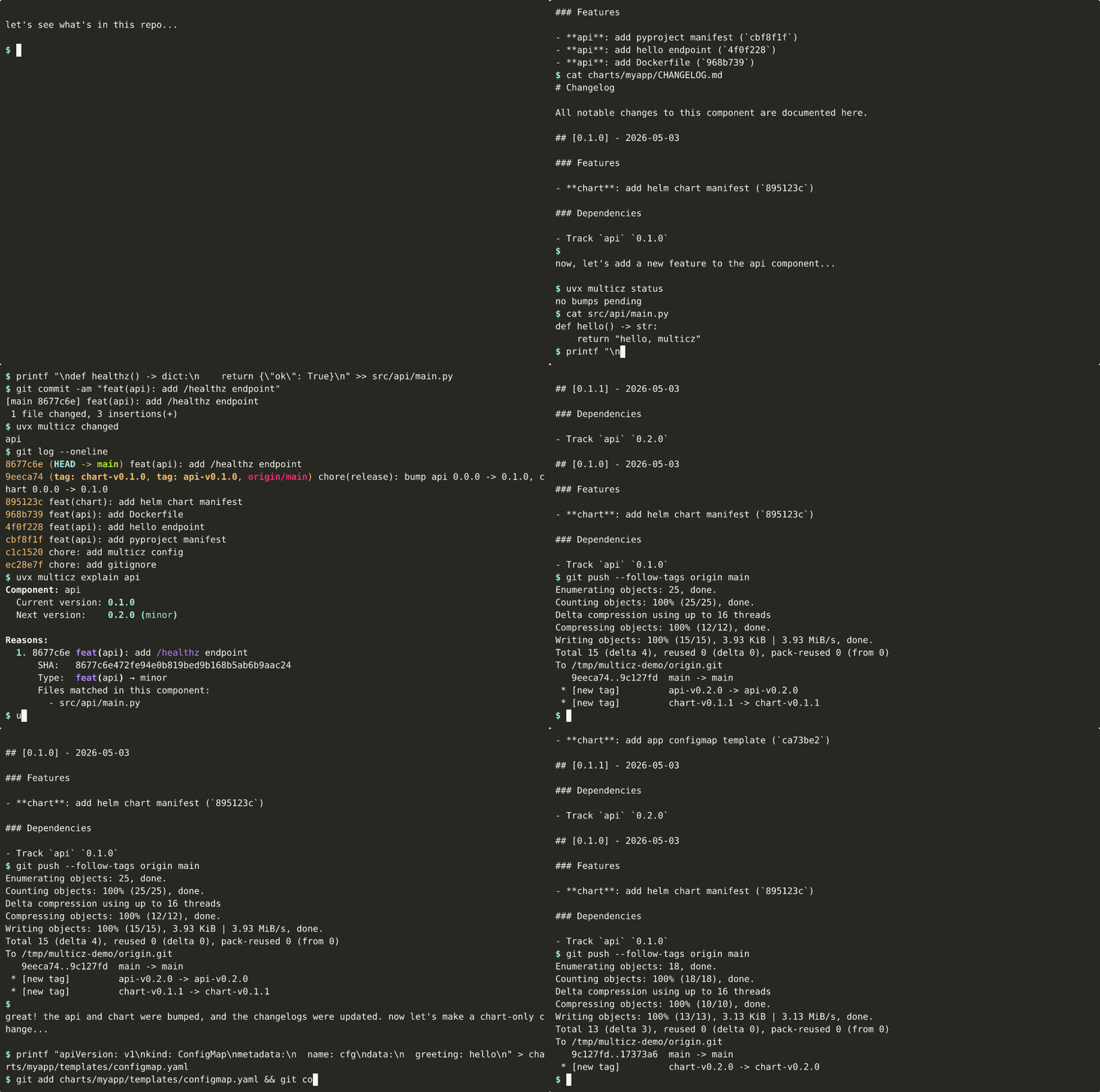
multicz bumps a Python app, its Docker image, and the Helm chart that
deploys it from a single conventional-commit history - each with its own
version line and its own git tag. Declare the components of a monorepo in
multicz.toml, and it plans the bumps, writes the version files and the
changelogs, then commits and tags.
Documentation
The project site is published from main to GitHub Pages:
https://goabonga.github.io/multicz/.
- Get started - install, minimal config, first bump
- Concepts - components, mirrors, triggers, cascades, bump policies
- Configuration - full
multicz.tomlreference - CLI - every command and flag
- Plugins - the plugin protocol and the built-in plugins
- Recipes - FastAPI + Helm walkthrough, CI matrix gating, release candidates
- Why multicz? - vs. semantic-release, Commitizen, Changesets, bump-my-version
- Security - guarantees and CI hardening
Requirements
- Python 3.12+
git
Installation
pip install multicz
Or run it without installing, using uv:
uv tool install multicz   # or: pipx install multicz
uvx multicz --help
Usage
# 1. scaffold a multicz.toml in the repo root
multicz init

# 2. see what would bump from the current commit window
multicz changed
multicz explain api

# 3. apply the bump (writes version files + changelog, commits, tags)
multicz bump --commit --tag

# 4. ship it
git push --follow-tags
For multi-component setups (api + chart, app + image + helm, ...), declare
each component's paths in multicz.toml and let mirrors and triggers cascade
related versions. See the
configuration reference
for every option.
- Per-component versions - each component has its own version line and
its own git tag (
api-v1.2.0,chart-v0.5.0). - Conventional-commit driven -
feat:→ minor,fix:→ patch,BREAKING CHANGE:→ major. Scopes route the bump to the right component. - Mirrors and triggers - bump api
1.2.0→1.3.0and the Helm chart'sappVersionfollows; the chart's own version cascades a patch. - No network, no auto-updates. Pure
git+ filesystem. Same input yields the same plan byte-for-byte.
Development
git clone https://github.com/goabonga/multicz.git
cd multicz
uv sync

# Quality gates (mirrored in CI).
uv run ruff check src tests scripts
uv run ruff format --check src tests scripts
uv run mypy src
uv run pyright
uv run pytest --cov=multicz

# Install the pre-commit + commit-msg hooks.
uv run pre-commit install
Versioning and release
multicz versions itself. Every push to main runs
multicz bump --commit --tag --push - driven by
Conventional Commits - then
publishes to PyPI and deploys the docs.
# Preview the next release against the current branch.
uv run multicz status
Contributing
See CONTRIBUTING.md for the workflow, the branch and commit-message conventions, and the test/lint expectations. By participating you agree to the Code of Conduct.
Security issues: please follow the disclosure process in SECURITY.md.
License
Distributed under the MIT License.
1 maintainer

Metadata
1 maintainer
Release files for multicz 1.10.1
For a detailed explanation of source distributions (sdists) and built distributions (wheels), please see the package formats documentation.
Source distribution (sdist)
| File | Size | Uploaded | Provenance | Actions |
|---|---|---|---|---|
| multicz-1.10.1.tar.gz | 106.8 kB | With provenance | Details for multicz-1.10.1.tar.gz |
Built distribution (wheel)
| File | Interpreter | ABI | Platform | Actions Reset |
|---|---|---|---|---|
| multicz-1.10.1-py3-none-any.whl | Python 3 | none | any | Details for multicz-1.10.1-py3-none-any.whl |
Total release size: 256.4 kB
Release files / multicz-1.10.1.tar.gz
| Download URL | multicz-1.10.1.tar.gz |
|---|---|
| Size | 106.8 kB |
| Tags | Source |
|
SHA-256 checksum How to use checksums |
adc8858031b614d5d42f71bf51436468a605f6b7fa9a70c532553136ed5d89db
|
|
BLAKE2b-256 checksum How to use checksums |
aef9b90bb1f2a5946d18b44c51590a50531a68c1e85d309d4d4acabfd409296f
|
| Upload date | |
|
Uploaded using Trusted Publishing? What is trusted publishing? |
Yes |
| Uploaded via |
twine/7.0.0 CPython/3.13.16
|
Provenance
Provenance describes where a file came from. On PyPI, provenance is shared via attestations, which provide a verifiable record of the build or publishing details. View details, limitations and caveats.


PyPI Publish Attestation
PyPI verified that this artifact, at this checksum, originated from the publisher listed below.
Signed by GitHub Actions, verified by PyPI on Nov 2, 2026.
Transparency logRelease files / multicz-1.10.1-py3-none-any.whl
| Download URL | multicz-1.10.1-py3-none-any.whl |
|---|---|
| Size | 149.6 kB |
| Tags | Python 3 |
|
SHA-256 checksum How to use checksums |
0a3ff46ba953806c102ea64a54108f1168391632ee5cecdec07046787a30123c
|
|
BLAKE2b-256 checksum How to use checksums |
d695a5a1d49b17502a41c2363d4b1f6b6e5ede593cca5c34d4826d27fef76079
|
| Upload date | |
|
Uploaded using Trusted Publishing? What is trusted publishing? |
Yes |
| Uploaded via |
twine/7.0.0 CPython/3.13.16
|
Provenance
Provenance describes where a file came from. On PyPI, provenance is shared via attestations, which provide a verifiable record of the build or publishing details. View details, limitations and caveats.
PyPI Publish Attestation
PyPI verified that this artifact, at this checksum, originated from the publisher listed below.
Signed by GitHub Actions, verified by PyPI on Nov 2, 2026.
Transparency logSecurity for multicz 1.10.1
Provenance
Provenance describes where a file came from. On PyPI, provenance is shared via attestations, which provide a verifiable record of the build or publishing details. View details, limitations and caveats.
Full provenance
Both files in this release have been uploaded with provenance metadata.
Attestation for multicz-1.10.1.tar.gz
PyPI Publish Attestation
PyPI verified that this artifact, at this checksum, originated from the publisher listed below.
Signed by GitHub Actions, verified by PyPI on Nov 2, 2026.
Transparency logA note on package security
PyPI is a repository for distributing packages, not a service for auditing them. While third-party security researchers and our staff do their best to detect and remove malicious packages, PyPI cannot guarantee the quality, security or suitability of any given package.
To learn more about protecting yourself from malicious actors, visit our package security documentation.














