
MultiMM: An OpenMM-based software for whole genome 3D structure reconstruction
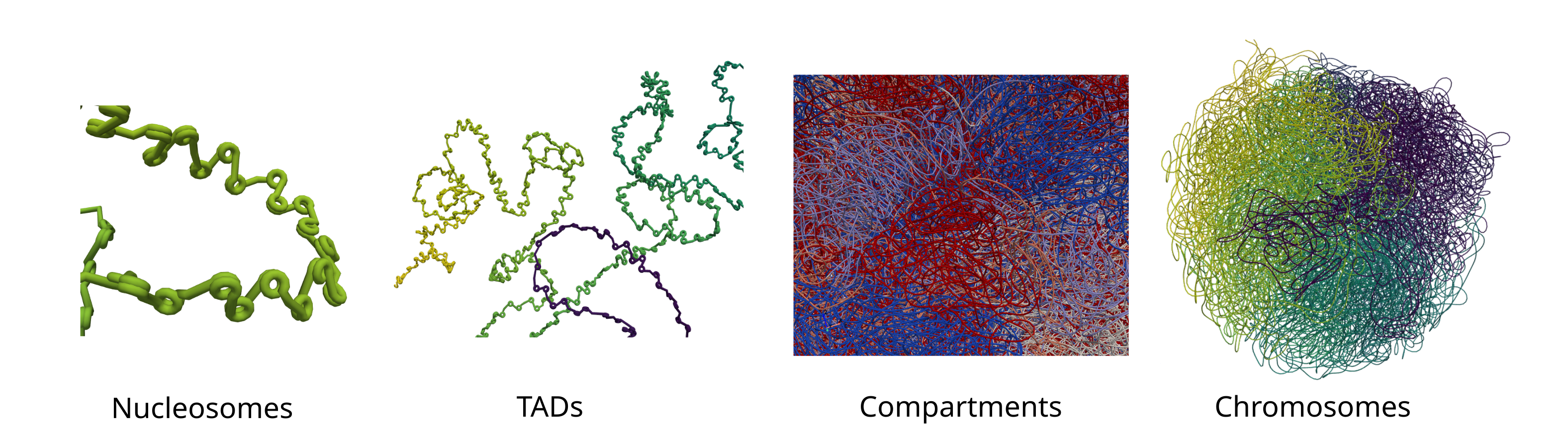
MultiMM is an OpenMM model designed for modeling the 3D structure of the whole human genome. Its distinguishing feature is that it is multiscale, meaning it aims to model different levels of chromatin organization, from smaller scales (nucleosomes) to the level of chromosomal territories. The algorithm is both fast and accurate. A key feature enabling its speed is GPU parallelization via OpenMM, along with smart assumptions that assist the optimizer in finding the global minimum. One such fundamental assumption is the use of a Hilbert curve as the initial structure. This helps MultiMM to converge faster because the initial structure is already highly compacted.
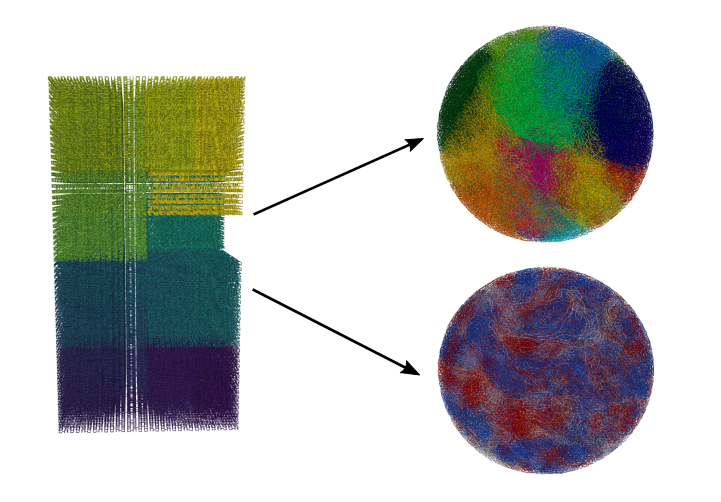
After running the MultiMM model, users obtain a genome-wide structure. Users can color different chromosomes or compartments, or they can visualize individual chromosomes separately. MultiMM is simple to use, as it is based on modifying a single configuration file. Here we explain its usage.
Key Features
- OpenMM based.
- User-friendly software available via PyPI.
- Efficient simulation of chromatin interactions using 3D conformations.
- Can simulate the scales of nucleosomes, TADs, compartments, chromosomal territories and interactions with lamina. Scalable simulations across different force fields and resolution levels.
- Compatible with modern GPU-accelerated simulation libraries. CPU acceleration can also be done.
- Possibility of creation of ensembles of 3D structures of chromatin.
About Operating Systems
MultiMM has been tested primarily on Linux-based operating systems, with successful tests in Ubuntu, Debian, and Red Hat-based distributions. It is also possible to run it on macOS, though without CUDA support, which is helpful for accelerating computations. We do not recommend running MultiMM on Windows systems.
Installation
MultiMM can be easily installed with pip:
pip install MultiMM
PyPI software: https://pypi.org/project/MultiMM/.
Input Data
Loops (bedpe file)
MultiMM relies on three types of datasets:
- Loop interactions in
bedpeformat (mandatory). - Compartmentalization data in
bedformat (optional). - ATAC-Seq p-value data in
.BigWigformat (optional).
For loop interactions, users need to provide a file with interactions between anchor 1 and anchor 2, and their strength. The file must be in .bedpe format, should contain 7 columns, and should not include a header. An example:
chr10	100225000	100230000	chr10	100420000	100425000	95
chr10	100225000	100230000	chr10	101005000	101010000	56
chr10	101190000	101195000	chr10	101370000	101375000	152
chr10	101190000	101200000	chr10	101470000	101480000	181
chr10	101600000	101605000	chr10	101805000	101810000	152
Compartments
The file may contain interactions for all chromosomes, which MultiMM can automatically model. For single-cell data, users can provide a file with the second and third columns identical (the same for the fifth and sixth columns) and strength set to 1.
For (sub)compartment interactions, the file should be in the format produced by the CALDER software: https://github.com/CSOgroup/CALDER2. Users do not need to run CALDER specifically, but the file format must match. The file should contain at least the first four columns with chromosome, regions, and the subcompartment label. Example:
chr1	700001	900000	A.1.2.2.2.2.2.2	0.875	.	700001	900000	#FF4848
chr1	900001	1400000	A.1.1.1.1.2.1.1.1.1.1	1	.	900001	1400000	#FF0000
chr1	1400001	1850000	A.1.1.1.1.2.1.2.2.2.1	1	.	1400001	1850000	#FF0000
chr1	1850001	2100000	B.1.1.2.2.1.2.1	0.5	.	1850001	2100000	#DADAFF
Alternatively, the user can provide a file in .tsv format with the first eigenvector. MultiMM would discretise it and convert it to compartments. Here we assume that positive values correspond to A compartment.
chrom	start	end	E1
chr1	600000	700000	0.05836110001861745
chr1	800000	900000	0.8317623736592369
chr1	900000	1000000	0.9789303554074167
chr1	1000000	1100000	1.060977133694018
chr1	1100000	1200000	1.0742104160308021
chr1	1200000	1300000	0.9966570829436122
chr1	1300000	1400000	1.032129387572702
chr1	1400000	1500000	1.145813878361721
Nucleosomes
For ATAC-Seq data, users should provide a file with p-values in BigWig format. The pyBigWig library is required, which does not work on Windows systems.
Note: At present, MultiMM only works for human genome data. The code may run for other organisms with some debugging and modifications. We hope that it will be generalized in future versions. MultiMM can run for different types of datasets. It is possible to call loops from any kind of experiment: Hi-C, scHi-C, ChIA-PET, Hi-ChIP. However, we cannot guarantee that the default choice of parameters is the most appropriate one for any dataset. Therefore, the user should test it and check the convergence of the algorithm for their own data. Before making any changes in the parameters, read the method paper carefully and try to understand the function of each force.
Definition of a region based on a gene (optional)
In case that you would like to model a region around a gene, it is enough if you load a .tsv file with genes and determine either the gene name or the gene id.
The file should look like as the following one,
gene_id	gene_name	chromosome	start	end
ENSG00000160072	ATAD3B	chr1	1471765	1497848
ENSG00000279928	DDX11L17	chr1	182696	184174
ENSG00000228037		chr1	2581560	2584533
ENSG00000142611	PRDM16	chr1	3069168	3438621
ENSG00000284616		chr1	5301928	5307394
ENSG00000157911	PEX10	chr1	2403964	2413797
ENSG00000269896		chr1	2350414	2352820
ENSG00000228463		chr1	257864	359681
ENSG00000260972		chr1	5492978	5494674
ENSG00000224340		chr1	10054445	10054781
Usage
All the model's parameters are specified in a config.ini file. This file should have the following format:
[Main]

; Platform selection
PLATFORM = OpenCL

; Input data
FORCEFIELD_PATH = forcefields/ff.xml
LOOPS_PATH = /home/skorsak/Data/Rao/GSE63525_GM12878_primary+replicate_HiCCUPS_looplist_hg19.bedpe
COMPARTMENT_PATH = /home/skorsak/Data/Rao/subcompartments_primary_replicate/sub_compartments/all_sub_compartments.bed
ATACSEQ_PATH = /home/skorsak/Data/encode/ATAC-Seq/ENCSR637XSC_GM12878/ENCFF667MDI_pval.bigWig
OUT_PATH = application_note

; Simulation Parameters
N_BEADS = 50000
SHUFFLE_CHROMS = True
NUC_DO_INTERPOLATION = True

; Enable forcefield for genome-wide simulation
SC_USE_SPHERICAL_CONTAINER = True
CHB_USE_CHROMOSOMAL_BLOCKS = True
SCB_USE_SUBCOMPARTMENT_BLOCKS = True
IBL_USE_B_LAMINA_INTERACTION = True
CF_USE_CENTRAL_FORCE = True

; Simulation Parameters
SIM_RUN_MD = True
SIM_SAMPLING_STEP = 50
SIM_N_STEPS = 1000
TRJ_FRAMES = 100
After specifying the parameters and forces, users can run the following command in the terminal:
MultiMM -c config.ini
The software will output a folder with the resulting structure and plots showing compartment distribution.
Example data can be found on Google Drive: https://drive.google.com/drive/folders/1nFAPE4pCaHpeL5nw6nq0VvfUFoc24aXm?usp=sharing. Note that this data is publicly available from Rao et al. The subcompartment predictions were made using CALDER, and the ATAC-Seq data is from ENCODE.
In the examples folder, we provide example configuration files for different modeling scenarios.
Vizualization
For vizualization purposes, if you would like to import the whole genome structure you may use the command,
import simulation.plots as splt

splt.viz_chroms(sim_path)
For sim_path you should add the output folder directory path (add comps=Fase in case that you do not need compartment coloring). Otherwise, in case that the user would like to model a particular region, without using compartment or chromosome coloring (pretty much any cif structure), they can type,
import simulation.plots as splt
import simulation.utils as suts

V = suts.get_coordinates_cif(cif_path)
splt.viz_structure(V)
We would like once again to thank people who developed pyvista library and allow us to have fast and good vizualizations of large chromatin structure.
Simulation Arguments
MultiMM has numerous configurable parameters. Below is a description of each argument and its default values. The defaults have been tested for genome-wide simulation but can be modified in the configuration file if needed. Units are typically assumed based on OpenMM conventions, though explicit unit specification is not required.
Here we can see the long table of the simulation arguments. Somtimes MultiMM might not work for some choices of arguments. For example:
- If you would like to model lamina interaction having disabled compartment interactions.
- If you do not provide appropriate data i.e. for compartmentalization but you have enabled (sub)compartent-specific forcefield.
Therefore, it is advisable to read the paper and understand well the meaning of each force before you start running simulations. MultiMM is a research model, not a market product and thus it requires a level of expertise (despite the easiness of usage) to underatand and run it.
| Argument Name | Type | Value | Units | Description |
|---|---|---|---|---|
| PLATFORM | str | None | None | name of the platform. Available choices: CPU, OpenCL, CUDA. |
| DEVICE | str | None | None | device index for CUDA or OpenCL (count from 0) |
| INITIAL_STRUCTURE_PATH | str | None | None | Path to CIF file. |
| BUILD_INITIAL_STRUCTURE | bool | True | None | To build a new initial structure. |
| INITIAL_STRUCTURE_TYPE | str | hilbert | None | you can choose between: hilbert, circle, rw, confined_rw, self_avoiding_rw, helix, spiral, sphere, knot. |
| GENERATE_ENSEMBLE | bool | False | False | True if you need to create an ensemble of structures. |
| N_ENSEMBLE | int | None | None | Number of samples that you would like to create. |
| DOWNSAMPLING_PROB | float | 1.0 | 1.0 | Probability of downsampling (from 0 to 1). There is no downsampling by default (p=1). |
| FORCEFIELD_PATH | str | None | None | Path to XML file with forcefield. |
| N_BEADS | int | 50000 | None | Number of Simulation Beads. |
| COMPARTMENT_PATH | str | None | None | It should be a .bed file with subcompartments from Calder. |
| LOOPS_PATH | str | None | None | A .bedpe file path with loops. It is required. |
| EIGENVECTOR_TSV | str | '' | None | Compartmentalization in the format of the first eigenvector of Hi-C in TSV data. |
| ATACSEQ_PATH | str | None | None | A .bw or .BigWig file path with atacseq data for nucleosome interpolation. It is not required. |
| OUT_PATH | str | results | None | Output folder name. |
| GENE_TSV | str | '' | None | A .tsv with genes and their locations in the genome. |
| GENE_NAME | str | '' | None | The name of the gene of interest. |
| GENE_ID | str | '' | None | The id of the gene of interest. |
| GENE_WINDOW | int | 200000 | bp | The window around the area of the gene of interest. |
| LOC_START | int | None | None | Starting region coordinate (in case that you do not want to model the whole genome). |
| LOC_END | int | None | None | Ending region coordinate (in case that you do not want to model the whole genome). |
| CHROM | str | None | None | Chromosome that corresponds the the modelling region of interest (in case that you do not want to model the whole genome). |
| SHUFFLE_CHROMS | bool | False | None | Shuffle the chromosomes. |
| SHUFFLING_SEED | int | 0 | None | Shuffling random seed. |
| SAVE_PLOTS | bool | True | None | Save plots. |
| POL_USE_HARMONIC_BOND | bool | True | None | Use harmonic bond interaction for consecutive beads ($i,i\pm 1$). |
| POL_HARMONIC_BOND_R0 | float | 0.1 | nm | Harmonic bond distance equilibrium constant. |
| POL_HARMONIC_BOND_K | float | 300000.0 | kJ/mol/nm^2 | harmonic bond force constant |
| POL_USE_HARMONIC_ANGLE | bool | True | None | Use harmonic angle interaction for consecutuve beads ($i,i\pm 1, i\pm 2$). |
| POL_HARMONIC_ANGLE_R0 | float | pi | None (radians) | Equilibrium angle of harmonic angle force. |
| POL_HARMONIC_ANGLE_CONSTANT_K | float | 100.0 | kJ/mol/radian^2 | Harmonic angle force constant. |
| LE_USE_HARMONIC_BOND | bool | True | None | Use harmonic bond interaction for long range loops. |
| LE_FIXED_DISTANCES | bool | False | None | For fixed distances between loops. False if you want to correlate with the heatmap strength. |
| LE_HARMONIC_BOND_R0 | float | 0.1 | None | Harmonic bond distance equilibrium constant for long-range loops. |
| LE_HARMONIC_BOND_K | float | 30000.0 | kJ/mol/nm^2 | Harmonic bond force constant for long-range loops. |
| EV_USE_EXCLUDED_VOLUME | bool | True | None | Use excluded volume $V_{ev}=\epsilon\left(\frac{\sigma}{r+r_{\text{small}}}\right)^{\alpha}$. |
| EV_EPSILON | float | 100.0 | kJ/mol | Epsilon parameter - strength of excluded volume. |
| EV_R_SMALL | float | 0.05 | nm | Add something small in denominator to make it not exploding all the time. |
| EV_POWER | float | 3.0 | None | Power $\alpha$ in the exponent of EV potential. |
| SC_USE_SPHERICAL_CONTAINER | bool | False | None | Use Spherical container. |
| SC_RADIUS1 | float | None | nm | Inner spherical container radius. |
| SC_RADIUS2 | float | None | nm | Outer spherical container radius. |
| SC_SCALE | float | 1000.0 | kJ/mol/nm^2 | Spherical container scaling factor |
| CHB_USE_CHROMOSOMAL_BLOCKS | bool | False | None | Use Chromosomal Blocks. |
| CHB_KC | float | 0.3 | nm^(-4) | Block copolymer width parameter. |
| CHB_DE | float | 1e-5 | kJ/mol | Energy factor for block copolymer chromosomal model. |
| COB_USE_COMPARTMENT_BLOCKS | bool | False | kJ/mol | Use Compartment Blocks. |
| COB_DISTANCE | float | None | nm | Block copolymer equilibrium distance for chromosomal blocks. |
| COB_EA | float | 1.0 | kJ/mol | Energy strength for A compartment. |
| COB_EB | float | 2.0 | kJ/mol | Energy strength for B compartment. |
| SCB_USE_SUBCOMPARTMENT_BLOCKS | bool | False | None | Use Subcompartment Blocks. |
| SCB_DISTANCE | float | None | nm | Block copolymer equilibrium distance for chromosomal blocks. |
| SCB_EA1 | float | 1.0 | kJ/mol | Energy strength for A1 compartment. |
| SCB_EA2 | float | 1.33 | kJ/mol | Energy strength for A2 compartment. |
| SCB_EB1 | float | 1.66 | kJ/mol | Energy strength for B1 compartment. |
| SCB_EB2 | float | 2.0 | kJ/mol | Energy strength for B2 compartment. |
| IBL_USE_B_LAMINA_INTERACTION | bool | False | None | Interactions of B compartment with lamina. |
| IBL_SCALE | float | 400.0 | kJ/mol | Scaling factor for B comoartment interaction with lamina. |
| CF_USE_CENTRAL_FORCE | bool | False | None | Attraction of smaller chromosomes to the nucleolus (in the center). |
| CF_STRENGTH | float | 10.0 | kJ/mol | Strength of Attraction of Smaller Chromosomes |
| NUC_DO_INTERPOLATION | bool | False | None | Attraction of smaller chromosomes. |
| NUC_RADIUS | float | 0.1 | None | The radius of the single nucleosome helix. |
| POINTS_PER_NUC | int | 20 | None | The number of points that consist a nucleosome helix. |
| PHI_NORM | float | pi/5 | None | Zig zag angle. |
| SIM_RUN_MD | bool | False | None | Do you want to run MD simulation? |
| SIM_N_STEPS | int | None | None | Number of steps in MD simulation |
| SIM_ERROR_TOLERANCE | float | 0.01 | None | Error tolerance for variable MD simulation |
| SIM_AMD_ALPHA | float | 100.0 | kJ/mol | Alpha of AMD simulation. |
| SIM_AMD_E | float | 1000.0 | kJ/mol | E (energy) of AMD simulation. |
| SIM_SAMPLING_STEP | int | 100 | None | It determines in t how many steps we save a structure. |
| SIM_INTEGRATOR_TYPE | str | langevin | None | Possible choices: variable_nagevin, langevin, variable_verlet, verlet, amd, brownian. |
| SIM_INTEGRATOR_STEP | Quantity | 1 | fsec | The step of integrator. |
| SIM_FRICTION_COEFF | float | 0.5 | 1/psec | Friction coefficient (Used only with langevin and brownian integrators). |
| SIM_SET_INITIAL_VELOCITIES | bool | False | None | Sets initial velocities based on Boltzmann distribution. |
| SIM_TEMPERATURE | Quantity | 310 | kelvin | Simulation temperature |
| TRJ_FRAMES | int | 2000 | None | Number of trajectory frames to save. |
Copyrights
The software is freely distributed under the GNU license and everybody is free to use it for their research interests following the open-source lisence of MultiMM. In case that the software would be used for research or any other activity, the method paper should be cited:
- Korsak, Sevastianos, Krzysztof Banecki, and Dariusz Plewczynski. "Multiscale molecular modeling of chromatin with MultiMM: From nucleosomes to the whole genome." Computational and Structural Biotechnology Journal 23 (2024): 3537-3548.
Please, communicate with the authors in case that you would like to contribute in this model and you would like to improve it. In case, that you have problems to run it, your feedback is very valuable to us and we are open to help you.
1 maintainer

Metadata
1 maintainer
Release files for MultiMM 1.0.19
For a detailed explanation of source distributions (sdists) and built distributions (wheels), please see the package formats documentation.
Source distribution (sdist)
| File | Size | Uploaded | Provenance | Actions |
|---|---|---|---|---|
| multimm-1.0.19.tar.gz | 52.3 kB | Without provenance | Details for multimm-1.0.19.tar.gz |
Built distribution (wheel)
| File | Interpreter | ABI | Platform | Actions Reset |
|---|---|---|---|---|
| multimm-1.0.19-py3-none-any.whl | Python 3 | none | any | Details for multimm-1.0.19-py3-none-any.whl |
Total release size: 103.3 kB
Release files / multimm-1.0.19.tar.gz
| Download URL | multimm-1.0.19.tar.gz |
|---|---|
| Size | 52.3 kB |
| Tags | Source |
|
SHA-256 checksum How to use checksums |
4ea1e7d76ff1fa69a212b024e63edeb4d050e6e3733ff8cf7d7e500c0e7aa2fb
|
|
BLAKE2b-256 checksum How to use checksums |
d3f4625cc51402250ea55e6f7c352f4284f744b4cf90451caff4413733074c9c
|
| Upload date | |
|
Uploaded using Trusted Publishing? What is trusted publishing? |
No |
| Uploaded via |
twine/6.1.0 CPython/3.8.20
|
Release files / multimm-1.0.19-py3-none-any.whl
| Download URL | multimm-1.0.19-py3-none-any.whl |
|---|---|
| Size | 51.0 kB |
| Tags | Python 3 |
|
SHA-256 checksum How to use checksums |
44c490d79a10b6bbde0b90801c14437d5f528fecaf5004674eae056313155b70
|
|
BLAKE2b-256 checksum How to use checksums |
9d4926fc687236c6248bc05ab21b4a4ca03d5b13fcaf89f5d633b0048774d820
|
| Upload date | |
|
Uploaded using Trusted Publishing? What is trusted publishing? |
No |
| Uploaded via |
twine/6.1.0 CPython/3.8.20
|
Security for MultiMM 1.0.19
Provenance
Provenance describes where a file came from. On PyPI, provenance is shared via attestations, which provide a verifiable record of the build or publishing details. View details, limitations and caveats.
No provenance found
None of the files in this release were uploaded with provenance metadata.
A note on package security
PyPI is a repository for distributing packages, not a service for auditing them. While third-party security researchers and our staff do their best to detect and remove malicious packages, PyPI cannot guarantee the quality, security or suitability of any given package.
To learn more about protecting yourself from malicious actors, visit our package security documentation.














