

MultiMM is an OpenMM-based tool for building 3D models of chromatin, from single genomic regions to the whole human genome. It is multiscale: one energy function covers nucleosomes, loops and TADs, A/B compartments, chromosome territories and the nucleus. You give it loop calls, and optionally compartments or a Hi-C map, and it returns a 3D structure that you can open in any molecular viewer. The model is fast because it starts from a compact Hilbert-curve conformation and runs on GPUs through OpenMM.
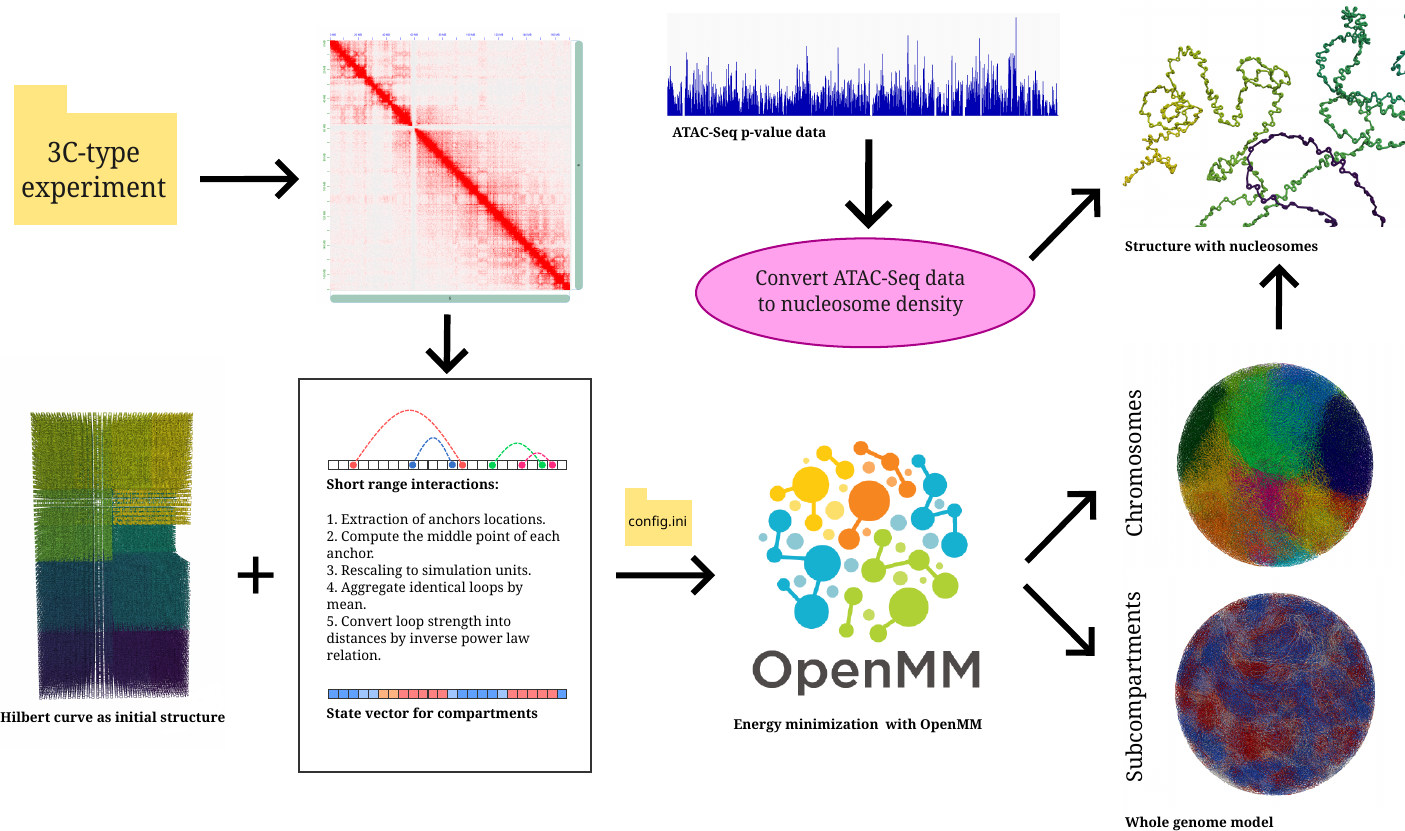
Scales of modelling
One energy function ties together five scales. Each is a different way of looking at the same chain of beads.
| Scale | What it means | How MultiMM models it |
|---|---|---|
| Nucleosome / fibre | DNA wrapped around histones, forming a ~10 nm fibre | Beads joined by bonds and angle (stiffness) terms, with excluded volume so beads do not overlap |
| Loops | Pairs of distant sites held together, e.g. by CTCF and cohesin | Harmonic springs between loop anchors, taken from your loop file |
| TADs / Hi-C contacts | Domains that fold together more than with their surroundings | Optional restraints derived from a Hi-C map by Boltzmann inversion |
| A/B compartments | Active (A) and inactive (B) chromatin that cluster by type | Soft attraction between beads of the same compartment type |
| Chromosomes and nucleus | Chromosome territories inside a nucleus, anchored at the lamina | Container wall, lamina and chromosome-block forces |
Install
From PyPI:
pip install MultiMM
With uv (fast, isolated):
uv pip install MultiMM          # into the current environment
uv tool install MultiMM         # or as a standalone command-line tool
For .hic Hi-C files, also install the optional reader (pip install "MultiMM[hic]"); .cool and .mcool files work out of the box.
Requires Python 3.10 or newer. Linux is the main platform; macOS works without CUDA. The documentation covers installation from source.
Run
All settings live in one config file:
MultiMM -c config.ini
Any setting can also be overridden on the command line, for example --n_beads 2000.
A config file
You only write what you want to change; everything else has a default.
[Main]
CHROM            = chr1
LOC_START        = 160_000_000
LOC_END          = 173_000_000
N_BEADS          = 5000

LOOPS_PATH       = data/loops.bedpe          ; chromatin loops
COMPARTMENT_PATH = data/compartments.bed     ; optional A/B compartments
COB_USE_COMPARTMENT_BLOCKS = True

OUT_PATH         = results/chr1_region
Documentation
The full documentation, with the mathematics of every force and a table of all arguments, is written with MkDocs and its source is in docs/. To read it locally:
pip install mkdocs-material
mkdocs serve
Development
git clone https://github.com/SFGLab/MultiMM.git
cd MultiMM
uv sync --extra dev             # or: pip install -e ".[dev]"
Run the tests (all are quick checks, no full simulation, about half a minute):
uv run pytest -q                # or: pytest -q
uv run pytest tests/test_force_signs.py   # a single file
Console output has four levels: no flag shows only the pipeline stages and progress bars; -v adds details, -vv adds statistics tables, -vvv is fully verbose.
Citation
If you use MultiMM in your research, please cite:
Korsak, Sevastianos, Krzysztof Banecki, and Dariusz Plewczynski. "Multiscale molecular modeling of chromatin with MultiMM: From nucleosomes to the whole genome." Computational and Structural Biotechnology Journal 23 (2024): 3537–3548.
License
MultiMM is free software, distributed under the GNU General Public License v3.0.
1 maintainer

Metadata
1 maintainer
Release files for MultiMM 2.1.1
For a detailed explanation of source distributions (sdists) and built distributions (wheels), please see the package formats documentation.
Source distribution (sdist)
| File | Size | Uploaded | Provenance | Actions |
|---|---|---|---|---|
| multimm-2.1.1.tar.gz | 1.5 MB | Without provenance | Details for multimm-2.1.1.tar.gz |
Built distribution (wheel)
| File | Interpreter | ABI | Platform | Actions Reset |
|---|---|---|---|---|
| multimm-2.1.1-py3-none-any.whl | Python 3 | none | any | Details for multimm-2.1.1-py3-none-any.whl |
Total release size: 3.0 MB
Release files / multimm-2.1.1.tar.gz
| Download URL | multimm-2.1.1.tar.gz |
|---|---|
| Size | 1.5 MB |
| Tags | Source |
|
SHA-256 checksum How to use checksums |
9d8493e6289fa8e023c23166589683353638e61da314269a58c2aaf33ec1a543
|
|
BLAKE2b-256 checksum How to use checksums |
2026f9a1be9cd556767a199609bc37083d6797b78cfbbd34cfbd61b0e82aaf4b
|
| Upload date | |
|
Uploaded using Trusted Publishing? What is trusted publishing? |
No |
| Uploaded via |
twine/7.0.0 CPython/3.13.16
|
Release files / multimm-2.1.1-py3-none-any.whl
| Download URL | multimm-2.1.1-py3-none-any.whl |
|---|---|
| Size | 1.5 MB |
| Tags | Python 3 |
|
SHA-256 checksum How to use checksums |
ffa58e8aaf128961d61c1a74b9cf280cf98f75e6833124437cef82f2c61cae74
|
|
BLAKE2b-256 checksum How to use checksums |
7d7265f535d9e78046bf68d756b609209748412a36c54f71e2f57b96240cd307
|
| Upload date | |
|
Uploaded using Trusted Publishing? What is trusted publishing? |
No |
| Uploaded via |
twine/7.0.0 CPython/3.13.16
|
Security for MultiMM 2.1.1
Provenance
Provenance describes where a file came from. On PyPI, provenance is shared via attestations, which provide a verifiable record of the build or publishing details. View details, limitations and caveats.
No provenance found
None of the files in this release were uploaded with provenance metadata.
A note on package security
PyPI is a repository for distributing packages, not a service for auditing them. While third-party security researchers and our staff do their best to detect and remove malicious packages, PyPI cannot guarantee the quality, security or suitability of any given package.
To learn more about protecting yourself from malicious actors, visit our package security documentation.














