
MultiModel Analysis








MultiModel Analysis is a Python framework designed to automate model benchmarking, evaluation, and visualization for Supervised Machine Learning tasks (Classification and Regression). It provides a unified interface for training multiple baseline models, computing statistical evaluation metrics, generating diagnostic visualizations, and identifying optimal model candidates.
Table of Contents
- Overview
- Design Architecture
- Supported Estimators
- Installation
- Quick Start Guide
- API Reference & Complete Function List
- Evaluation Metrics
- Dependencies
- License and Citation
Overview
Selecting an appropriate estimator for a given tabular dataset requires benchmarking multiple baseline algorithms. Manually executing model fitting, cross-validation, feature scaling, metric aggregation, and plotting leads to repetitive code overhead.
multimodel_analysis streamlines this process by implementing an automated execution pipeline:
- Automated Preprocessing: Applies standard scaling (
StandardScaler) while preserving pandas DataFrame structure and column metadata. - Label Encoding: Encodes target arrays (
LabelEncoder) to support numerical, string, and categorical target types across binary and multiclass tasks. - Stratified Splitting: Implements stratified train-test splits (
train_test_split) for classification tasks to maintain target class proportions. - Fault-Tolerant Training: Wraps individual model evaluations in isolated execution blocks to prevent full execution failure if a single estimator encounters a fitting exception.
- Metric Calculation & Visualization: Computes standardized evaluation metrics and renders diagnostic plots (Confusion Matrices, ROC Curves, Residual/Prediction Scatter plots, and Bar Charts).
- Headless & File Exporting: Supports saving report tables directly to CSV, Excel, HTML, or JSON, and saving plot charts to PNG files without requiring an interactive display window.
Design Architecture
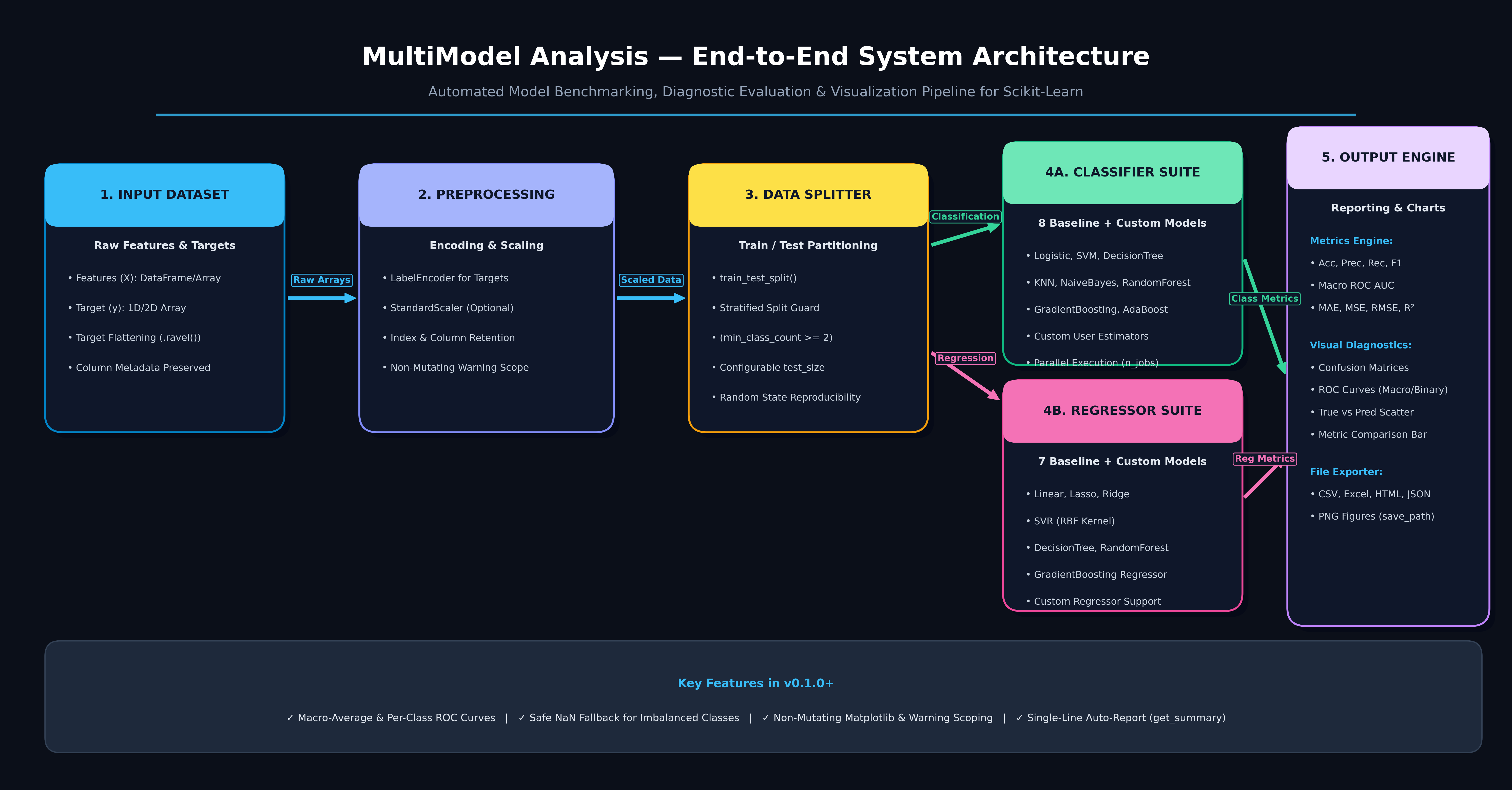
Supported Estimators
Classification Estimators
- Logistic Regression (
LogisticRegression) - Support Vector Machine (
SVC) - Decision Tree Classifier (
DecisionTreeClassifier) - K-Nearest Neighbors (
KNeighborsClassifier) - Gaussian Naive Bayes (
GaussianNB) - Random Forest Classifier (
RandomForestClassifier) - Gradient Boosting Classifier (
GradientBoostingClassifier) - AdaBoost Classifier (
AdaBoostClassifier) - Custom Estimators: User-supplied scikit-learn compatible classifiers.
Regression Estimators
- Linear Regression (
LinearRegression) - Lasso Regression (
Lasso) - Ridge Regression (
Ridge) - Support Vector Regressor (
SVR) - Decision Tree Regressor (
DecisionTreeRegressor) - Random Forest Regressor (
RandomForestRegressor) - Gradient Boosting Regressor (
GradientBoostingRegressor) - Custom Estimators: User-supplied scikit-learn compatible regressors.
Installation
Installation via PyPI (Recommended)
pip install multimodel-analysis
Installation from Source
pip install git+https://github.com/udityamerit/Multimodel-Analysis-Pacakge.git
Quick Start Guide
Classification Pipeline
import pandas as pd
from multimodel_analysis import MultiModelClassifier, save_report

# 1. Prepare features and target variable
df = pd.read_csv("dataset.csv")
X = df.drop(columns=["target"])
y = df["target"]

# 2. Instantiate MultiModelClassifier
classifier = MultiModelClassifier(
    X=X,
    y=y,
    test_size=0.3,
    scaled_data=True,
    random_state=42,
    stratify=True,
    n_jobs=-1
)

# 3. Train all classification models (including optional custom models)
results = classifier.run_all_models()

# 4. Display tabular performance report
df_report = classifier.show_tabular_report(results, return_df=True)

# 5. Export tabular report to disk
save_report(df_report, "classification_report.csv")

# 6. Render & save diagnostic figures
classifier.plot_confusion_matrices(results, save_path="confusion_matrix.png")
classifier.plot_roc_curves(results, save_path="roc_curve.png")
classifier.plot_comparison(results, save_path="metrics_comparison.png")

# Or run everything in one line:
classifier.get_summary(results, save_prefix="clf_run")
Regression Pipeline
import pandas as pd
from multimodel_analysis import MultiModelRegressor

# 1. Prepare features and target variable
df = pd.read_csv("housing.csv")
X = df.drop(columns=["Price"])
y = df["Price"]

# 2. Instantiate MultiModelRegressor
regressor = MultiModelRegressor(
    X=X,
    y=y,
    test_size=0.3,
    scaled_data=True,
    random_state=42,
    n_jobs=-1
)

# 3. Train all regression models
results = regressor.run_all_models()

# 4. Display tabular performance report
regressor.show_tabular_report(results)

# 5. Render & save diagnostic figures
regressor.plot_true_vs_predicted(results, save_path="true_vs_pred.png")
regressor.plot_comparison(results, save_path="r2_comparison.png")

# Or run everything and export outputs in one line:
regressor.get_summary(results, save_prefix="reg_run")
API Reference & Complete Function List
Standalone Utility Functions
save_report(df, filepath)
Saves a model comparison DataFrame to disk. Automatically infers format from file extension.
from multimodel_analysis import save_report

save_report(df, "report.csv")   # Saves as CSV
save_report(df, "report.xlsx")  # Saves as Excel Spreadsheet
save_report(df, "report.html")  # Saves as HTML Table
save_report(df, "report.json")  # Saves as JSON File
df(pandas.DataFrame): Report DataFrame returned byshow_tabular_report(models, return_df=True).filepath(str): Target file path with.csv,.xlsx,.xls,.html,.htm, or.jsonextension.
MultiModelClassifier
multimodel_analysis.MultiModelClassifier(
    X,
    y,
    test_size=0.3,
    scaled_data=False,
    random_state=42,
    stratify=True,
    n_jobs=-1
)
Constructor Parameters
X(pandas.DataFrame or numpy.ndarray): Feature matrix of shape(n_samples, n_features).y(pandas.Series, pandas.DataFrame, or numpy.ndarray): Target labels (binary or multiclass, numerical or string).test_size(float, default=0.3): Proportion of dataset for test split (between0.0and1.0).scaled_data(bool, default=False): Fits and appliesStandardScalerto features while preserving DataFrame columns and index metadata.random_state(int, default=42): Seed for train-test split and reproducible model initialization.stratify(bool, default=True): Performs stratified splitting when class sample counts allow (min_count >= 2).n_jobs(int or None, default=-1): Number of parallel CPU threads for estimators supportingn_jobs.
Complete Method List
| Method | Parameters | Return Type | Description |
|---|---|---|---|
run_all_models() |
custom_models: dict = None |
list of tuple |
Fits all 8 built-in classifiers (plus optional custom estimators in custom_models). Returns a list of evaluation tuples. |
show_tabular_report() |
models: list, return_df: bool = False |
pandas.DataFrame or None |
Displays a formatted comparison table sorted by Accuracy and recommends the best model. Returns a DataFrame if return_df=True. |
plot_confusion_matrices() |
models: list, save_path: str = None, show_plot: bool = True |
None |
Plots confusion matrix heatmaps with original class labels for all models. Saves image if save_path is given. |
plot_roc_curves() |
models: list, save_path: str = None, show_plot: bool = True |
None |
Plots combined binary or macro-average ROC curves with AUC scores. Saves image if save_path is given. |
plot_comparison() |
models: list, save_path: str = None, show_plot: bool = True |
None |
Plots grouped bar charts comparing Accuracy, Precision, Recall, and F1 Score. Saves image if save_path is given. |
get_summary() |
models: list, save_prefix: str = None, show_plot: bool = True |
None |
Executes the full reporting and plotting suite in one call. Auto-exports report CSV and PNG charts if save_prefix is set. |
save_report() |
df_or_filepath: Union[pd.DataFrame, str], filepath: str = None |
None |
Instance method to save report to CSV/Excel/HTML/JSON. Can be called as clf.save_report("report.csv"). |
evaluate_model() |
model: estimator, X_test: array, y_true: array |
tuple |
Evaluates a single trained model instance and returns its evaluation tuple (report, matrix, accuracy, precision, recall, f1, fpr_dict, tpr_dict, roc_auc). |
Individual Model Methods
clf.Logistic_model(): Trains and evaluates Logistic Regression.clf.Support_vector_model(): Trains and evaluates Support Vector Classifier.clf.DecisionTree_model(): Trains and evaluates Decision Tree Classifier.clf.KNN_model(): Trains and evaluates K-Nearest Neighbors.clf.Naive_Bayes_model(): Trains and evaluates Gaussian Naive Bayes.clf.RandomForest_model(): Trains and evaluates Random Forest Classifier.clf.GradientBoosting_model(): Trains and evaluates Gradient Boosting Classifier.clf.AdaBoost_model(): Trains and evaluates AdaBoost Classifier.
MultiModelRegressor
multimodel_analysis.MultiModelRegressor(
    X,
    y,
    test_size=0.3,
    scaled_data=False,
    random_state=42,
    n_jobs=-1
)
Constructor Parameters
X(pandas.DataFrame or numpy.ndarray): Feature matrix of shape(n_samples, n_features).y(pandas.Series, pandas.DataFrame, or numpy.ndarray): Continuous target values (automatically flattened if 2D single-column input).test_size(float, default=0.3): Proportion of dataset for test split.scaled_data(bool, default=False): AppliesStandardScalerto features retaining DataFrame structure.random_state(int, default=42): Seed for reproducible train-test split.n_jobs(int or None, default=-1): Number of CPU threads for parallel regressors.
Complete Method List
| Method | Parameters | Return Type | Description |
|---|---|---|---|
run_all_models() |
custom_models: dict = None |
list of tuple |
Fits all 7 built-in regressors (plus optional custom regressors in custom_models). Returns a list of evaluation tuples. |
show_tabular_report() |
models: list, return_df: bool = False |
pandas.DataFrame or None |
Displays a formatted comparison table sorted by R² Score (MAE, MSE, RMSE, R²) and recommends the best model. |
plot_true_vs_predicted() |
models: list, save_path: str = None, show_plot: bool = True |
None |
Renders True vs Predicted scatter plots with identity line bounds. Saves image if save_path is given. |
plot_comparison() |
models: list, save_path: str = None, show_plot: bool = True |
None |
Renders a comparative bar chart of R² Scores across evaluated regressor models. Saves image if save_path is given. |
get_summary() |
models: list, save_prefix: str = None, show_plot: bool = True |
None |
Executes full tabular report and plotting pipeline. Auto-exports report CSV and PNG charts if save_prefix is set. |
save_report() |
df_or_filepath: Union[pd.DataFrame, str], filepath: str = None |
None |
Instance method to save report to CSV/Excel/HTML/JSON. Can be called as reg.save_report("report.csv"). |
evaluate_model() |
model: estimator, X_test: array, y_true: array |
tuple |
Evaluates a single trained regressor and returns (mae, mse, rmse, r2, y_pred). |
Individual Model Methods
reg.LinearRegression_model(): Trains and evaluates Linear Regression.reg.Lasso_model(): Trains and evaluates Lasso Regression.reg.Ridge_model(): Trains and evaluates Ridge Regression.reg.SVR_model(): Trains and evaluates Support Vector Regressor.reg.DecisionTree_model(): Trains and evaluates Decision Tree Regressor.reg.RandomForest_model(): Trains and evaluates Random Forest Regressor.reg.GradientBoosting_model(): Trains and evaluates Gradient Boosting Regressor.
Class Aliases
MultiModelRegressior: Backward-compatibility alias forMultiModelRegressor.
Evaluation Metrics
Classification Metrics
- Accuracy: $\frac{TP + TN}{TP + TN + FP + FN}$
- Precision (Weighted): $\sum_{c} w_c \cdot \frac{TP_c}{TP_c + FP_c}$
- Recall (Weighted): $\sum_{c} w_c \cdot \frac{TP_c}{TP_c + FN_c}$
- F1 Score (Weighted): $2 \cdot \frac{\text{Precision} \cdot \text{Recall}}{\text{Precision} + \text{Recall}}$
- ROC-AUC: Computed using positive-class probabilities for binary tasks and One-vs-Rest (
ovr) weighted macro-strategy for multiclass tasks.
Regression Metrics
- Mean Absolute Error (MAE): $\frac{1}{n} \sum_{i=1}^n |y_i - \hat{y}_i|$
- Mean Squared Error (MSE): $\frac{1}{n} \sum_{i=1}^n (y_i - \hat{y}_i)^2$
- Root Mean Squared Error (RMSE): $\sqrt{\frac{1}{n} \sum_{i=1}^n (y_i - \hat{y}_i)^2}$
- Coefficient of Determination ($R^2$): $1 - \frac{\sum_{i=1}^n (y_i - \hat{y}i)^2}{\sum{i=1}^n (y_i - \bar{y})^2}$
Dependencies
python >= 3.8numpypandasmatplotlibseabornscikit-learn
License and Citation
This project is licensed under the Apache Software License 2.0.
Author: Uditya Narayan Tiwari
Repository: https://github.com/udityamerit/Multimodel-Analysis-Pacakge
PyPI Package: https://pypi.org/project/multimodel-analysis/
1 maintainer

Metadata
1 maintainer
Release files for multimodel-analysis 0.1.3
For a detailed explanation of source distributions (sdists) and built distributions (wheels), please see the package formats documentation.
Source distribution (sdist)
| File | Size | Uploaded | Provenance | |
|---|---|---|---|---|
| multimodel_analysis-0.1.3.tar.gz | 2.6 MB | Without provenance | Details |
Built distribution (wheel)
| File | Interpreter | ABI | Platform | Reset |
|---|---|---|---|---|
| multimodel_analysis-0.1.3-py3-none-any.whl | Python 3 | none | any | Details |
Total release size: 2.6 MB
Release files / multimodel_analysis-0.1.3.tar.gz
| Download URL | multimodel_analysis-0.1.3.tar.gz |
|---|---|
| Size | 2.6 MB |
| Tags | Source |
|
SHA-256 checksum How to use checksums |
4c6e779a2f1e2154880c825f1b395eda33f1af7d7c9ffb352b0443f5b1f2c50f
|
|
BLAKE2b-256 checksum How to use checksums |
6baf55e7974d211083ceae1e6e1936672e23dd344eea05c77767715a76c6334a
|
| Upload date | |
|
Uploaded using Trusted Publishing? What is trusted publishing? |
No |
| Uploaded via |
twine/7.0.0 CPython/3.11.4
|
Release files / multimodel_analysis-0.1.3-py3-none-any.whl
| Download URL | multimodel_analysis-0.1.3-py3-none-any.whl |
|---|---|
| Size | 18.4 kB |
| Tags | Python 3 |
|
SHA-256 checksum How to use checksums |
7899c0d37e1b88cee53442093809e74ba0d412a9c2e2608d139d2dfa5b6b4981
|
|
BLAKE2b-256 checksum How to use checksums |
9bea65973f7e83251d23a59fc1514bfb3278e7b0bcd53db12b4ea7ea212c33fc
|
| Upload date | |
|
Uploaded using Trusted Publishing? What is trusted publishing? |
No |
| Uploaded via |
twine/7.0.0 CPython/3.11.4
|
Security for multimodel-analysis 0.1.3
Provenance
Provenance describes where a file came from. On PyPI, provenance is shared via attestations, which provide a verifiable record of the build or publishing details. View details, limitations and caveats.
No provenance found
None of the files in this release were uploaded with provenance metadata.
A note on package security
PyPI is a repository for distributing packages, not a service for auditing them. While third-party security researchers and our staff do their best to detect and remove malicious packages, PyPI cannot guarantee the quality, security or suitability of any given package.
To learn more about protecting yourself from malicious actors, visit our package security documentation.














