
MultiREx
Planetary transmission spectra generator







MultiREx is a Python library designed for generating synthetic exoplanet transmission spectra. This tool extends the functionalities of the Taurex library (see below), reorganizing and enabling the massive generation of spectra and observations with added noise. The package was originally devised for training large machine learning models at identifying the presence of biosignatures in noisy spectra. However, it should also be used for other purposes.
For the science behind the model please refer to the following paper:
David S. Duque-Castaño, Jorge I. Zuluaga, and Lauren Flor-Torres (2024), Machine-assisted classification of potential biosignatures in earth-like exoplanets using low signal-to-noise ratio transmission spectra, accepted to MNRAS, arXiv:2407.19167. The notebooks used to develop this work are available in the examples/papers/DZF-MLBiosignatureClassification directory.
Downloading and Installing MultiREx
MultiREx is available at the Python package index and can be installed in Linux using:
$ sudo pip install multirex
as usual this command will install all dependencies and download some useful data, scripts and constants.
NOTE: If you don't have access to
sudo, you can installMultiRExin your local environmen (usually at~/.local/). In that case you need to add to yourPATHenvironmental variable the location of the local python installation. For that purpose add to the configuration files~/.bashrcor~/.bash_profile, the lineexport PATH=$HOME/.local/bin:$PATH
If you are a developer or want to work directly with the package sources, clone MultiREx from the GitHub repository:
$ git clone https://github.com/D4san/MultiREx-public
To install the package from the sources use:
$ cd MultiREx-public
$ python3 setup.py install
Running MultiREx in GoogleColab
To run MultiREx in Google Colab you should execute:
!pip install -Uq multirex
After installing you should reset session before importing the package. This is to avoid the unintended behavior of the package pybtex. After reset you should not reinstall the package, just import it:
import multirex as mrex
Quickstart
To start using MultiREx you must import the package:
import multirex as mrex
To start with, we need to provide to MultiREx the properties of the three components of any transmission model: A star, a planet and a planetary atmosphere.
star=mrex.Star(temperature=5777,radius=1,mass=1)
Radius and mass are in solar units.
Now let's create the planet:
planet=mrex.Planet(radius=1,mass=1)
Radius and mass are in units of Earth properties.
Now it's time to give the planet an atmosphere. This is a basic example of an N2 atmosphere having 100 ppm of CO2 and 1 ppm of CH4:
atmosphere=mrex.Atmosphere(
    temperature=288, # in K
    base_pressure=1e5, # in Pa
    top_pressure=1, # in Pa
    fill_gas="N2", # the gas that fills the atmosphere
    composition=dict(
        CO2=-4, # This is the log10(mix-ratio)
        CH4=-6,
    )
)
planet.set_atmosphere(atmosphere)
Now we can ensamble the system:
system=mrex.System(star=star,planet=planet,sma=1)
Semimajor axis of the planeta (sma) is given in au (astronomical units).
We are ready to see some spectrum. For this purpose we need to create a transmission model:
system.make_tm()
Once initialized, let's plot the transmission spectrum over a given grid of wavenumbers or wavelengths:
wns = mrex.Physics.wavenumber_grid(wl_min=0.6,wl_max=10,resolution=1000)
fig, ax = system.plot_contributions(wns,xscale='log')
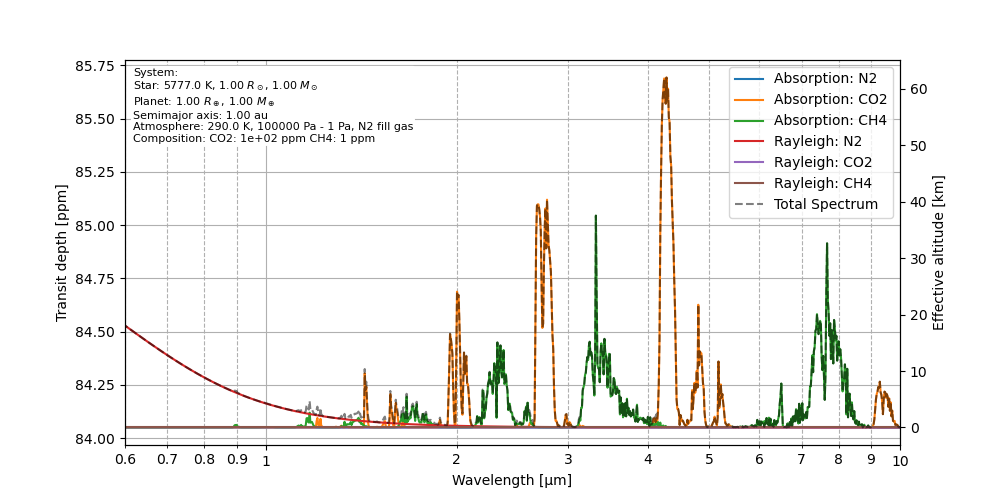
All of these functionalities are also available in Taurex. However, the interface to MultiREx is much more intuitive and, more importantly, it is also best suited for the real superpower of the package: the capaciy to create large ensamble of random planetary systems.
For creating a random planetary system starting with a range of the relevant parameters (ranges given between parenthesis), we use the command:
system=mrex.System(
    star=mrex.Star(
        temperature=(4000,6000),
        radius=(0.5,1.5),
        mass=(0.8,1.2),
    ),
    planet=mrex.Planet(
        radius=(0.5,1.5),
        mass=(0.8,1.2),
        atmosphere=mrex.Atmosphere(
            temperature=(290,310), # in K
            base_pressure=(1e5,10e5), # in Pa
            top_pressure=(1,10), # in Pa
            fill_gas="N2", # the gas that fills the atmosphere
            composition=dict(
                CO2=(-5,-4), # This is the log10(mix-ratio)
                CH4=(-6,-5),
            )
        )
    ),
    sma=(0.5,1)
)
In this simple example, we assume that all key parameters (stellar mass and radius, planetary mass and radius, surface planetary temperature, semimajor axis, etc.) are physically and statistically independent. This is not true, but it works for testing the basic features of the package.
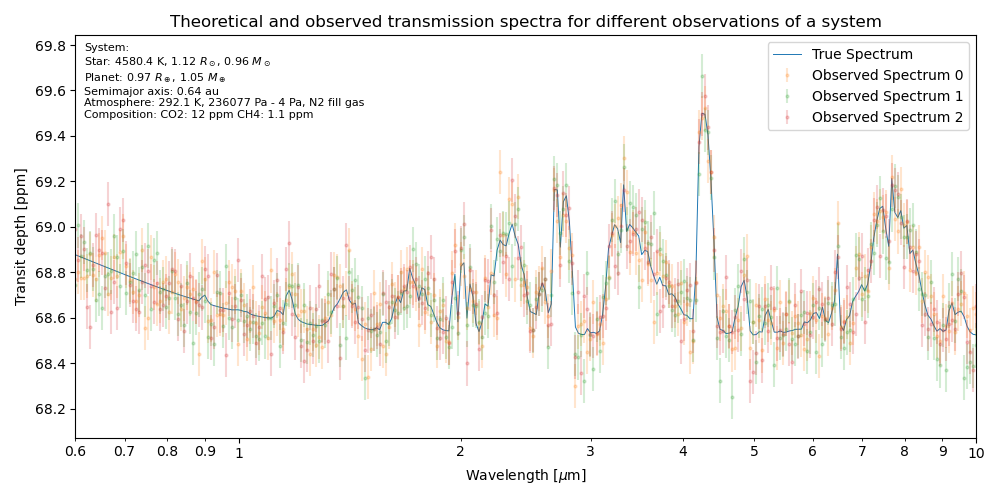
Using this system as a template we may generate thousands of spectra that can be used, for instance, for training machine learning algorithms. For an in depth explanation of how to use those advanced functionalities of MultiREx please check the quick start guide.
In the figure below we show some of the resulting synthetic spectra, along with the corresponding theoretical spectrum corresponding to a particular set of random values for the key system parameters.
Further examples
In order to illustrate the basic and advanced functionalities of MultiREx we provided with the package repository several example Jupyter notebooks (see directory examples/). Additionally, all the notebooks used to generate the results and create the figures for our papers are also available in the GitHub repo (see directory examples/papers).
Key features of MultiREx
-
Planetary System Assembly: Facilitates the combination of different planets, stars, and atmospheres to explore various stellar system configurations.
-
Customizable Atmospheres: Allows the addition and configuration of varied atmospheric compositions for the planets.
-
Synthetic Spectrum Generation: Produces realistic spectra based on the attributes and conditions of planetary systems.
-
Astronomical Observation Simulation: Includes
randinstrumentto simulate spectral observations with noise levels determined by the signal-to-noise ratio (SNR). -
Multiverse analysis: Automates the generation of multiple spectra that randomly vary in specific parameters, providing a wide range of results for analysis.
A note about Taurex
MultiREx is built on the spectral calculation capabilities and the basic structure of Taurex. If you use MultiREx in your research or publications, please also cite Taurex as follows:
A. F. Al-Refaie, Q. Changeat, I.P. Waldmann, and G. Tinetti TauREx III: A fast, dynamic, and extendable framework for retrievals, arXiv preprint arXiv:1912.07759 (2019).
It is necessary to load the opacities or cross-sections of the molecules used in the formats that Taurex utilizes, which can be obtained from:
We have pre-downloaded some of these molecules, and others can be downloaded using the command multirex.Util.get_gases()
What's new
For a detailed list of the newest characteristics of the code see the file What's new.
This package has been designed and written by David Duque-Castaño and Jorge I. Zuluaga (C) 2024
1 maintainer

Metadata
1 maintainer
Release files for multirex 0.3.2
For a detailed explanation of source distributions (sdists) and built distributions (wheels), please see the package formats documentation.
Source distribution (sdist)
| File | Size | Uploaded | |
|---|---|---|---|
| multirex-0.3.2.tar.gz | 23.2 MB | Details |
Built distribution (wheel)
| File | Interpreter | ABI | Platform | Reset |
|---|---|---|---|---|
| multirex-0.3.2-py3-none-any.whl | Python 3 | none | any | Details |
Total release size: 47.0 MB
Release files / multirex-0.3.2.tar.gz
| Download URL | multirex-0.3.2.tar.gz |
|---|---|
| Size | 23.2 MB |
| Tags | Source |
|
SHA-256 checksum How to use checksums |
266a54c605effdd131d2820ff3361a458fb1fa8386aab37171ad247687dd0eaf
|
|
BLAKE2b-256 checksum How to use checksums |
a059a8bf468221563c81fdeaea2720b8205491e185ae62abcea27c2a9d46afd7
|
| Upload date | |
|
Uploaded using Trusted Publishing? What is trusted publishing? |
No |
| Uploaded via |
twine/5.0.0 CPython/3.10.12
|
Release files / multirex-0.3.2-py3-none-any.whl
| Download URL | multirex-0.3.2-py3-none-any.whl |
|---|---|
| Size | 23.8 MB |
| Tags | Python 3 |
|
SHA-256 checksum How to use checksums |
4f4de98c05f4d9d5b6956107ca3049538d8158506f60bf82fad1586dc96ddb22
|
|
BLAKE2b-256 checksum How to use checksums |
b3ea3ec221d7d2a026a047179e9eb8eecf29aa350fc11f7074b710aa40631b06
|
| Upload date | |
|
Uploaded using Trusted Publishing? What is trusted publishing? |
No |
| Uploaded via |
twine/5.0.0 CPython/3.10.12
|














