
Mus Musculus Tracker 🐁


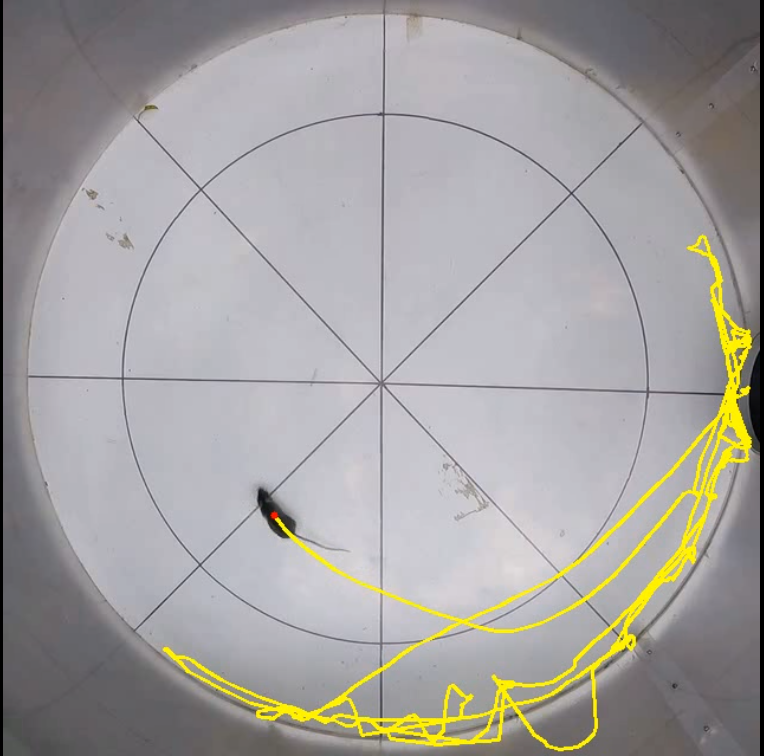
A custom YOLO-based tool for automated mouse (Mus musculus) detection, movement tracking, and manual keypoint labeling.
📋 Features
- Automated Detection: Robust mouse tracking powered by YOLO (v12).
- Video Cropping and Compression: Automatically crops video borders to focus on the arena/cage and compresses them to 640x640 MP4.
- Trajectory Tracking: Extracts movement coordinates and trajectory data.
- Keypoints Labeling: Interactive script to label points
p0..p9on the first frame. - CLI: Command-line interface.
🚀 Installation
Via Pip (Recommended)
pip install mus-musculus-tracker
Via Conda (Development)
gh repo clone juancolonna/mouse-tracker
cd mouse-tracker
conda env create -f environment.yml
conda activate mouse-tracker
pip install -e .
🛠 Usage
1) Basic Use of Mouse tracking (mouse-track)
Run mouse-track with a single video file:
mouse-track path/to/video.mp4
The output files are saved in the same directory as the input video:
video_tracked.mp4annotated video with the tracking results.video_log.csvCSV file containing the tracking data.
The video_log.csv file contains:
Frame: frame number in the video.Track_ID: object tracking ID assigned by YOLO.Class: detected object class.Time (s): timestamp of the frame in seconds.Confidence: YOLO detection confidence score.pos_x: x-coordinate of the detected mouse position.pos_y: y-coordinate of the detected mouse position.Radius: distance from the arena center (p0) to the detected position.Angle: angle of the detected position relative to the arena center (p0), in degrees.Jump: whether the detected point is outside the outer ellipse plus the margin.Region: position category:inner,outer, oroutside.Accumulated distance (px): total distance traveled by the animal in pixels of the processed 640x640 video.Velocity (px/s): instantaneous velocity measured in pixels per secondp0_x,p0_y,...,p16_x,p16_y: coordinates of the manually selected and inferred reference points.
For batch mode, provide a CSV file containing the list of videos (one video per row):
mouse-track path/to/list_of_videos.csv
Use the -y flag to automatically accept confirmation prompts:
mouse-track -y path/to/video.mp4
or, in batch mode:
mouse-track -y path/to/list_of_videos.csv
2) Keypoints labeling (keypoints-labeler)
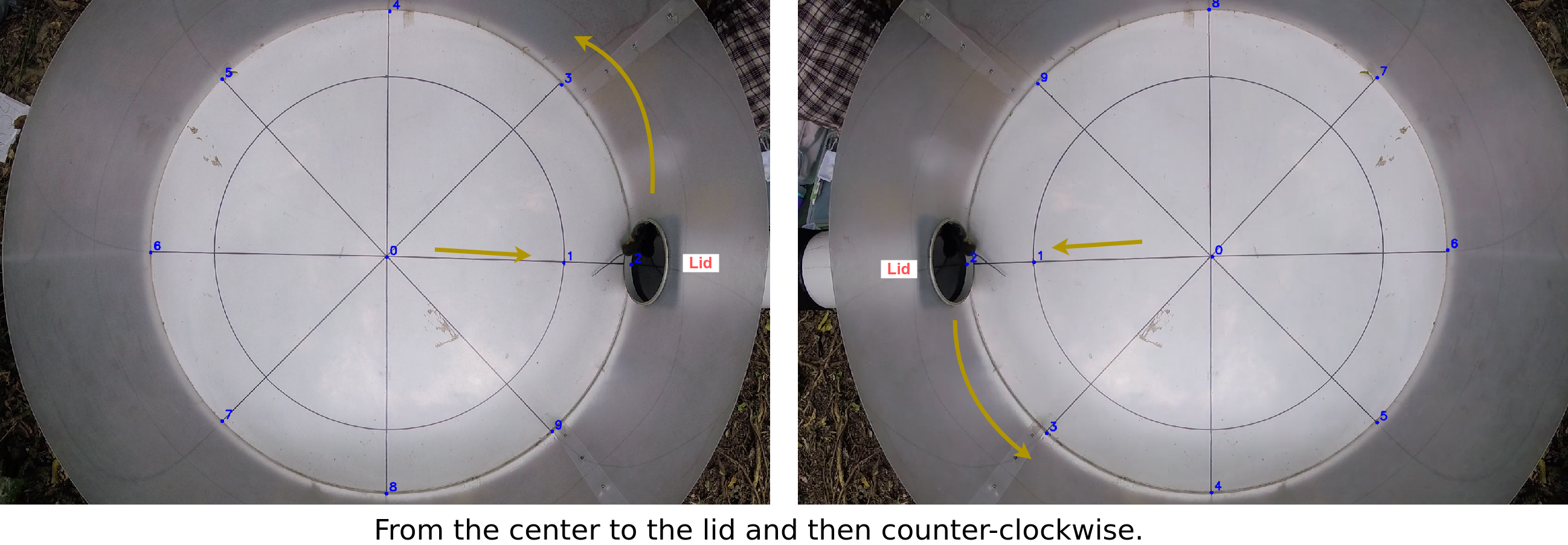
The keypoints_labeler.py script reads a CSV list of videos, opens the first frame of each video, and requests manual selection of the 10 keypoints (p0 to p9).
keypoints-labeler path/to/video_list.csv path/to/output_keypoints.csv
Expected video_list.csv format:
- No header.
- One video path per line.
- Only one column is used.
Example video_list.csv:
/data/exp01/video_001.mp4
/data/exp01/video_002.mp4
Output (output_keypoints.csv):
path_and_filecolumn with the original video path.p0_x,p0_y,...,p9_x,p9_ycolumns.
Labeling behavior:
- Left-click to select the current point.
- Any key (e.g.
ESC) other thanq/Qmoves to the next point. - If you advance without clicking (e.g. press
ESCtwice without a mouse click), the current video is skipped. qorQaborts the batch process.
Point order:
p0is the center.- Points
p0 -> p1 -> p2go from the center toward the lid. p3..p9follow a counter-clockwise order according to the figure.
3) Batch Tracking Mode (mouse-track)
For processing multiple videos with pre-labeled keypoints, use a CSV file containing video paths and their keypoints:
mouse-track -y path/to/keypoints_list.csv
Expected keypoints_list.csv format:
- Header row:
path_and_file,p0_x,p0_y,p1_x,p1_y,...,p9_x,p9_y - Each subsequent row: video path followed by 20 numeric values (x,y pairs for p0-p9)
Example keypoints_list.csv:
path_and_file,p0_x,p0_y,p1_x,p1_y,p2_x,p2_y,p3_x,p3_y,p4_x,p4_y,p5_x,p5_y,p6_x,p6_y,p7_x,p7_y,p8_x,p8_y,p9_x,p9_y
/data/exp01/video_001.mp4,320,240,315,235,310,230,325,245,330,250,335,255,340,260,345,265,350,270,355,275
/data/exp01/video_002.mp4,320,240,315,235,310,230,325,245,330,250,335,255,340,260,345,265,350,270,355,275
This mode automatically crops and tracks all videos in the list without manual interaction. The script will prompt for confirmation before starting the batch process.
📑 Requirements
- Python >= 3.13
ultralyticsopencv-pythonmoviepytqdmnumpy
✍️ Researchers and Authors
Software author and research: Juan G. Colonna juancolonna@icomp.ufam.edu.br
Instituto de Computação (Icomp) - Universidade Federal do Amazonas (UFAM) - Brazil
Data collection and research: Tamara Encinabecker tamara.encinabecker@vuw.ac.nz
Victoria University of Wellington (VUW) - New Zealand
Project research: Stephen Marsland stephen.marsland@vuw.ac.nz
Victoria University of Wellington (VUW) - New Zealand
Project research: Stephen Hartley stephen.hartley@vuw.ac.nz
Victoria University of Wellington (VUW) - New Zealand
📄 License
This project is licensed under the MIT License. See LICENSE for details.
1 maintainer

Metadata
1 maintainer
Release files for mus-musculus-tracker 0.1.8
For a detailed explanation of source distributions (sdists) and built distributions (wheels), please see the package formats documentation.
Source distribution (sdist)
| File | Size | Uploaded | |
|---|---|---|---|
| mus_musculus_tracker-0.1.8.tar.gz | 4.9 MB | Details |
Built distribution (wheel)
| File | Interpreter | ABI | Platform | Reset |
|---|---|---|---|---|
| mus_musculus_tracker-0.1.8-py3-none-any.whl | Python 3 | none | any | Details |
Total release size: 9.9 MB
Release files / mus_musculus_tracker-0.1.8.tar.gz
| Download URL | mus_musculus_tracker-0.1.8.tar.gz |
|---|---|
| Size | 4.9 MB |
| Tags | Source |
|
SHA-256 checksum How to use checksums |
d8b5abc3864e36a3699950446560a78bb17d44dc73d7d19fa6992d45e5b5f384
|
|
BLAKE2b-256 checksum How to use checksums |
bb72db4e5e5a63b9686ff42af9cf7ee4eacbe1fb8fdadd772045381482b76fa4
|
| Upload date | |
|
Uploaded using Trusted Publishing? What is trusted publishing? |
No |
| Uploaded via |
twine/6.2.0 CPython/3.13.13
|
Release files / mus_musculus_tracker-0.1.8-py3-none-any.whl
| Download URL | mus_musculus_tracker-0.1.8-py3-none-any.whl |
|---|---|
| Size | 4.9 MB |
| Tags | Python 3 |
|
SHA-256 checksum How to use checksums |
4e634cae332071055f75c59bad17443bb182adf803562ecd90459cf134ac2bfa
|
|
BLAKE2b-256 checksum How to use checksums |
aa200efc28878009f2f2ddb6053d647d4728e1fe9b4bfa308e1cc244a0c2d406
|
| Upload date | |
|
Uploaded using Trusted Publishing? What is trusted publishing? |
No |
| Uploaded via |
twine/6.2.0 CPython/3.13.13
|














