
A production-grade YouTube music downloader CLI

Project description
musicmandu
musicmandu is a production-grade, zero-configuration command-line interface (CLI) tool written in Python. It allows users to seamlessly download high-quality audio from YouTube videos and automatically process them into fully tagged, album-art-embedded MP3 files.
Features
- ⚡ Lightning-Fast Short Command: No more typing out long commands. Just hit
mduto launch. - 🎮 Fully Interactive Menu: Uses arrow keys and interactive prompts—no complex flags required for regular use.
- 🎬 Video & Audio Support: Toggle seamlessly between high-bitrate MP3 Audio (320 kbps) and crisp MP4 Video.
- Zero Manual Dependencies: Automatically detects, downloads, and caches the correct system-specific FFmpeg binaries at runtime—even when Windows user paths contain spaces.
- Rich Metadata Integration: (Audio Mode) Automatically extracts and embeds metadata, then downloads and embeds the video's high-resolution thumbnail as album art.
- Sleek Visual Feedback: Uses
Richconsole components to replace noisy console output with clean status spinners and styled messages.
Installation & Prerequisites
Requirements
- Python 3.10 or later
piporpipx
FFmpeg does not need to be installed manually. musicmandu automatically downloads and configures a compatible FFmpeg binary when required.
Install with pipx — Recommended
pipx installs the CLI in an isolated environment and makes the musicmandu command available globally.
pipx install musicmandu
If pipx is not installed:
python -m pip install --user pipx
python -m pipx ensurepath
Restart your terminal after running ensurepath, then install:
pipx install musicmandu
Install with pip
python -m pip install musicmandu
Verify the installation:
mdu --help
Upgrade
With pipx:
pipx upgrade musicmandu
With pip:
python -m pip install --upgrade musicmandu
🛠 Usage & Commands
1. The Interactive Way (Recommended)
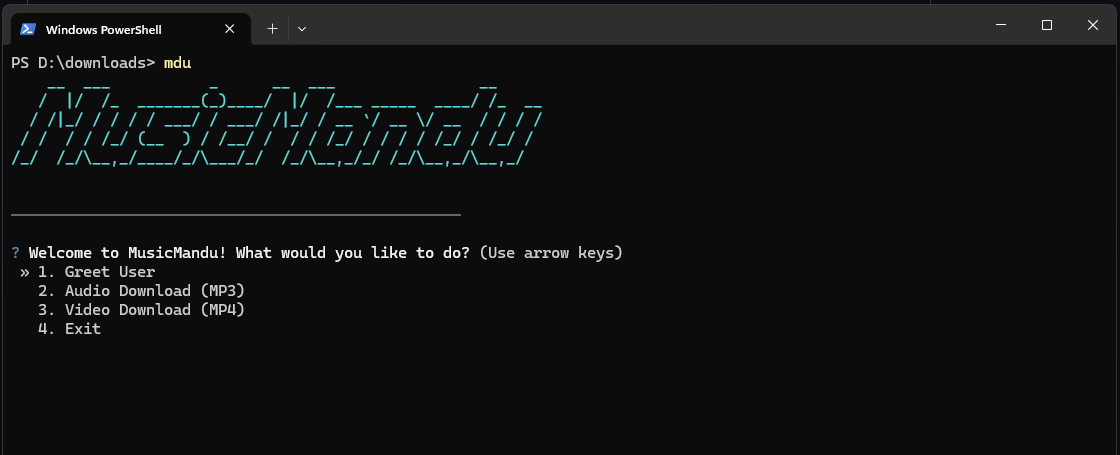
Simply type the 3-letter command and hit Enter. An interactive guide will appear, letting you navigate options using your keyboard's arrow keys:
mdu
  MusicMandu CLI
──────────────────────────────────────────────────

? Welcome to MusicMandu! What would you like to do?
  1. Greet User
❯ 2. Audio Download (MP3)
  3. Video Download (MP4)
  4. Exit
2. The Power-User Way (Direct Commands)
If you are in a rush or writing a script, you can completely bypass the menus by supplying arguments directly.
Audio Download (Default)
mdu download "[https://www.youtube.com/watch?v=dQw4w9WgXcQ](https://www.youtube.com/watch?v=dQw4w9WgXcQ)"
Video Download
Force a video download by appending the --video or -v flag:
mdu download "[https://www.youtube.com/watch?v=dQw4w9WgXcQ](https://www.youtube.com/watch?v=dQw4w9WgXcQ)" --video
# or
mdu download "[https://www.youtube.com/watch?v=dQw4w9WgXcQ](https://www.youtube.com/watch?v=dQw4w9WgXcQ)" -v
Greet Users
mdu greet Milan
View Help
mdu --help
mdu download --help
mdu greet --help
Architecture & Under the Hood
The application relies on three core frameworks to provide a seamless user experience:
- Typer: Powers command parsing, argument handling, flags, and dynamically generated help screens.
- Questionary: Drives the premium, user-friendly interactive terminal prompts and menus.
- Rich: Manages styled terminal output, layout, and responsive loading indicators.
- yt-dlp and ffmpeg-downloader: Handle the download and processing pipeline, including metadata extraction, high-bitrate audio retrieval, thumbnail downloading, and FFmpeg-based MP3 conversion.
How yt-dlp and FFmpeg Work Together
YouTube never stores music as standard MP3 files. To save internet bandwidth, YouTube splits videos into separate streams (one stream for just the video, and one stream for just the audio) and compresses them into modern, web-optimized formats like .webm or .m4a.
Because of this, yt-dlp cannot just "download an MP3" from YouTube—the MP3 file literally does not exist on YouTube's servers.
This is where the teamwork happens:
Plaintext
[YouTube Servers]
       │
       ▼ (Downloads raw .webm/.m4a stream)
┌──────────────┐
│   yt-dlp     │  <─── Role: The Courier (Fetches the raw files)
└──────┬───────┘
       │
       ▼ (Hands raw file + thumbnail + title)
┌──────────────┐
│   FFmpeg     │  <─── Role: The Factory Worker (Converts & polishes)
└──────┬───────┘
       │
       ▼ (Outputs a perfect, tagged asset)
[ Finished .mp3 File ]
Step 1: yt-dlp acts as the "Courier"
When you pass a URL to your musicmandu tool, yt-dlp connects to YouTube. It bypasses the website restrictions, scans the background metadata, and downloads two things:
- The highest-quality raw audio stream available (usually a
.webmor.m4afile). - The high-resolution video thumbnail image file.
Step 2: yt-dlp hands the files to FFmpeg
Once the download is complete, yt-dlp looks at the configuration you wrote in your Python script ('preferredcodec': 'mp3'). It realizes the file is a web-format and needs to become an MP3.
yt-dlp automatically wakes up FFmpeg in the background and hands it three raw items:
- The raw audio file (
.webm) - The image file (
.jpg) - The text data (Song Title and Artist Name)
Step 3: FFmpeg acts as the "Factory Worker"
FFmpeg takes those pieces and performs three rapid tasks in milliseconds:
- Extraction/Conversion: It decodes the
.webmaudio and re-encodes it into a high-quality320kbps MP3stream. - Metadata Tagging: It writes the Artist name and Song Title directly into the hidden data layer of the audio file.
- Artwork Embedding: It takes the thumbnail image, shrinks it, and literally glues it inside the MP3 file as the album cover.
Step 4: Clean up
Once FFmpeg finishes creating the perfect .mp3 file, yt-dlp deletes the temporary raw files it originally downloaded, leaving you with just a clean, beautiful, ready-to-play music file in your folder.
Runtime Dependency Sandbox
When the download command is invoked, the application runs a gatekeeper function named ensure_ffmpeg_installed.
If a valid FFmpeg installation cannot be found in the system path, the application downloads and caches a platform-specific FFmpeg binary. It then maps the binary into the current process environment without modifying the user's global system configuration.
License
Distributed under the MIT License. See LICENSE for more information.
Release history Release notifications | RSS feed


Download files
Download the file for your platform. If you're not sure which to choose, learn more about installing packages.
Source Distribution
Built Distribution
Filter files by name, interpreter, ABI, and platform.
If you're not sure about the file name format, learn more about wheel file names.
Copy a direct link to the current filters
File details
Details for the file musicmandu-1.0.10.tar.gz.
File metadata
- Download URL: musicmandu-1.0.10.tar.gz
- Upload date:
- Size: 7.4 kB
- Tags: Source
- Uploaded using Trusted Publishing? No
- Uploaded via: twine/6.2.0 CPython/3.13.3
File hashes
| Algorithm | Hash digest | |
|---|---|---|
| SHA256 |
1cfd1b3ca63f1ad8fb487afc4c1b8d6d0f9312b31f0d749ae3526a8294dd4e58
|
|
| MD5 |
7cbe0af4b2bdb6634fa4d10745beff6d
|
|
| BLAKE2b-256 |
7b830f9707f9ffe012d298bb4e96603f245664001abb95d42f3fa33ffde06aba
|
File details
Details for the file musicmandu-1.0.10-py3-none-any.whl.
File metadata
- Download URL: musicmandu-1.0.10-py3-none-any.whl
- Upload date:
- Size: 7.4 kB
- Tags: Python 3
- Uploaded using Trusted Publishing? No
- Uploaded via: twine/6.2.0 CPython/3.13.3
File hashes
| Algorithm | Hash digest | |
|---|---|---|
| SHA256 |
a463485b9c3e249c602a7170560c49e9affd25c9a8587a225aef1aaa6fcbfa7e
|
|
| MD5 |
c3c114ff5b04899d3f7272686cbf91f1
|
|
| BLAKE2b-256 |
0ff275ae4263ff8750b86cae69896446895c81d24e5cf4252b4b7896e84ce876
|






