
GUI for abcplus music notation.

Project description
MusicRaft
'MusicRaft' is a GUI for the ABC(plus) music notation, built around python and the Qt GUI toolkit. A note regarding this documentation: The documentation located on my gitlab page https://gitlab.com/papahippo/MusicRaft will tend to be more up-to-date than the documentation located on 'the python package index' https://pypi.org/project/MusicRaft/
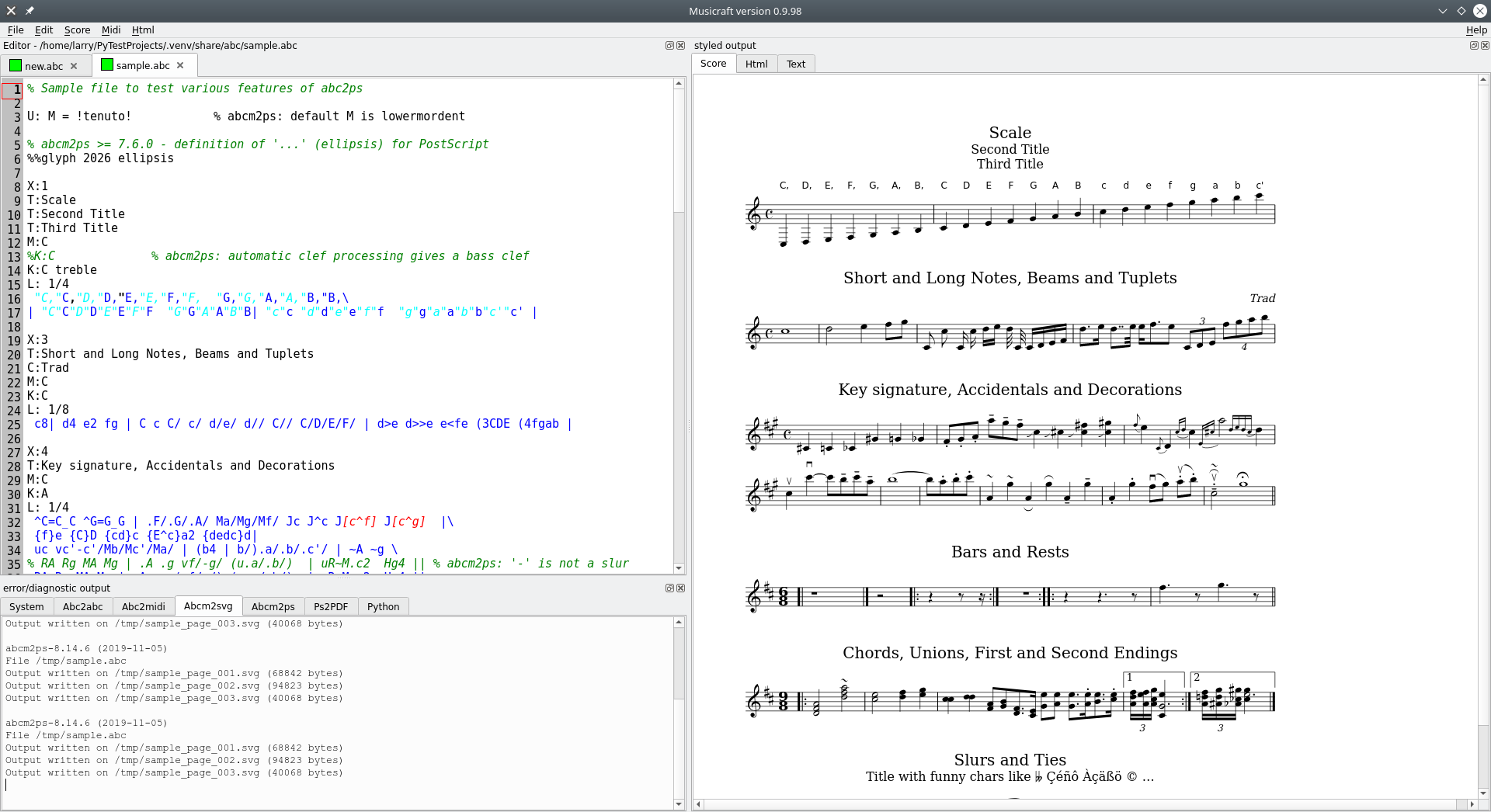
The following screenshot will, I trust, paint the first thousand words of documentation:
Installation
This version of the musicraft package has been validated to work under Linux, under Windows and under MacOSX. Each of these, however, can be problematic. The various issues are dealt with in a separate document: install.
A note regarding virtuaL environments: Since the introduction of the uv tool (this links to the official python package index, but tutorial introductions exist elsewhere) , working with virtual envronments has become fast and, at least under Linux, very easy. While I would encourage you to embrace the use of 'uv' also for musicraft, I have not yet updated these instructions accordingly.
Musicraft and its dependencies can be installed from the python package repository. The exact syntax will vary across platforms but will be something like...
pip3 install --user musicraft
... or ...
python3 -m pip install --user musicraft
The --user is not essential but it avoids permission problems,
e.g. having to use sudo on Linux systems.
bundled 'command line' tools
The following 'command line' tools are automatically installed alongside musicraft into 'share' direcetories...
abcm2psto derive graphic scores from ABCplus codeabcm2midito derive midi files from ABCplus codeabc2abcto transpose ABCplus code
... but don't worry, you won't actually have to use these from the command line! This is handled 'under the surface' by musicraft.
To keep the setup scripting simple, executables for Linux, Windows and Mac OSX are all installed, but of course, at run-time only the appropriate native versions are run.
bundled Documentation
I try to keep this README down to size, so that impatient users can
get up and running quickly. Quite a lot of supplentary documentation
gets installed alongside this README in the doc subdirectory, inculding an
index.
Standalone binaries
Some time ago, I created (using PyInstaller) a standalone executable version of Musicraft for 64-bit systems under Windows (tested on Windows 10). N.B. I haven't recently regenerated this version so particularly the documentation may not match completely.
I have disabled the standalone binary for Linux. (don't ask; it was a long sad story which I have conveniently forgotten!)
I haven't looked into the desirability or feasibility of a standalone binary version for Mac OSX but am open to suggestions and guidance.
Running musicraft
Starting musicraft is a simple matter of ...
python -m musicraft [options] [abc-source-file-name ...]
... or ...
run_musicraft [options] [abc-source-file-name ...]
If no options are included, musicraft uses the bundled copies of the command-line tools ('abcm2ps' etc.).
This behaviour can be specified explicitly by including optio -S or --share.
Conversely, in order to use versions of the these tools which were present on your system before
musicraft was installed, include the option -X or --external.
It is possible to associate musicraft (and desired options) with all .abc files so that a
double-click on such a file in the file manager is sufficient to start
musicraft. How to do this depends on the operating system context; perhaps
this will be (semi)- automated in later releases of the musicraft
package.
By clicking on the tabs abc2abc abc2midi abcm2ps ps2pdf
and abcm2svg of theerror/diagnostic output panel you can check whether musicraft
is finding and executing the 'command line tools' properly. If not,
you can find the version of these tools for your system from
the sites listed under ABCplus music notation below. After doing this, you omit
the-S when starting musicraft and it will use your specially installed versions,
Two alternative start-up scripts are also included. These illustrate how, with a little python knowledge, one can adjust ('tweak') the behaviour of musicraft:
musicraft_custom.pycustomizes the PDF output filename to include the current date.musicraft_cello.pycustomizes extra [keyboard snippets](##### keyboard snippets) (see below!).
Both of the above also contain a number of disabled customizations for illustration purposes.
Debugging
Musicraft writes some 'on the go' diagnostic information to the System tab of
the error/diagnostic panel. Actual error oinformation (more properly:
information written to stderr as opposed to stdout) is written
in italics.
On the go' diagnostic information can be obtained by setting...
- `MUSICRAFT_DBG = 1
... before starting musicraft. Inevitably, perhaps, the choice of what debug info to output is governed by my issues encountered recently, not by your issues encountered today, so this is not guaranteed to be helpful!
This 'debug' mode causes standard output and standard error to be written
to the shell from which musicraft was started, not to the System tab of
the error/diagnostic panel. This is because the latter disappears without trace if
musicraft bombs out owing to an unforseen exceptions. [This behaviour is under review.]
Debug info ouput can also be requested by -D or --debug on the command
line - or explicitly suppressed by -ND or --no-debug. These overrule
any setting of MUSICRAFT_DBG from the environment.
The 'command line programs' write their output to the approprite tabs
of the panel: Abc2abc Abc2midi and Abcm2svg. The last of these
actually relates to abcm2ps and is so named because we always use it
to produce SVG not PS output.
Musicraft was originally designed to work with Qt4 via either PyQt4 or
PySide. This software is however now deprecated in favour of Qt5 via either
PySide2 or PyQt5. Accordingly, Musicraft has
been reworked to support these; This behaviour can be selected by settinging an
environment variable:
MUSICRAFT_QT = PySide2MUSICRAFT_QT = PyQt5
Not overruling this setting is treated as equivalent to...
MUSICRAFT_QT = PyQt5
Important note regarding 'Qt' dependencies:
The dependencies of musicraft are defined assuming PyQt5 will be used. If you want to use PySide2, you will need to install this separately. This is because I had difficulty installing PySide2; you, of course, may be more successful!
window layout
Before you start inputting music to Musicraft, it is a good idea to tweak the window layout to suit your monitor layout:
-
If you have just one screen, first click the full-screen button, then if necessary use the mouse to to drag the vertical line which divides the text area from the score area so that each is wide enough.
-
If you have two displays next to each other, you may want to drag the whole musicraft window to straddle the two, so that one shows the abc source code, the other the score.
-
With two or more displays, you may want to 'undock' one or more of the three panels by dragging their top line(s) - identified by the texts
Editor,styled outputanderror/diagnostic outputto an empty area of one of the screens.
warning: if you stretch the styled output window too much
you may encounter 'extra' unresponsive scroll-bars. This is a bug which I
am having difficulty fixing!
ABCplus music notation
It is unlikely that you have got to this stage without knowing at least something about ABCplus music notation. Even so, it's always good to have some resources at hand. The list below will get you started and lead you to more goodies:
- http://abcplus.sourceforge.net/
- http://moinejf.free.fr/abcm2ps-doc/features.xhtml
- https://sourceforge.net/projects/abcplus/files/Abcplus/abcplus_en-2019-12-20.zip
Typing in your tune(s)
Assuming you are familiar with ABCplus notation (if not, see previous section!)
you can now simply type the ABCplus code into the Editor panel.
The score panel will change as you type. In doing this, musicraft auto-saves
your abc code into a temporary directory and derives one or more temporary svg files from it.
Nnonetheless, you must not forget to save your source code regularly with control-S (or via the file menu).
By each such explicit save action, musicraft derives not only svg file(s) but also a postcript
file with suffix '.ps'. The derived '.ps' is then used immediately to produce a PDF.
keyboard snippets
For most purposes, abcplus is concise; that's waht I like most about it!
Some annotations, can however, be a bit long to type in. This is where keyboared
snippets come in. When, while typing in a tune, you press the TAB key,
musicraft will look at the previous 'word'. If this word is a known key in the dictionary of snippets,
the coreesponding value will be substitued for the word, e.g. 'MR'
ecomes '"_molto rit."'. See AbcHighlighter.snippets in
```musicraft/abcraft/syntax.py. . If, however, the word is not a key of snippets`, it will simply
be encloses in exclamation warks. E.g. 'ff' becomes '!ff!' - less of a saving but still worth it.
The snippet facility is also intended to support two-part snippets,
e.g. 'cr' for '!<(!' and a subsequent '!<)!'
but this is not fully implemented.
Release history Release notifications | RSS feed


Download files
Download the file for your platform. If you're not sure which to choose, learn more about installing packages.
Source Distribution
Built Distribution
Filter files by name, interpreter, ABI, and platform.
If you're not sure about the file name format, learn more about wheel file names.
Copy a direct link to the current filters
File details
Details for the file musicraft-1.0.9.tar.gz.
File metadata
- Download URL: musicraft-1.0.9.tar.gz
- Upload date:
- Size: 35.5 MB
- Tags: Source
- Uploaded using Trusted Publishing? No
- Uploaded via: twine/6.2.0 CPython/3.9.2
File hashes
| Algorithm | Hash digest | |
|---|---|---|
| SHA256 |
7a5f4eb658ab8309e0e741ece3347fbfea0986ff2b667fffb2f3e92f653a21e6
|
|
| MD5 |
588a1d8931f939ada2f0f21aff15bc3b
|
|
| BLAKE2b-256 |
dc879c274459b587f156ac9dd59331cec2f236d7c9743333cf5d4ca807b8c0f3
|
File details
Details for the file musicraft-1.0.9-py3-none-any.whl.
File metadata
- Download URL: musicraft-1.0.9-py3-none-any.whl
- Upload date:
- Size: 35.5 MB
- Tags: Python 3
- Uploaded using Trusted Publishing? No
- Uploaded via: twine/6.2.0 CPython/3.9.2
File hashes
| Algorithm | Hash digest | |
|---|---|---|
| SHA256 |
3e507dd9f3a62945c61c98b81bae9b665a5f3e79ef607af9413f6a92982f1a15
|
|
| MD5 |
e8d52b006296d52e7a775fc3d5304630
|
|
| BLAKE2b-256 |
9d066a42e4c92708d0def0978e8f7fbff154b8efed39679bc4997361143ec646
|






