
my-mpl-style



Two small helpers that give matplotlib figures a publication-ready look:
plot_rc()applies a consistent rcParams preset — serif fonts, Computer Modern math, a MATLAB-like colour cycle, optional grid and tick direction, plus 300 dpi / tight-bbox save defaults.ax_setting3D()turns a 3D axes into a clean orthographic box with explicit tick positions and a grey back edge.
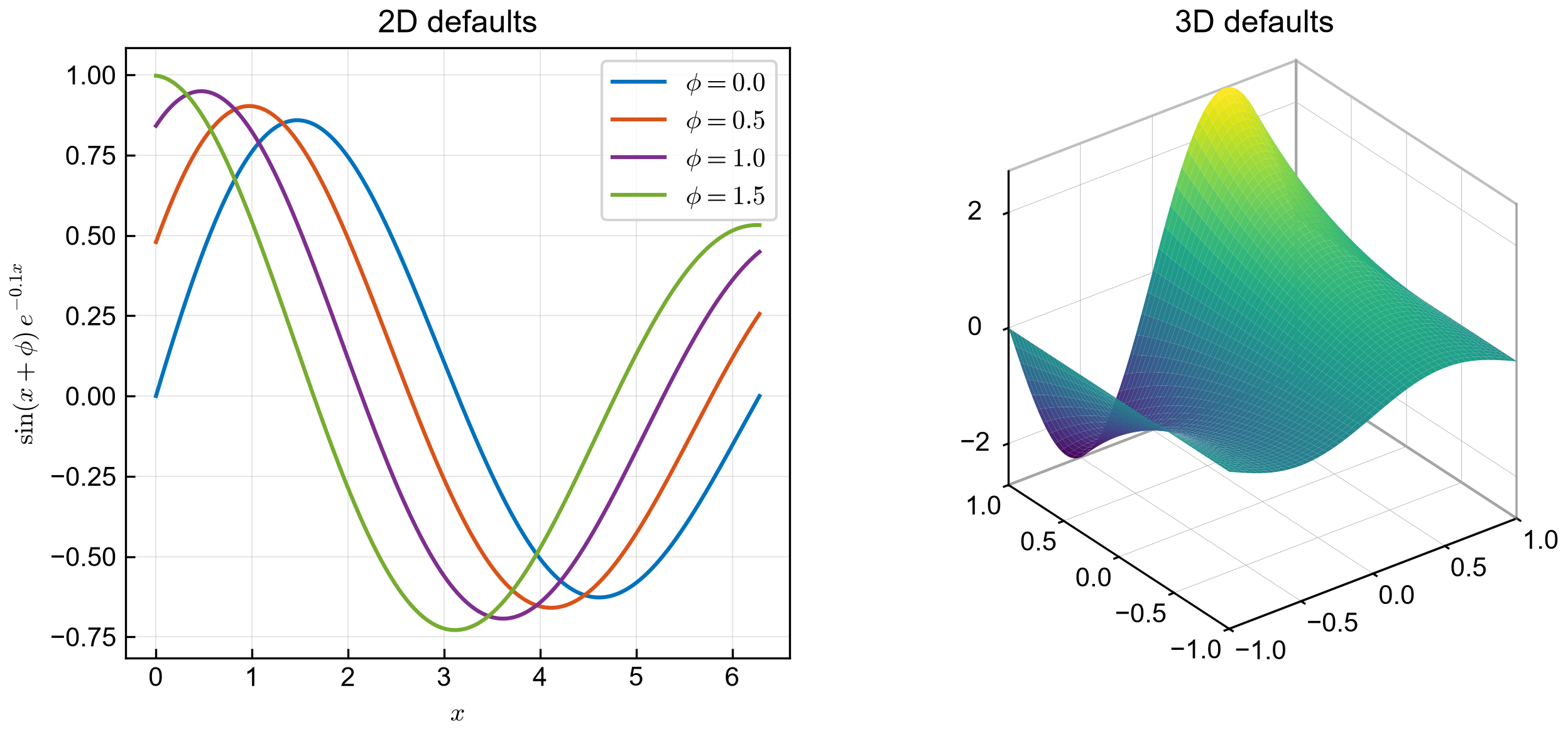
Installation
pip install my-mpl-style
Requires Python 3.10+ and matplotlib 3.5+.
Quick start
import matplotlib.pyplot as plt
from my_mpl_style import plot_rc

plot_rc(grid=True)                 # serif + CM math, 300 dpi, tight bbox

fig, ax = plt.subplots()
ax.plot([0, 1, 2], [0, 1, 4], label="data")
ax.set(xlabel="$x$", ylabel="$y$")
ax.legend(frameon=False)

fig.savefig("figure.png")          # uses savefig.dpi=300, bbox="tight"
Every default can be overridden per call:
plot_rc(
    save_dpi=600,
    save_bbox="standard",
    save_pad_inches=0.1,
    font_family="sans-serif",
    font_serif=["DejaVu Sans"],
)
3D axes
import matplotlib.pyplot as plt
import numpy as np
from my_mpl_style import ax_setting3D

a = np.linspace(-1, 1, 200)
x, y = np.meshgrid(a, a)
z = np.sin(np.pi * x) * np.exp(y)

fig = plt.figure()
ax = fig.add_subplot(111, projection="3d")
ax.plot_surface(x, y, z, linewidth=0, antialiased=True)
ax_setting3D(
    ax,
    (-1, 1), (-1, 1), (z.min(), z.max()),
    xticks=[-1, -0.5, 0, 0.5, 1],
    yticks=[-1, -0.5, 0, 0.5, 1],
    zticks=[-2, 0, 2],
    box_aspect=(1, 1, 1),
)
plt.show()
Ticks are passed to ax_setting3D() rather than set separately with
ax.set(xticks=...), so the grey back edge is computed after the final limits
and ticks are known.
API
plot_rc(...)
plot_rc(
    grid=False,
    tick_direction="out",
    tick_right=False,
    tick_top=False,
    save_dpi=300,
    save_bbox="tight",
    save_pad_inches=0.05,
    font_family="serif",
    font_serif=("Arial", "Helvetica", "DejaVu Sans"),
)
Updates the global matplotlib.rcParams, so it affects every figure created
afterwards.
| Parameter | Type | Default | Description |
|---|---|---|---|
grid |
bool |
False |
Draw light major grid lines behind the artists. |
tick_direction |
"in" | "out" |
"out" |
Direction of the tick marks on both axes. |
tick_right |
bool |
False |
Also show ticks and labels on the right y axis. |
tick_top |
bool |
False |
Also show ticks and labels on the top x axis. |
save_dpi |
int |
300 |
Resolution used by savefig. |
save_bbox |
"tight" | "standard" |
"tight" |
Bounding-box mode (stored as None for "standard"). |
save_pad_inches |
float |
0.05 |
Padding around the tight bbox, in inches. |
font_family |
str |
"serif" |
Value for font.family; "sans-serif" switches faces. |
font_serif |
Sequence[str] |
("Arial", "Helvetica", "DejaVu Sans") |
Font candidates for the serif family. |
rcParams written by the preset:
| rcParam | Value |
|---|---|
font.family |
font_family |
font.serif |
font_serif |
mathtext.fontset |
"cm" |
axes.formatter.use_mathtext |
True |
axes.prop_cycle |
6-colour palette: #0072BD, #D95319, #7E2F8E, #77AC30, #4DBEEE, #A2142F |
xtick.direction, ytick.direction |
tick_direction |
axes.grid |
grid |
savefig.dpi, savefig.bbox, savefig.pad_inches |
save_dpi, save_bbox, save_pad_inches |
grid.linewidth, grid.alpha, axes.grid.which, axes.axisbelow |
0.5, 0.3, "major", True — only when grid=True |
ytick.right, ytick.labelright |
True — only when tick_right=True |
xtick.top, xtick.labeltop |
True — only when tick_top=True |
ax_setting3D(...)
ax_setting3D(
    ax,
    xlim, ylim, zlim,
    xticks, yticks, zticks,
    aspect="equal",
    box_aspect=None,
    xticks_pad=-5,
    yticks_pad=-5,
    zticks_pad=0,
)
Makes the panes transparent, thins the grid and tick marks, aligns the tick labels next to their axes, sets the tick positions and limits, and draws the grey back edge of the box.
| Parameter | Type | Default | Description |
|---|---|---|---|
ax |
Axes3D |
— | Axes created with projection="3d". |
xlim, ylim, zlim |
Sequence[float] |
— | Axis limits. |
xticks, yticks, zticks |
Sequence[float] |
— | Tick positions for each axis. |
aspect |
"auto" | "equal" |
"equal" |
Data aspect. |
box_aspect |
Sequence[float] | None |
None |
Ratio of the axes box along x, y and z. |
xticks_pad, yticks_pad, zticks_pad |
float |
-5, -5, 0 |
Padding between axis and tick labels, in points. |
Development
python -m venv .venv
.venv\Scripts\activate          # Windows
pip install -e ".[dev]"

pytest
python examples/demo.py          # regenerate docs/images/demo.png
python -m build
twine check dist/*
examples/demo.py prepends src/ to sys.path, so it always renders with the
checkout's code even when an older release is installed in site-packages.
Changelog
See CHANGELOG.md.
License
MIT © 2026 chengtau
1 maintainer

Metadata
1 maintainer
Release files for my-mpl-style 0.2.1
For a detailed explanation of source distributions (sdists) and built distributions (wheels), please see the package formats documentation.
Source distribution (sdist)
| File | Size | Uploaded | Provenance | |
|---|---|---|---|---|
| my_mpl_style-0.2.1.tar.gz | 558.7 kB | Without provenance | Details |
Built distribution (wheel)
| File | Interpreter | ABI | Platform | Reset |
|---|---|---|---|---|
| my_mpl_style-0.2.1-py3-none-any.whl | Python 3 | none | any | Details |
Total release size: 567.2 kB
Release files / my_mpl_style-0.2.1.tar.gz
| Download URL | my_mpl_style-0.2.1.tar.gz |
|---|---|
| Size | 558.7 kB |
| Tags | Source |
|
SHA-256 checksum How to use checksums |
af1c1a223e79c7bdd62ce8c0b4cccaa46f5601e4d3ff869ae0991bae054b72b1
|
|
BLAKE2b-256 checksum How to use checksums |
d079fdd6902f8521bfcb294b7ca7810d72006bdd13fa9323940374dfdd78d786
|
| Upload date | |
|
Uploaded using Trusted Publishing? What is trusted publishing? |
No |
| Uploaded via |
twine/7.0.0 CPython/3.13.5
|
Release files / my_mpl_style-0.2.1-py3-none-any.whl
| Download URL | my_mpl_style-0.2.1-py3-none-any.whl |
|---|---|
| Size | 8.5 kB |
| Tags | Python 3 |
|
SHA-256 checksum How to use checksums |
f62f31c1f3e2c75c7addcb1b1b1bff0062b01afe399b70398949b0b950150a10
|
|
BLAKE2b-256 checksum How to use checksums |
3d84717bc23c41aca33bbc546b3d82aecfb01abf1767ea98c478ccd866f2d4b9
|
| Upload date | |
|
Uploaded using Trusted Publishing? What is trusted publishing? |
No |
| Uploaded via |
twine/7.0.0 CPython/3.13.5
|
Security for my-mpl-style 0.2.1
Provenance
Provenance describes where a file came from. On PyPI, provenance is shared via attestations, which provide a verifiable record of the build or publishing details. View details, limitations and caveats.
No provenance found
None of the files in this release were uploaded with provenance metadata.
A note on package security
PyPI is a repository for distributing packages, not a service for auditing them. While third-party security researchers and our staff do their best to detect and remove malicious packages, PyPI cannot guarantee the quality, security or suitability of any given package.














