
MyAnimeList MCP server: browse and edit your anime and manga lists, with an embedded UI
Verified details
These details have been verified by PyPIProject links
GitHub Statistics
Maintainers

Project description
myanimelist-mcp



An MCP server that exposes your MyAnimeList data — watch list, scores, progress, rankings, recommendations — as tools, plus a premium MCP Apps UI that renders those results as an interactive, anime-styled interface right inside the chat. Any assistant that speaks MCP can analyze your taste, browse seasons, and edit your list; on hosts that support MCP Apps it does so through the UI below.
Python 3.12 · FastMCP 3 (stdio) · React + Vite for the UI.
Installation
Requires uv. No clone, no build, no Docker.
uvx myanimelist-mcp
The server speaks MCP over stdio: it prints nothing and waits on stdin for JSON-RPC, so
running it by hand looks like a hang — that is correct behaviour. Your MCP client is what
launches it. Add it to your client config — macOS
~/Library/Application Support/Claude/claude_desktop_config.json,
Windows %APPDATA%\Claude\claude_desktop_config.json:
{
  "mcpServers": {
    "myanimelist": {
      "command": "uvx",
      "args": ["myanimelist-mcp"],
      "env": {
        "MAL_CLIENT_ID": "your-client-id",
        "MAL_CLIENT_SECRET": "your-client-secret",
        "MAL_REFRESH_TOKEN": "your-refresh-token",
        "MAL_TIMEZONE": "Europe/Istanbul"
      }
    }
  }
}
Then quit and reopen the client completely. See Authentication for how to get those credentials.
spawn uvx ENOENT? Desktop clients launch servers with a minimalPATHthat usually excludes~/.local/bin. Runwhich uvxand put the absolute path in"command".
Your credentials live in that file in plaintext, and stderr from this server is persisted by some clients (e.g.
~/Library/Logs/Claude/). Considerchmod 600on the config, and revoke the MAL token if you ever share logs.
For Claude Code:
claude mcp add --env MAL_CLIENT_ID=… --env MAL_REFRESH_TOKEN=… \
  --transport stdio myanimelist -- uvx myanimelist-mcp
Pinning a version, or installing with pip instead:
uvx --from 'myanimelist-mcp==X.Y.Z' myanimelist-mcp
pip install myanimelist-mcp   # then "command": "myanimelist-mcp"
                              # or   "command": "python", "args": ["-m", "mal_mcp"]
The interface
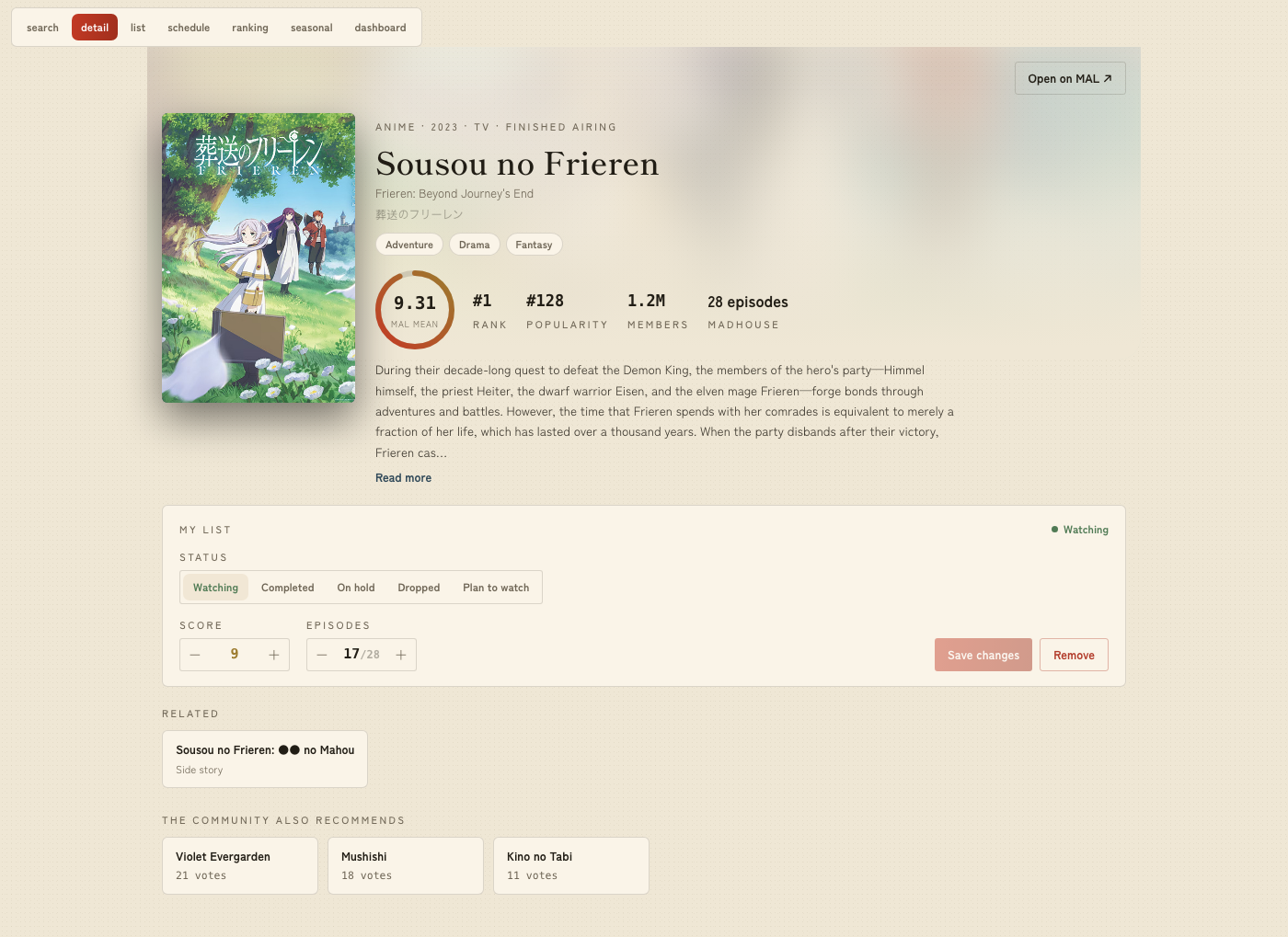
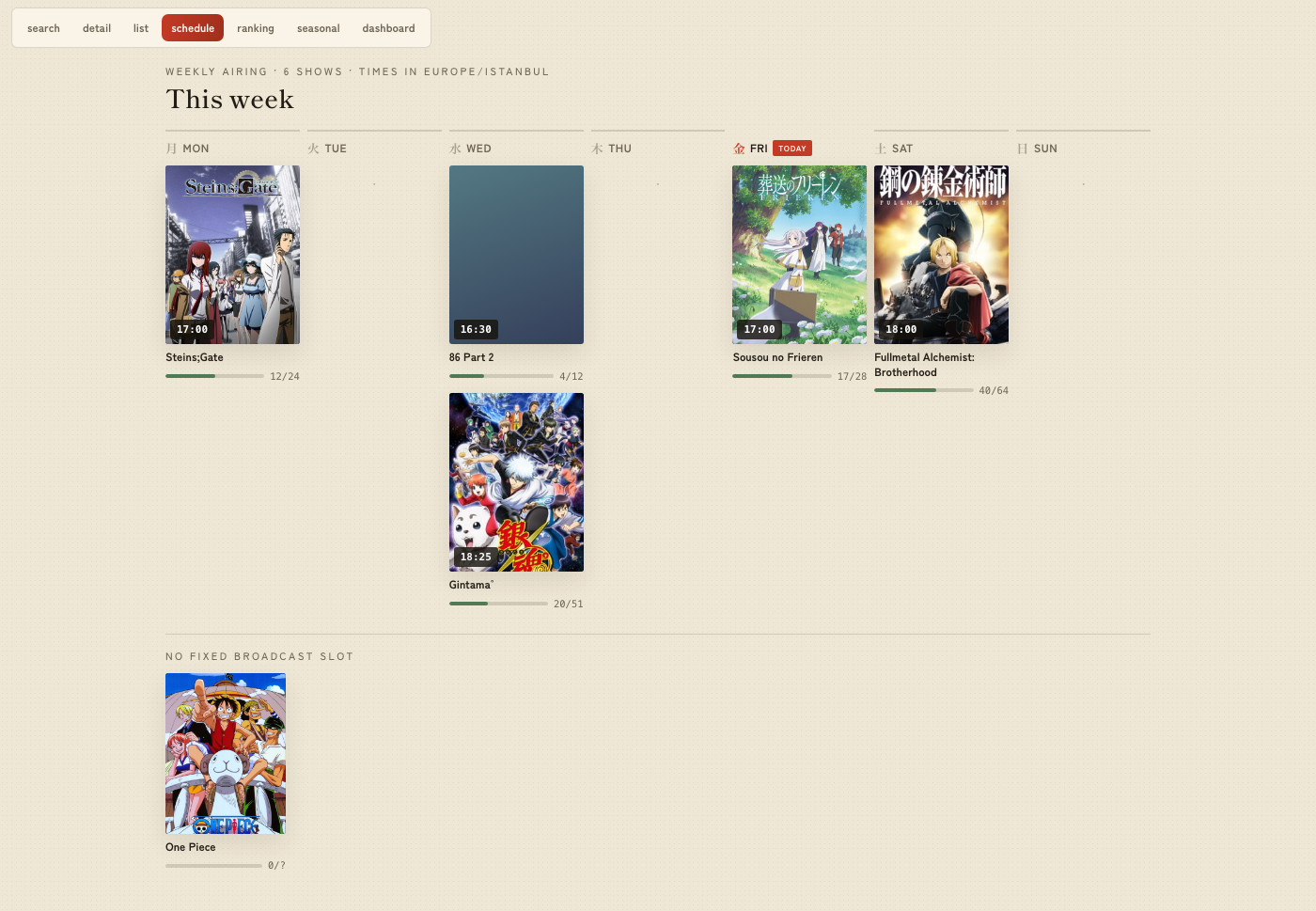
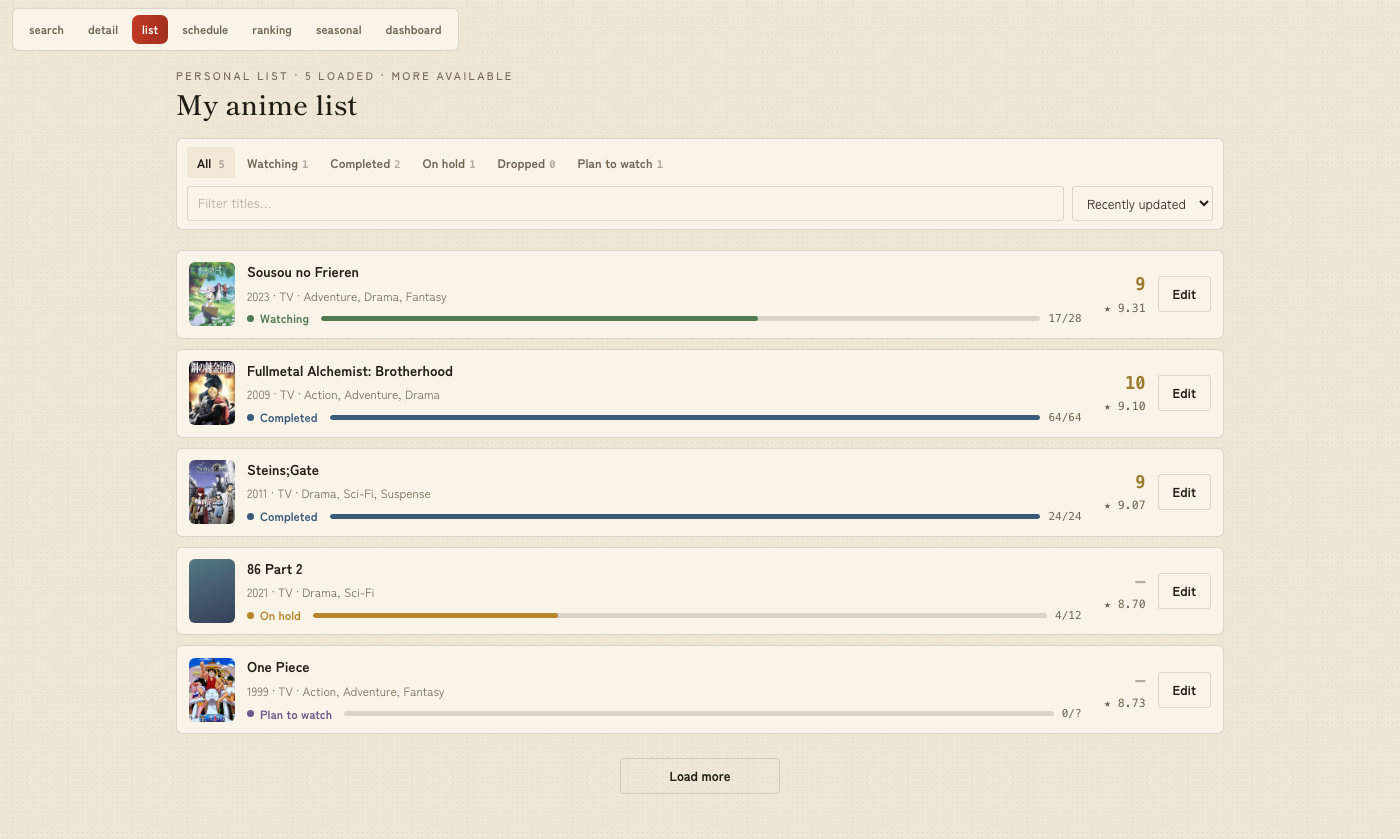
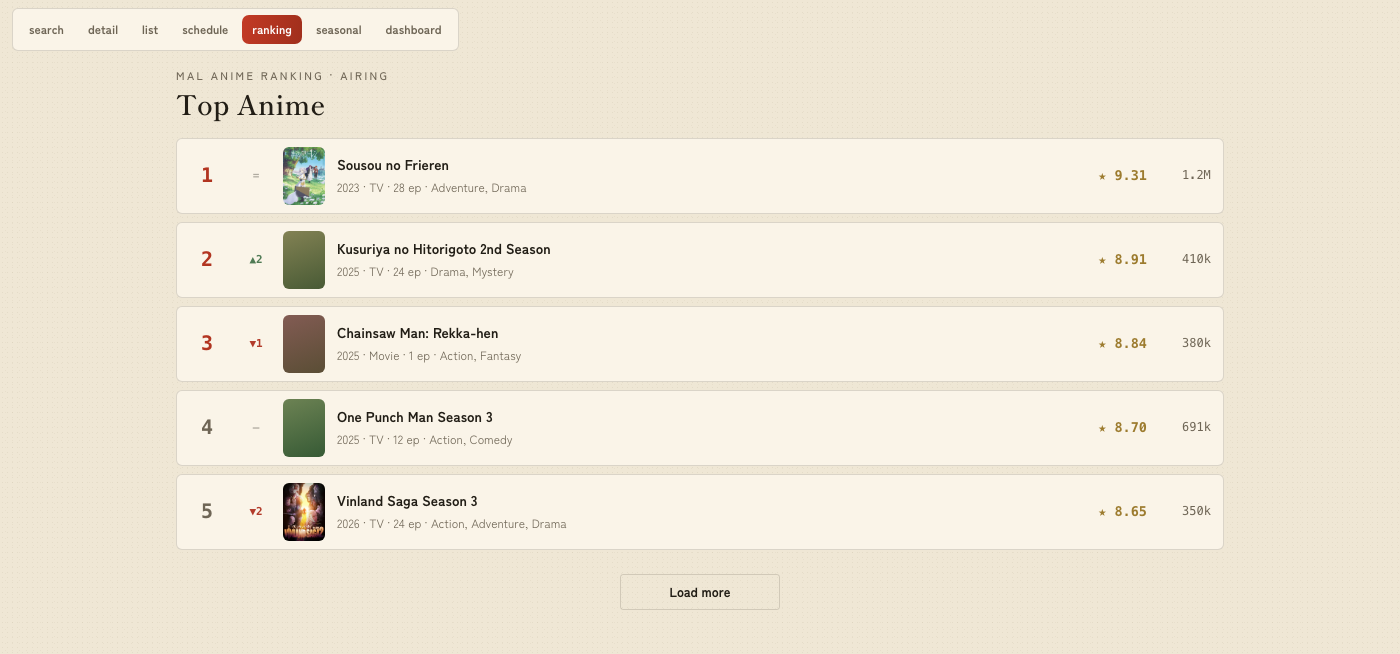
Each read tool ships a ui:// app resource alongside its text summary, so hosts that support
MCP Apps render the result as a
live view. The model still receives the compact text summary; the full data travels to the
iframe as structured content. Where the host has no MCP Apps support, the tools degrade to
those text summaries and everything still works.

 |
 |
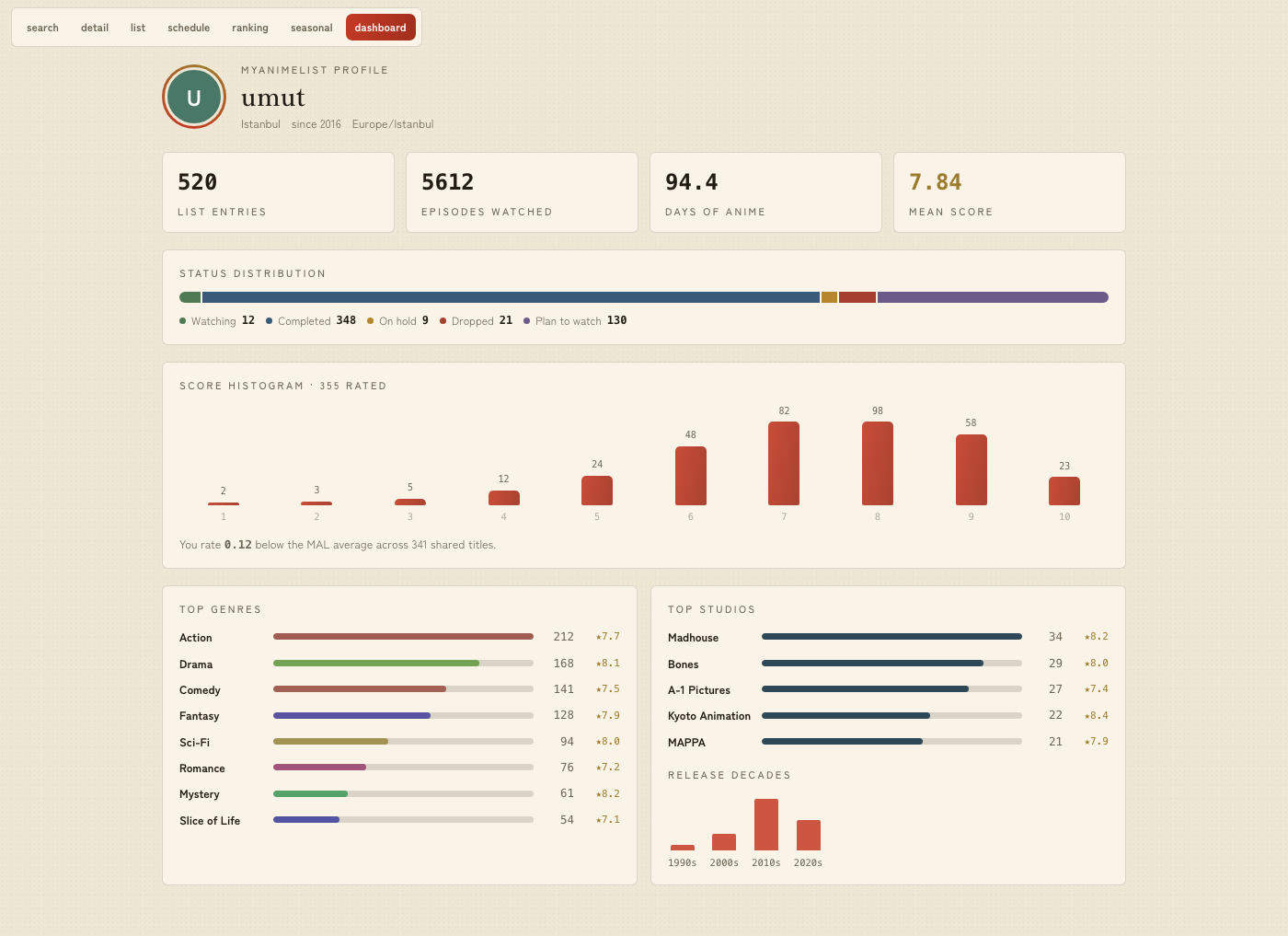
The detail and list views edit your MAL entries in place (status / score / progress) and navigate between titles — all through the same tools, so nothing UI-only happens behind the model's back. The theme follows the host's light/dark mode; cover art loads from MAL's CDN.
Tools
Anime
| Tool | Description |
|---|---|
get_my_anime_list(status_filter?, sort?, limit=100, offset=0) |
A page of your list: title, cover, watch status, score, episode progress, genres, community mean, studios. |
get_user_stats() |
Locally computed summary: status/score/genre/media-type/decade distributions, total episodes, estimated watch time, user-vs-community score deviation, top studios. |
search_anime(query, limit=10) |
Public catalog search (compact results with covers, truncated synopsis). |
get_anime_detail(anime_id) |
Full public detail incl. related anime, recommendations, statistics, and your own list entry if present. |
analyze_taste() |
Token-efficient raw export of the whole list (grouped by status, sorted by score) for the calling model to analyze — this tool itself performs no analysis. |
Manga
| Tool | Description |
|---|---|
search_manga(query, limit=10) |
Public manga catalog search (chapters/volumes, authors, genres). |
get_manga_detail(manga_id) |
Full manga detail incl. authors, serialization magazines, related works, recommendations, and your own entry if present. |
get_my_manga_list(status_filter?, sort?, limit=100, offset=0) |
A page of your manga list with chapter/volume progress. |
Discovery
| Tool | Description |
|---|---|
get_anime_ranking(ranking_type, limit=25) |
MAL's official rankings: all, airing, upcoming, tv, ova, movie, special, bypopularity, favorite. |
get_manga_ranking(ranking_type, limit=25) |
Manga rankings: all, manga, novels, oneshots, doujin, manhwa, manhua, bypopularity, favorite. |
get_seasonal_anime(year, season, sort?, limit=25) |
Anime of one broadcast season (winter/spring/summer/fall). |
get_suggested_anime(limit=25) |
MAL's personalized suggestions for the authenticated user. |
get_weekly_schedule(timezone?) |
Your personal weekly airing calendar: the currently-airing anime on your watching list, grouped by broadcast day. Uses the timezone argument, else the MAL_TIMEZONE env var, else MAL's native JST. |
Users
| Tool | Description |
|---|---|
get_my_profile() |
Your profile + lifetime anime statistics. MAL exposes this only for @me. |
get_user_anime_list(user_name, ...) |
Another user's public anime list (403 usually = private list or unknown user). |
get_user_manga_list(user_name, ...) |
Another user's public manga list. |
Write tools — these modify your MAL list
| Tool | Description |
|---|---|
update_my_anime_entry(anime_id, ...) |
Update score/status/episode progress/tags — or add the anime to the list. Only provided fields change. |
delete_my_anime_entry(anime_id) |
Permanently remove an anime from the list (cannot be undone). |
update_my_manga_entry(manga_id, ...) |
Same as the anime variant, with chapter/volume progress. |
delete_my_manga_entry(manga_id) |
Permanently remove a manga from the list. |
Aggregate tools (get_user_stats, analyze_taste) fetch the entire list in one paginated
pass (safety cap: 20,000 entries — beyond that a truncated/WARNING marker is included).
paging.next URLs are validated (https + api.myanimelist.net) before being followed, so
the bearer token can never be sent elsewhere. Verified MAL API facts (fields syntax,
pagination, limits, error shapes) are documented in NOTES.md.
Development
uv sync                 # install Python dependencies
uv run pytest           # unit tests (pure helpers, no network)
uv run myanimelist-mcp  # run the server over stdio (waits on stdin for JSON-RPC)
Building the UI
The server runs without the UI bundle (it serves a small placeholder), so a clone never needs Node. To build the real interface:
cd ui
npm ci
npm run build   # emits src/mal_mcp/ui/dist/index.html (a single self-contained file)
For UI development without a host, npm run dev in ui/ renders every view with fixture
data and a view switcher — the screenshots above are those views.
Released wheels always ship a freshly built bundle: .github/workflows/publish.yml builds it
before uv build and fails the release if it is missing.
Authentication
The server needs a MyAnimeList access token and stores nothing on disk. Set the credentials in
the "env" block of your MCP client config, in one of two ways (this is the precedence order):
MAL_REFRESH_TOKEN(+MAL_CLIENT_ID,MAL_CLIENT_SECRET) — recommended. The server mints and renews access tokens itself via the OAuthrefresh_tokengrant, in memory only. Set up once, no monthly re-pasting.MAL_ACCESS_TOKEN— a static token (expires ~31 days); simplest for a quick test.
Getting a MAL token
- Create an API app at https://myanimelist.net/apiconfig → Create ID, App Type:
Web(this is what makes MAL issue a Client Secret). Set the redirect URL to your OAuth callback, or a localhost URL likehttp://localhost:8080/callbackfor the manual flow. - MAL uses
plainPKCE only (noS256), so the code verifier and challenge are the same string. Obtain a token once:
# 1) code verifier (43-128 chars); challenge == verifier for plain PKCE
VERIFIER=$(python3 -c "import secrets; print(secrets.token_urlsafe(64)[:100])")

# 2) open in a browser, log in, approve — you get ?code=<CODE> at your redirect URL:
#    https://myanimelist.net/v1/oauth2/authorize?response_type=code&client_id=<CLIENT_ID>&code_challenge=$VERIFIER&code_challenge_method=plain&state=x&redirect_uri=<URL_ENCODED_REDIRECT_URL>

# 3) exchange the code for tokens:
curl -s https://myanimelist.net/v1/oauth2/token \
  -d client_id=<CLIENT_ID> -d client_secret=<CLIENT_SECRET> \
  -d grant_type=authorization_code -d code=<CODE> \
  -d code_verifier=$VERIFIER -d redirect_uri=<REDIRECT_URL>
# → {"token_type":"Bearer","expires_in":2678400,"access_token":"...","refresh_token":"..."}
Keep the refresh_token for MAL_REFRESH_TOKEN (option 1), or the access_token for
MAL_ACCESS_TOKEN (option 2).
Environment variables
| Variable | Default | Purpose |
|---|---|---|
MAL_REFRESH_TOKEN |
(unset) | Enables self-renewing tokens via the refresh_token grant (needs MAL_CLIENT_ID). In-memory only. |
MAL_CLIENT_ID |
(unset) | MAL app Client ID, for the refresh grant. |
MAL_CLIENT_SECRET |
(unset) | MAL app Client Secret — required for "Web"-type apps. |
MAL_ACCESS_TOKEN |
(unset) | Static fallback token (expires ~31 days). |
MAL_TIMEZONE |
(unset → JST) | Default IANA timezone for get_weekly_schedule (e.g. Europe/Istanbul). The tool's timezone argument overrides it. |
Project layout
src/mal_mcp/
├── server.py       # FastMCP app, token helper, 20 tools, stats/format/summary helpers
├── mal_client.py   # MAL API wrapper: fields, pagination (paging.next), retries, error mapping
├── token_manager.py# self-renewing OAuth refresh_token grant (in-memory)
├── __main__.py     # `python -m mal_mcp`
└── ui/             # MCP Apps layer: ui:// resource + meta/ToolResult helpers
    └── dist/       # built single-file HTML bundle (gitignored; built by CI for releases)
ui/                 # Vite + React + TypeScript app (motion animations, 6 views)
tests/              # offline unit tests (pure helpers, token manager, UI contract)
NOTES.md            # verified MAL API / FastMCP facts
The PyPI distribution is myanimelist-mcp; the import package is mal_mcp.
License
Project details
Verified details
These details have been verified by PyPIProject links
GitHub Statistics
Maintainers
Release history Release notifications | RSS feed


Download files
Download the file for your platform. If you're not sure which to choose, learn more about installing packages.
Source Distribution
Built Distribution
Filter files by name, interpreter, ABI, and platform.
If you're not sure about the file name format, learn more about wheel file names.
Copy a direct link to the current filters
File details
Details for the file myanimelist_mcp-0.5.0.tar.gz.
File metadata
- Download URL: myanimelist_mcp-0.5.0.tar.gz
- Upload date:
- Size: 539.8 kB
- Tags: Source
- Uploaded using Trusted Publishing? Yes
- Uploaded via: twine/6.1.0 CPython/3.13.12
File hashes
| Algorithm | Hash digest | |
|---|---|---|
| SHA256 |
486952356a90182923e9f213c5d0420217582373517b84c97439fad63c4a66fe
|
|
| MD5 |
e6cf87d681060c6234decd34c72823a9
|
|
| BLAKE2b-256 |
0bf140f6ad0e3092019cab706325695bb8025db7631474c2c06bf771d503d121
|
Provenance
The following attestation bundles were made for myanimelist_mcp-0.5.0.tar.gz:
Publisher:
publish.yml on UmutKDev/myanimelist-mcp
-
Statement:
-
Statement type:
https://in-toto.io/Statement/v1 -
Predicate type:
https://docs.pypi.org/attestations/publish/v1 -
Subject name:
myanimelist_mcp-0.5.0.tar.gz -
Subject digest:
486952356a90182923e9f213c5d0420217582373517b84c97439fad63c4a66fe - Sigstore transparency entry: 2194939905
- Sigstore integration time:
-
Permalink:
UmutKDev/myanimelist-mcp@5197ec8c5cf26a4cb8866fc92c2db408f0df46fc -
Branch / Tag:
refs/tags/v0.5.0 - Owner: https://github.com/UmutKDev
-
Access:
public
-
Token Issuer:
https://token.actions.githubusercontent.com -
Runner Environment:
github-hosted -
Publication workflow:
publish.yml@5197ec8c5cf26a4cb8866fc92c2db408f0df46fc -
Trigger Event:
push
-
Statement type:
File details
Details for the file myanimelist_mcp-0.5.0-py3-none-any.whl.
File metadata
- Download URL: myanimelist_mcp-0.5.0-py3-none-any.whl
- Upload date:
- Size: 325.4 kB
- Tags: Python 3
- Uploaded using Trusted Publishing? Yes
- Uploaded via: twine/6.1.0 CPython/3.13.12
File hashes
| Algorithm | Hash digest | |
|---|---|---|
| SHA256 |
edce12017eb65d7ef8d491e895f61294760f1af8789e27760865c976b1a74153
|
|
| MD5 |
a9306c2aed46e70def5dbfc9d784efd4
|
|
| BLAKE2b-256 |
0645d8e0bde5c5bf115c395d32ea7800e6b866827b3cfa076409f3faa0509600
|
Provenance
The following attestation bundles were made for myanimelist_mcp-0.5.0-py3-none-any.whl:
Publisher:
publish.yml on UmutKDev/myanimelist-mcp
-
Statement:
-
Statement type:
https://in-toto.io/Statement/v1 -
Predicate type:
https://docs.pypi.org/attestations/publish/v1 -
Subject name:
myanimelist_mcp-0.5.0-py3-none-any.whl -
Subject digest:
edce12017eb65d7ef8d491e895f61294760f1af8789e27760865c976b1a74153 - Sigstore transparency entry: 2194939912
- Sigstore integration time:
-
Permalink:
UmutKDev/myanimelist-mcp@5197ec8c5cf26a4cb8866fc92c2db408f0df46fc -
Branch / Tag:
refs/tags/v0.5.0 - Owner: https://github.com/UmutKDev
-
Access:
public
-
Token Issuer:
https://token.actions.githubusercontent.com -
Runner Environment:
github-hosted -
Publication workflow:
publish.yml@5197ec8c5cf26a4cb8866fc92c2db408f0df46fc -
Trigger Event:
push
-
Statement type:






