
Myanmar Glyph Studio · မြန်မာဖောင့် ရေးဆွဲကိရိယာ
Every letter above — Burmese and Latin — is set in Myanmar Glyph Sans, the typeface this toolkit built.






Sketch your own Myanmar font, glyph by glyph, over dimmed guide characters — then build a real, installable, Unicode-correct font.
✏️ Try it now — no install: https://thiha-lynn.github.io/myanmar-glyph-studio/ · 🖼 Font gallery: https://thiha-lynn.github.io/myanmar-glyph-studio/gallery.html · 🔍 Rendering showcase: https://thiha-lynn.github.io/myanmar-glyph-studio/showcase.html · ✦ Type specimen: https://thiha-lynn.github.io/myanmar-glyph-studio/specimen.html · 🎨 Font styles: https://thiha-lynn.github.io/myanmar-glyph-studio/styles.html · 📖 Reading proof: https://thiha-lynn.github.io/myanmar-glyph-studio/book.html · 🇲🇲 မြန်မာဘာသာဖြင့် ဖတ်ရန် → README.my.md
An open-source toolkit for the Myanmar fonts community. Anyone who can draw can make a font: the studio shows each Myanmar character (and the combined forms like stacked consonants) as a dimmed guide, you trace your own style over it, and the toolchain turns your sketches into a working font.
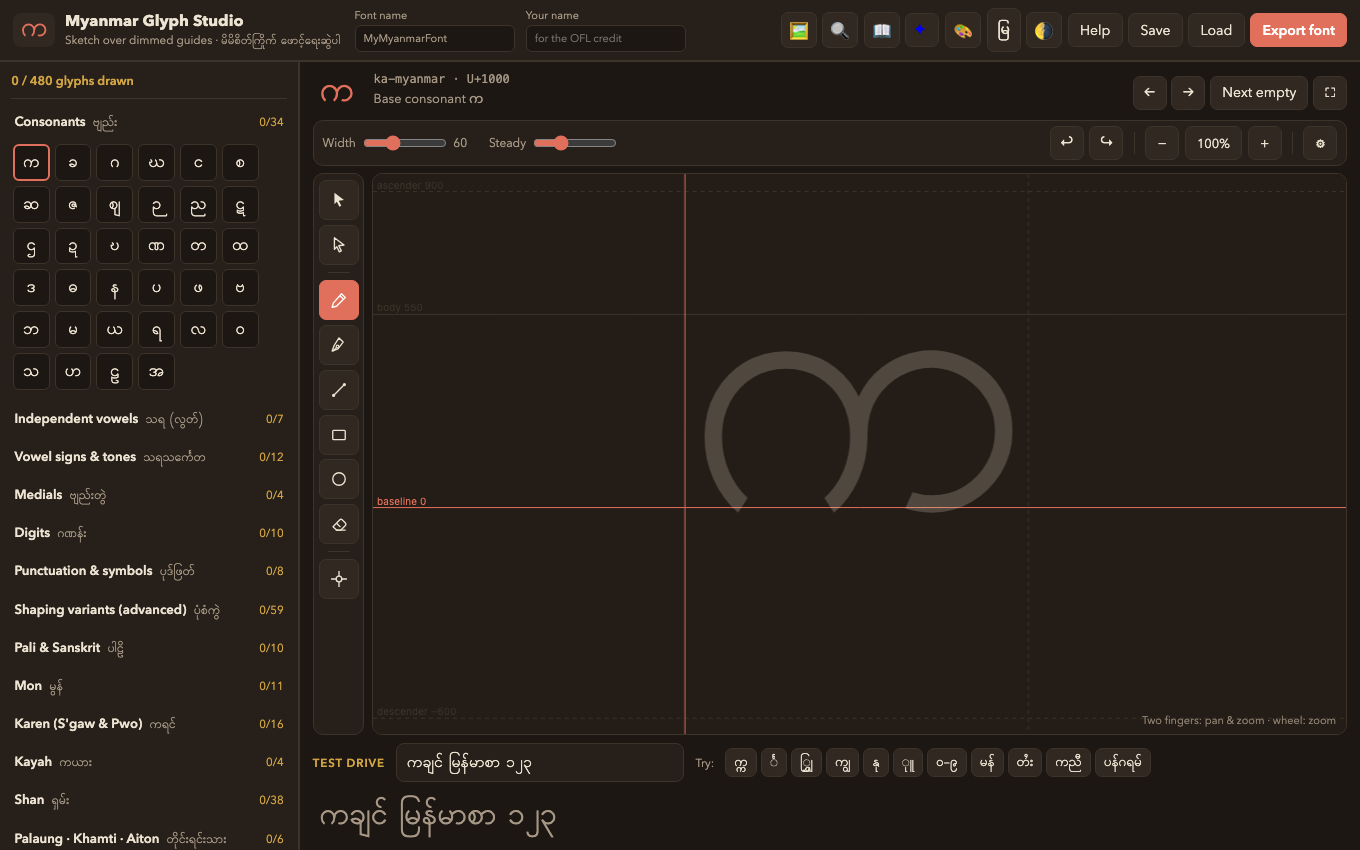
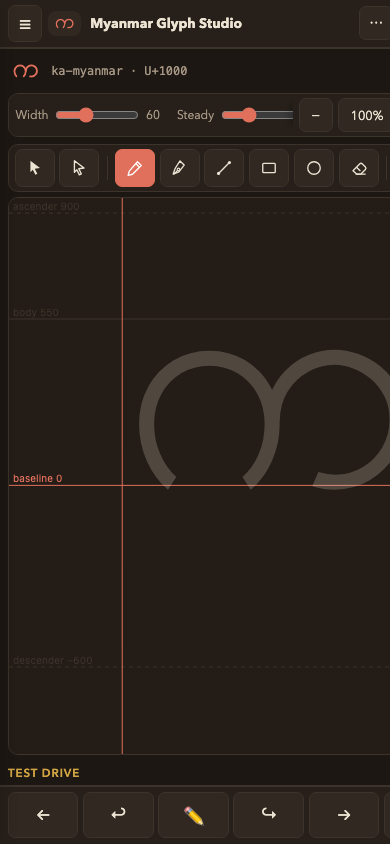
It is built phone-first, because that is the device the community actually has: finger and stylus drawing with palm rejection and pressure support, two-finger pan & zoom, multi-finger tap for undo/redo, a thumb bar for one-handed use, and the whole studio installs as an offline app (PWA) — as a desktop app for macOS, Windows and Linux, or as a phone app for Android and iOS — all five running the same code, so a feature cannot exist on one and not another.
ဖောင့်တစ်လုံး ဖန်တီးဖို့ စာလုံးတိုင်းကို ရေးဆွဲစရာမလိုပါ — အခြေခံစာလုံး ~၁၅၀ နဲ့ ပုံစံကွဲအချို့ကိုသာ ရေးဆွဲပြီး ကျန်တာကို OpenType shaping စနစ်က ပေါင်းစပ်ပေးပါတယ်။
How it works
 ┌───────────────┐     ┌──────────────────┐     ┌──────────────────────┐
 │  web/          │     │ project JSON      │     │ pipeline/             │
 │  Glyph Studio  │ ──► │ (.glyphstudio.json│ ──► │ json_to_ufo.py        │
 │  draw in the   │     │  = your source    │     │ → UFO sources         │
 │  browser       │     │  of truth)        │     │ → fontmake → real TTF │
 └───────────────┘     └──────────────────┘     └──────────────────────┘
        │
        └──► one-click **draft TTF** straight from the browser (for quick testing)
-
Draw — open the studio, pick a glyph (က ခ ဂ …), and sketch over the dimmed guide. Combined forms are guided too: for the stack က္က you draw only the small lower letter; for vowel signs you draw only the mark next to the dotted circle ◌.
Built for real drawing hands: works on phone, tablet, and desktop; Apple Pencil / stylus pressure varies your stroke width; once a pen is detected, fingers pan and zoom while the pen draws (palm rejection); pinch or scroll to zoom into details (a precision grid appears); a stabilizer steadies shaky lines; focus mode (⛶) hides everything but the canvas.
And built for design hands too — an Illustrator-style toolset lives in the tool rail: a Bézier pen (click corners, drag curves, close for filled shapes — paths stay editable point by point), a selection tool with move/scale/rotate handles, copy-paste across glyphs, flip, smooth and simplify, a node editor for reshaping any stroke after the fact, line/rectangle/circle shapes with grid & guide snapping, and a two-mode eraser that can rub away just part of a stroke. Everything stays in the same portable project format.
-
Test — the test-drive box previews your drawn letters live, and Export font gives an installable TTF in one click. The in-app Help explains how to use it everywhere: install on Windows/macOS/Linux, ship it in Unity/Godot/Unreal games, bundle it in Android/iOS/Flutter apps, or serve it on the web with
@font-face. ⚓ Anchor mode shows where vowel signs will attach — drag the points to fix mark positioning without a font editor. Import SVG brings vectorized paper sketches (Inkscape/Illustrator trace) straight onto a glyph. -
Build — save your project file and run the pipeline to get proper UFO sources and a shaping-capable font (stacked consonants, kinzi, mark/mkmk positioning) via the industry-standard
fontmaketoolchain. Finished fonts appear in the community gallery with live preview.
Run the studio
It installs as a real app — Android, iPhone/iPad, Windows, macOS, Linux — and keeps working offline, guide font and all. See docs/PLATFORMS.md for installing it and for wrapping it as a store app.
Prefer a downloadable application? Desktop builds — macOS DMG, Windows installer, Linux AppImage/deb — are attached to each release. They are the same studio bundled with Electron, and they are unsigned; docs/DESKTOP.md explains exactly what that means and how to build your own.
No build step, no install — it is plain HTML/JS:
cd web && python3 -m http.server 8321
Then open http://localhost:8321. (Opening index.html directly also works
in most browsers.) Your work autosaves to the browser's local storage;
Save downloads the portable project JSON you should keep and commit.
The guides render from whatever Myanmar font your system has (Padauk, Myanmar MN, Noto Sans Myanmar, Myanmar Text). For the best guides, install Padauk (free, OFL).
Build a real font from your project
cd pipeline
python3 -m venv .venv && source .venv/bin/activate
pip install -r requirements.txt
./build.sh ~/Downloads/MyFont.glyphstudio.json build/
This writes UFO sources (editable in Fontra,
FontForge, Glyphs, …) and compiles a TTF with auto-generated mym2
shaping features and mark anchors. Verify shaping with HarfBuzz:
hb-view build/*.ttf "ကျွန်ုပ်တို့ မြန်မာစာ" --output-file proof.png
One drawing, a whole weight axis
Because a sketch is stored as centre-lines plus a pen width, thinning and fattening the pen gives you real weights — no redrawing:
python3 pipeline/make_variable.py ~/Downloads/MyFont.glyphstudio.json build/
That writes Light/Regular/Bold masters and a designspace, then compiles a
variable font with a wght axis plus one static TTF per weight. The
masters are interpolation-compatible by construction: point decimation keys
off the unscaled drawing, so every weight shares the same point structure.
Pick your own stops with --weights 300,400,900.
What you draw (and what you don't)
Myanmar is a complex script: the text engine composes syllables at render time, so a font needs parts + rules, not a glyph per syllable.
| You draw | The build system handles |
|---|---|
| 74 core Burmese characters (consonants, vowels, signs, digits, punctuation) | glyph encoding, metrics, UFO packaging |
| ~34 subjoined (stacked) forms — guided by stacks like က္က | blwf substitutions so ္ + က renders your stack form |
| kinzi, wide medial-ra, short u/uu variants | rphf / pres / blws contextual rules |
| the invisible virama — never; it's synthesized automatically | mark positioning (GPOS mark/mkmk) from anchors — auto-placed, draggable in ⚓ anchor mode |
Coverage is complete — and then some. The inventory spans the entire Myanmar Unicode block U+1000–109F — every Burmese character plus Pali/Sanskrit, Mon, S'gaw & Pwo Karen, Kayah, Shan (letters, tones, digits, symbols), Rumai Palaung, Khamti and Aiton — plus Myanmar Extended-A (Khamti Shan, Aiton) and Extended-B (Tai Laing, Shan Pali) and the ◌ dotted circle (U+25CC): 223 encoded characters and 38 shaping variants. Draw the core Burmese groups for a usable font; the ethnic groups extend it as far as you want to go.
English is optional. The A–Z / a–z / 0–9 / punctuation groups let one font cover Myanmar and English — but they are marked "(optional)": leave them empty and your font is simply Myanmar-only. Mark classification and codepoints for the extended groups are generated from the Unicode Character Database, not hand-typed.
Myanmar Glyph Sans — a complete font, free to use today
projects/myanmar-glyph-sans/ is a
finished typeface built with this toolkit: 459 glyphs covering the
whole Myanmar block, Myanmar Extended-A/B, full English, and Western
European accents, punctuation and currency — in Light, Regular, Bold and
a variable font, under the OFL. Every weight passes fontbakery with no
failures and shapes the entire test corpus with no missing glyphs.
Download it from the gallery or a release, and use it anywhere fonts work — see docs/PLATFORMS.md for video, design, document and app workflows. Its project file opens in the studio, so you can redraw any glyph and build your own family from it.
The sample font — see the whole pipeline work
projects/sample/ contains Glyph Studio Sample, a
complete 110-glyph font generated by skeletonizing Padauk (OFL) through this
exact stroke pipeline — the same path your hand-drawn font takes. It proves
stacks (က္က), kinzi (င်္), medial wraps (ကြ) and mark positioning all work:
see proof.png, install
the built TTF, or
regenerate it yourself:
python3 pipeline/make_sample.py Padauk-Regular.ttf projects/sample/GlyphStudioSample.glyphstudio.json
Project structure
web/        the Glyph Studio drawing app (static, no dependencies to build)
pipeline/   project JSON → UFO → fontmake build, feature generation,
            make_sample.py (sample generator), proof.py (visual proof sheets),
            test_corpus.txt (shaping test sentences)
projects/   community font projects — one folder per family
docs/       design notes, the shaping spec + validation report, testing
            and debugging guides
The full map — every module, the data flow, the pairs of files that must change together, and where to start as a designer, translator or developer — is in docs/ARCHITECTURE.md.
Install the toolchain
The studio needs nothing but a browser. The build pipeline is a normal Python package:
pip install myanmar-glyph-studio        # from PyPI
pip install -e ".[dev]"                 # …or from a clone, for development

mgs-build MyFont.glyphstudio.json build/      # project file -> UFO + features
mgs-variable MyFont.glyphstudio.json build/   # …plus weight masters and a VF
mgs-proof build/MyFont-Regular.ttf "ကျွန်ုပ်" proof.png
mgs-validate build/MyFont-Regular.ttf         # 1,486-cluster shaping audit
mgs-kerning build/MyFont-Regular.ttf          # measure kerning from the outlines
mgs-postbuild build/MyFont-Regular.ttf        # smart-dropout hinting prep
Those work on any font, anywhere — mgs-validate will audit a Myanmar
font you did not make, which is how the benchmark numbers in
docs/VALIDATION.md were produced. A second family
regenerates this repository's own data (the gallery, the glyph
inventory, the showcase, the book, the reference corpus) and therefore
needs a clone rather than an installed package — run from a checkout:
mgs-fetch-vocab                               # sweep all 12,450 real words
mgs-gallery                                   # rebuild the gallery webfonts
mgs-book                                      # page a book for the reading proof
mgs-i18n-check                                # what a translation is missing
Every command is also runnable straight from a checkout with no install
(python3 pipeline/json_to_ufo.py …) — same code, same behaviour.
The studio can be hosted for free on GitHub Pages
(.github/workflows/pages.yml deploys web/ — enable Pages → GitHub Actions
in the repo settings), so contributors need nothing but a browser.
Contributing & community
All skill levels welcome — drawing a single glyph is a real contribution. See CONTRIBUTING.md for the ways in (drawing, tools, testing, translation), projects/README.md for the font-family folder layout, and docs/LAUNCH.md for the maintainer playbook. New here? Take one of the four standing invitations — no ticket to claim, partial work welcome. Testing a font on a real phone or Windows box is the easiest one: open the device shaping test there and it renders every tricky cluster, tells you what correct looks like, and writes the bug report for you. Questions and ideas go to Discussions or SUPPORT.md — Burmese welcome. We follow the Contributor Covenant; report security issues per SECURITY.md. Releases are chronicled in CHANGELOG.md, and academic users can cite the project via CITATION.cff.
One person maintains this project — @Thiha-Lynn.
Commits from the first days appear under two older git identities (a
university account, uit-shinnthantkyaw, and a personal email) from
before the repository's git identity was set on 2026-08-16;
.mailmap maps them all to the same maintainer, so
git shortlog -sne shows the real picture.
Fonts produced with this toolkit are meant to be released under the SIL Open Font License 1.1 (each family folder carries the OFL text); the toolkit code is MIT. Full licensing details, including the bundled Padauk guide font, are in NOTICE.md. Tagged releases ship ready-to-install zips (TTF + WOFF2 + proof sheet) for every family.
Roadmap
- Shared HarfBuzz shaping test corpus + visual proof tool
(
pipeline/test_corpus.txt,pipeline/proof.py) - Complete sample font demonstrating the full pipeline
- Full Myanmar block U+1000–109F (Mon, Karen, Kayah, Shan, Pali, Palaung, Khamti, Aiton) + optional Latin groups
- Anchor editing in the studio (⚓ — drag mark attachment points, stored in the project JSON, honored by the build)
- SVG import (vectorized paper sketches → filled contours on the current glyph; studio SVG exports round-trip exactly)
- Myanmar Extended-A + Extended-B blocks (Khamti Shan, Aiton, Tai
Laing, Shan Pali) — generated from the UCD by
pipeline/gen_inventory.py - Dotted-circle (U+25CC) support glyph in the inventory
- Gallery site of community fonts with live preview (web/gallery.html, auto-built on deploy)
- Rendering showcase — 60 hard clusters rendered in the generated
webfont beside the font they were traced over, each row carrying the
glyphs the shaper produced and the ink distance between the two
(web/showcase.html, data from
pipeline/make_showcase.py). It catches what the corpora cannot: a vowel in the wrong contextual form is still perfectly positioned, so it scores 0 FAIL - Reading proof — 34 pages of a classical Burmese orthography
primer set in a generated font, optionally beside Padauk
(web/book.html,
pipeline/make_book.py) - Shaped pens — the nib is a superellipse (
meta.pen: 2 round, 4 squircle, 8 slab) andmake_sample --squirclesquares the skeletons themselves, so the toolkit can produce display faces and not only monolinear sans. See Bagan Display - fontbakery QA in CI (universal profile, FAIL-gated) + HarfBuzz shaping regression on the sample font
- Smooth curve outlines — strokes are decimated and fitted to cubic curves (adaptive tolerance, corner detection) instead of shipping as dense polygons
- Weight-variable fonts from one drawing —
pipeline/make_variable.pyderives Light/Regular/Bold masters by scaling the pen and compiles awghtvariable font; try the slider in the gallery - Explicit GDEF classes and kerning support in the pipeline
- Every shaping engine checked automatically — HarfBuzz in CI,
CoreText via a Swift shaper on macOS (
pipeline/coretext/), and DirectWrite via a C++ shaper on a Windows runner (pipeline/directwrite/). 6,363 cluster comparisons per engine across both corpora, zero rendering differences - Pro drawing tools — Bézier pen with editable paths, selection with move/scale/rotate, node editing, cross-glyph copy/paste, shape tools with snapping, partial eraser
- Myanmar Extended-C block (U+116D0–116FF, Unicode 16) — the pipeline already accepts its uXXXXX names; waiting on guide-font coverage
- Kerning UI in the studio (the pipeline already carries pairs/groups)
- In-studio component reuse (draw once, place many times)
- Per-language shaping test corpora (Mon, Shan, S'gaw/Pwo Karen) and automated visual regression of rendered proofs
- A second axis: width, or a slant/italic
Acknowledgements
Standing on the shoulders of SIL Padauk, the Noto Myanmar project, opentype.js, fontmake / ufoLib2, and the Microsoft Myanmar script development spec.
1 maintainer

Metadata
1 maintainer
Release files for myanmar-glyph-studio 0.7.0
For a detailed explanation of source distributions (sdists) and built distributions (wheels), please see the package formats documentation.
Source distribution (sdist)
| File | Size | Uploaded | |
|---|---|---|---|
| myanmar_glyph_studio-0.7.0.tar.gz | 269.2 kB | Details |
Built distribution (wheel)
| File | Interpreter | ABI | Platform | Reset |
|---|---|---|---|---|
| myanmar_glyph_studio-0.7.0-py3-none-any.whl | Python 3 | none | any | Details |
Total release size: 561.8 kB
Release files / myanmar_glyph_studio-0.7.0.tar.gz
| Download URL | myanmar_glyph_studio-0.7.0.tar.gz |
|---|---|
| Size | 269.2 kB |
| Tags | Source |
|
SHA-256 checksum How to use checksums |
7d8ddf0ae2353ce13148e34f1acf2799ed81f82a73b4e591796e29a4058e4fff
|
|
BLAKE2b-256 checksum How to use checksums |
af64423af39413f40ad72b557231b5ae0b07a89cab6f41aac5cf40b43fa8e5dd
|
| Upload date | |
|
Uploaded using Trusted Publishing? What is trusted publishing? |
Yes |
| Uploaded via |
twine/7.0.0 CPython/3.13.14
|
Provenance
Provenance describes where a file came from. On PyPI, provenance is shared via attestations, which provide a verifiable record of the build or publishing details. View details, limitations and caveats.


PyPI Publish Attestation
PyPI verified that this artifact, at this checksum, originated from the publisher listed below.
Signed by GitHub Actions, verified by PyPI on Aug 17, 2026.
Transparency logRelease files / myanmar_glyph_studio-0.7.0-py3-none-any.whl
| Download URL | myanmar_glyph_studio-0.7.0-py3-none-any.whl |
|---|---|
| Size | 292.5 kB |
| Tags | Python 3 |
|
SHA-256 checksum How to use checksums |
594c50f4848b9750c85a61bef9bf247693110afe29acb458276f3dfbbd68e5f2
|
|
BLAKE2b-256 checksum How to use checksums |
9c3605b15156f5e2e9eb93ef1a40de155599c921a35888df1c8fbbefaa46fbc1
|
| Upload date | |
|
Uploaded using Trusted Publishing? What is trusted publishing? |
Yes |
| Uploaded via |
twine/7.0.0 CPython/3.13.14
|
Provenance
Provenance describes where a file came from. On PyPI, provenance is shared via attestations, which provide a verifiable record of the build or publishing details. View details, limitations and caveats.
PyPI Publish Attestation
PyPI verified that this artifact, at this checksum, originated from the publisher listed below.
Signed by GitHub Actions, verified by PyPI on Aug 17, 2026.
Transparency log














