
Desktop Cat: Qt Overlay

Project description
Desktop Cat: QT Overlay 🐱




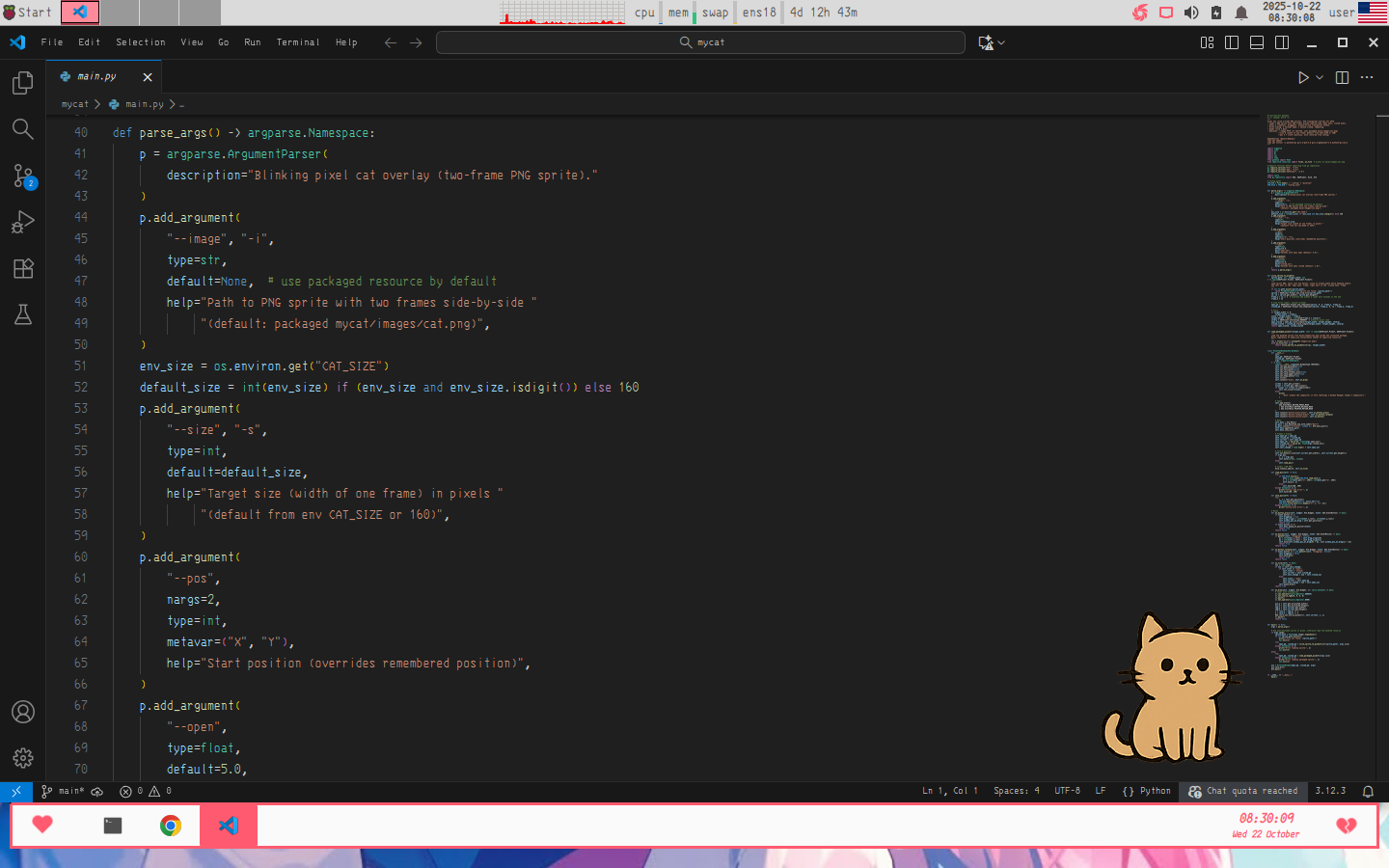
I made a cute little animated cat 🐈 for your desktop.
It's a lightweight Python + QT app — no borders, and you can drag it around easily.
Shows static first frame for 5 seconds, then plays GIF animation once, then loops back to static.
If you like it, maybe I'll share an AnimeGirl version next time~ 😉
1. Install Dependencies
Requirements: Python 3.9 or higher
sudo apt update
sudo apt install -y python3 python3-pip libxcb-cursor0
pip install PySide6 Pillow
2. Set up OpenAI API token 🔑
This application requires an OpenAI API token to access certain AI features.
Windows (PowerShell)
setx OPENAI_API_KEY "your_api_key_here"
Linux/macOS
export OPENAI_API_KEY="your_api_key_here"
After setting the token, restart your terminal or source your shell configuration to apply it.
3.1 Install from PyPI
# user install (recommended on Ubuntu)
python3 -m venv --system-site-packages .venv
source .venv/bin/activate
python3 -m pip install mycat
# or system-wide (not recommended on Ubuntu desktop)
# sudo python3 -m pip install mycat
# Run
mycat
# or explicitly:
python3 -m mycat
# Upgrade
python3 -m pip install --upgrade mycat
# Uninstall
python3 -m pip uninstall mycat
3.2 Download from GitHub and install
# Install
git clone https://github.com/yumiaura/mycat
cd mycat
python3 -m venv --system-site-packages .venv
source .venv/bin/activate
python3 -m pip install .
# Run
mycat
# Uninstall
python3 -m pip uninstall mycat
3.3 Run without installation 🏃♂️
# Clone repository
git clone https://github.com/yumiaura/mycat
cd mycat
python3 mycat/main.py --image images/cat.zip
4. Usage & Options 🎮
After installation, you can customize the cat 🐱 with various command-line options:
Basic Usage
# Run with default settings
mycat

# Run from source without installation
python3 mycat/main.py
Command-Line Options
--image, -i <path> 🖼️
Use a custom ZIP archive containing GIF animation instead of the default cat.
# Use your own cat ZIP archive
mycat --image ~/my-custom-cat.zip

# Example with full path
mycat --image images/cat.zip
ZIP Archive Requirements: 🐾
- ZIP format containing exactly one GIF file
- First frame of GIF is used as static image
- GIF animation plays once, then returns to first frame
- Images are automatically scaled if larger than 300x500 pixels
--pos <x> <y> 📍
Start the cat at a specific screen position (overrides saved position).
# Top-left corner
mycat --pos 0 0

# Center of 1920x1080 screen
mycat --pos 960 540

# Bottom-right area
mycat --pos 1600 900
Note: Position is saved automatically and restored on next launch.
Combined Examples 🎯
# Custom cat with specific wait time and position
mycat --image ~/my-cat.zip --wait 3 --pos 100 100

# Quick animation start in corner
mycat --image images/girl1.zip --wait 1 --pos 1500 800

# Slow animation start with custom ZIP
mycat --image /path/to/custom.zip --wait 10 --pos 0 0
Controls 🎮
- Drag with left mouse button to move the cat 🐱
- Right-click anywhere on the cat for context menu with image selection
- Close via context menu or Ctrl+C in terminal
The cat remembers its position and selected image between sessions in ~/.config/pixelcat/config.ini.
4. Create animated GIF and ZIP archive 🎬
# Install ImageMagick for GIF creation
sudo apt install imagemagick

# Create animated GIF from sprite sheet
convert images/cat.png -crop 50%x100% +repage -set delay '200,100' -loop 0 images/cat.gif

# Create ZIP archive for the application
zip images/cat.zip images/cat.gif
5. Docker Usage 🐳
Run the desktop cat in a containerized environment for easy deployment across platforms. The Docker setup handles GUI forwarding to display the cat on your host desktop.
Prerequisites
- Docker installed on your system
- X server running on the host (Xorg on Linux, VcXsrv on Windows, XQuartz on macOS)
Linux 🐧
# Required before docker compose up (allow container access to X11)
xhost +local:docker

# Run the container
docker compose up --build
Windows 🪟
- Install an X server like VcXsrv
- Configure VcXsrv to allow connections from network clients
- Run the container:
docker compose -f docker-compose.windows.yml up
macOS 🍎
- Install XQuartz
- Allow connections from network clients in XQuartz preferences
- Run the container:
docker compose -f docker-compose.mac.yml up
How it Works
- The container uses multi-platform Docker images compatible with Linux, Windows, and macOS hosts
- GUI is forwarded from the container to the host's X server using TCP (Windows/macOS) or Unix socket (Linux)
- X11 authorization is handled via mounted
.Xauthorityfile - Host networking mode allows direct access to the host's display
- The app runs with xcb platform plugin for native GUI performance
Customization
- Modify
docker-compose.ymlfiles for different environments - Add custom ZIP archives by mounting volumes to
/app/images/ - Adjust display settings via environment variables
6. Troubleshooting 🔧
Common Issues
Cat doesn't appear or transparency doesn't work 🫥
- On Linux, ensure you're using a compositing window manager (most modern desktop environments support this)
- Try running with different window flags or check if your system supports ARGB visuals
- For KDE Plasma, you may need to enable desktop effects
High CPU usage 💻
- The animation runs at 60 FPS by default, which can be intensive on some systems
- The CPU usage is usually minimal but depends on your system's Qt implementation
Window doesn't stay on top 📌
- Some window managers or desktop environments may override the "always on top" setting
- Try restarting your desktop session or check window manager settings
Custom image doesn't load ❌
- Ensure your ZIP archive contains exactly one GIF file
- Check that the GIF file is valid and not corrupted
- Verify the file path is correct and the ZIP file exists
- Make sure the GIF has proper frame delays for smooth animation
Position not saving 💾
- Check that
~/.config/pixelcat/directory exists and is writable - Look for error messages in the terminal when closing the application
- The config file should be at
~/.config/pixelcat/config.ini
Installation issues on Windows 🪟
- Ensure you have Python 3.9 or higher:
python --version - Make sure you're using the
run_windows.batscript from the project root - Check that PySide6 installed correctly:
pip list | findstr PySide6 - Try running
python -c "import PySide6; print('PySide6 OK')"to test
Permission errors 🔒
- On Linux, avoid using
sudofor installation - use user installs instead - Check that virtual environment activation worked:
which python3andwhich pip
Python version issues 🐍
- This application requires Python 3.9 or higher due to modern type hints
- Check your version:
python --versionorpython3 --version - If you have Python 3.8 or older, please upgrade to Python 3.9+
- Tested and working on Python 3.9, 3.10, 3.11, and 3.12
Getting Help 🤝
- Check the GitHub Issues for similar problems
- Read CONTRIBUTING.md for development setup and guidelines
- Create a new issue with your system details (OS, desktop environment, Python version)
- Include any error messages from the terminal
License
Thank you for reading to the end! 😸🐾


Download files
Download the file for your platform. If you're not sure which to choose, learn more about installing packages.
Source Distribution
Built Distribution
Filter files by name, interpreter, ABI, and platform.
If you're not sure about the file name format, learn more about wheel file names.
Copy a direct link to the current filters
File details
Details for the file mycat-0.1.5.tar.gz.
File metadata
- Download URL: mycat-0.1.5.tar.gz
- Upload date:
- Size: 94.4 kB
- Tags: Source
- Uploaded using Trusted Publishing? Yes
- Uploaded via: twine/6.1.0 CPython/3.13.12
File hashes
| Algorithm | Hash digest | |
|---|---|---|
| SHA256 |
b4a2357d09fe72dccf8dd735b5289830018713b6ecbefeca95a32bc1be348a6b
|
|
| MD5 |
1d99882b477a2780131f7b5a22f3ca83
|
|
| BLAKE2b-256 |
143db9c26c1cd5270cc91abbcb9bd6e01160ab1cb8494a005db58f9a60ca44c9
|
Provenance
The following attestation bundles were made for mycat-0.1.5.tar.gz:
Publisher:
publish.yml on yumiaura/myCat
-
Statement:
-
Statement type:
https://in-toto.io/Statement/v1 -
Predicate type:
https://docs.pypi.org/attestations/publish/v1 -
Subject name:
mycat-0.1.5.tar.gz -
Subject digest:
b4a2357d09fe72dccf8dd735b5289830018713b6ecbefeca95a32bc1be348a6b - Sigstore transparency entry: 1539517439
- Sigstore integration time:
-
Permalink:
yumiaura/myCat@9eb7391e6956253040581ad4343a77638fda9874 -
Branch / Tag:
refs/tags/0.1.5 - Owner: https://github.com/yumiaura
-
Access:
public
-
Token Issuer:
https://token.actions.githubusercontent.com -
Runner Environment:
github-hosted -
Publication workflow:
publish.yml@9eb7391e6956253040581ad4343a77638fda9874 -
Trigger Event:
push
-
Statement type:
File details
Details for the file mycat-0.1.5-py3-none-any.whl.
File metadata
- Download URL: mycat-0.1.5-py3-none-any.whl
- Upload date:
- Size: 91.7 kB
- Tags: Python 3
- Uploaded using Trusted Publishing? Yes
- Uploaded via: twine/6.1.0 CPython/3.13.12
File hashes
| Algorithm | Hash digest | |
|---|---|---|
| SHA256 |
815388c459683100a4648a170ae712be183ade963f6678b0371654d697bbbb94
|
|
| MD5 |
c2491cb24b0e53e2b408c73f06f884f9
|
|
| BLAKE2b-256 |
6fd28667a5362aef5fde3dabd2b3e62f886454b2610e9265ec94d4695fb2c8f2
|
Provenance
The following attestation bundles were made for mycat-0.1.5-py3-none-any.whl:
Publisher:
publish.yml on yumiaura/myCat
-
Statement:
-
Statement type:
https://in-toto.io/Statement/v1 -
Predicate type:
https://docs.pypi.org/attestations/publish/v1 -
Subject name:
mycat-0.1.5-py3-none-any.whl -
Subject digest:
815388c459683100a4648a170ae712be183ade963f6678b0371654d697bbbb94 - Sigstore transparency entry: 1539517707
- Sigstore integration time:
-
Permalink:
yumiaura/myCat@9eb7391e6956253040581ad4343a77638fda9874 -
Branch / Tag:
refs/tags/0.1.5 - Owner: https://github.com/yumiaura
-
Access:
public
-
Token Issuer:
https://token.actions.githubusercontent.com -
Runner Environment:
github-hosted -
Publication workflow:
publish.yml@9eb7391e6956253040581ad4343a77638fda9874 -
Trigger Event:
push
-
Statement type:






