
Plex collection creator and recommendation system using LAION-CLAP

Project description
🍄 Mycelium




AI-powered music recommendation system for Plex using semantic search with CLAP embeddings that understands both natural language and sonic characteristics.
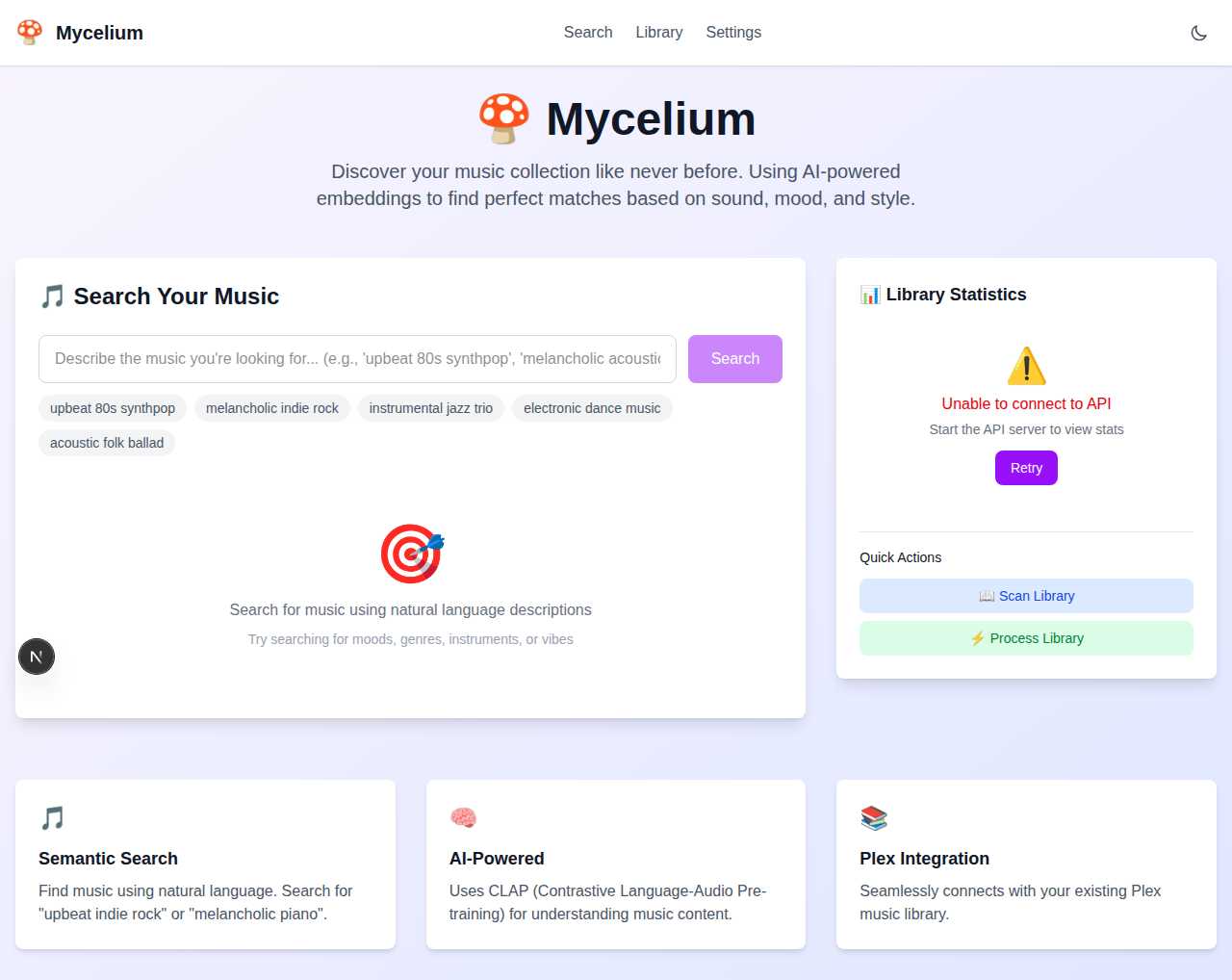
What is this?
Mycelium connects to your Plex media server and uses AI to understand your music collection at both semantic and sonic levels. Search for songs using natural language descriptions ("melancholic indie rock", "fast drumbeat with distorted guitar") or upload audio files to find tracks with similar rhythm, timbre, and sonic characteristics. Uses CLAP (Contrastive Language-Audio Pre-training) to analyze both text descriptions and actual audio features like tempo, instrumentation, and production qualities.
How it works
- Scan - Connects to Plex and extracts music track metadata
- Process - Generates AI embeddings using CLAP model for comprehensive music understanding (both semantic and acoustic features)
- Search - Find music using natural language or audio file similarity
- Recommend - Get AI-powered recommendations based on sonic qualities, rhythm patterns, mood, and style
Architecture: Python backend (FastAPI) + Next.js frontend + ChromaDB vector database
Features
🔍 Smart Search
- Text search: "upbeat 80s synthpop", "melancholic indie rock", "fast drumbeat with heavy bass", "acoustic guitar with reverb"
- Audio search: Upload files to find similar tracks by rhythm, tempo, and sonic characteristics
- Browse library with AI recommendations based on musical patterns
🚀 Performance
- Distributed GPU processing for large libraries
- Resumable embedding generation
- Real-time progress tracking
⚙️ Integration
- Seamless Plex integration
- Modern web interface (Next.js + TypeScript)
- YAML configuration with platform-specific paths
Setup
Requirements
- Python 3.9+ and Node.js 18+
- Plex Media Server with music library
- GPU recommended for faster processing
Installation
# 1. Clone and install backend
git clone https://github.com/marceljungle/mycelium.git
cd mycelium
pip install -e .

# 2. Setup configuration
mkdir -p ~/.config/mycelium
cp config.example.yml ~/.config/mycelium/config.yml
# Edit config.yml with your Plex token

# 3. Install frontend dependencies
cd frontend && npm install
Quick Start
# Start server (API + Frontend)
mycelium-ai server

# For distributed processing (optional)
mycelium-ai client --server-host 192.168.1.100  # On GPU machine
Visit http://localhost:8000 for the web interface.
Usage
Basic Workflow
# 1. Start the web interface
mycelium-ai server

# 2. Open http://localhost:8000 in your browser
# 3. Use the web interface to:
#    - Scan your Plex library
#    - Generate AI embeddings
#    - Search and explore your music
Available Commands
mycelium-ai server                         # Start server (API + Frontend)
mycelium-ai client --server-host HOST      # Start GPU worker client
Web Interface
Search: Natural language search ("upbeat indie rock", "slow tempo with piano") or upload audio files to find sonically similar tracks
Library: Browse tracks, scan Plex library, and process embeddings
Settings: Configure Plex connection and processing options
Access the web interface at http://localhost:8000 after starting the server.
Distributed Processing
For large libraries, use GPU workers for faster processing:
# On main server
mycelium-ai server

# On GPU machine(s)
mycelium-ai client --server-host YOUR_SERVER_IP
Configuration
Edit ~/.config/mycelium/config.yml with your Plex token:
plex:
  url: http://localhost:32400
  token: your_plex_token_here
  music_library_name: Music

api:
  host: 0.0.0.0
  port: 8000
Platform paths:
- Linux/macOS:
~/.config/mycelium/config.yml - Windows:
%APPDATA%\mycelium\config.yml
API Reference
Library: /api/library/scan, /api/library/process, /api/library/stats
Search: /api/search/text?q=query, /api/search/audio (POST)
Workers: /workers/register, /workers/get_job, /workers/submit_result
Development
# Development setup
pip install -e ".[dev]"
cd frontend && npm install

# Code quality
black src/ && isort src/ && mypy src/
cd frontend && npm run lint && npm run build
Project Structure
mycelium/
├── src/mycelium/           # Python backend (FastAPI + clean architecture)
│   ├── domain/             # Core business logic
│   ├── application/        # Use cases and services
│   ├── infrastructure/     # External adapters (Plex, CLAP, ChromaDB)
│   ├── api/                # FastAPI endpoints
│   └── main.py             # CLI entry point
├── frontend/               # Next.js frontend (TypeScript + Tailwind)
│   └── src/components/     # React components
└── config.example.yml      # Configuration template
Tips
- Large libraries: Use GPU workers (
mycelium-ai client) for faster processing - Plex token: Get from Plex settings → Network → "Show Advanced"
- Resume processing: Embedding generation can be stopped and resumed anytime
- Performance: Batch processing adapts to available memory automatically
Packaging and Distribution
Mycelium includes automated CI/CD workflows for building and publishing to PyPI.
Build Process
The package build follows a two-stage process:
- Frontend Compilation: Next.js frontend is built into static files
- Python Package Build: Frontend assets are included in the Python wheel
To build locally:
# Generate OpenAPI clients and build both frontend bundles
./build.sh

# Build Python wheel (after frontend build)
python -m build
The build.sh orchestrator supports optional flags (run ./build.sh --help) to
skip specific stages or trigger python -m build automatically when using the
--with-wheel flag.
GitHub Actions Workflow
The repository includes a GitHub Action (.github/workflows/build-and-publish.yml) that:
- Automatic Triggers: Runs when merging PRs to the
mainbranch - Smart Versioning: Automatically determines version bump based on PR labels
- Manual Triggers: Can be triggered manually via GitHub Actions UI for testing
- Test PyPI Support: Option to upload to Test PyPI for validation
- Build Verification: Validates that frontend assets are included in the package
Automatic Release Strategy
The workflow automatically creates releases when merging to main based on PR labels:
Version Bump Types:
majorlabel: Createsx+1.0.0version (breaking changes)minorlabel: Createsx.y+1.0version (new features)hotfixlabel: Createsx.y.z+1version (bug fixes)- No label: Defaults to patch version (
x.y.z+1)
Workflow Examples:
-
Feature Release (develop → main):
# Create PR from develop to main with "minor" label
# When merged: 1.0.0 → 1.1.0
-
Major Release (develop → main):
# Create PR from develop to main with "major" label
# When merged: 1.1.0 → 2.0.0
-
Hotfix (hotfix/issue-123 → main):
# Create PR from hotfix branch to main with "hotfix" label
# When merged: 1.1.0 → 1.1.1
Manual Testing
Manual Trigger for Testing:
- Go to GitHub Actions tab in the repository
- Select "Build and Publish to PyPI" workflow
- Click "Run workflow"
- Choose version type and whether to upload to Test PyPI
Required Secrets
Configure these secrets in your GitHub repository settings:
PYPI_API_TOKEN: API token for PyPI uploadsTEST_PYPI_API_TOKEN: API token for Test PyPI uploads (optional, for testing)
The workflow uses PyPI's trusted publishing when possible, or falls back to API tokens.
Contributing
Contributions welcome! Ensure changes follow existing patterns, include TypeScript types, and use the logging system.
License
MIT License - see LICENSE file.


Download files
Download the file for your platform. If you're not sure which to choose, learn more about installing packages.
Source Distribution
Built Distribution
Filter files by name, interpreter, ABI, and platform.
If you're not sure about the file name format, learn more about wheel file names.
Copy a direct link to the current filters
File details
Details for the file mycelium_ai-0.5.0.tar.gz.
File metadata
- Download URL: mycelium_ai-0.5.0.tar.gz
- Upload date:
- Size: 656.4 kB
- Tags: Source
- Uploaded using Trusted Publishing? No
- Uploaded via: twine/6.1.0 CPython/3.13.7
File hashes
| Algorithm | Hash digest | |
|---|---|---|
| SHA256 |
14ea25e6c28dee653786aa2019c436de3bd5410300243dc371980fc572109581
|
|
| MD5 |
4ad6cabca438029158224a8d8b0904ab
|
|
| BLAKE2b-256 |
ea01d1bb9459067d1ea61c6f1ed8eaefa4eb19a5b9740a53e131f99d42028e0a
|
File details
Details for the file mycelium_ai-0.5.0-py3-none-any.whl.
File metadata
- Download URL: mycelium_ai-0.5.0-py3-none-any.whl
- Upload date:
- Size: 732.5 kB
- Tags: Python 3
- Uploaded using Trusted Publishing? No
- Uploaded via: twine/6.1.0 CPython/3.13.7
File hashes
| Algorithm | Hash digest | |
|---|---|---|
| SHA256 |
64138b53d82318221cc75c2a9d4b713b24f181d08a088e7cd81a76066d136c23
|
|
| MD5 |
f6ab1ba4fb3203af1ea0a6997e7ed5ef
|
|
| BLAKE2b-256 |
f42e095e1578aad87f32a62d9567beb4df7c53416fa2a45f0067eae5fb2231e9
|






