
python-mygramdb-client


Python client library for MygramDB — a high-performance in-memory full-text search engine with MySQL replication support.
Server compatibility: MygramDB 1.6 or later, with the protocol implemented through 1.12.0. A server rejects options it predates, and an older server's ERROR frames carry no numeric code; the API reference marks each option that needs a newer server.
Overview
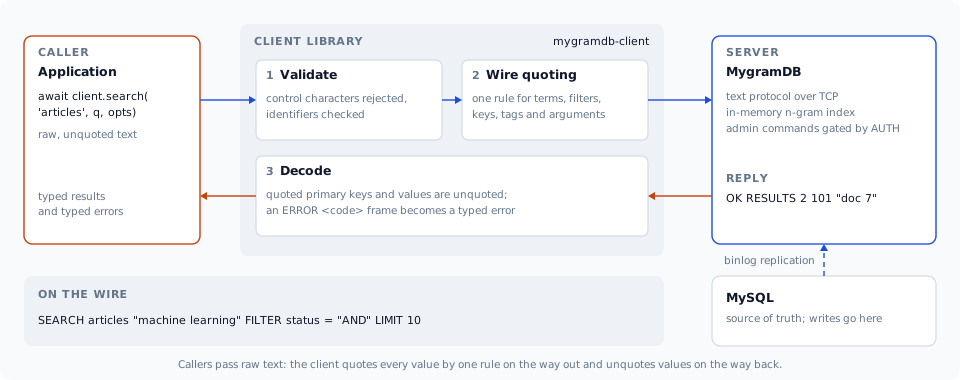
MygramDB answers full-text queries from memory instead of an on-disk MySQL FULLTEXT index. How much that gains depends on the query and the dataset; the published benchmarks give the numbers together with the conditions they were measured under. This client communicates via MygramDB's TCP text protocol (memcached-style) with zero external dependencies.
| MySQL FULLTEXT | MygramDB | |
|---|---|---|
| Search Speed | Baseline | Measured |
| Storage | On-disk | In-memory |
| Replication | — | MySQL binlog |
| Protocol | MySQL | TCP (memcached-style) |
Features
- Zero Dependencies — Standard library only
- Async/Await API — Modern asyncio-based interface with context manager support
- Connection Pooling — Built-in
MygramPoolfor high-throughput workloads, with per-command retry, circuit breaker, and observability hooks - Resilient Transport — Auto-reconnect (with re-authentication), one total command deadline, response frame cap, and TCP keepalive
- Typed Errors — Numeric server error codes decoded into specific exceptions, so retry decisions never depend on message text
- IPv4 and IPv6 — Connects to IPv6 literals (
host='::1') and to hostnames that resolve only to an AAAA record - Search Expression Parser — Web-style search syntax (+required, -excluded, "phrase", OR, grouping)
- Full Protocol Support — All MygramDB commands (SEARCH, COUNT, GET, INFO, CACHE, DUMP, OPTIMIZE, etc.)
- Type Safety — Full type hints with dataclasses, shipped with a PEP 561
py.typedmarker - Input Validation — Built-in protection against control character injection
Installation
pip install mygramdb-client
From source
git clone https://github.com/libraz/python-mygramdb-client.git
cd python-mygramdb-client
rye sync
Quick Start
import asyncio
from mygramdb_client import MygramClient, ClientConfig, SearchOptions

async def main():
    async with MygramClient(ClientConfig(host='localhost', port=11016)) as client:
        # Search
        results = await client.search('articles', 'hello', SearchOptions(limit=100))
        print(f"Found {results.total_count} results")

        # Count
        count = await client.count('articles', 'technology')
        print(f"Count: {count.count}")

        # Get document by ID
        doc = await client.get('articles', '12345')
        print(f"Doc: {doc.primary_key} {doc.fields}")

asyncio.run(main())
Connection Pooling
For hundreds of requests per second, use MygramPool instead of a single
connection. It multiplexes concurrent requests over a bounded set of
connections and layers on retry, a circuit breaker, and event hooks.
from mygramdb_client import (
    MygramPool, PoolConfig, ClientConfig,
    RetryPolicy, CircuitBreakerConfig,
)

pool_config = PoolConfig(
    min_connections=4,
    max_connections=32,
    acquire_timeout=2.0,
    retry_policy=RetryPolicy(max_attempts=3),
    circuit_breaker=CircuitBreakerConfig(failure_threshold=5, reset_timeout=10.0),
)

async with MygramPool(ClientConfig(host='localhost'), pool_config) as pool:
    # Delegation API: acquire, run, release — with retry + breaker applied
    result = await pool.search('articles', 'hello')

    # Or check out a connection explicitly
    async with pool.acquire() as client:
        await client.count('articles', 'python')

    print(pool.stats())  # PoolStats snapshot
See Advanced Usage for timeouts, auto-reconnect, and observability details.
Search Expressions
convert_search_expression() turns web-style input into a server boolean
query: unprefixed terms and + terms are joined with AND, - terms become
AND NOT, and an OR chain stays in parentheses.
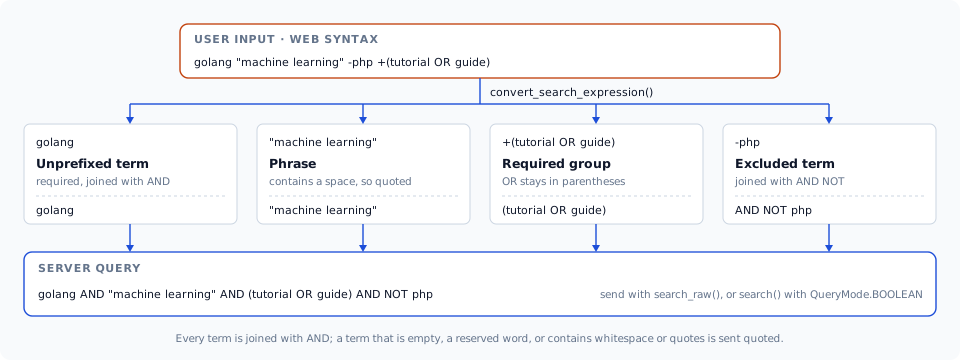
search() sends its query as literal text, so a boolean expression goes through
search_raw(), or through search() with QueryMode.BOOLEAN when it also
needs filters, sorting, fuzzy matching or highlighting:
from mygramdb_client import (
    convert_search_expression, HighlightOptions, QueryMode,
    SearchOptions, SearchRawOptions,
)

raw = convert_search_expression('golang "machine learning" -php +(tutorial OR guide)')
# 'golang AND "machine learning" AND (tutorial OR guide) AND NOT php'

res = await client.search_raw('articles', raw, SearchRawOptions(limit=50))

res = await client.search('articles', raw, SearchOptions(
    query_mode=QueryMode.BOOLEAN,
    filters={'lang': 'en'},
    sort_column='_score',
    highlight=HighlightOptions(),
))
In the default literal mode, plain user text keeps matching as a phrase. For
input without OR or grouping, simplify_search_expression() splits it into a
main term plus AND/NOT terms for search(); it raises ValueError on OR or
grouping, so check with has_complex_expression() first when the input may
contain either:
from mygramdb_client import (
    convert_search_expression, has_complex_expression,
    parse_search_expression, simplify_search_expression,
)

if has_complex_expression(parse_search_expression(user_input)):
    results = await client.search_raw('articles', convert_search_expression(user_input))
else:
    expr = simplify_search_expression(user_input)
    results = await client.search('articles', expr.main_term, SearchOptions(
        and_terms=expr.and_terms,
        not_terms=expr.not_terms,
        limit=100,
        filters={'status': 'published', 'lang': 'en'},
        sort_column='created_at',
        sort_desc=True,
    ))
Search Features
from mygramdb_client import HighlightOptions, FacetOptions, SearchOptions

# BM25 relevance scoring
result = await client.search('articles', 'python',
    SearchOptions(sort_column='_score', sort_desc=True))

# Fuzzy search (Levenshtein distance 1 or 2)
result = await client.search('articles', 'helo',
    SearchOptions(fuzzy=1))

# Highlighted snippets
result = await client.search('articles', 'python',
    SearchOptions(highlight=HighlightOptions(
        open_tag='<mark>', close_tag='</mark>',
        snippet_len=150, max_fragments=3,
    )))
for r in result.results:
    print(r.primary_key, r.snippet)
Comparison Filters
filters covers equality. For range and inequality predicates, pass
filter_conditions:
from mygramdb_client import FilterCondition, FilterOp

result = await client.search('articles', 'python', SearchOptions(
    filters={'lang': 'en'},                               # FILTER lang = en
    filter_conditions=[
        FilterCondition('views', '100', FilterOp.GTE),    # FILTER views >= 100
        FilterCondition('status', 'draft', FilterOp.NE),  # FILTER status != draft
    ],
))
Facets
facet() aggregates distinct filter-column values with document counts,
optionally scoped to a query. It takes a limit and offset, and the response
reports how many distinct values exist in total. A value that starts with #
is kept as data.
facets = await client.facet('articles', 'category',
    FacetOptions(query='python', limit=10))
for v in facets.results:
    print(f'{v.value}: {v.count}')

page = await client.facet('articles', 'category',
    FacetOptions(limit=20, offset=40))
print(f'{len(page.results)} of {page.total_count} categories')
Multi-database Tables
A server can index tables from more than one database. Reference a table as
database.table; bare names work on single-database servers.
from mygramdb_client import qualify_table_identity, parse_table_identity

await client.search('app_db.articles', 'hello')

qualify_table_identity('articles', 'app_db')  # 'app_db.articles'
parse_table_identity('app_db.articles')       # ('app_db', 'articles')
Wire Quoting
Search text, AND/NOT terms, filter values and command arguments (SET,
SHOW VARIABLES LIKE, DUMP) all go through one quoting decision: quoted
when empty, a reserved clause keyword (AND, OR, NOT, FILTER, SORT,
LIMIT, OFFSET, HIGHLIGHT, FUZZY, FACET, ORDER, matched
case-insensitively), or containing ASCII/Unicode whitespace (including the
full-width space U+3000 and no-break space U+00A0), a control character, ",
', \, ( or ). Callers pass raw text; the client quotes it
automatically:
# The full-width space stays inside one term.
await client.search('articles', '機械学習 チュートリアル')

# A filter value equal to a reserved keyword still matches literally.
await client.search('articles', 'q', SearchOptions(filters={'status': 'AND'}))
A search result's primary key containing whitespace is decoded back from its quoted wire form.
Authentication and Error Codes
Administrative Authentication
A server whose TCP listener is not loopback-only requires an admin token for administrative commands. Set it once on the config and the client authenticates on connect and on every transparent reconnect:
config = ClientConfig(host='localhost', admin_token='...', auto_reconnect=True)
async with MygramClient(config) as client:
    await client.optimize('articles')   # administrative command, already authed
The TCP transport does not encrypt the token — keep that listener on a trusted network or behind a terminating proxy.
Typed Error Codes
Every ERROR frame carries a numeric code, so retry and failover decisions
branch on the code instead of matching message text:
from mygramdb_client import ErrorCode, ServerError, ServerNotReadyError

try:
    await client.search('articles', 'python')
except ServerNotReadyError:
    ...                      # still loading; retrying may succeed
except ServerError as exc:
    if exc.error_code == ErrorCode.TABLE_NOT_FOUND:
        ...                  # retrying cannot help
RetryPolicy uses this by default: ServerNotReadyError and ServerBusyError
are retried, other server rejections are not.
Readiness
INFO reports readiness, so a TCP-only deployment can gate traffic without
polling the HTTP health endpoint:
info = await client.info()
if not (info.data_initialized and info.ready):
    ...
Server Administration
Replication Lag
get_replication_status() reports seconds_since_last_applied, stamped where
the replication position advances, so it measures progress rather than
connectivity. It is an administrative command, so a server with a token
configured needs admin_token to answer it:
status = await client.get_replication_status()
if (status.seconds_since_last_applied or 0) > 60:
    print(f'replication is {status.seconds_since_last_applied}s behind', status.last_error)
Runtime Variables and On-demand Sync
await client.set_variable('logging.level', 'info')
print(await client.show_variables('logging%'))

await client.sync('app_db.articles')
print(await client.sync_status())
await client.sync_stop('app_db.articles')
Type Hints
The package ships a PEP 561 py.typed marker, so type checkers (mypy, pyright)
use its inline annotations directly — no stub package needed. Full type
definitions are included:
from mygramdb_client import (
    ClientConfig,
    SearchResponse,
    CountResponse,
    Document,
    ServerInfo,
    SearchOptions,
    DumpStatus,
    CacheStats,
)
Documentation
- Getting Started — install, configuration, and error handling
- Search Expressions — parse and convert web-style search input
- API Reference — every method, option, and type
- Advanced Usage — connection pooling, resilience, authentication, and error codes
Development
rye sync              # Install dependencies
rye run pytest        # Run tests
rye run pytest -v     # Run tests (verbose)
rye run flake8 src tests  # Lint
License
1 maintainer

Metadata
1 maintainer
Release files for mygramdb-client 1.6.0
For a detailed explanation of source distributions (sdists) and built distributions (wheels), please see the package formats documentation.
Source distribution (sdist)
| File | Size | Uploaded | Provenance | Actions |
|---|---|---|---|---|
| mygramdb_client-1.6.0.tar.gz | 172.0 kB | With provenance | Details for mygramdb_client-1.6.0.tar.gz |
Built distribution (wheel)
| File | Interpreter | ABI | Platform | Actions Reset |
|---|---|---|---|---|
| mygramdb_client-1.6.0-py3-none-any.whl | Python 3 | none | any | Details for mygramdb_client-1.6.0-py3-none-any.whl |
Total release size: 229.9 kB
Release files / mygramdb_client-1.6.0.tar.gz
| Download URL | mygramdb_client-1.6.0.tar.gz |
|---|---|
| Size | 172.0 kB |
| Tags | Source |
|
SHA-256 checksum How to use checksums |
e876a945849f40ff72d80f26035b39a6db87cc1b2057bf248cebdba438f01398
|
|
BLAKE2b-256 checksum How to use checksums |
9fe512af65a6e89e1126a2ad187b644fc5db7c701435960a2a760eb8216e1e1d
|
| Upload date | |
|
Uploaded using Trusted Publishing? What is trusted publishing? |
Yes |
| Uploaded via |
twine/7.0.0 CPython/3.13.16
|
Provenance
Provenance describes where a file came from. On PyPI, provenance is shared via attestations, which provide a verifiable record of the build or publishing details. View details, limitations and caveats.


PyPI Publish Attestation
PyPI verified that this artifact, at this checksum, originated from the publisher listed below.
Signed by GitHub Actions, verified by PyPI on Nov 6, 2026.
Transparency logRelease files / mygramdb_client-1.6.0-py3-none-any.whl
| Download URL | mygramdb_client-1.6.0-py3-none-any.whl |
|---|---|
| Size | 57.9 kB |
| Tags | Python 3 |
|
SHA-256 checksum How to use checksums |
bf50a922278f1238fefecfab2c28ce3f807e0ff51c1beb30f9213ceea156932f
|
|
BLAKE2b-256 checksum How to use checksums |
a3adb06c585d396c56e1200b527870cb33496734d52361c68aaa09751fda8a22
|
| Upload date | |
|
Uploaded using Trusted Publishing? What is trusted publishing? |
Yes |
| Uploaded via |
twine/7.0.0 CPython/3.13.16
|
Provenance
Provenance describes where a file came from. On PyPI, provenance is shared via attestations, which provide a verifiable record of the build or publishing details. View details, limitations and caveats.
PyPI Publish Attestation
PyPI verified that this artifact, at this checksum, originated from the publisher listed below.
Signed by GitHub Actions, verified by PyPI on Nov 6, 2026.
Transparency logSecurity for mygramdb-client 1.6.0
Provenance
Provenance describes where a file came from. On PyPI, provenance is shared via attestations, which provide a verifiable record of the build or publishing details. View details, limitations and caveats.
Full provenance
Both files in this release have been uploaded with provenance metadata.
Attestation for mygramdb_client-1.6.0.tar.gz
PyPI Publish Attestation
PyPI verified that this artifact, at this checksum, originated from the publisher listed below.
Signed by GitHub Actions, verified by PyPI on Nov 6, 2026.
Transparency logA note on package security
PyPI is a repository for distributing packages, not a service for auditing them. While third-party security researchers and our staff do their best to detect and remove malicious packages, PyPI cannot guarantee the quality, security or suitability of any given package.
To learn more about protecting yourself from malicious actors, visit our package security documentation.














