
MyHumbleSelf
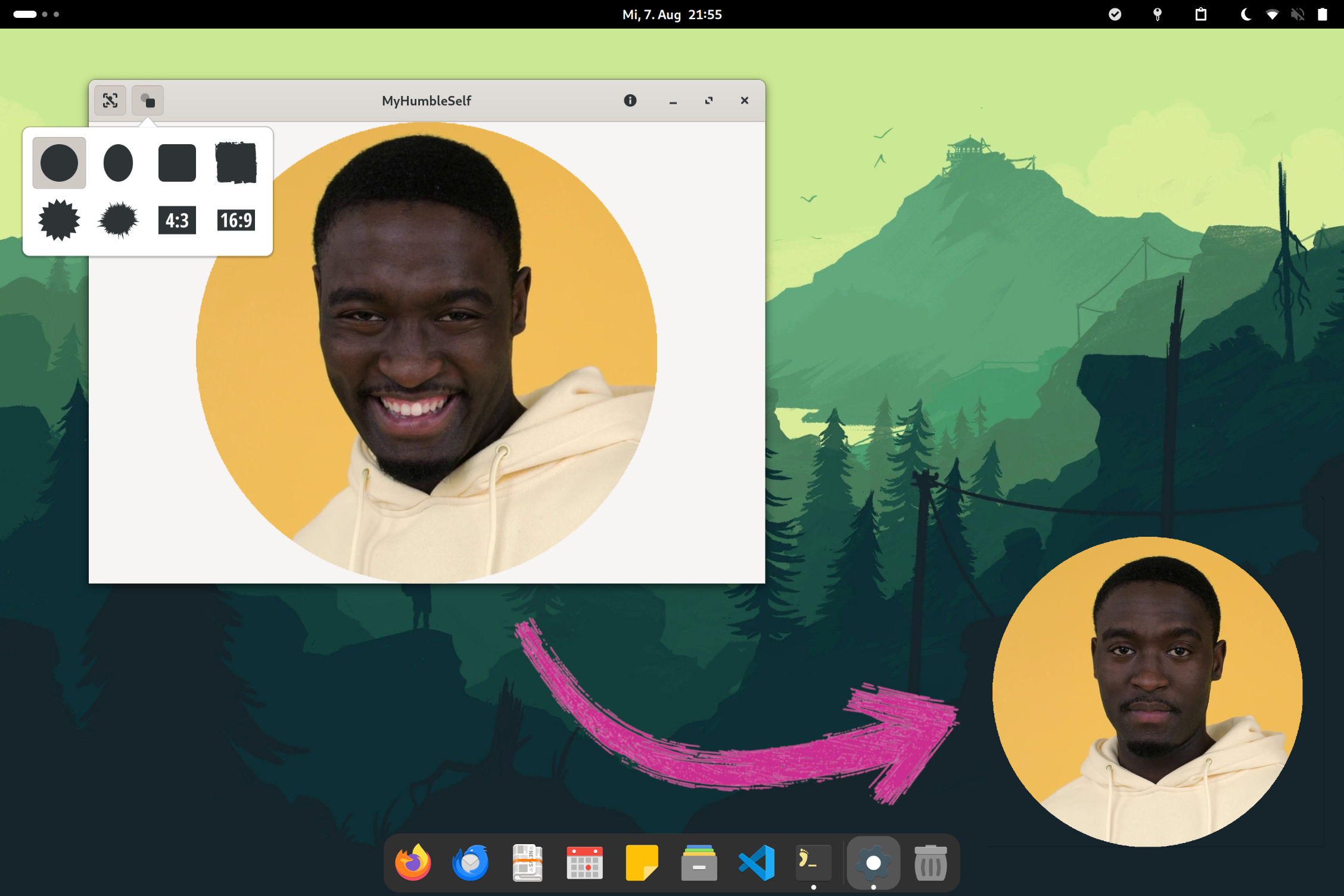
Show your webcam image on your desktop during presentations or screencasts. (Linux only 🐧)




Installation
- Python Package from PyPi and its prerequisites!
Usage
Quick start:
- Launch MyHumbleSelf
- Resize the window and move it to the desired location
- Set it to "always on top" via your window manager (right-click on titlebar)
- Hover the webcam image and click the "eye"-button on top right to hide the window controls
Some notable features:
- Use face tracking to keep your head in the center
- Choose from a variety of shape-masks to add some style
Frequently Asked Questions
1) How can I display my webcam stream in MyHumbleSelf and in a video conferencing tool at the same time?
You can use v4l2loopback to create a virtual webcam that you can access by multiple applications at the same time.
2) What should I do if I need more features?
If you think it is an important basic feature, open a feature request. Otherwise, consider using a tool like OBS Studio, which is much more powerful (but a bit more difficult to use).
Contributing
You are very welcome to contribute to this project! However, before you invest a lot of time in a contribution, it might be worth sharing your idea in advance to avoid an unnecessary disappointment.
Development Setup
- Python 3.12+
- GTK 4.6+ and related dev packages:
sudo apt-get install \
   libgirepository1.0-dev \
   libcairo2-dev \
   python3-gi \
   gobject-introspection \
   libgtk-4-dev
Setup your version of the repository:
- Fork the project's repository.
- Copy your fork to the local file system:
git clone https://github.com/<YOUR-USERNAME>/myhumbleself.git
Setup Virtual Environment:
- Navigate into the repository root directory:
cd myhumbleself - Create the virtual environment:
python -m venv .venv - Activate the environement: \
source .venv/bin/activate
Install dependencies:
- Install the package, it's dependencies, and development dependencies in editable
mode:
pip install -e '.[dev]' - Verify installation by launching MyHumbleSelf:
python myhumbleself/app.py
Run checks and tests:
- Run all project checks locally, to verify a correct setup of the dev environment:
pre-commit run --all-files - You should run those checks before doing any
git committo ensure your change doesn't break anything. You can do this automatically by installing them as git hook:
pre-commit install
Design Principles
- No network connection
Everything should run locally without any network communication. - Simplicity
Focus on key features. Keep the UI simple. Avoid text in the UI if possible. - Dependencies
The less dependencies, the better.
Certification
1 maintainer

Metadata
1 maintainer
Release files for MyHumbleSelf 0.1.1
For a detailed explanation of source distributions (sdists) and built distributions (wheels), please see the package formats documentation.
Source distribution (sdist)
| File | Size | Uploaded | |
|---|---|---|---|
| myhumbleself-0.1.1.tar.gz | 3.3 MB | Details |
Built distribution (wheel)
| File | Interpreter | ABI | Platform | Reset |
|---|---|---|---|---|
| MyHumbleSelf-0.1.1-py3-none-any.whl | Python 3 | none | any | Details |
Total release size: 6.5 MB
Release files / myhumbleself-0.1.1.tar.gz
| Download URL | myhumbleself-0.1.1.tar.gz |
|---|---|
| Size | 3.3 MB |
| Tags | Source |
|
SHA-256 checksum How to use checksums |
ec9aa59892b4f50c509a0ee30ffad720fa0325eaff32225daac986af5676e2c9
|
|
BLAKE2b-256 checksum How to use checksums |
fbcefe5e9bf1f40c5f803aea160bdd31fefc97343743169987ff1a4e06006d43
|
| Upload date | |
|
Uploaded using Trusted Publishing? What is trusted publishing? |
Yes |
| Uploaded via |
twine/5.1.1 CPython/3.12.5
|
Release files / MyHumbleSelf-0.1.1-py3-none-any.whl
| Download URL | MyHumbleSelf-0.1.1-py3-none-any.whl |
|---|---|
| Size | 3.3 MB |
| Tags | Python 3 |
|
SHA-256 checksum How to use checksums |
22f5f43f58e5239881f1da7e489c725a90129ea5a45991505f496d1dab07e055
|
|
BLAKE2b-256 checksum How to use checksums |
90b346201da5d9d500f49077123b660304025cef6d895056cbd0656d3ea4095e
|
| Upload date | |
|
Uploaded using Trusted Publishing? What is trusted publishing? |
Yes |
| Uploaded via |
twine/5.1.1 CPython/3.12.5
|














