
mynah 🐦
Local-first transcription for Korean meetings.
Record directly or drop an audio file — get a clean.txtin minutes.
No cloud. No per-meeting cost. Runs entirely on your Mac.



Screenshots
Features
- Transcribes while you record — 60–90 s chunks are cut at natural pauses and transcribed in the background, so the transcript is ready seconds after you stop instead of an hour later
- Survives a crash — audio is written as headerless raw PCM with no close step, so killing the terminal cannot corrupt it. Unfinished sessions are found on the next launch and can be resumed, finished, or discarded
- Apple GPU acceleration — MLX runs Whisper on the Metal GPU at 7.8–10.9× realtime, against 0.86× on the CPU path. Falls back automatically off Apple Silicon
- Automatic gain correction — quiet recordings are the single largest cause of Whisper hallucination loops; input is normalized to −18 dBFS before transcription (the archived audio keeps its original level)
- Or drop an existing file — m4a, mp3, wav, flac, webm, mp4 supported
- Korean-first — Whisper large-v3, fixed
kolanguage - Speaker diarization —
SPEAKER_01:labels per segment (optional, requires HF token) - Word-level timestamps —
[HH:MM:SS]prefix per segment (optional) - Denoising — Demucs vocals stem strips HVAC and keyboard noise (optional)
- Replacements — find/replace rules applied after transcription, editable inside the TUI
- TUI for daily use, CLI for scripting — both first-class, same pipeline
- System health check —
mynah --doctorverifies all dependencies and shows actionable fixes - Offline, always — no API calls after the first model download (~3 GB, one-time)
Output formats
| Flags | Format |
|---|---|
| (none) | continuous text |
--timestamps |
[HH:MM:SS] sentence... |
--diarize |
SPEAKER_NN: sentence... |
--diarize --timestamps |
[HH:MM:SS] SPEAKER_NN: sentence... |
Output filename: <input>.txt. On collision: <input> (1).txt, <input> (2).txt, etc. — never silently overwrites.
Install
Prerequisites
| Requirement | Version | Install |
|---|---|---|
| macOS (Apple Silicon) | 14+ | — |
| Python | 3.11 – 3.13 | brew install python@3.13 |
| ffmpeg | any | brew install ffmpeg |
| pipx | any | brew install pipx && pipx ensurepath |
⚠️ Python 3.13+ is not yet supported — the ML stack (torch, torchaudio, ctranslate2) does not have stable wheels for 3.13+.
One-line install
pipx install mynah-stt

# Optional: with denoising (Demucs) support
# pipx install 'mynah-stt[denoise]'

# Optional: speaker diarization needs a free HuggingFace token
mynah --setup
Package vs. command name: the PyPI distribution is
mynah-stt, but the CLI you actually run ismynah(and Python imports areimport mynah). The-sttsuffix only shows up at install time — same pattern aspip install Pillow→import PIL.
First run: Whisper large-v3 (~3 GB) downloads automatically on the first transcription and is cached for all subsequent runs.
Quick start
mynah                               # open TUI → Record → Stop → transcript ready
mynah meeting.m4a                   # CLI: transcribe existing file
mynah meeting.m4a --diarize         # with speaker labels
mynah meeting.m4a --timestamps      # with time codes
mynah --doctor                      # check system dependencies
TUI
Run mynah with no arguments to open the TUI.
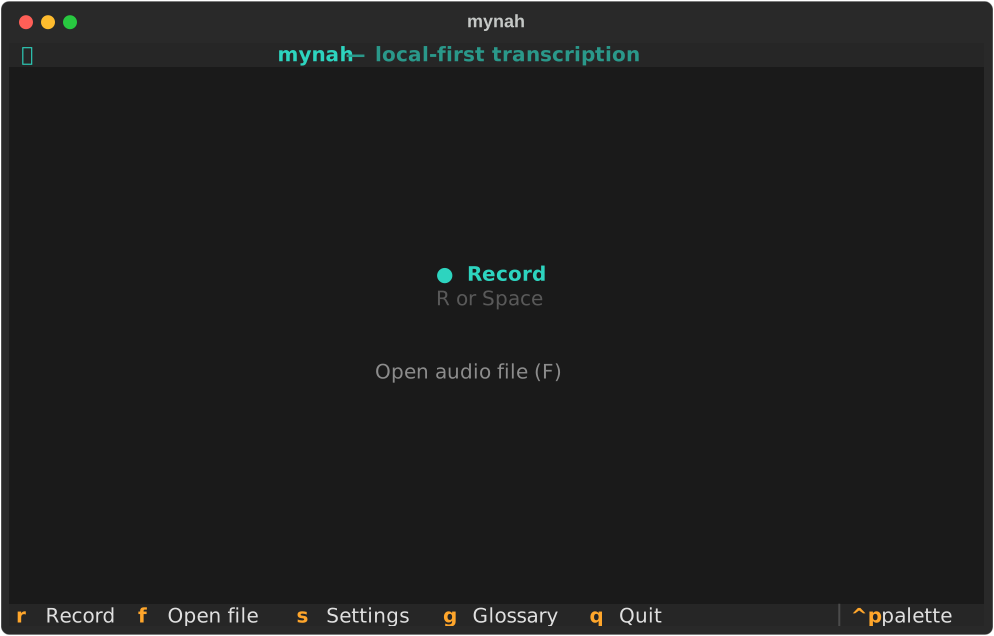
Main screen — press R or Space to start recording, F to open an existing audio file, S for settings, G for replacement rules, Q to quit.
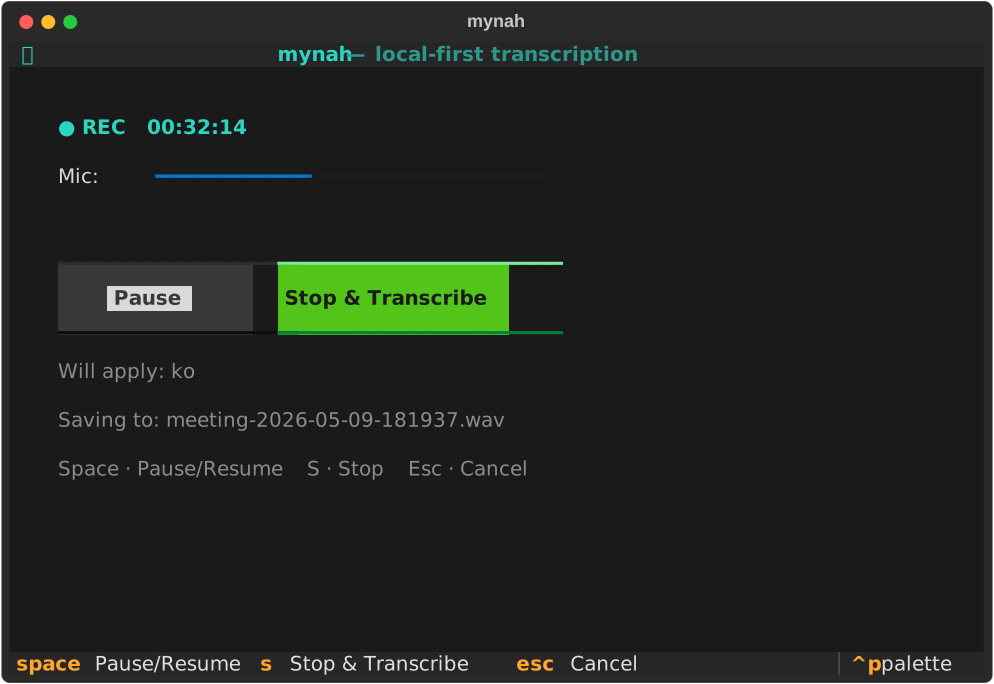
Recording screen — microphone captures at 16 kHz mono. The level meter shows live input amplitude, and transcribed text appears in the panel below as each chunk finishes. Space to pause/resume, S to stop and transcribe, Esc to leave the screen with the recording kept (finish or discard it later from the main screen). After S, an overlay covers the screen while the last chunk is transcribed, so the controls cannot be used on a recording that has already ended.
Recovering an unfinished session — if mynah was killed mid-recording, the main screen shows a banner. Press U to resume recording into the same session, finalize what was captured, or discard it. Nothing is deleted until you confirm twice.
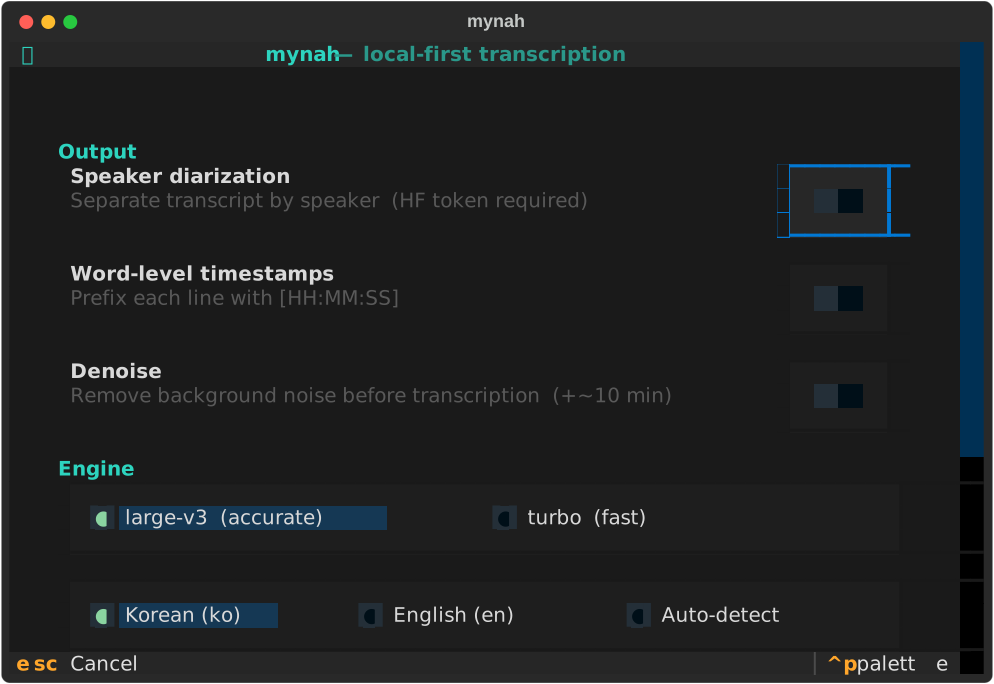
Settings (S from anywhere) — toggle speaker diarization, word-level timestamps, and denoising with on/off switches; switch the Whisper model and input language; set your HuggingFace token inline without leaving the TUI.
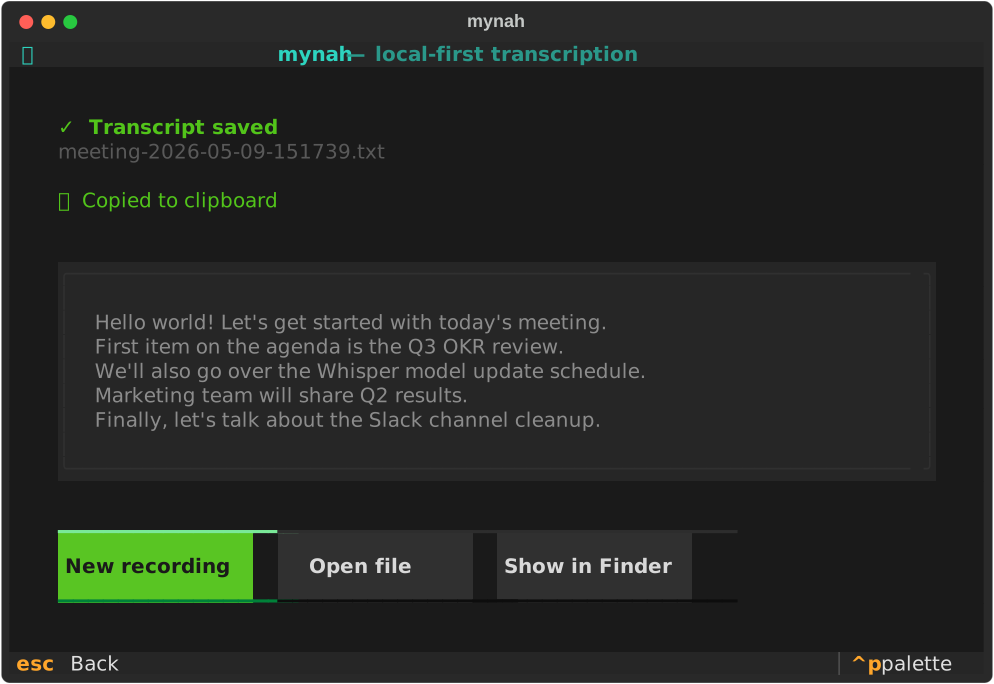
Result screen — transcript is auto-copied to the clipboard the moment it appears. Open the file or reveal it in Finder directly from this screen.
CLI
mynah <audio_file> [flags]
| Flag | Description |
|---|---|
--diarize |
Speaker diarization (SPEAKER_NN: labels) |
--timestamps |
Word-level timestamps ([HH:MM:SS] prefixes) |
--denoise |
Denoise with Demucs (requires mynah-stt[denoise]) |
--model |
Whisper model name (default large-v3) |
--lang |
ko (default), en, auto |
--setup |
Interactive HuggingFace token wizard |
--doctor |
System dependency health check |
--edit-replacements |
Open the TUI replacements editor |
Replacements
Find/replace rules applied to the finished transcript, for mistakes the model makes repeatedly:
# ~/Library/Application Support/mynah/replacements.toml
[[rule]]
from = "슬랙"
to = "Slack"

[[rule]]
from = "위스퍼"
to = "Whisper"
Set regex = true on any rule to use Python regex syntax.
Configuration files
| Path | Purpose |
|---|---|
~/Library/Application Support/mynah/config.toml |
Last-used options (auto-saved) |
~/Library/Application Support/mynah/replacements.toml |
Post-transcription find/replace |
Recording sessions
Each recording gets its own folder under ~/Documents/mynah-recordings/:
2026-08-12-145934/
├── audio.pcm         raw 16 kHz mono, appended as you speak — no header to corrupt
├── transcript.jsonl  one line per finished chunk
├── session.json      options + status
├── meeting.wav       written when the session is finalized
└── 2026-09-17-1430.txt   the transcript
audio.pcm deliberately has no header. A WAV header stores the total length
and can only be written when the file is closed, so a process killed
mid-recording leaves an unreadable file. Headerless PCM is valid at every
instant, and the header is added afterwards from the file size — the same code
path for a normal stop and for a crash recovery.
Performance
Measured on a MacBook Pro M5 with large-v3, on real Korean meeting audio.
| Backend | Speed vs. realtime |
|---|---|
| MLX — Metal GPU | 7.8 – 10.9× |
| CTranslate2 — CPU, int8 | 0.86× |
CPU inference is slower than the recording itself, which is why a one-hour meeting used to mean an hour of waiting. On the GPU path the transcription keeps pace with the microphone, so a chunk is finished long before the next one is recorded and the wait after you press stop is a few seconds.
Dropping int8 quantization along with the CPU makes the GPU path both faster and more accurate — quantization was a compromise the CPU forced.
Speaker diarization is the exception. It needs word-level timestamps and global speaker clustering across the whole meeting, neither of which per-chunk transcription produces, so enabling it re-runs the full file pipeline after recording ends. Expect a wait proportional to the meeting length.
Check which backend you are actually on:
mynah --doctor # reports backend, model, and last input level
Troubleshooting
Run the built-in health check first:
mynah --doctor
Common issues and fixes:
| Error | Fix |
|---|---|
ffmpeg not found |
brew install ffmpeg |
bad value(s) in fds_to_keep |
pipx runpip mynah-stt install --upgrade ctranslate2 |
list_audio_backends missing |
pipx runpip mynah-stt install --upgrade torchaudio |
| Python 3.13+ not supported | brew install python@3.12 then pipx install mynah-stt --python /opt/homebrew/bin/python3.12 --force |
| Microphone not captured | macOS System Settings → Sound → Input → select the correct device |
| Words repeated over and over | The recording is too quiet. mynah --doctor reports the input level; below about −30 dBFS Whisper starts hallucinating. Move the mic closer or raise the input gain in System Settings → Sound → Input |
| Recording lost after a crash | It is not. Relaunch mynah — the main screen offers the unfinished session under U |
Development
git clone https://github.com/rlawjdghksdlqslek/mynah-stt.git
cd mynah-stt

# Install with dev extras (editable mode — code changes take effect immediately)
pipx install -e '.[dev]'

# Unit tests — no model download required
pytest tests/

# Lint
ruff check .
mynah/core/ and mynah/config/ have no UI dependencies; the TUI and CLI are
thin wrappers over them. ML packages are imported lazily inside the functions
that need them, so the whole test suite runs without downloading a model.
mynah/
├── core/
│   ├── session.py    # session folder, raw PCM, JSONL, crash recovery
│   ├── live.py       # chunk transcription worker + hallucination guard
│   ├── record.py     # mic capture, silence-based chunk boundaries
│   ├── audio.py      # ffmpeg normalize + gain correction
│   ├── transcribe.py # MLX / WhisperX backend dispatch
│   └── pipeline.py   # file pipeline + session finalization
├── config/           # settings, replacements (no ML deps)
├── tui/              # Textual app + screens
└── app.py            # dispatches TUI vs CLI based on argv
There are two pipelines. Live recording streams PCM to a session folder
while a worker transcribes silence-cut chunks into transcript.jsonl;
finalize_session() renders it and wraps the audio into a WAV. File input
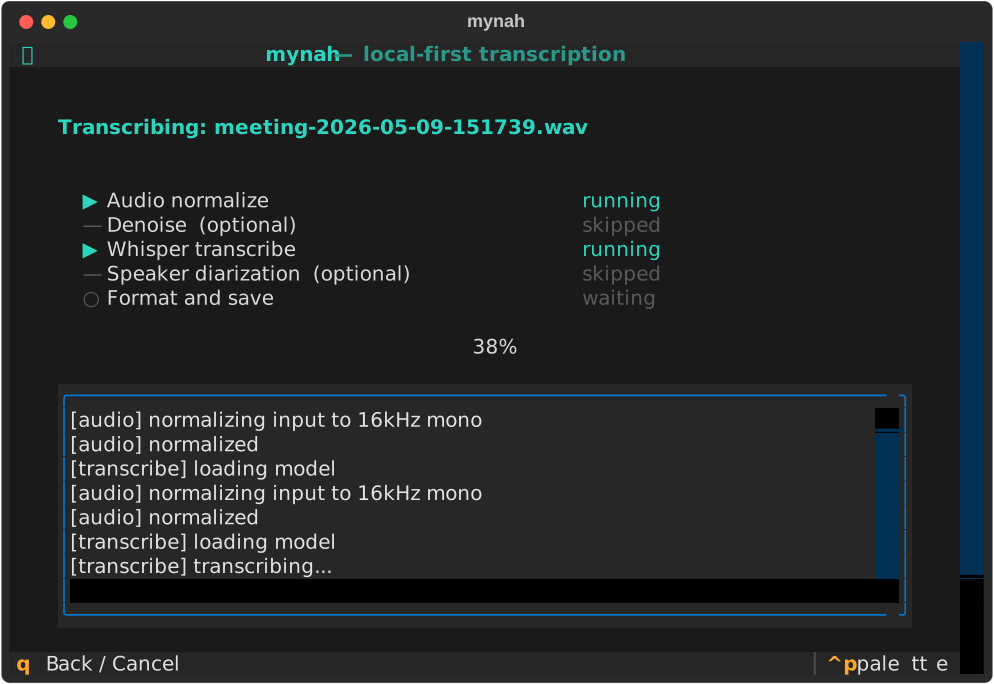
(pipeline.run()) is the original path: normalize, optional denoise,
whole-file transcribe, optional diarize, render.
MLX has no beam search, and beam search is what suppressed Whisper's
repetition loops on the CPU path. core/live.py therefore checks each chunk
for a loop and retries it through WhisperX with beam_size=5, falling back to
an explicit gap marker rather than writing garbage or dropping audio silently.
License
Apache-2.0. See LICENSE.
Acknowledgments
- OpenAI Whisper — speech recognition model
- MLX — Apple Silicon array framework
- mlx-whisper — Whisper on the Metal GPU
- WhisperX — alignment + diarization wrapper
- faster-whisper — CTranslate2-accelerated Whisper inference
- pyannote-audio — speaker diarization
- Textual — TUI framework
- Demucs — audio source separation
1 maintainer

Metadata
1 maintainer
Release files for mynah-stt 0.4.2
For a detailed explanation of source distributions (sdists) and built distributions (wheels), please see the package formats documentation.
Source distribution (sdist)
| File | Size | Uploaded | |
|---|---|---|---|
| mynah_stt-0.4.2.tar.gz | 66.2 kB | Details |
Built distribution (wheel)
| File | Interpreter | ABI | Platform | Reset |
|---|---|---|---|---|
| mynah_stt-0.4.2-py3-none-any.whl | Python 3 | none | any | Details |
Total release size: 125.3 kB
Release files / mynah_stt-0.4.2.tar.gz
| Download URL | mynah_stt-0.4.2.tar.gz |
|---|---|
| Size | 66.2 kB |
| Tags | Source |
|
SHA-256 checksum How to use checksums |
d73e7147c24ef28650530f0791bee8a54f5fa5c722892cec56df6b50e6c5af26
|
|
BLAKE2b-256 checksum How to use checksums |
d18316ace7b21cb0d61b273aea7c097256912845cf68a5afa177163ba477cd59
|
| Upload date | |
|
Uploaded using Trusted Publishing? What is trusted publishing? |
Yes |
| Uploaded via |
twine/7.0.0 CPython/3.13.14
|
Provenance
Provenance describes where a file came from. On PyPI, provenance is shared via attestations, which provide a verifiable record of the build or publishing details. View details, limitations and caveats.


PyPI Publish Attestation
PyPI verified that this artifact, at this checksum, originated from the publisher listed below.
Signed by GitHub Actions, verified by PyPI on Oct 9, 2026.
Transparency logRelease files / mynah_stt-0.4.2-py3-none-any.whl
| Download URL | mynah_stt-0.4.2-py3-none-any.whl |
|---|---|
| Size | 59.1 kB |
| Tags | Python 3 |
|
SHA-256 checksum How to use checksums |
c85a4bd452528c862c9f9cc988670d047d32ce62693be91bf3609fb79ab8d5a5
|
|
BLAKE2b-256 checksum How to use checksums |
7dde1a941684176b016a2b35747aa04d7a28de6f424f55329b5c74c77058d0de
|
| Upload date | |
|
Uploaded using Trusted Publishing? What is trusted publishing? |
Yes |
| Uploaded via |
twine/7.0.0 CPython/3.13.14
|
Provenance
Provenance describes where a file came from. On PyPI, provenance is shared via attestations, which provide a verifiable record of the build or publishing details. View details, limitations and caveats.
PyPI Publish Attestation
PyPI verified that this artifact, at this checksum, originated from the publisher listed below.
Signed by GitHub Actions, verified by PyPI on Oct 9, 2026.
Transparency log













